Okwu mmalite
The Plantronics M25 Bluetooth headset is designed for convenient wireless communication and audio playback. It features an extended battery life with DeepSleep mode, ensuring readiness when needed. The headset provides whispered alerts for battery status and connection information, and allows for listening to music, internet radio, or navigation directions while managing calls.
Ihe ngwugwu
Chọpụta na ihe niile dị na ngwugwu gị:
- Plantronics M25 ekweisi Bluetooth
- AC Charger (100-240v)
- Clip-on Earloop
Melite
1. Ịchaji ekweisi
Before first use, fully charge the headset. Connect the AC charger to the headset's charging port. The indicator light will change to show charging status and turn off or change color when fully charged. A full charge can provide up to 5 months of readiness in DeepSleep mode.
2. Ijikọ na ngwaọrụ
To pair your Plantronics M25 headset with a Bluetooth-enabled device (e.g., smartphone, tablet):
- Ensure the headset is charged and turned off.
- Press and hold the Call button on the headset until the indicator light flashes red and blue, indicating pairing mode.
- Na ngwaọrụ gị, mee ka Bluetooth rụọ ọrụ ma chọọ ngwaọrụ ọhụrụ.
- Select "Plantronics M25" from the list of available devices.
- If prompted for a passcode, enter "0000" (four zeros).
- Once paired, the headset's indicator light will stop flashing and a voice prompt will confirm the connection.
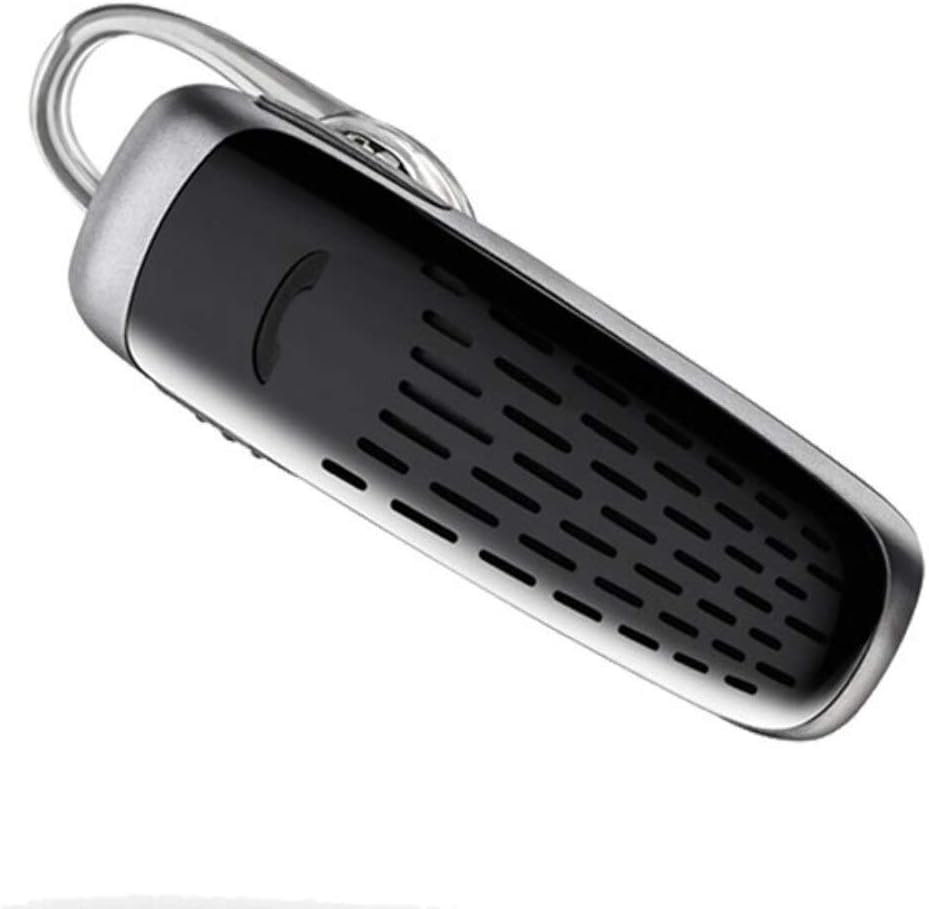
Image: The Plantronics M25 Bluetooth Headset, a compact black and silver device with an earloop, shown from an angled perspective. The call button is visible on the side.
Ntuziaka ọrụ
Gbanyụọ/ Gbanyụọ
- Ike Na: Pịa ma jide bọtịnụ Ike ruo mgbe ìhè ihe ngosi ahụ na-acha anụnụ anụnụ.
- Gbanyụọ: Press and hold the Power button until the indicator light flashes red.
Ịkpọ na ịnata oku
- Oku azaa: Pịa bọtịnụ oku.
- Oku ngwụcha: Pịa bọtịnụ oku.
- Jụ oku: Pịa ma jide bọtịnụ oku maka sekọnd 2.
- Nọmba Ikpeazụ emegharịgharịrị: Pịa bọtịnụ oku ugboro abụọ.
Ngwugharị ọdịyo
The headset supports streaming audio from your device, including music, podcasts, and GPS directions.
- Gwuo/kwụsịtụ: Press the Call button during audio playback.
Ọnọdụ DeepSleep
The headset enters DeepSleep power-saving mode if it is disconnected from your phone for over 90 minutes. To wake it up when it's back in range (within 33 feet), simply tap the Call button.
Nlekọta
- Nhicha: Use a soft, dry cloth to clean the headset. Do not use liquid cleaners or aerosols.
- Nchekwa: Store the headset in a cool, dry place away from extreme temperatures.
- Nlekọta batrị: To preserve battery life, avoid fully discharging the battery frequently. Charge the headset regularly, even if not in use.
- Nguzogide mmiri: Ngwaọrụ a bụ Ọ bụghị mmiri na-eguzogide. Avoid exposure to water or excessive moisture.
Nchọpụta nsogbu
| Nsogbu | Ngwọta |
|---|---|
| Igweisi anaghị agba ọkụ. | Ensure the headset is charged. Connect it to the AC charger and allow it to charge for at least 30 minutes before attempting to power on. |
| Cannot pair the headset with my device. |
|
| No audio or low audio volume. |
|
| Headset frequently disconnects. |
|
Nkọwapụta
| Njirimara | Nkọwa |
|---|---|
| Aha Nlereanya | Plantronics M25 |
| Teknụzụ Njikọta | Bluetooth |
| Teknụzụ nzikọrịta ozi ikuku | Bluetooth |
| Ngwa dakọtara | Smartphones, Laptops, Desktops, Tablets, Smart Speakers, Televisions |
| Ụdị njikwa | Njikwa oku |
| Ibu Ibu | 0.3 Ounces (approx. 8.5 grams) |
| Ọkwa Nguzogide mmiri | Ọ bụghị mmiri na-eguzogide |
| Oke ugboro ugboro | 20Hz ruo 20,000Hz |
| Battery Life (DeepSleep) | Ruo ụbọchị 150 |
| Oke Bluetooth | Ruo mita iri (ụkwụ 33) |
| Ntinye ntị | Na Ntị |
| Ụdị Ihe | One Ear |
| Njikwa mkpọtụ | Nkagbu mkpọtụ nọ n'ọrụ |
| Akụkụ ngwaahịa | 1.85 x 0.59 x 0.35 sentimita asatọ |
| Agba | Nwa |
| Onye nrụpụta | Plantronics |
Akwụkwọ ikike na nkwado
Ozi akwụkwọ ikike: Please note that this product is sold with No Warranty or Return as per the provided information. Users are advised to verify product condition upon receipt.
For further assistance or inquiries, please refer to the official POLY support channels or visit their website. Contact information may be available on the product packaging or the manufacturer's official websaịtị.
Disclaimer: Product specifications and features are subject to change without notice. Always refer to the latest information provided by the manufacturer.


