Akwụkwọ ntuziaka onye ọrụ Druck DPI822 Thermocouple/Loop Calibrator
Model: DPI822
1. Ngwaahịa gafereview
The Druck DPI822 is a robust, hand-held instrument designed for the test and calibration of various process parameters, specifically focusing on thermocouple and loop calibration. It offers advanced features for efficient and reliable measurements in industrial applications.
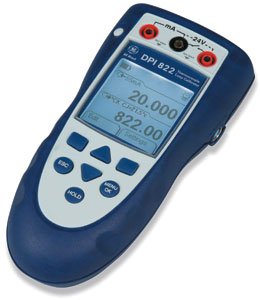
Foto 1: N'ihu view of the Druck DPI822 Thermocouple/Loop Calibrator, showing its display and control buttons.
Key functionalities include simultaneous thermocouple output and mA measurement, a 24V loop power supply for energizing transmitters and control loops, and an automatic switch test for capturing open/closed trip values. It also features a switchable Hart resistor for digital communicators.
2. Ihe ngwugwu
Upon unpacking your DPI822 Calibrator, please verify that all the following items are present:
Druck DPI822 Thermocouple/Loop Calibrator Unit
Calibration Certificate (NIST-traceable)
Akwụkwọ ntuziaka onye ọrụ (akwụkwọ a)
Set of Test Leads
Ọ bụrụ na ihe ọ bụla efuo ma ọ bụ mebie, biko kpọtụrụ onye na-ebunye gị ngwa ngwa.
3. Atụmatụ igodo
NIST-traceable calibration certificate with data provided prior to shipment.
Ability to measure and source thermocouples.
Advanced cold junction compensation for accurate temperature measurements.
Large, backlit display for clear visibility in various lighting conditions.
Menu-driven interface for intuitive navigation.
mA measure, switch test, and 24V loop power capabilities.
4. Ntọlite na mbido mbụ
4.1 Ịnye Ike na Ngwaọrụ
Ensure fresh batteries are installed in the battery compartment. Press and hold the power button (typically located on the top or side) until the display illuminates.
4.2 Njikọ Ndị Nnwale Nlele
Connect the provided test leads to the appropriate input/output terminals on the DPI822. Refer to the labels next to each terminal for correct connection points for thermocouple, mA, and 24V loop power applications.
For Thermocouple measurements: Connect thermocouple probes to the designated thermocouple input jacks.
For mA measurements/sourcing: Connect test leads to the mA input/output jacks.
For 24V Loop Power: Connect to the dedicated 24V output terminals.
4.3 Initial Calibration Check
Although your unit is pre-calibrated, it is good practice to perform a quick functional check. Navigate through the menu to a known measurement or source function and observe the readings. Consult the calibration certificate for expected performance.
5. Ntuziaka ọrụ
5.1 Nsorouzọ NchNhr
The DPI822 features a menu-driven interface. Use the arrow keys (Up/Down/Left/Right) to navigate through options and the 'OK' or 'Enter' button to select. The 'ESC' button typically returns to the previous screen or cancels an operation.
5.2 Thermocouple Measurement and Sourcing
Select the thermocouple function from the main menu. Choose the desired thermocouple type (e.g., Type K, J, T) if prompted. Connect the thermocouple probe to the input terminals for measurement, or connect to the device under test for sourcing a temperature signal.
5.3 mA Measurement and Sourcing
Access the mA function from the menu. For measuring current, connect the DPI822 in series with the circuit. For sourcing current, connect the DPI822 to the input of the device requiring a current signal. Adjust the output value using the navigation keys.
5.4 24V Loop Power Supply
The DPI822 can provide 24V loop power to energize transmitters or control loops. Select the 24V loop power option and connect the appropriate leads to the device requiring power. This feature is useful for testing transmitters without an external power supply.
5.5 Automatic Switch Test
To perform an automatic switch test, select this function from the menu. Connect the DPI822 to the switch or safety system. The calibrator will automatically capture open/closed trip values, providing a fast and accurate check of the system's response.
5.6 Hart Resistor Integration
When using a Hart digital communicator, the DPI822 allows for a 250Ω Hart resistor to be switched into the loop. This eliminates the need to carry a separate resistor. Consult the menu for the option to enable or disable the Hart resistor.
6. Nlekọta
6.1 Nhicha
Clean the exterior of the DPI822 with a soft, damp cloth. Do not use abrasive cleaners or solvents. Ensure no moisture enters the device through ports or openings.
6.2 nnọchi batrị
When the low battery indicator appears on the display, replace the batteries immediately. Refer to the battery compartment cover for the correct battery type and polarity. Always use high-quality batteries.
6.3 Nchekwa
Store the DPI822 in a cool, dry place, away from direct sunlight and extreme temperatures. If storing for extended periods, remove the batteries to prevent leakage.
6.4 Nhazigharị
For continued accuracy and compliance with quality standards, periodic recalibration of the DPI822 is recommended. Refer to your organization's calibration schedule or contact a certified calibration service.
7. Nchọpụta nsogbu
7.1 Ngwaọrụ anaghị agba ọkụ
Lelee nrụnye batrị ma hụ na batrị dị ọhụrụ.
Verify battery polarity is correct.
7.2 Ọgụgụ na-ezighi ezi
Ensure test leads are securely connected and not damaged.
Verify the correct measurement function and range are selected.
Check for proper cold junction compensation if measuring thermocouples.
Consider if recalibration is due.
7.3 Ihe ngosi
If the display is dim, replace batteries.
If the display is blank or frozen, try restarting the device.
For issues not covered here, or if troubleshooting steps do not resolve the problem, please contact customer support.
8. Nka na ụzụ nkọwa
Oke
Uru
Nọmba nlereanya
DPI822
Onye nrụpụta
Mmanya
Akụkụ ngwugwu
7 x 3.3 x 2 sentimita asatọ
Ibu Ibu
3.5 pound
Ụbọchị mbụ dị
Mee 31, 2012
ASIN
B0087SCCDK
Mara: Nkọwapụta ga-agbanwe na-enweghị ọkwa.
9. Akwụkwọ ikike Ozi
The Druck DPI822 Thermocouple/Loop Calibrator is covered by a standard manufacturer's warranty. Please refer to the warranty card included with your product or visit the official Druck webEbe nrụọrụ weebụ maka usoro na ọnọdụ zuru ezu gbasara mkpuchi akwụkwọ ikike, oge, na usoro nkwupụta. Debe ihe akaebe ịzụrụ ihe gị maka nkwenye akwụkwọ ikike.
10. Nkwado ndị ahịa
For technical assistance, service, or inquiries regarding your Druck DPI822, please contact Druck customer support. Contact information can typically be found on the manufacturer's official website or on the product packaging. When contacting support, please have your product model number (DPI822) and serial number (if applicable) ready.
Akwụkwọ ndị emetụtara - DPI822
Druck DPI 611 Calibrator Nrụgide Aka Jidere: Njirimara, Nkọwapụta, na Ngwa. Detailed information on the Druck DPI 611 hand-held pressure calibrator, including its precision engineering, pressure generation capabilities, electrical functions, user interface, advanced features, specifications, and available accessories. Learn about its compact design, accuracy, and integration with 4Sight2 calibration software.
Druck DPI 620 Advanced Modular Calibrator - Akwụkwọ ntuziaka onye ọrụ GE Sensing Comprehensive user manual for the GE Druck DPI 620 advanced modular calibrator. Discover its capabilities in electrical measurement, sourcing, HART communications, and its modular system with MC 620, PM 620, and PV 62x pressure components.
Druck UPS4E Loop Calibrator: atụmatụ, nkọwapụta na ịtụ Explore the Druck UPS4E, a rugged and compact loop calibrator designed for process control mA loops and mA devices. This document details its features, technical specifications, ordering information, and related products.