1. Okwu mmalite
This manual provides detailed instructions for the installation, operation, and maintenance of your Gewiss GW10701 Programmable Thermostat. This device is designed to control heating and air conditioning systems, allowing you to manage room temperature efficiently and comfortably. Please read this manual thoroughly before installation and use to ensure proper functionality and safety.
2. Ozi nchekwa
Always observe the following safety precautions to prevent personal injury or damage to the device:
- Installation should only be performed by qualified personnel in accordance with local electrical codes and regulations.
- Disconnect power to the heating/cooling system at the main circuit breaker before installing or servicing the thermostat.
- Ekpughela thermostat ahụ na mmiri ma ọ bụ oke iru mmiri.
- Jiri naanị ụdị batrị akọwapụtara ma hụ na polarity ziri ezi n'oge nrụnye.
- Keep batteries out of reach of children. Do not dispose of batteries in fire.
- Do not attempt to open or repair the thermostat yourself. Contact qualified service personnel.
3. Ngwaahịa gafereview
The Gewiss GW10701 is a wall-mounted programmable thermostat featuring an LCD display and intuitive controls for temperature management.
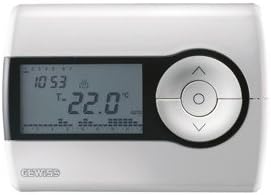
Foto 1: N'ihu view of the Gewiss GW10701 Thermostat. It features a clear LCD screen displaying time and temperature, alongside a circular control panel with directional buttons and a central confirmation button for easy navigation and setting adjustments.
3.1. Akụrụngwa
- Ngosipụta LCD: Shows current time, temperature, operating mode, and programming settings.
- bọtịnụ njikwa: Typically include UP/DOWN arrows for temperature adjustment, MODE button for selecting operating modes (e.g., Heat, Cool, Auto, Off), and a SET/PROG button for accessing programming menus. (Note: Specific button functions may vary slightly; refer to on-screen prompts.)
- Akụkụ batrị: Located on the rear or side, houses the power supply batteries.
- Efere Nkwanye: For secure wall installation.
4. Nwụnye
4.1. Ịhọrọ ebe
Select a central location on an interior wall, approximately 1.5 meters (5 feet) above the floor. Avoid locations near heat sources (lamps, direct sunlight, fireplaces), drafts (windows, doors), or areas with poor air circulation.
4.2. Ịwụnye Thermostat
- Kwụpụ ike: Turn off the power to your heating/cooling system at the main circuit breaker.
- Separate Base Plate: Carefully detach the front cover of the thermostat from its base plate.
- Akara na Ịkụ ọkpọ: Hold the base plate against the wall at your chosen location. Mark the drilling points. Drill holes and insert wall anchors if necessary.
- Efere Ntọala Edobere: Fasten the base plate to the wall using the provided screws.
- Njikọ waya (ọ bụrụ na ọdabara): Connect the system wires to the appropriate terminals on the base plate. Refer to the wiring diagram provided with your heating/cooling system or consult a qualified electrician. Note: While the thermostat is battery-powered, it controls a 230V system. Ensure correct wiring.
- Wụnye batrị: Insert the required batteries into the battery compartment, observing correct polarity (+/-).
- Tinye Thermostat: Carefully reattach the thermostat front cover to the base plate, ensuring it clicks securely into place.
- Weghachi ike: Turn on the power to your heating/cooling system at the main circuit breaker.
5. Ọrụ
5.1. Mbido Mbido
Upon first power-up or after battery replacement, you may need to set the current time and date. Follow the on-screen prompts or refer to the programming section.
5.2. Ịtọlite okpomọkụ
Jiri ihe UP na N'ala arrow buttons to adjust the desired temperature. The display will show the set temperature temporarily, then revert to the current room temperature.
5.3. Ụdị arụ ọrụ
Pịa MODE button (or similar) to cycle through available operating modes:
- Ọkụ: Thermostat ga-eme ka sistemụ kpo oku rụọ ọrụ mgbe okpomọkụ ụlọ dara n'okpuru okpomọkụ edobere.
- Oyi: The thermostat will activate the air conditioning system when the room temperature rises above the set temperature.
- UTgbọala: Igwe ọkụ ọkụ na-agbanwe na-akpaghị aka n'etiti kpo oku na jụrụ oyi iji dokwaa oke okpomọkụ nke edobere.
- Gbanyụọ: A na-agbanyụ sistemụ ikpo ọkụ na oyi.
6. Mmemme
The Gewiss GW10701 allows you to create custom heating/cooling schedules for different times of the day and days of the week. This feature helps optimize energy consumption and comfort.
6.1. Ịtọ oge na ụbọchị
- Pịa SET or ỌRỤ bọtịnụ iji tinye menu ntọala.
- Navigate using the arrow buttons to find "Time" or "Date" settings.
- Use the arrow buttons to adjust the values (hour, minute, day, month, year).
- Confirm each setting with the SET or central button.
6.2. Creating a Program Schedule
The thermostat typically offers daily or weekly programming options. You can set different temperatures for various periods (e.g., Wake, Day, Evening, Sleep).
- Pịa ỌRỤ bọtịnụ iji tinye ọnọdụ mmemme.
- Select the day or group of days you wish to program (e.g., Mon-Fri, Sat-Sun, or individual days).
- For each period (e.g., "Wake"), set the desired start time and temperature using the arrow buttons.
- Advance to the next period and repeat the process.
- Save your program and exit programming mode.
Consult the on-screen menu and specific button labels on your device for precise programming steps, as interfaces can vary.
7. Nlekọta
7.1. Ngbanwe batrị
The thermostat is powered by batteries. When the battery indicator appears on the display, replace the batteries promptly to ensure continuous operation. Typically, 2x AA or AAA alkaline batteries are required.
- Jiri nlezianya wepụ ihe mkpuchi ihu nke thermostat ahụ.
- Wepu batrị ochie ma tụfuo ha nke ọma.
- Fanye batrị ọhụrụ, na-ahụ polarity ziri ezi.
- Tinyeghachi mkpuchi ihu.
7.2. Nhicha
Clean the thermostat's exterior with a soft, dry cloth. Do not use abrasive cleaners, solvents, or spray cleaners directly onto the device, as this can damage the display or internal components.
8. Nchọpụta nsogbu
| Nsogbu | Ihe nwere ike ime | Ngwọta |
|---|---|---|
| Ngosipụta bụ oghere ma ọ bụ nchara nchara. | Batrị dị ala ma ọ bụ nwụrụ anwụ. | Jiri ndị ọhụrụ dochie batrị. |
| Sistemụ kpo oku/ọkụ anaghị aza. |
|
|
| Ọ dị ka ihe na-egosi na okpomọkụ adịghị mma. | Ọnọdụ okpomọkụ emetụtara site na mpempe akwụkwọ ma ọ bụ isi mmalite okpomọkụ. | Ensure thermostat is not exposed to direct sunlight, drafts, or heat-emitting appliances. |
9. Nkọwapụta
- Onye nrụpụta: Gewiss
- Nọmba nlereanya: GW10701 (Chorus)
- Akụkụ (L x W x H): 13 x 2.3 x 9.2 cm
- Arọ: 9.07 g
- Agba: Ọcha
- Ihe: Plastic
- Ịnye ọkụ: Batrị kwadoro
- Na-agbanwe Voltage: 230 Volt (for controlled system)
- Ụdị ngosi: LCD ma ọ bụ LED
- Ụdị nkwụnye: Ejiri mgbidi
- Njirimara njikwa: Programmable, Button control
- Ojiji: Heating systems, Air conditioning systems
10. Akwụkwọ ikike na nkwado
For warranty information, technical support, or service inquiries regarding your Gewiss GW10701 Thermostat, please refer to the warranty card included with your product or visit the official Gewiss website. You may also contact your local Gewiss distributor or retailer for assistance.
Gewiss Official Websaịtị: www.gewiss.com


