Okwu mmalite
Daalụ maka ịzụrụasing the GPX Weatherx WR282B Weather and Alert Radio. This portable radio is designed to provide you with AM/FM radio reception and access to all 7 NOAA weatherband channels, ensuring you stay informed during various conditions. It offers flexible power options, operating on either AC power or D-size batteries, making it suitable for both indoor and outdoor use.
Please read this manual thoroughly before operating the device to ensure proper use and to maximize its performance and longevity.
Ozi nchekwa dị mkpa
- Gụọ ntuziaka: Ekwesịrị ịgụ ntuziaka nchekwa niile na arụ ọrụ tupu ejiri ya rụọ ọrụ.
- Jido ntuziaka: Ekwesịrị idowe ntuziaka nchekwa na ọrụ maka ntụnye aka n'ọdịnihu.
- Ịdọ aka ná ntị ntị: Ekwesịrị idobe ịdọ aka ná ntị niile dị na ngwaahịa yana na ntuziaka ọrụ.
- Soro ntuziaka: Ekwesịrị ịgbaso ntuziaka ọrụ na ojiji niile.
- Mmiri na mmiri: Do not use this product near water (e.g., near a bathtub, washbowl, kitchen sink, laundry tub, in a wet basement, or near a swimming pool).
- Nhicha: Jiri akwa kpọrọ nkụ hichaa naanị.
- Igwe ikuku: Akwụsịla oghere ikuku ikuku ọ bụla. Wụnye dị ka ntuziaka onye nrụpụta si dị.
- Okpomọkụ: Awụnyela n'akụkụ ebe okpomọkụ ọ bụla dị ka radiators, ndekọ okpomọkụ, stovu, ma ọ bụ ngwa ndị ọzọ (gụnyere amplifiers) nke na-emepụta okpomọkụ.
- Ike-Powerdọ Nchedo: Chebe eriri ọkụ ka ị ghara ịgagharị ma ọ bụ tuo ya, ọkachasị na plọg, ebe nchekwa dị mma, na ebe ha si na ngwa ahụ pụta.
- Àmụmà: Kwupu ngwa a n'oge oke mmiri ozuzo ma ọ bụ mgbe ejighi ya ogologo oge.
- Ije ozi: Tụtụ aka n'aka ndị ọrụ ruru eru. A na-achọ ọrụ mgbe ngwa ahụ mebiri emebi n'ụzọ ọ bụla, dị ka eriri ọkụ ma ọ bụ plọg mebiri emebi, mmiri mmiri wụfuru ma ọ bụ ihe dabara n'ime ngwa ahụ, ekpughere ngwa ahụ na mmiri ozuzo ma ọ bụ mmiri, anaghị arụ ọrụ nke ọma. , ma ọ bụ ahapụla ya.
Atụmatụ
- AM/FM Radio Tuner
- Weatherband - All 7 NOAA Channels
- Swivel Telescopic Antenna
- Njikwa olu
- Audio Line Input (Auxiliary Input)
- Ejikọtara ihe eji ebu
- Dual Power Options: AC/DC Adapter or 3 x 'D' Batteries
Ihe ngwugwu
- GPX Weatherx WR282B Weather and Alert Radio
- Ihe nkwụnye ọkụ AC/DC
- Akwụkwọ ntuziaka (akwụkwọ a)
Njikwa na egosi
Familiarize yourself with the various controls and indicators on your WR282B radio.
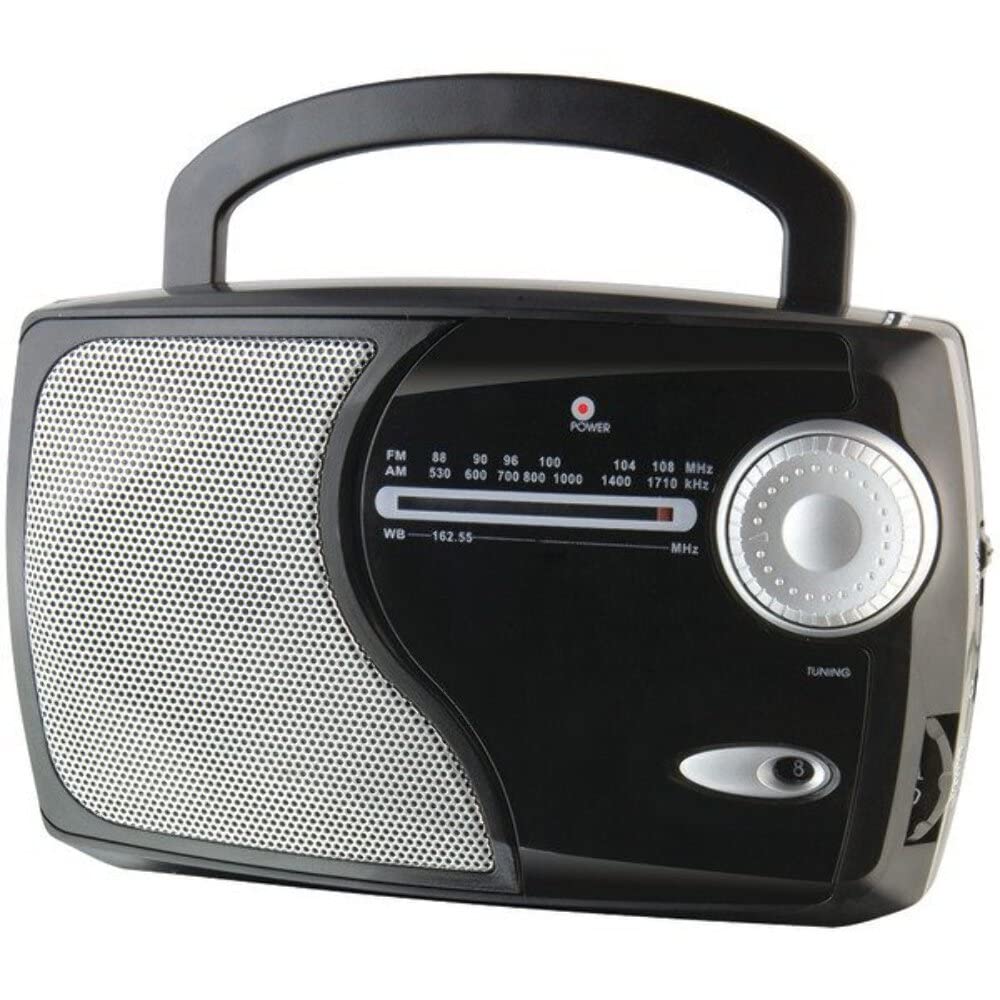
Foto: N'ihu view of the GPX Weatherx WR282B radio, showing the speaker, tuning dial, and control knobs.
- Ike/Mpịakọta olu: Turns the radio on/off and adjusts the audio output level.
- Mgbanwe Nhọrọ Band: Selects between AM, FM, and Weatherband (WB) modes.
- Knob ntughari: Adjusts the frequency to tune into desired radio stations or weather channels.
- Tuning Indicator: Illuminates when a strong signal is received.
- Ịkpọ oku ugboro ugboro: Na-egosiputa ugboro redio dị ugbu a.
- Antenna telescopic: Extendable antenna for improved FM and Weatherband reception.
- Auxiliary Input (AUX IN): 3.5mm jaak maka ijikọ ngwaọrụ ọdịyo mpụga.
- Ntinye ike AC: Jack for connecting the included AC/DC power adapter.
- Akụkụ batrị: Located on the back, holds 3 'D' size batteries.
- Ibu Aka: Maka ibugharị ngwa ngwa.
Melite
Na-akwado redio
The WR282B radio can be powered using either the included AC/DC power adapter or three 'D' size batteries.
1. AC Power Operation
- Ensure the radio is turned off by rotating the Power/Volume knob counter-clockwise until it clicks.
- Insert the small plug of the AC/DC power adapter into the AC Power Input jack on the radio.
- Plug the other end of the AC/DC power adapter into a standard wall outlet (AC 120V~60Hz).
- The radio is now ready for use with AC power.
Mara: When the AC adapter is connected, battery power is automatically disconnected.
2. Battery Power Operation
- Gbaa mbọ hụ na agbanyụrụ redio.
- Chọta ebe batrị dị n'azụ redio.
- Mepee mkpuchi nke batrị batrị.
- Insert three (3) 'D' size batteries (not included) into the compartment, observing the correct polarity (+/-) as indicated inside the compartment.
- Mechie mkpuchi nke batrị batrị nke ọma.
- The radio is now ready for use with battery power.
Ihe dị mkpa: Remove batteries if the radio will not be used for an extended period to prevent leakage and damage.
Ntuziaka ọrụ
1. Turning On and Adjusting Volume
- Tugharia ihe Ike/Mpịakọta olu clockwise to turn on the radio. Continue rotating to increase the volume to a comfortable listening level.
- Ka ịgbanyụọ redio, tụgharịa ya Ike/Mpịakọta olu counter-clockwise until it clicks.
2. Selecting a Radio Band (AM/FM/Weatherband)
- Jiri ihe Band Selector Switch to choose your desired listening mode:
- AM: Maka Amplitude Modulation radio stations.
- FM: For Frequency Modulation radio stations.
- WB: For NOAA Weatherband channels.
3. Tuning to a Station or Channel
- Gbatịkwuo ya Telescopic mpi fully for optimal FM and Weatherband reception. For AM reception, the radio has a built-in antenna, and adjusting the radio's position may improve reception.
- Tugharia ihe Ntughari mkpu to scan through frequencies on the Ịkpọ oku ugboro ugboro.
- When a strong signal is received, the Ngosipụta ngbanwe ìhè ga-enwu.
- For Weatherband (WB) mode, tune to one of the 7 NOAA weather channels (162.400 MHz to 162.550 MHz).
4. Using the Auxiliary Input (AUX IN)
- Connect a 3.5mm audio cable (not included) from your external audio device (e.g., MP3 player, smartphone) to the Ntinye Enyemaka (AUX IN) jack on the radio.
- Ensure the radio is turned on and the volume is adjusted.
- The audio from your external device will now play through the radio's speaker. Control playback and track selection from your external device.
Nlekọta
- Nhicha: Wipe the exterior of the radio with a soft, dry cloth. Do not use abrasive cleaners, waxes, or solvents.
- Ngbanwe batrị: Replace all three 'D' batteries when the radio's performance diminishes or if the unit will not be used for an extended period. Always replace with new batteries of the same type.
- Nchekwa: When storing the radio for a long time, remove the batteries to prevent leakage. Store in a cool, dry place away from direct sunlight and extreme temperatures.
- Nlekọta Antenna: Handle the telescopic antenna gently to avoid bending or breaking.
Nchọpụta nsogbu
| Nsogbu | Ihe nwere ike ime | Ngwọta |
|---|---|---|
| Enweghị ike |
|
|
| Nnabata redio adịghị mma |
|
|
| No sound from AUX IN |
|
|
Nkọwapụta
- Ụdị: WR282B
- Otu egwu redio: AM, FM, Weatherband (7 NOAA channels)
- Isi mmalite ike: AC 120V~60Hz (via included adapter) or 3 x 'D' Batteries (not included)
- Njikọta: Ntinye inyeaka 3.5mm
- Antenna: Telescopic (FM/WB), Built-in Ferrite Bar (AM)
- Akụkụ ngwaahịa: 8.86" L x 2.76" W x 5.51" H (approximately)
- Ibu ihe: Paụnd 1.06 (na-enweghị batrị)
Akwụkwọ ikike na nkwado
For detailed warranty information and customer support, please refer to the warranty card included with your product or visit the official GPX websaịtị. Debe nnata nzụta gị dị ka ihe akaebe nke ịzụrụ ihe maka akwụkwọ ikike ọ bụla.
If you experience issues not covered in the troubleshooting section, please contact GPX customer service for assistance.


