1. Ngwaahịa gafereview
The Eaton TR7740W-K is a combination USB charger and tamper-resistant AC receptacle designed for convenient charging of electronic devices and safe power access. This device integrates two USB charging ports and a standard 125V AC outlet into a single unit, eliminating the need for bulky adapters.
Atụmatụ gụnyere:
- Dual USB ports for charging most electronic devices.
- Energy-efficient design compared to traditional plug-in adapters.
- LED indicator light to show charging status; turns off upon full charge.
- 15A 125V tamper-resistant AC receptacle, compliant with 2011 NEC Article 406.12 for child safety.
- UL approved tamper-resistant shutters prevent insertion of foreign objects.
- Backwire clamps on side terminals for easy installation with #12 and #14 AWG wire.
- Designed to replace existing standard duplex receptacles.
2. Ozi nchekwa
Ịdọ aka ná ntị: To avoid fire, shock, or death, turn off power at the circuit breaker or fuse box and test that power is off before wiring. This device must be installed in accordance with national and local electrical codes.
- Gbanyụọ ike ọkụ eletrik mgbe niile tupu echichi ma ọ bụ rụzie ọrụ.
- Use only with copper wire. Do not use with aluminum wire.
- Gbaa mbọ hụ na echekwabara njikọ waya niile.
- Ngwaọrụ a bụ naanị maka ime ụlọ.
- Ekwela ka ọ gafere ọkwa eletriki kachasị elu nke ngwaọrụ ahụ.
- Ọ bụrụ na ịmaghị maka akụkụ ọ bụla nke ntuziaka ndị a, kpọtụrụ onye ọrụ ọkụ eletrik tozuru etozu.
Atụmatụ ịdọ aka ná ntị 65: Ngwaahịa a nwere ike ịnwe kemịkalụ mara steeti California na-ebute ọrịa kansa na ntụpọ ọmụmụ ma ọ bụ mmerụ ahụ ọmụmụ ọzọ.
3. Ihe ngwugwu
- Eaton TR7740W-K Combination USB Charger Receptacle (White)
- (3) Pre-stripped 6-inch wire leads
- Installation Hardware (screws)
4. Ntọala na nwụnye
Installation should be performed by a qualified individual. Follow these steps carefully:
- Gbanyụọ ike: Locate the circuit breaker or fuse box controlling the outlet where you intend to install the receptacle. Turn off the power to that circuit. Verify power is off using a voltagọ bụ onye nyocha.
- Wepu ihe nnabata ochie: Unscrew and carefully pull the existing receptacle from the wall box. Disconnect the wires from the old receptacle. Note the wire connections: typically, black (hot), white (neutral), and bare copper or green (ground).
- Kwadebe wires: If necessary, strip approximately 1/2 inch (12.7 mm) of insulation from the ends of the circuit wires. The TR7740W-K includes pre-stripped wire leads for convenience.
- Njikọ waya:
- Jikọọ akwụkwọ ndụ akwụkwọ ndụ ma ọ bụ iferi ọla kọpa waya from the wall box to the green ground screw on the new receptacle.
- Jikọọ waya ọcha (anọpụ iche). from the wall box to the silver screw terminal or the white pre-stripped wire lead on the new receptacle.
- Jikọọ waya ojii (ọkụ). from the wall box to the brass screw terminal or the black pre-stripped wire lead on the new receptacle.
- For backwire clamps, insert the stripped wire end fully into the clamp opening and tighten the screw firmly.
- Ebe Nchekwa Ugwu: Carefully push the wired receptacle back into the wall box. Secure it with the mounting screws provided.
- Wụnye Mgbidi: Tinye ihe ịchọ mma mgbidi ahụ (anaghị etinye ya) n'elu ihe nkwụnye ahụ.
- Weghachi ike: Gbanyụọ ọkụ azụ na igbe sekit ma ọ bụ fuse.

Foto 1: N'ihu view of the Eaton TR7740W-K, highlighting the USB ports and AC outlet.
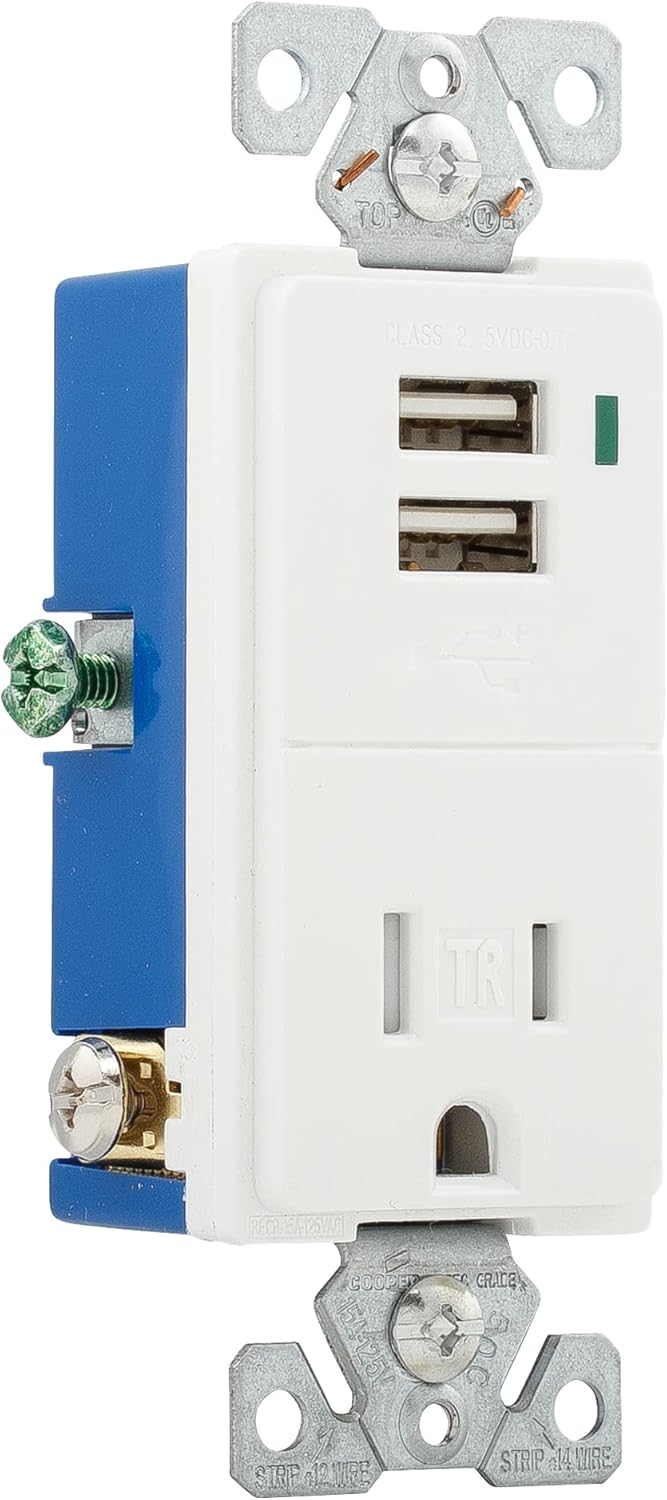
Foto 2: Akụkụ view of the Eaton TR7740W-K, illustrating the wiring terminals for installation.
5. Ntuziaka ọrụ
Using your Eaton TR7740W-K combination receptacle is straightforward:
- Nchaji USB: Insert your device's USB charging cable into one of the two USB ports. The LED indicator light will glow to confirm that the device is charging. The light will turn off when the device reaches a full charge.
- Ike AC: Plug any standard 125V AC appliance or charger into the tamper-resistant AC outlet. The tamper-resistant shutters require simultaneous pressure on both slots to open, preventing single-object insertion for enhanced safety.
The USB ports provide a total output of 0.7A (700mA) at 5V DC. While suitable for most smartphones and smaller electronic devices, some high-current devices like certain tablets (e.g., older iPads) may charge slower or not at full speed due to their higher power requirements.
6. Nlekọta
The Eaton TR7740W-K requires minimal maintenance:
- Nhicha: Gbanyụọ ike tupu ị sachaa ya. Jiri ihe dị nro hichaa elu ya.amp akwa . Ejila ihe nchacha abrasive ma ọ bụ ihe mgbaze.
- Nyocha: Periodically inspect the receptacle for any signs of damage, loose connections, or discoloration. If any issues are found, turn off power and consult a qualified electrician for repair or replacement.
7. Nchọpụta nsogbu
| Nsogbu | Ihe nwere ike ime | Ngwọta |
|---|---|---|
| No power to AC outlet or USB ports. | Circuit breaker tripped or fuse blown. Loose wiring connection. | Check and reset the circuit breaker or replace the fuse. Turn off power and check wire connections. |
| Ngwaọrụ USB anaghị agbacha ma ọ bụ na-achaji nwayọ nwayọ. | Device requires higher current than supplied (0.7A total). Faulty USB cable. Device not properly connected. | Verify device's charging requirements. Use a different USB cable. Ensure cable is fully inserted. Note that some high-power devices may charge slower. |
| LED indicator not glowing when charging. | Device is fully charged. Faulty LED. | Check if the device is already fully charged. If not, and the device is charging, the LED may be faulty (does not affect charging function). |
| Difficulty inserting plug into AC outlet. | Tamper-resistant shutters engaged. | Apply firm, even pressure to both prongs of the plug simultaneously to engage the shutters. Do not force. |
8. Nkọwapụta
| Njirimara | Nkọwa |
|---|---|
| Nọmba nlereanya | TR7740W-K |
| Ụdị | Eton |
| AC Receptacle Rating | 15A, 125V AC |
| USB mmepụta | 5V DC, 0.7A (700mA) total |
| Wiring | Ogidi abụọ, waya atọ |
| Agba | Ọcha |
| Ihe onwunwe | Ọla kọpa |
| Asambodo | UL Listed, NEMA |
| Akụkụ ngwaahịa | Approximately 9.01 x 4.4 x 6.61 inches (overall package) / 1.9 x 3.8 x 5.9 inches (device) |
| Ibu Ibu | 4.2 ounces |
9. Akwụkwọ ikike na nkwado
For warranty information and technical support, please refer to the official Eaton website or contact Eaton customer service directly. Keep your purchase receipt as proof of purchase for any warranty claims.
Eaton Customer Service: Biko gaa leta www.eaton.com maka nkọwa kọntaktị na ozi ngwaahịa ndị ọzọ.


