1. Okwu mmalite
This manual provides instructions for the Uniden DECT 6.0 Cordless Phone, model D1364. This phone features DECT 6.0 digital technology for enhanced clarity, security, and range. It includes Caller ID, Call Waiting, a phonebook, and an Eco-Mode for power management.
For optimal performance and to prevent damage, please read these instructions thoroughly before using your new phone.
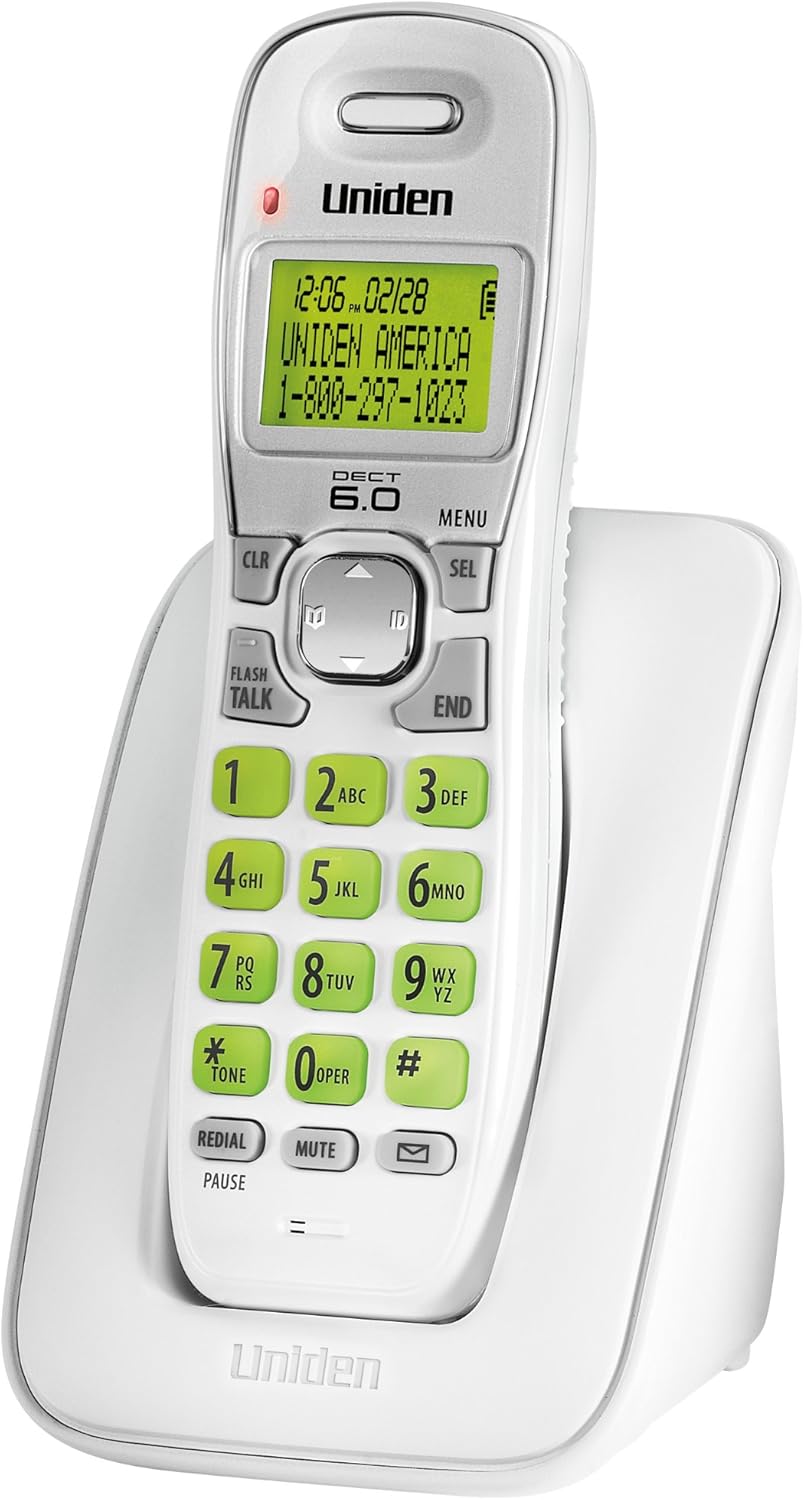
Foto 1: Uniden DECT 6.0 Cordless Phone D1364. This image shows the white cordless handset resting in its charging base. The handset features a green backlit LCD display showing time, date, and a sample caller ID entry. The keypad has large, green-backlit buttons for dialing and function keys like CLR, MENU, SEL, FLASH/TALK, END, REDIAL/PAUSE, MUTE, and a message indicator.
2. Ihe ngwugwu
Chọpụta na ngwungwu gị nwere ihe ndị a:
- One (1) Cordless Handset (D1364)
- One (1) Handset Charging Base
- One (1) AC Adapter for the charging base
- One (1) Telephone Line Cord
- One (1) Rechargeable Battery Pack (Product Specific, included)
- Akwụkwọ ntuziaka onye ọrụ a
3. Nhazi
3.1 Ntinye batrị
- Chọta mkpuchi nchekwa batrị n'azụ ekwentị.
- Slide the cover down and lift it off.
- Connect the battery pack connector to the jack inside the compartment, ensuring correct polarity.
- Tinye batrị batrị n'ime oghere.
- Replace the battery compartment cover, sliding it up until it clicks into place.
3.2 Njikọ Njikọ
- Plug the small end of the AC adapter into the DC IN jack on the back of the charging base.
- Plug the large end of the AC adapter into a standard electrical outlet.
- Plug one end of the telephone line cord into the TEL LINE jack on the back of the charging base.
- Plug the other end of the telephone line cord into a telephone wall jack.
3.3 Nchaji batrị mbụ
Place the handset on the charging base. The handset display will indicate charging. Allow the handset to charge for at least 15-20 awa before initial use to ensure full battery capacity.
3.4 Mgbidi mgbidi (nhọrọ)
The charging base includes a built-in wall mount feature. Consult the diagrams in the full manual for detailed wall mounting instructions, typically involving two screws spaced appropriately on the wall.
4. Ntuziaka ọrụ
4.1 Ịkpọ na ịnata oku
- Ka ịkpọ oku: Pịa FLASH/TALK, wee pịa nọmba ahụ. Ma ọ bụghị ya, buru ụzọ kpọọ nọmba ahụ, wee pịa FLASH/TALK.
- Iji kwụsị oku: Pịa N'ikpeazụ or place the handset back on the charging base.
- Iji zaa oku: Mgbe ekwentị kụrụ, pịa FLASH/TALK.
4.2 na-agbanwe olu
Mgbe a na-akpọ oku, jiri ya Igodo akụ elu/ala on the navigation pad to adjust the earpiece volume.
4.3 Akwụkwọ ekwentị
Akwụkwọ ekwentị nwere ike ịchekwa aha na nọmba iri ise.
- To Add an Entry: Pịa MENU, navigate to "Phonebook," select "Add Entry," and follow the on-screen prompts to enter the name and number.
- To Dial from Phonebook: Pịa Igodo akụ elu/ala to browse the phonebook, then press FLASH/TALK to dial the selected entry.
4.4 Caller ID and Call Waiting
This phone supports Caller ID and Call Waiting features (subscription required from your telephone service provider).
- The Caller ID list stores up to 30 incoming calls. Press the ID button (down arrow on navigation pad) to review the Caller ID list.
- During a call, if you hear a Call Waiting tone, press FLASH to switch to the incoming call.
4.5 Mgbanwe
The phone stores the last 5 numbers dialed.
- Pịa REDIAL/kwụsịtụ ka view ndepụta redial.
- Jiri ihe Igodo akụ elu/ala to select a number, then press FLASH/TALK ịkpọ oku.
4.6 Ogbi ọrụ
Mgbe oku na-aga, pịa MUTU to temporarily disable your microphone. The other party will not hear you. Press MUTU ọzọ ka maliteghachi mkparịta ụka ahụ.
4.7 Handset Locator
If you misplace the handset, press the Chọta button on the base unit. The handset will beep, allowing you to locate it.
4.8 Eco-Mode
The phone features Eco-Mode, which automatically manages power consumption to extend battery life. This mode is active by default and does not require manual activation.
5. Nlekọta
5.1 Nhicha
Jiri nwayọ hichaa ekwentị na nkeji ntọala, damp cloth. Do not use cleaning sprays or abrasive cleaners, as they may damage the finish or electrical components.
5.2 Nlekọta batrị
- Jiri ngwungwu batrị enwere ike chajịja mgbe niile.
- If the phone will not be used for an extended period, remove the battery pack to prevent leakage.
- Tụfuo batrị ochie dịka iwu obodo si dị. Atụfula ha n'ọkụ.
5.3 Ihe gbasara gburugburu ebe obibi
Avoid placing the phone in direct sunlight, near heat sources, or in areas with high humidity. Ensure proper ventilation around the base unit.
6. Nchọpụta nsogbu
| Nsogbu | Ihe nwere ike ime | Ngwọta |
|---|---|---|
| Enweghị ụda ọkpụkpọ | Akwụsịla eriri ekwentị. | Ensure the telephone line cord is securely plugged into the base and the wall jack. |
| Ekwentị anaghị akwụ ụgwọ | AC adapter is disconnected or handset is not seated correctly. | Verify the AC adapter is plugged into the base and a working outlet. Re-seat the handset firmly on the charging base. |
| Ọdịmma ụda adịghị mma / kwụ ọtọ | Interference from other electronic devices or distance from base. | Move the handset closer to the base. Relocate the base away from other electronic devices (Wi-Fi routers, microwaves). |
| Caller ID not displaying | No subscription to Caller ID service. | Contact your telephone service provider to subscribe to Caller ID service. |
| Handset lost connection to base | Handset out of range or power interruption. | Move the handset closer to the base. Check power connections for the base. |
7. Nkọwapụta
| Njirimara | Nkọwa |
|---|---|
| Nlereanya | D1364 |
| Nkà na ụzụ | DECT 6.0 Dijitalụ |
| Agba | Ọcha |
| Ebe nchekwa onye oku | 30 names/numbers |
| Ikike akwụkwọ ekwentị | 30 names/numbers |
| Redial Memory | Nọmba 5 ikpeazụ |
| Ngosipụta | Green Backlit LCD |
| Ahụigodo | Green Backlit |
| Ụdị batrị | Rechargeable (Product Specific, included) |
| Talk Time (approx.) | Ruo awa iri abụọ |
| Standby Time (approx.) | Ruo ụbọchị 6 |
| Isi Iyi Ike | AC Adapter (Base), Battery Powered (Handset) |
| Akụkụ (L x W x H) | 5.12 x 3.62 x 7.68 sentimita asatọ |
| Ibu Ibu | 3.76 pound |
| Ịrụ ọrụ ike | Eco-Mode, Energy Star compliant |
8. Akwụkwọ ikike na nkwado
For warranty information and technical support, please refer to the warranty card included with your product or visit the official Uniden website. You may also contact Uniden customer service directly.
Uniden America Customer Service: 1-800-297-1023
Mara: Nkọwa ngwaahịa na atụmatụ nwere ike ịgbanwe na-enweghị ọkwa.


