1. Okwu mmalite
This manual provides essential information for the safe and efficient installation, operation, and maintenance of your Airflow iCon ECO 15 Extractor Fan. Please read these instructions thoroughly before installation and retain them for future reference. The Airflow iCon ECO 15 is a stylish, compact, low-profile fan designed for discreet ventilation in various domestic applications.
2. Ozi nchekwa
Ntuziaka nchekwa dị mkpa:
- Ensure the power supply is disconnected before installation, maintenance, or servicing.
- Installation must be carried out by a qualified electrician in accordance with national wiring regulations and local building codes.
- Ezubere ngwa a maka iji ndị mmadụ (gụnyere ụmụaka) nwere ike anụ ahụ, mmetụta uche ma ọ bụ nke uche, ma ọ bụ enweghị ahụmịhe na ihe ọmụma, ma ọ bụrụ na enyereghị ha nlekọta ma ọ bụ ntụziaka gbasara iji ngwa ahụ site n'aka onye na-ahụ maka nchekwa ha.
- Ekwesịrị ilekọta ụmụaka ka ha hụ na ha ejighi ngwa eji egwu egwu egwu.
- Do not install the fan directly above a shower or bath unless it is protected by a suitable enclosure.
- Ensure that the air intake and exhaust vents are not obstructed.
- The fan must not be connected to a chimney flue or any other appliance flue.
3. Ngwaahịa gafereview
The Airflow iCon ECO 15 is a 100mm (4-inch) axial extractor fan featuring an intelligent iris shutter design for efficient and quiet operation. Its low-profile aesthetic integrates seamlessly into modern interiors.
3.1 Atụmatụ
- Iris Shutter Technology: Intelligent, award-winning design with a delayed shutter that opens and closes over up to 2 minutes. This avoids unnecessary operation for energy efficiency and prevents unwanted backdraughts.
- Pro dị alafile Nhazi: Discreet and aesthetically pleasing.
- Modular Versatility: Compatible with various control modules (sold separately) for enhanced functionality.
- Ọrụ dị jụụ: Designed for low noise levels.


4. Nkọwapụta
| Nkọwapụta | Uru |
|---|---|
| Ụdị | Ofufe ikuku |
| Nọmba nlereanya | iCON ECO 15 |
| Ụdị Fans | Axial |
| Air Flow (m³/h / l/s) | 69/19 |
| Nkwanye ọnọdụ | Mgbidi / elu ụlọ |
| Sound Pressure @ 3m (dB(A)) | 28.8 |
| Ike (W) | 9.4 |
| Duct Diameter (mm) | 100 |
| Tụkwasịnụ Voltage | 230 V / 1ph / 50 Hz |
| Nleba nchekwa mbata | IPX4 |
| Kachasị okpomọkụ gburugburu (°C) | 40 |
| Ibu (kg) | 0.74 |
| Akụkụ H x W x D (mm) | 197 x 197 x 108.5 |


5. Nwụnye
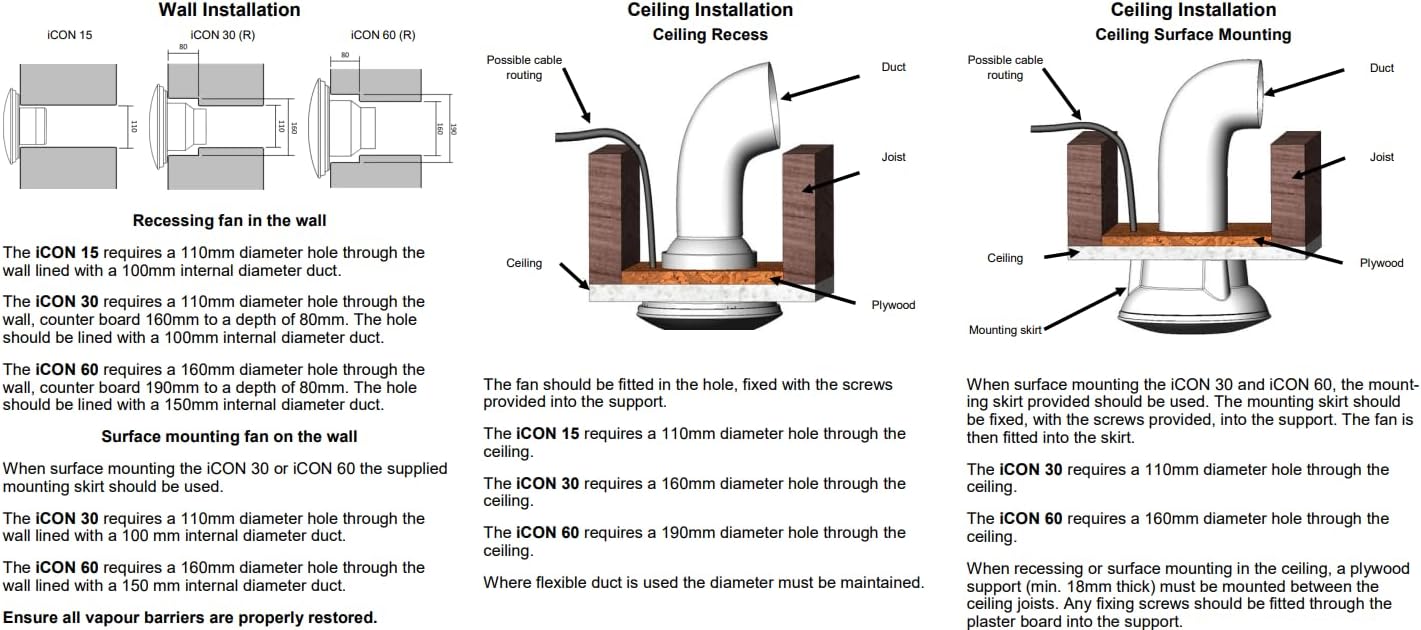
The Airflow iCon ECO 15 fan is designed for installation in walls or ceilings. Always ensure the power supply is isolated before commencing any installation work.
5.1 Ntuziaka nwụnye izugbe
- The fan requires a 110mm diameter hole for installation.
- For wall installations, the hole should be lined with a 100mm internal diameter duct.
- When using flexible ducting, ensure the diameter is maintained throughout the run.
- Ensure all vapor barriers are properly restored after installation.
5.2 Wall Installation (Recessing Fan)
The iCon 15 requires a 110mm diameter hole through the wall. This hole should be lined with a 100mm internal diameter duct.
5.3 Ceiling Installation (Recess)
The fan should be fitted in the hole, secured with the screws provided into the support structure. The iCon 15 requires a 110mm diameter hole through the ceiling.
5.4 Ceiling Installation (Surface Mounting)
When surface mounting, the fan is fitted into the mounting skirt (if supplied). The iCon 15 requires a 110mm diameter hole through the ceiling. When recessing or surface mounting in the ceiling, a plywood support (min. 18mm thick) must be mounted between the ceiling joists. Any fixing screws should be fitted through the plasterboard into this support.


6. Ntuziaka ọrụ
The Airflow iCon ECO 15 operates automatically based on its intelligent iris shutter technology. When activated (e.g., by a light switch or an optional control module), the iris shutter will slowly open, and the fan will begin to extract air. Upon deactivation, the fan will continue to run for a set period (if a timer module is installed) before the shutter slowly closes, preventing backdraughts.
6.1 Control Modules (Sold Separately)
The iCon ECO 15 is designed to be upgraded with various 'snap-in' interchangeable control modules to suit specific ventilation needs. These modules offer functionalities such as:
- Basic Switching: Simple on/off operation.
- Mmalite igbu oge: Fan starts after a delay.
- Iru mmiri mmetụta: Activates based on room humidity levels.
- Sensọ ngagharị: Activates upon detecting movement.
- Pullcord: Manual activation via a pull cord.
- Room Refresh: Periodic ventilation.
- SELV: Nchekwa Extra Low Voltage.
- Ngụ oge: Fan runs for a set duration after activation.
- Two Speed: Allows selection between two fan speeds.
- Ọsọ mgbanwe: Adjustable fan speed.
Refer to the specific control module's instructions for detailed operating procedures.

7. Nlekọta
Regular cleaning and maintenance will ensure the longevity and optimal performance of your Airflow iCon ECO 15 Extractor Fan.
- Kwụpụ ike: Always ensure the power supply to the fan is disconnected before performing any maintenance.
- Na-ehicha mkpuchi: The front cover can be gently wiped with a damp akwa na ncha dị nro. Zere ndị na-ehicha ihe na-ekpo ọkụ.
- Nhicha Agụba Fan: Carefully remove the front cover (refer to installation instructions for removal). Gently clean the fan blades and internal surfaces with a soft brush or damp cloth. Ensure no moisture enters electrical components.
- Nchikota: Once clean and dry, reassemble the fan cover, ensuring it is securely fitted.
- Ugboro: Cleaning should be performed periodically, depending on the environment and usage, typically every 3-6 months.
8. Nchọpụta nsogbu
If you experience issues with your Airflow iCon ECO 15 fan, consult the following common troubleshooting steps:
| Nsogbu | Ihe nwere ike ime | Ngwọta |
|---|---|---|
| Fan anaghị arụ ọrụ. | No power supply; faulty wiring; fan motor failure; control module issue. | Check power supply at the switch and fuse box. Verify wiring connections (by a qualified electrician). If using a control module, check its functionality. |
| Onye ofufe na-eme mkpọtụ. | Obstruction in ducting or fan blades; loose mounting; worn bearings. | Disconnect power and inspect fan blades and ducting for obstructions. Ensure the fan is securely mounted. If noise persists, professional inspection may be required. |
| Arụmọrụ mmịpụta adịghị mma. | Blocked ducting; dirty fan blades; incorrect fan size for room. | Clean fan blades and check ducting for blockages. Ensure ducting is correctly installed and not excessively long or restrictive. |
| Iris shutter not opening/closing. | Obstruction; motor fault; control module issue. | Disconnect power and check for any physical obstructions around the shutter mechanism. If using a control module, verify its operation. |
For issues not listed here or if solutions do not resolve the problem, please contact Airflow customer support or a qualified technician.
9. Akwụkwọ ikike Ozi
Airflow Developments Ltd guarantees the iCon fan for afọ 3 from the date of purchase against faulty material or workmanship. This warranty is applicable to units installed and used in the United Kingdom.
You can register your warranty online for more information at www.airflow.com.
The warranty covers only the fan and does not include reinstallation if required. In the event of any defective parts being found, Airflow Developments Ltd reserves the right to repair or replace the unit at their discretion without charge, provided that:
- It has been installed and used in accordance with the fitting and wiring instructions supplied with each unit.
- It has not been connected to an unsuitable electrical supply.
- It has not been subjected to misuse, neglect, or damage.
- It has not been modified or repaired by any person not authorized by Airflow Developments Ltd.
- It has been installed in accordance with the latest Building Regulations and IET wiring regulations by a person who is recognized as a competent installer (e.g., NICEIC Ventilation Scheme).
Airflow Developments Ltd shall not be liable for any loss, injury, or other consequential damage arising from a failure of the equipment, except only that nothing in this condition shall be construed as to exclude or restrict liability for negligence.
This warranty does not affect any statutory or other consumer rights.
For detailed standard warranty terms and conditions, please visit the Airflow websaịtị ma ọ bụ kpọtụrụ Ọrụ Ndị Ahịa.

10. Nkwado na kọntaktị
For further assistance, frequently asked questions (FAQs), and installation help, please visit the Airflow Knowledge Base:
airflow.com/useful-links/knowledge-base-faqs


