1. Okwu mmalite
This manual provides detailed instructions for the installation, operation, and maintenance of the Eaton Accell AIM06-A-K Smart Dimmer. This device is designed for smooth, full-range digital dimming of incandescent, magnetic low-voltage, and fluorescent lighting. Please read these instructions carefully before installation and use.
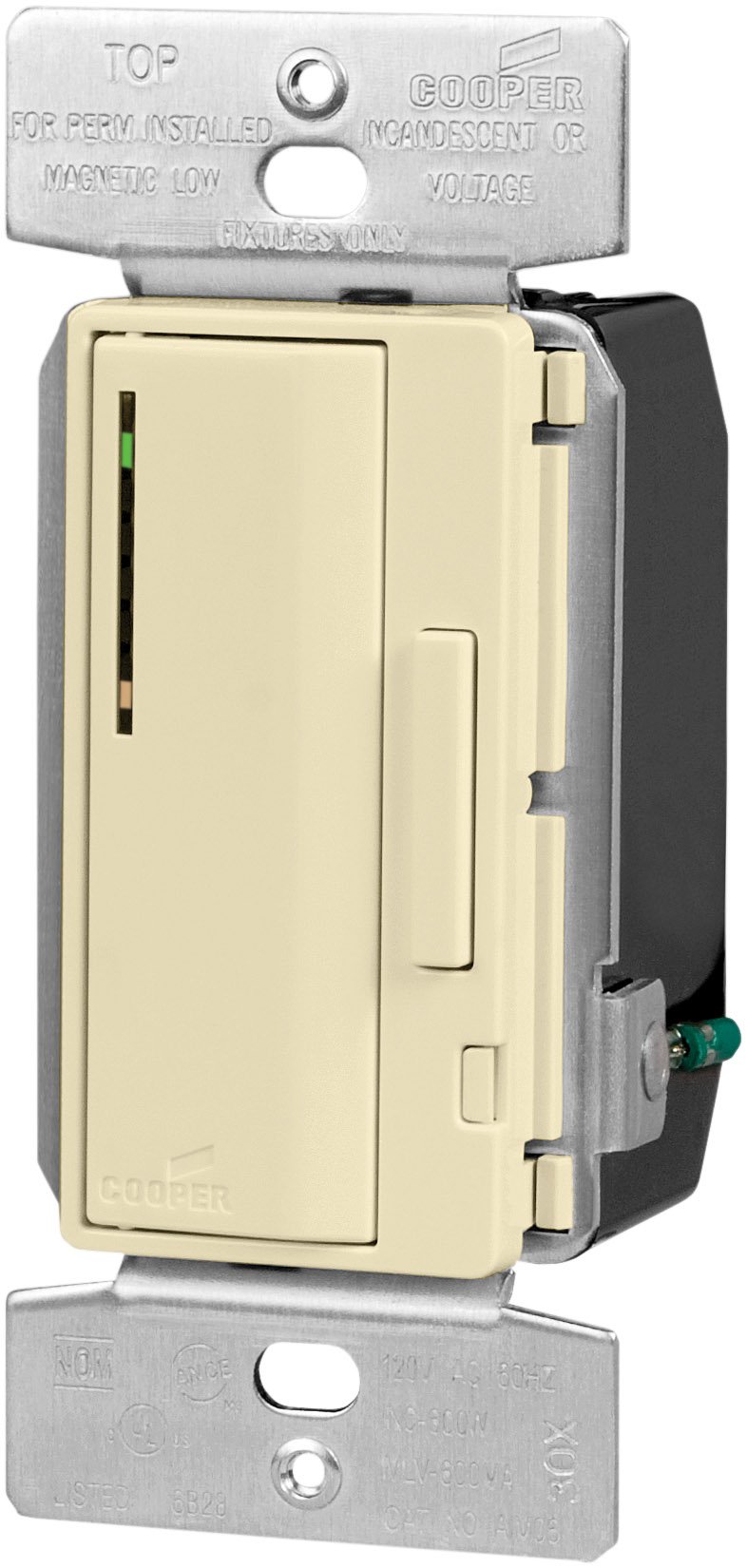
Image 1.1: Eaton Accell AIM06-A-K Smart Dimmer in Almond. This image shows the front view of the dimmer switch, highlighting its push pad and dim/bright bar.
2. Ozi nchekwa
Ịdọ aka ná ntị: Iji zere ọkụ, ujo, ma ọ bụ ọnwụ, gbanyụọ ike na ihe na-agbaji sekit ma ọ bụ igbe fuse ma nwalee na agbanyụrụ ike tupu e jiri waya.
- A ga-arụrịrị nrụnye site n'aka onye ọrụ ọkụ eletrik ruru eru dịka koodu eletriki mpaghara na nke obodo siri dị.
- Do not use with loads exceeding 600 Watts for incandescent/halogen or magnetic low-voltage ọkụ.
- Gbaa mbọ hụ na echekwabara njikọ waya niile.
- Ngwaọrụ a bụ naanị maka ime ụlọ.
- Do not attempt to repair or modify the device. Refer servicing to qualified personnel.
3. Ihe ngwugwu
Chọpụta na akụrụngwa niile dị tupu ịmalite nrụnye:
- Eaton Accell AIM06-A-K Smart Dimmer (Almond)
- Wire Nuts (typically included for connections)
- Akwụkwọ ntuziaka (akwụkwọ a)
4. Atụmatụ igodo
- Single-pole and multi-location smart dimmer functionality.
- Smooth, full-range digital dimming for incandescent, magnetic low-voltage, and fluorescent lighting.
- Electro-mechanical push pad for ON/OFF operation with a separate dim/bright bar.
- Preset feature allows return to the previous light setting.
- LED light level display for presetting illumination levels.
- Amber LED at the bottom indicates ON/OFF load status.
- Seven-step green LED display indicates selected light level and reduces brightness when off (night light feature).
- Digital circuitry provides soft-on/fade-off, extending lamp ndu.
- Neutral wire is not required for installation.
- Compatible with any decorator designer-style wallplates.
5. Nwụnye
- Gbanyụọ ike: N'ebe mgbanaka sekit ma ọ bụ igbe fuse, gbanyụọ ọkụ na ebe mgba ọkụ. Nyochaa na agbanyụrụ ọkụ site na iji voltagọ bụ onye nyocha.
- Wepu Mgbanwe Ochie: Carefully remove the existing wallplate and switch from the wall box. Disconnect the wires from the old switch.
- Chọpụta waya:
- Line Wire: Waya ahụ na-eweta ike site na ihe mgbawa sekit.
- Waya Ibu: The wire going to the light fixture.
- Waya ala: Bare copper or green insulated wire.
- Traveler Wires (for multi-location): If replacing a 3-way or 4-way switch, identify the traveler wires.
- Dọnye Dimmer ahụ: Connect the wires to the dimmer according to the wiring diagram provided with the product.
- Connect the Line wire to the dimmer's Line terminal.
- Connect the Load wire to the dimmer's Load terminal.
- Connect the Ground wire to the dimmer's Ground terminal.
- For multi-location installations, connect traveler wires as per the specific diagram for your setup.
Mara: The AIM06-A-K dimmer does not require a neutral wire for installation.
- Ugwu Dimmer: Carefully fold the wires into the wall box and secure the dimmer to the wall box using the provided screws.
- Wụnye Mgbidi: Attach a decorator-style wallplate (sold separately) over the dimmer.
- Weghachi ike: Gbanyụọ ọkụ azụ na ihe nbibi sekit.
- Ọrụ nnwale: Test the dimmer's ON/OFF function and dimming capabilities.
6. Ọrụ
- Na-agbanye/ Gbanyụọ: Press the large electro-mechanical push pad to turn the lights ON or OFF.
- Dimming/Brightening: Use the separate dim/bright bar located next to the push pad. Press the top of the bar to brighten lights, and the bottom to dim lights.
- Atụmatụ Edobere: When turning the lights ON, the dimmer will return to the last set brightness level.
- LED Light Level Display: The seven-step green LED display indicates the current light level. When the lights are off, these LEDs reduce brightness, acting as a night light.
- Load Status Indicator: An amber LED at the bottom of the LED display indicates the ON/OFF status of the load.
7. Nlekọta
- Nhicha: To clean the dimmer, wipe with a soft, damp akwa . Ejila ihe nchacha abrasive ma ọ bụ ihe mgbaze.
- Enweghị akụkụ ndị ọrụ-ọrụ: The dimmer contains no user-serviceable parts. Do not attempt to open or repair the unit.
8. Nchọpụta nsogbu
| Nsogbu | Ihe nwere ike ime | Ngwọta |
|---|---|---|
| Ọkụ anaghị agbanwu. |
|
|
| Ọkụ anaghị agba ọchịchịrị. |
|
|
| Dimmer is hot to the touch. |
|
|
9. Nkọwapụta
- Ụdị: AIM06-A-K
- Akara: Eton
- Ụdị: Smart Dimmer, Incandescent/Halogen, Magnetic Low-Voltage
- Wattage: 600 watts (kachasị)
- Voltage: 120V AC, 60Hz
- Ụdị ọrụ: Push Button with Dim/Bright Bar
- Agba: Almọnd
- Akụkụ (L x W x H): Approximately 2.27 x 2.27 x 2.27 inches (actual faceplate size may vary)
- Asambodo: cULus Listed to UL1472, NOM certified
- Protocol Njikọta: X-10
- Waya na-anọpụ iche: Not required for installation
10. Akwụkwọ ikike na nkwado
For warranty information and technical support, please refer to the official Eaton website or contact Eaton customer service directly. Specific warranty terms may vary by region and purchase date.