Okwu mmalite
This manual provides comprehensive instructions for the assembly, operation, and maintenance of your Sauder Lake Point L Desk, Model 410866. Designed with a contemporary architectural style, this L-shaped desk features storage drawers and glass tops, suitable for various office and entertainment needs. Please read these instructions carefully before beginning assembly and retain them for future reference.
Ozi nchekwa
- Na-agbaso ntuziaka nhazi mgbe niile kpọmkwem.
- Ensure all hardware is securely fastened before use.
- Do not overload the desk or drawers.
- Handle glass components with care to prevent breakage or injury.
- Debe obere akụkụ n'ebe ụmụaka nọ n'oge mgbakọ.
Ihe ngwugwu
Before beginning assembly, verify that all parts and hardware are present. Refer to the packing list provided with your desk for a complete inventory. If any parts are missing or damaged, contact Sauder customer support.
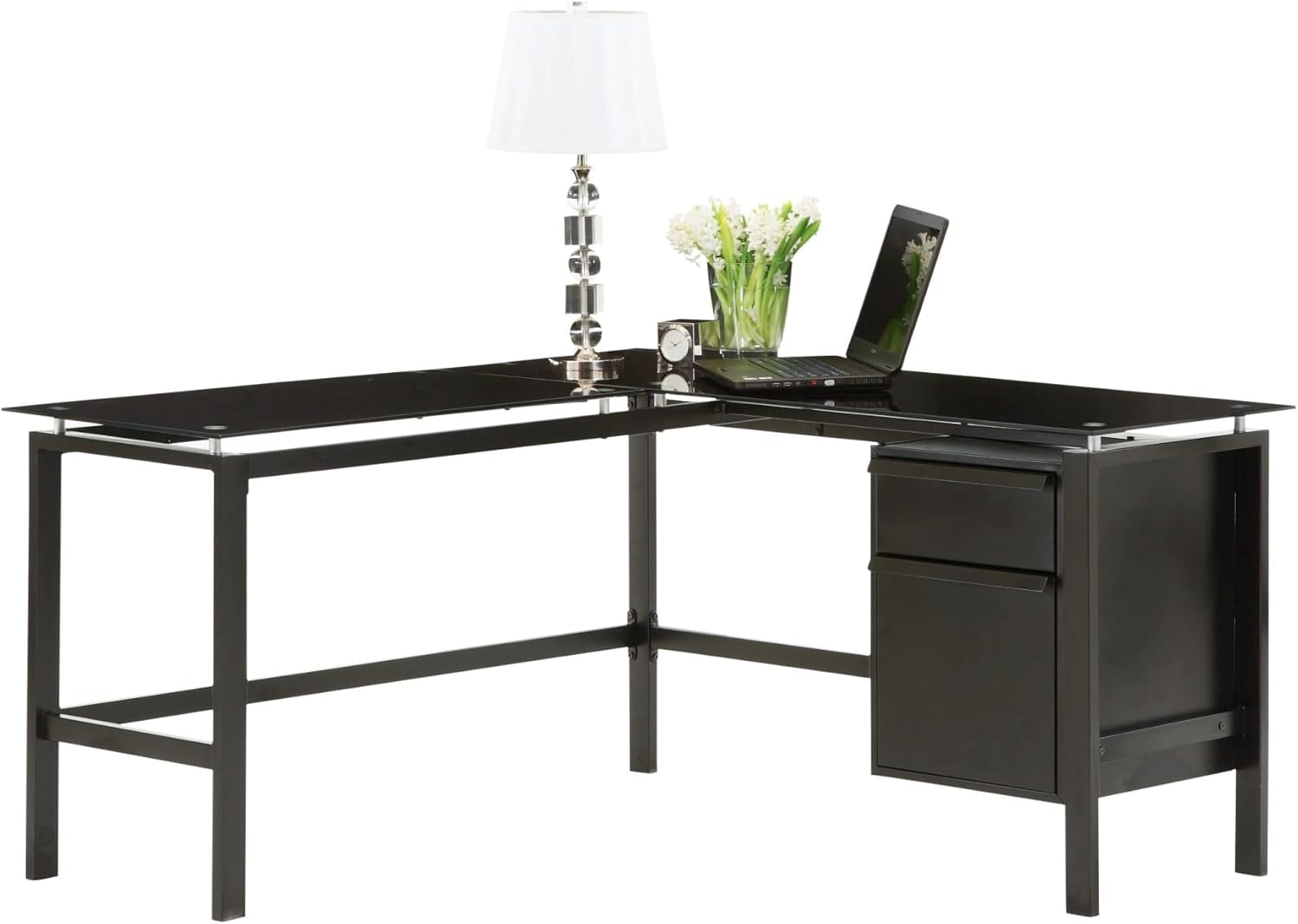
Foto 1: Assembled Sauder Lake Point L Desk. This image illustrates the overall design and components of the desk, including the L-shaped configuration, black metal frame, and glass work surfaces. A laptop, lamp, and decorative items are shown on the desk.
Ntọala na Mgbakọ
Assembly typically requires two adults and basic tools such as a Phillips head screwdriver. Follow the step-by-step diagrams and instructions included in your product packaging. The following general steps outline the assembly process:
- Kwadebe Mpaghara: Clear a spacious, clean, and level area for assembly. Lay down a blanket or cardboard to protect floor surfaces and desk components.
- Chọpụta akụrụngwa: Unpack all parts and hardware. Organize them according to the provided parts list.
- Gwakọta Frame ahụ: Begin by assembling the metal frame sections. Insert bolts loosely at first. This allows for minor adjustments if holes do not align perfectly. Tighten all bolts only after all components are in place and aligned.
- Install Drawer Unit: Assemble the drawer unit according to the instructions. Ensure drawer slides are correctly oriented for smooth operation.
- Attach Drawer Unit to Frame: Secure the assembled drawer unit to the main desk frame.
- Place Glass Tops: Carefully place the tempered glass tops onto the designated frame supports. Ensure they are level and securely seated. The glass is heavy and requires careful handling.
- Mmechi ikpeazụ: Once all parts are assembled and aligned, fully tighten all screws and bolts. Do not overtighten.

Foto 2: Sauder Lake Point L Desk in a complete office setup. This image shows the desk positioned in a room, accompanied by a white office chair and a complementary shelving unit, demonstrating its integration into a functional workspace.
Ọrụ
The Sauder Lake Point L Desk is designed for general office and home use. Its L-shape provides ample workspace, and the integrated drawers offer convenient storage.
- Elu ọrụ: Utilize the tempered glass surface for your computer, documents, and other work essentials. Avoid placing extremely hot items directly on the glass without a protective coaster.
- Drawers: The desk includes two drawers for organized storage. Pull drawers open smoothly and close gently to prevent wear. Do not force overloaded drawers.
Nlekọta na nlekọta
Proper care will ensure the longevity and appearance of your desk.
- Ihu iko: Clean glass tops regularly with a glass cleaner and a soft, lint-free cloth. To avoid smudges and streaks, wipe in one direction and buff dry.
- Frame and Drawers: Wipe the metal frame and drawer surfaces with a soft, damp akwa . Zere ihe nchacha abrasive ma ọ bụ kemịkalụ siri ike nke nwere ike imebi njedebe.
- Akụrụngwa: Periodically check all screws and bolts to ensure they remain tight. Retighten as necessary, but do not overtighten.
- Zere ibu oke ibu: Do not place excessively heavy items on the glass or in the drawers.
Nchọpụta nsogbu
If you encounter issues with your Sauder Lake Point L Desk, refer to the following common solutions:
- Desktọpụ dị egwu:
Ensure all assembly bolts and screws are fully tightened. Check that the desk is on a level surface. If not, use shims under the feet to stabilize it.
- Glass Tops Appear Smudged/Dirty:
This is common with glass surfaces. Clean with a high-quality glass cleaner and a microfiber cloth. For persistent smudges, try a mixture of vinegar and water.
- Draws anaghị amịpụta nke ọma:
Check that the drawer slides are correctly installed and free of obstructions. Ensure the drawer unit is properly aligned and secured to the desk frame.
- Akụkụ anaghị adaba n'oge a na-ejikọta ha:
During initial assembly, only loosely fasten bolts. This allows for flexibility to align all parts before final tightening. If parts are significantly bent or damaged, contact customer support for replacements.
Nkọwapụta
| Njirimara | Nkọwa |
|---|---|
| Ụdị | Sauder |
| Nọmba nlereanya | 410866 |
| Akụkụ ngwaahịa | 154.94 x 58.42 x 15.88 cm (61 x 23 x 6.25 inch) |
| Ibu Ibu | 56.63 n'arọ (124.85 lbs) |
| Ụdị | L-ọdịdị |
| Agba | Nwa |
| Ụdị | Nke dị ugbu a |
| Isi ihe | Ọla |
| Ụdị ihe kacha elu | Glass |
| Ụdị ụlọ | Ụlọ ọrụ |
| Onu ogugu | 2 |
| Mechaa ngwá ụlọ | Nickel (hardware highlights) |
Akwụkwọ ikike na nkwado ndị ahịa
For specific warranty information, please refer to the documentation included with your purchase or visit the official Sauder website. If you require assistance with assembly, missing parts, or have any questions regarding your Sauder Lake Point L Desk, please contact Sauder customer support directly. Contact details are typically found on the manufacturer's websaịtị ma ọ bụ na nkwakọ ngwaahịa gị.
Ị nwekwara ike ịga na Sauder Brand Store on Amazon maka ozi ngwaahịa ọzọ.


