1. Okwu mmalite
This manual provides comprehensive instructions for the safe and efficient installation, operation, and maintenance of the Carrier HH18HA280 Temperature Actuation Switch. Please read this manual thoroughly before attempting any installation or operation to ensure proper function and safety.
2. Ozi nchekwa
Ịdọ aka ná ntị:
- Always disconnect power to the equipment before installing, servicing, or removing the switch. Failure to do so can result in electrical shock, injury, or death.
- Installation and servicing should only be performed by qualified and experienced HVAC technicians.
- Ensure all wiring connections comply with local and national electrical codes.
- Do not operate the switch if it appears damaged.
3. Ngwaahịa gafereview
The Carrier HH18HA280 is a temperature actuation switch designed for use in HVAC systems. It is responsible for sensing specific temperature conditions and activating or deactivating connected components based on these readings. This switch is a critical component for maintaining optimal system performance and safety.
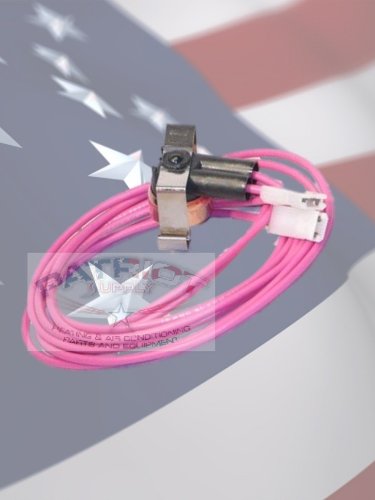
Figure 1: The Carrier HH18HA280 Temperature Actuation Switch. This image displays the compact switch unit with its metal bracket and two pink electrical wires terminating in white connectors. The background features a subtle American flag pattern.
4. Ntọala na nwụnye
Proper installation is crucial for the correct functioning of the temperature actuation switch. Refer to the specific wiring diagrams and installation instructions provided with your HVAC unit for precise connection details.
- Ịkwụsị ike: Ensure all power to the HVAC system is completely disconnected at the main breaker before beginning installation.
- Chọta ebe a na-etinye ya: Identify the designated mounting location for the temperature switch within your HVAC unit, typically near the component it is designed to monitor.
- Ugwu mgbanaka: Securely attach the HH18HA280 switch using appropriate fasteners to prevent vibration or movement.
- Njikọ waya: Connect the pink wires from the switch to the corresponding terminals on your HVAC control board or wiring harness, following the system's wiring diagram. Ensure connections are tight and secure.
- Nyochaa nwụnye: Double-check all connections and mounting security before restoring power.
- Weghachi ike: Carefully restore power to the HVAC system and observe for proper operation.
If you are unsure about any step, consult a certified HVAC professional.
5. Ntuziaka ọrụ
The Carrier HH18HA280 Temperature Actuation Switch operates automatically based on the temperature it senses. It does not require manual adjustment or user interaction during normal operation.
- The switch monitors the temperature of its environment.
- Upon reaching a pre-set temperature threshold, the switch will change its state (e.g., open or close a circuit).
- This change in state signals other components in the HVAC system to perform a specific action, such as turning a fan on/off or activating a heating/cooling element.
Ensure the switch is free from obstructions and debris that could affect its temperature sensing capabilities.
6. Nlekọta
The Carrier HH18HA280 Temperature Actuation Switch is designed for reliable, long-term operation with minimal maintenance. However, periodic inspection is recommended as part of your overall HVAC system maintenance schedule.
- Nyocha kwa afọ: During routine HVAC system checks, visually inspect the switch for any signs of physical damage, corrosion, or loose connections.
- Nhicha: Ensure the area around the switch is clean and free of dust, lint, or other debris that could impede its function or airflow. Use a soft, dry cloth or brush for cleaning. Do not use liquid cleaners directly on the switch.
- Nyochaa waya: Hụ na njikọ waya niile dị nchebe ma ghara imebi ma ọ bụ mebie.
Kwupu ike mgbe niile tupu ime mmezi ọ bụla.
7. Nchọpụta nsogbu
If your HVAC system is not functioning as expected, and you suspect the temperature actuation switch may be involved, consider the following common issues:
| Nsogbu | Ihe nwere ike ime | Ngwọta |
|---|---|---|
| System not responding to temperature changes | Loose wiring connection, faulty switch, obstructed sensor. | Check wiring connections. Ensure sensor area is clear. If issues persist, the switch may need replacement by a qualified technician. |
| Ọrụ na-adịte aka | Poor connection, fluctuating power, internal switch fault. | Verify stable power supply. Inspect connections. Consider professional diagnosis and potential switch replacement. |
| Switch appears physically damaged | Impact, corrosion, overheating. | Immediately disconnect power. The switch must be replaced by a qualified technician. |
For complex issues or if you are uncomfortable performing these checks, contact a certified HVAC technician.
8. Nkọwapụta
| Njirimara | Nkọwa |
|---|---|
| Ụdị | Onye na-ebu |
| Nọmba nlereanya | HH18HA280 |
| Ibu Ibu | 1 paụnd |
| ASIN | B004SCD760 |
| Mbụ Dị | Maachị 16, 2011 |
9. Akwụkwọ ikike Ozi
Carrier products are manufactured to high-quality standards. For specific warranty terms and conditions applicable to the HH18HA280 Temperature Actuation Switch, please refer to the warranty documentation provided with your original HVAC system or contact Carrier customer support. Keep your proof of purchase for warranty claims.
10. Nkwado ndị ahịa
If you require further assistance, have questions regarding installation, operation, or troubleshooting, please contact your authorized Carrier dealer or a certified HVAC technician. You can also visit the official Carrier websaịtị maka akụrụngwa ndị ọzọ na ozi kọntaktị.
Carrier Official Websaịtị: www.carrier.com


