1. Okwu mmalite
Daalụ maka ịzụrụasing the Edifier M1360 Wired Multimedia Speaker System. This 2.1 speaker system is designed to provide a convenient and high-quality audio solution for various multimedia applications, including computers, laptops, gaming consoles, and MP3 players. Featuring upward-angled satellites and a downward-angled subwoofer, the system delivers clear sound with steady bass output. The wired remote control offers easy volume adjustment and includes a headphone jack for private listening.
2. Ozi nchekwa dị mkpa
- Read these instructions thoroughly before operating the product.
- Debe akwụkwọ ntuziaka a maka ntụnye aka n'ọdịnihu.
- Ewepụla unit ahụ na mmiri ozuzo ma ọ bụ mmiri iji gbochie ọkụ ma ọ bụ ujo eletrik.
- Akwụsịla oghere ikuku ikuku ọ bụla. Wụnye dị ka ntuziaka onye nrụpụta si dị.
- Awụnyela n'akụkụ ebe okpomọkụ ọ bụla dị ka radiators, ndekọ okpomọkụ, stovu, ma ọ bụ ngwa ndị ọzọ (gụnyere amplifiers) nke na-emepụta okpomọkụ.
- Chebe eriri ọkụ ka ị ghara ịgagharị ma ọ bụ tuo ya, ọkachasị na plọg, ebe nchekwa dị mma, na ebe ha si na ngwa ahụ pụta.
- Jiri naanị mgbakwunye / ngwa ndị nrụpụta akọwapụtara.
- Kwupu ngwa a n'oge oke mmiri ozuzo ma ọ bụ mgbe ejighi ya ogologo oge.
- Tụtụ aka n'aka ndị ọrụ ruru eru. A na-achọ ọrụ mgbe ngwa ahụ mebiri emebi n'ụzọ ọ bụla, dị ka eriri ọkụ ma ọ bụ plọg mebiri emebi, mmiri mmiri wụfuru ma ọ bụ ihe dabara n'ime ngwa ahụ, ekpughere ngwa ahụ na mmiri ozuzo ma ọ bụ mmiri, anaghị arụ ọrụ nke ọma. , ma ọ bụ ahapụla ya.
3. Ihe ngwugwu
Biko lelee ihe dị n'ime ngwugwu gị. Ọ bụrụ na ihe ọ bụla efuo ma ọ bụ mebie, kpọtụrụ onye na-ere ahịa gị.
- 1x Edifier M1360 Subwoofer
- 2x Satellite ọkà okwu
- 1x Wired Remote Control
- 1x 3.5mm Audio Input Cable
- 1 x Akwụkwọ ntuziaka onye ọrụ (akwụkwọ a)
4. Ngwaahịa gafereview
4.1 Ngwa sistemu
- Subwoofers: Houses the main amplifier and bass driver. Connects to the satellite speakers and the audio source.
- Ndị na-ekwu okwu Satellite: Two compact speakers for mid-range and high-frequency audio.
- Njikwa ikuku ikuku: Features a volume dial, power switch, and headphone output.
4.2 njirimara akụrụngwa

Foto 1: N'ihu view of the Edifier M1360 speaker system, showing the central subwoofer, two angled satellite speakers, and the wired remote control unit.
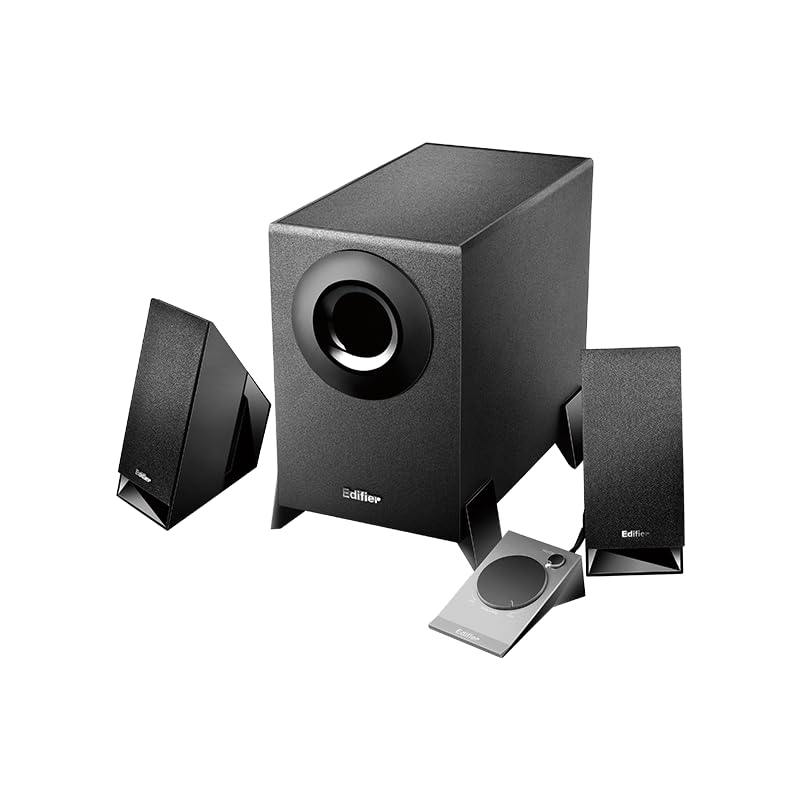
Figure 2: Another perspective of the Edifier M1360 speaker system, highlighting the compact design of the satellite speakers and the wired remote's placement.
5. Nhazi
5.1 Ntinye
- Place the subwoofer on the floor or a sturdy surface near your computer or audio source.
- Position the satellite speakers on either side of your monitor or listening area, ensuring they are angled towards you for optimal sound.
- Ensure adequate ventilation around all components.
5.2 Njikọ
- Connect the satellite speakers to the corresponding output jacks on the back of the subwoofer. Ensure the left and right speakers are connected correctly.
- Connect the wired remote control cable to the dedicated port on the subwoofer.
- Connect the 3.5mm audio input cable from the "AUDIO IN" port on the subwoofer to the audio output (headphone jack) of your computer, laptop, MP3 player, or other audio source.
- Plug the power cord of the subwoofer into a standard AC power outlet.
6. Ntuziaka ọrụ
6.1 Gbanyụọ ma ọ bụ gbanyụọ
- To turn on the speaker system, press the power button located on the wired remote control. The power indicator light will illuminate.
- To turn off the speaker system, press the power button again. The power indicator light will turn off.
6.2 Njikwa olu
- Rotate the large dial on the wired remote control clockwise to increase the volume.
- Rotate the large dial counter-clockwise to decrease the volume.
6.3 Mmepụta ekweisi
- To listen privately, plug your headphones into the 3.5mm headphone jack on the wired remote control.
- When headphones are connected, the speaker output will automatically mute.
- Unplug the headphones to resume audio playback through the speakers.
7. Nlekọta na nlekọta
- Nhicha: Use a soft, dry cloth to clean the surfaces of the speakers and subwoofer. Do not use liquid cleaners or aerosol sprays.
- Igwe ikuku: Ensure that the ventilation openings on the subwoofer are not blocked. Proper airflow prevents overheating.
- Nchekwa: Ọ bụrụ na ị na-echekwa sistemụ ahụ ruo ogologo oge, kwụpụ ya na ọkụ ma debe ya n'ebe dị jụụ ma kpọọ nkụ, ebe anwụ na-anaghị apụta kpọmkwem na oke okpomọkụ.
- Zere mmiri mmiri: Keep the speaker system away from water, humidity, and other liquids.
8. Nchọpụta nsogbu
| Nsogbu | Ihe nwere ike ime | Ngwọta |
|---|---|---|
| Enweghị ụda |
|
|
| Ụda agbagọ |
|
|
| Otu ọkà okwu anaghị arụ ọrụ |
|
|
9. Nkọwapụta
| Njirimara | Nkọwa |
|---|---|
| Aha Nlereanya | M1360 |
| Ụdị Ọkà Okwu | Multimedia |
| Nhazi ọwa ụda gburugburu | 2.1 |
| Teknụzụ Njikọta | Wired (3.5mm stereo input) |
| Ọnọdụ mmepụta ọdịyo | Stereo |
| Ike Nwepu kacha elu | 8.5 Watt |
| Dayameta nke subwoofer | 5 sentimita asatọ |
| Dayameta Tweeter | 1 sentimita asatọ |
| Signgbaàmà-na-Noise ruru | 85 dB |
| Nzaghachi ugboro ugboro | 20 KHz (Note: This is likely the upper limit, not the full range. Common for speakers to list only max freq.) |
| Ngwa dakọtara | Smartphone, Laptop, Desktop, Gaming Console, MP3 Player |
| Akụkụ ngwaahịa | 6.4D x 11.2W x 14H centimita |
| Ibu Ibu | 2.5 n'arọ (2500 grams) |
| Isi Iyi Ike | AC |
| Agba | Nwa |
| Mba onye si | China |
10. Akwụkwọ ikike na nkwado
For detailed warranty information and customer support, please refer to the warranty card included with your product packaging or visit the official Edifier websaịtị.
Onye Mmepụta: Onye Mmezi
Importer: Nikita Distributors - Green Terrace Building, Lane Number 5, South Koregaon Park, Pune 411001, MH, India


