1. Okwu mmalite
This manual provides essential information for the safe and effective operation, maintenance, and troubleshooting of your BLACK+DECKER ASI200 12V Portable Compressor. Please read these instructions thoroughly before using the appliance and retain them for future reference.
2. Ozi nchekwa
Nchekwa izugbe:
- Always wear appropriate eye protection when operating the compressor.
- Ensure the compressor is placed on a stable, flat surface during operation.
- Do not operate the compressor in wet conditions or expose it to rain.
- Debe ụmụaka na ndị na-ekiri ebe a na-arụ ọrụ.
- Never point the air nozzle at people or animals.
- Disconnect the compressor from the power source when not in use or before performing any maintenance.
Nchekwa Eletriki:
- This appliance is designed for 12V DC power only, typically from a vehicle's cigarette lighter socket.
- Ensure the vehicle's engine is running when using the compressor to avoid draining the battery.
- Do not use the compressor if the power cord or plug is damaged.
- Avoid kinking or pinching the power cord.
Nchekwa nrụgide:
- Always check the recommended pressure for the item being inflated (e.g., tire sidewall, ball).
- Do not over-inflate items, as this can cause them to burst, leading to injury.
- The automatic shut-off feature helps prevent over-inflation, but always monitor the process.
3. Ngwaahịa gafereview
Familiarize yourself with the components of your BLACK+DECKER ASI200 compressor.

Foto 1: Components of the ASI200 Compressor. This image shows the compressor with labels pointing to its key features: Pressure Gauge with LED Digital Display, On/Off Switch, Emergency Light, Area/Emergency Light On/Off Switch, Air Hose with Universal Valve Adaptor, and 3 Valve Attachments.
- Pressure Gauge with LED Digital Display: Shows current pressure and allows setting target pressure.
- Mgbanwu ma ọ bụ gbanyụọ: Activates or deactivates the compressor motor.
- Ìhè mberede: Provides illumination for visibility in low-light conditions.
- Area/Emergency Light On/Off Switch: Controls the emergency light function.
- Air Hose with Universal Valve Adaptor: Connects to various inflation valves.
- 3 Valve Attachments: Includes a needle for sports balls and two other adaptors for different inflation needs.
4. Nhazi
Follow these steps to prepare your compressor for use:
- Jikọọ na Ike: Insert the 12V power plug into your vehicle's cigarette lighter socket. Ensure the connection is secure. For optimal performance and to prevent battery drain, it is recommended to have the vehicle's engine running.
- Họrọ Mgbakwunye: Choose the appropriate valve attachment for the item you wish to inflate. The compressor comes with a universal valve adaptor for standard tire valves, a needle for sports balls, and two other attachments for various inflatables. Attach it firmly to the air hose.
- Tinye na ihe: Securely connect the air hose (with the chosen attachment) to the valve stem of the item you are inflating.
5. Ntuziaka ọrụ
Operating your ASI200 compressor is straightforward:
- Tọọ nrụgide achọrọ: Turn on the compressor. The digital display will show the current pressure. Use the '+' and '-' buttons to set your desired target pressure. Refer to the item's manufacturer recommendations for correct pressure levels (e.g., PSI or Bar).

Foto 2: Digital display for setting and monitoring pressure. The display shows the current pressure in PSI, BAR, or KPA, with '+' and '-' buttons for adjustment.
- Malite onu oriri: Press the compressor's On/Off switch to start the motor. The compressor will begin inflating the item.
- Mkpuchi akpaaka: The compressor features an automatic shut-off function. Once the preset target pressure is reached, the compressor will automatically stop, preventing over-inflation.
- Nyochaa Nrụgide: While the automatic shut-off is reliable, it is good practice to periodically check the pressure on the digital display during inflation.
- Kwụsị ọnụ ahịa: If you need to stop inflation before the target pressure is reached, simply press the On/Off switch.
- Kwụpụ: Once inflation is complete, turn off the compressor, disconnect the air hose from the item's valve, and then unplug the 12V power cord from the vehicle's socket.
Iji LED Work Light:
The compressor is equipped with an LED work light for use in dark conditions. Use the dedicated Area/Emergency Light On/Off switch to activate or deactivate the light.

Foto 3: Agara nso view of the integrated emergency light. This light provides illumination for nighttime use or in poorly lit areas.
Inflation Examples:

Foto 4: Inflating a motorcycle tire. The compact design allows for easy use even with motorcycle tires.

Foto 5: Inflating a car tire. The long 3.1m cable provides ample reach for all four tires of a vehicle.

Foto 6: Inflating a sports ball. Use the needle attachment for sports equipment.
6. Nlekọta
Proper maintenance ensures the longevity and reliable performance of your compressor.
- Nhicha: Wipe the exterior of the compressor with a damp cloth. Do not use harsh chemicals or abrasive cleaners. Ensure no water enters the air vents.
- Nchekwa: Store the compressor in a dry, cool place, away from direct sunlight and extreme temperatures. The integrated cable management allows for neat storage of the power cord and air hose. Keep the valve attachments in their designated storage area on the unit to prevent loss.
- Nyocha: Periodically inspect the power cord, air hose, and attachments for any signs of wear or damage. Do not use the compressor if any part is damaged.

Foto 7: Compressor stored on a shelf. The compact design and integrated cable storage make it easy to store.
7. Nchọpụta nsogbu
If you encounter issues with your compressor, refer to the following common problems and solutions:
- Compressor does not turn on:
- Ensure the 12V power plug is securely inserted into the vehicle's cigarette lighter socket.
- Check the vehicle's fuse for the cigarette lighter socket.
- Verify the vehicle's engine is running to provide adequate power.
- Ensure the compressor's On/Off switch is in the 'On' position.
- Compressor na-agba ọsọ mana ọ naghị ebu:
- Check that the air hose and valve attachment are securely connected to the item's valve stem.
- Ensure there are no leaks in the air hose or connections.
- Verify the correct valve attachment is being used for the item.
- Compressor stops prematurely:
- The automatic shut-off feature may have activated because the preset pressure was reached. Check the digital display.
- The unit may have overheated. Allow it to cool down for 15-20 minutes before attempting to use it again.
- Ọgụgụ nrụgide na-ezighi ezi:
- Ensure the connection to the valve stem is tight and there are no air leaks.
- Compare the reading with a known accurate pressure gauge if available.
Ọ bụrụ na usoro ndị a akwụsịghị nsogbu a, biko kpọtụrụ nkwado ndị ahịa.
8. Nkọwapụta
Key technical specifications for the BLACK+DECKER ASI200 compressor:
| Nọmba nlereanya | ASI200-XJ |
| Voltage | 12 volts DC |
| Oke nrụgide | 8.27 Ogwe / 120 PSI |
| Isi Iyi Ike | Corded Electric (12V Cigarette Lighter) |
| Ogologo eriri USB | 3.1 mita |
| Ibu Ibu | 1.3 n'arọ |
| Akụkụ | 10 x 10 x 10 cm (ihe dị ka) |
| Atụmatụ pụrụ iche | Digital Display, Automatic Shut-Off, LED Work Light, Portable |
| Ngwa gụnyere | 1 Compressor, 1 Needle Attachment, 2 Other Valve Attachments |

Foto 8: gafereview of product specifications. This image provides a summary of the compressor's technical details and features.
9. Akwụkwọ ikike na nkwado
For warranty information, sales, after-sales support, original parts, and service, please contact BLACK+DECKER customer service.
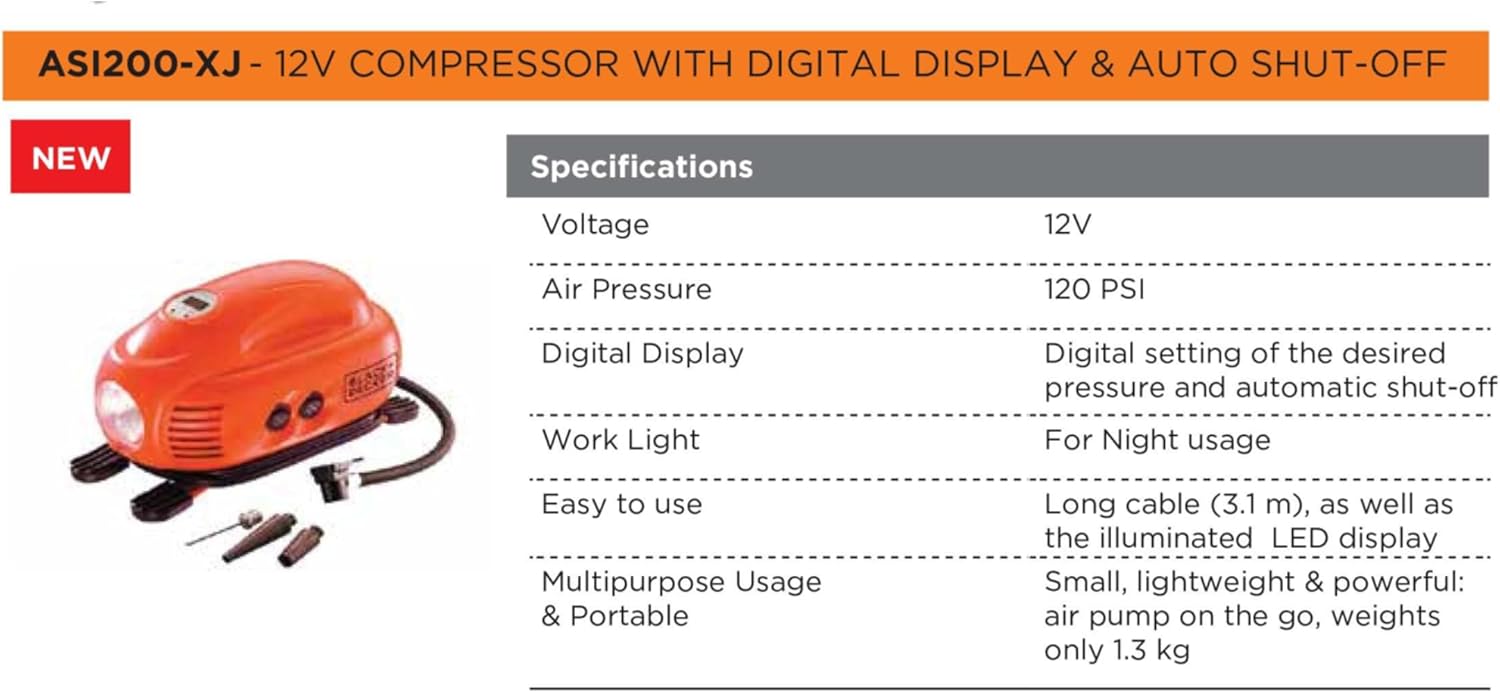
Foto 9: Total Care support information. This image displays contact details for customer support.
Ekwentị: 1800-203-0644 (Mọnde-Satọde, 09:00 nke ụtụtụ - 06:00 nke mgbede IST, ewezuga ezumike gọọmentị)
Email: SBD-CUSTOMERCOMMUNICATIONS@SBDINC.COM
WhatsApp: +91 96060 55835
Netwọk ọrụ: Ebe ọrụ ndị a kwadoro karịrị narị ise na iri ise.


