Okwu mmalite
Daalụ maka ịzụrụasing the Muse M-10 CR Clock Radio. This manual provides important information regarding the setup, operation, and maintenance of your new device. Please read it thoroughly before use and retain it for future reference.
Ozi nchekwa dị mkpa
- Ewepụla ngwa a na ntapu ma ọ bụ na-efesa mmiri.
- Edokwala ihe jupụtara na mmiri mmiri, dị ka vases, na ngwa.
- Hụ na ikuku dị mma gburugburu ebe ahụ. Ekpuchila oghere ikuku.
- Jiri naanị ihe nkwụnye ọkụ ewepụtara na unit ahụ.
- Anwala ịkwasa ma ọ bụ gbanwee unit ahụ. Kpọtụrụ ndị ọrụ ruru eru ọrụ niile.
- Debe ihe ahụ ka ọ ghara ịpụta ìhè n'anwụ, ebe okpomọkụ na-esi, na ebe magnet siri ike.
- Jiri naanị akwa dị nro hichaa otu ahụ.
Ihe ngwugwu
Biko lelee na ihe niile dị:
- Muse M-10 CR Clock Radio
- Ihe nkwụnye ọkụ
- Akwụkwọ ntuziaka onye ọrụ
Ngwaahịa gafereview
Familiarize yourself with the controls and display of your Muse M-10 CR.

Foto: N'ihu view of the Muse M-10 CR Clock Radio, showing the large white LED display and control buttons on top.

Foto: N'elu view of the Muse M-10 CR Clock Radio, highlighting the control buttons for power, alarm settings, hour/minute adjustment, radio tuning, and the large snooze button.
Njikwa na egosi:
- Bọtịnụ ike: Gbanyụọ/gbanyụọ unit
- Alarm 1 / Alarm 2 Buttons: Set and activate individual alarms.
- HR (Hour) Button: Adjusts the hour.
- MIN (Minute) Button: Adjusts the minute.
- Tuning Buttons (<< / >>): Na-emezi ugboro redio.
- Bọtịnụ snooze: Na-emechi mkpu ahụ nwa oge ma na-eme ka ngosipụta ahụ ghara ịdị mma.
- Ikanam Display: Shows time, alarm status, and radio frequency.
Melite
1. Ijikọ Ike
- Insert the DC plug of the power adapter into the DC IN jack on the back of the unit.
- Plug the power adapter into a standard wall outlet (AC 220V, 50Hz).
- The LED display will light up, indicating the unit is powered.
2. Isetịpụ Oge
- Ka ịtọọ oge, pịa ma jide HR bọtịnụ iji dozie elekere.
- Pịa MIN bọtịnụ iji dozie nkeji.
- Release the buttons to confirm the time. The time will be set in 24-hour format.
Ntuziaka ọrụ
Ọrụ redio (FM)
- Pịa Ike bọtịnụ iji gbanye redio.
- Pịa Tuning (<< / >>) buttons briefly to manually tune to your desired FM frequency.
- To auto-scan and store presets: Press and hold the Tuning (<< / >>) button for a few seconds. The radio will scan for available stations and store them automatically. The unit supports 20 preset FM stations.
- To recall a preset station: After auto-scanning, use the Tuning (<< / >>) buttons to cycle through the stored preset stations.
Mara: For optimal reception, ensure the FM wire antenna (located at the back of the unit) is fully extended.
Setting Alarms (Dual Alarm)
The Muse M-10 CR features a dual alarm system, allowing you to set two separate alarm times.
- Pịa Mkpu 1 or Mkpu 2 button once. The alarm time will flash on the display.
- While the alarm time is flashing, press the HR bọtịnụ iji tọọ oge mkpu.
- Pịa MIN bọtịnụ iji tọọ oge mkpu.
- Pịa Mkpu 1 or Mkpu 2 button again to confirm the alarm time.
- To select the alarm source (Buzzer or Radio), press the respective Mkpu 1 or Mkpu 2 button repeatedly until the desired icon (buzzer or radio wave) appears next to the alarm indicator on the display.
- To deactivate an alarm, press the corresponding Mkpu 1 or Mkpu 2 button until the alarm indicator disappears from the display.
Ọrụ snooze
Mgbe mkpu dara, pịa nnukwu URUA button on top of the unit. The alarm will be temporarily silenced for approximately 9 minutes and will sound again after this period. The snooze function can be used multiple times.
Ngosipụta Dimmer
The 0.6-inch white LED display has adjustable intensity. Press the URUA button while the unit is in standby mode to cycle through different brightness levels (High, Low, Off). This allows you to adjust the display brightness to your preference, especially for nighttime use.
Nlekọta
Nhicha
- Mgbe niile, wepụ unit na ebe ọkụ tupu ihicha.
- Use a soft, dry cloth to wipe the exterior surfaces of the clock radio.
- Ejila ihe nchacha, waxes, ma ọ bụ ihe mgbaze ka ha nwere ike imebi njedebe.
Nchekwa
If you plan to store the unit for an extended period, unplug it from the power source and store it in a cool, dry place, away from direct sunlight and extreme temperatures.
Nchọpụta nsogbu
| Nsogbu | Ihe nwere ike ime | Ngwọta |
|---|---|---|
| Unit anaghị agbanye ọkụ. | Ejikọtaghị ihe nkwụnye ọkụ ma ọ bụ mejọrọ. | Ensure the power adapter is securely plugged into the unit and a working wall outlet. Try a different outlet. |
| Nnabata redio adịghị mma. | Weak signal; antenna not properly extended. | Extend the FM wire antenna fully. Reposition the unit for better reception. |
| Oti mkpu anaghị ada ụda. | Alarm not set or deactivated; volume too low (for radio alarm). | Verify that the alarm is set and activated (alarm icon visible). Ensure radio alarm volume is audible. |
| Ngosipụta na-egbuke egbuke/ nchacha ọkụ. | Display dimmer setting needs adjustment. | Press the SNOOZE button in standby mode to cycle through display brightness levels. |
Nkọwapụta
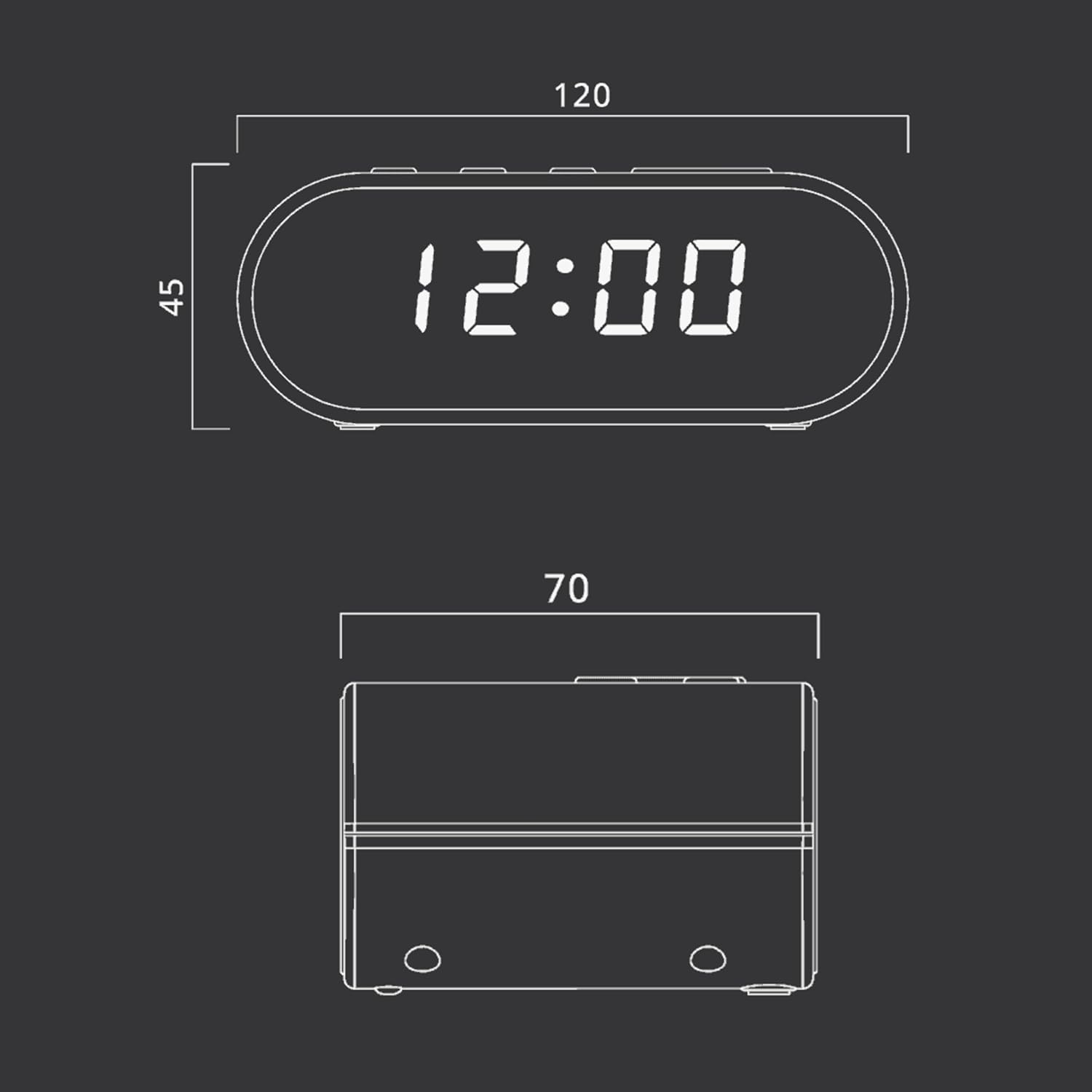
Foto: Technical drawing illustrating the dimensions of the Muse M-10 CR Clock Radio, with measurements in millimeters.
- Akara: Muse
- Nọmba nlereanya: 3700460200701
- Agba: Schwarz (Ojii)
- Akụkụ ngwaahịa: 12 x 7 x 10.9 cm (L x W x H)
- Ibu ihe: 200 g
- Voltage: 220 volts
- Ihe: Kunststoff (Plastic)
- Ụdị ngosi: LED (0.6-inch white)
- Redio: FM PLL Radio with 20 preset stations
- Atụmatụ pụrụ iche: Adjustable Brightness, Large Display, Radio, Snooze Function, Dual Alarm
Akwụkwọ ikike na nkwado
For warranty information or technical support, please refer to the warranty card included with your purchase or contact your local Muse distributor or retailer. Keep your proof of purchase for any warranty claims.
You can also visit the official Muse websaịtị maka enyemaka na ozi ngwaahịa ndị ọzọ.


