Okwu mmalite
This manual provides detailed instructions for the safe and effective use of your Canon EOS 7D Digital SLR camera body. Please read this manual thoroughly before using the camera and keep it for future reference.

N'ihu view of the Canon EOS 7D Digital SLR camera body, showing the lens mount and grip.
Melite
1. Ntinye batrị
The EOS 7D uses one Battery Pack LP-E6. A CR1616 lithium-ion battery is also used for date/time retention.
- Mepee mkpuchi nke batrị dị n'okpuru igwefoto ahụ.
- Insert the LP-E6 battery pack with the electrical contacts facing inward, ensuring it clicks into place.
- Mechie mkpuchi nke batrị batrị nke ọma.
- For the date/time battery, refer to the dedicated section in the full user manual for replacement instructions.
2. CF Card Installation
The camera records images directly to a CompactFlash (CF) card.
- Open the CF card slot cover on the side of the camera.
- Insert the CF card with the correct orientation until it is fully seated.
- Close the CF card slot cover securely.
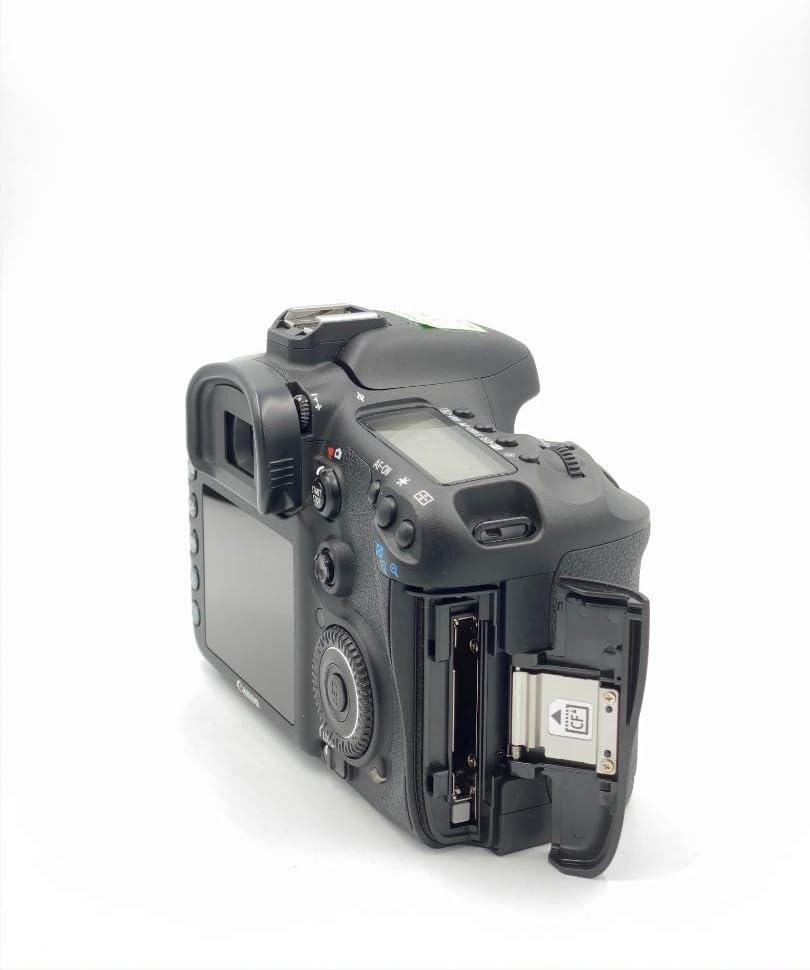
Akụkụ view of the Canon EOS 7D, showing the open CF card slot for media insertion.
3. Ịtinye oghere
The EOS 7D is compatible with Canon EF and EF-S lenses.
- Wepu okpu ahụ na igwefoto yana okpu azụ na oghere.
- Align the red or white index mark on the lens with the corresponding mark on the camera body.
- Tụgharịa oghere n'akụkụ elekere ruo mgbe akpọchiri ya.
4. Ntọala mbụ
Upon first power-on or after battery replacement, you may need to set the language and time zone.
- Turn the camera on using the power switch.
- Soro mkpali na ihuenyo ka ịhọrọ asụsụ ọkacha mmasị gị.
- Tọọ ụbọchị, oge, na mpaghara oge.
Ntuziaka ọrụ
1. Basic Ọrụ
To power on the camera, slide the power switch to the "ON" position. To take a photo, press the shutter button halfway to focus, then press fully to capture the image.
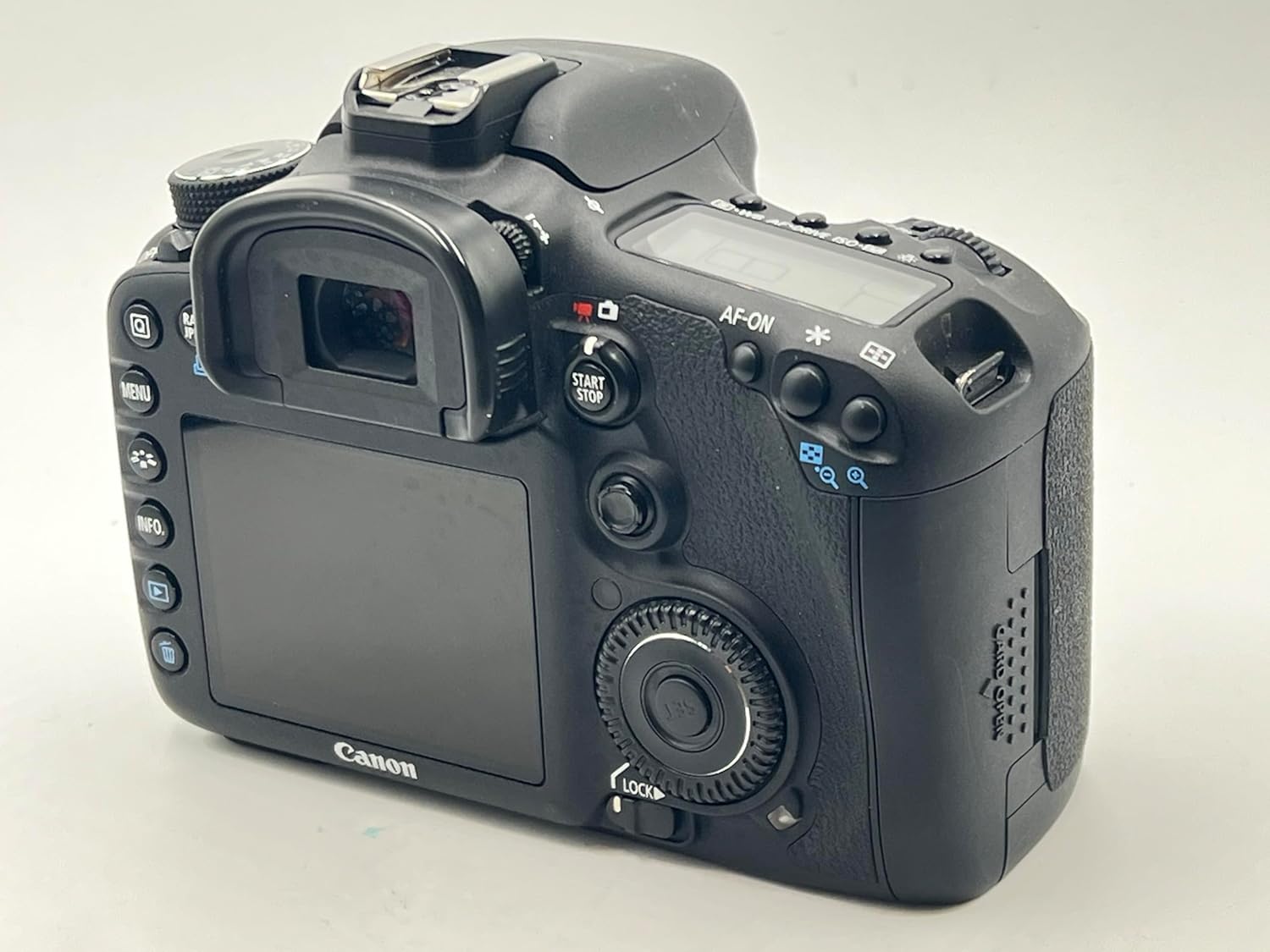
N'azụ view of the Canon EOS 7D, showing the LCD monitor and control buttons.
2. Image Capture Settings
- Ihe mmetụta onyonyo: 18.0 Megapixel APS-C size CMOS sensor.
- Image Processors: Dual DIGIC 4 for high speed and quality.
- Ọsọ ISO: Range from 100 to 6400, expandable to 12800.
- Agbapụ na-aga n'ihu: Up to 8.0 frames per second (fps).
- Ụdị ndekọ: JPEG, RAW (14-bit), M-RAW, S-RAW. Video in MOV (H.264).
- Picture Style: Select from Standard, Portrait, Landscape, Neutral, Faithful, Monochrome, or User Defined settings.
- Ntụle ọcha: Auto, Daylight, Shade, Cloudy, Tungsten Light, White Fluorescent Light, Flash, Custom, Color Temperature setting.
3. Sistemụ Nchekwa Onwe
The EOS 7D features a sophisticated 19-point all cross-type AF system for precise focusing.
- AF Points: 19-point all cross-type, with dual diagonal cross-type sensors at the center (f/2.8 and f/5.6).
- Ụdị elekwasị anya: One-Shot AF (for still subjects), AI Servo AF (for moving subjects), AI Focus AF (automatic switching), and Manual Focus (MF).
- AF Point Selection: Manual selection (Single point, Spot AF, AF point expansion, Zone AF) or Automatic selection (19 point AF).
- AF Assist Beam: Emitted from an external Speedlite when necessary.
4. Njikwa ngosi
Accurate exposure is achieved through various metering modes and controls.
- Ụdị nha: Evaluative (63 zones, linked to active AF point), Partial (approx. 9.4% of viewfinder), Spot (approx. 2.3% of viewfinder), and Center-weighted average.
- Exposure Control Systems: Program AE, Shutter-priority AE, Aperture-priority AE, Creative Auto, Full auto, Manual exposure, and E-TTL II autoflash.
- Nkwụghachi ụgwọ ngosi: Adjustable up to ±5 stops in 1/3- or 1/2-stop increments.
- Mkpọchi AE: Available automatically in One-Shot AF with evaluative metering, or manually via the AE lock button.
5. Shutter and Flash
- Ọsọ nke shutter: From 30 seconds to 1/8000th second, plus Bulb mode. X-sync at 1/250th second.
- Wuru na-Flash: Retractable, auto pop-up flash with a Guide Number of 12/39 (meters/feet at ISO 100).
- External Flash: Compatible with E-TTL II Speedlites, offering flash exposure compensation and FE Lock.
6. Ndụ View and Video Recording
The camera supports Live View for both still photos and video, with advanced video capabilities.
- Dị ndụ View: Offers Quick mode, Live mode, Face detection Live mode, and Manual focusing with magnification.
- Ndekọ vidiyo: Full HD (1920 x 1080) at 30p, 24p, 25p; HD (1280 x 720) at 60p, 50p; SD (640 x 480) at 60p, 50p.
- Audio: Linear PCM (monaural). Manual audio level adjustment is available with Firmware Version 2.0.X.
- Ndekọ na-aga n'ihu: Approximately 12 minutes for Full HD/HD, 24 minutes for SD (with a 4GB card).
7. Playback and Customization
- Nkpọghachi: View single images, histograms, magnified views, and perform in-camera RAW processing, JPEG resizing, and image rating.
- Custom Functions: 27 customizable functions to tailor camera operation to your preferences.
- Custom Controls: Assign desired functions to various buttons and dials for personalized control.
- Ntọala onye ọrụ: Register up to three sets of camera settings (C1, C2, C3) on the Mode Dial for quick recall.
Nlekọta
1. Dust Deletion Feature
The EOS 7D includes features to manage dust on the image sensor:
- Automatic Sensor Cleaning: The low-pass filter is automatically cleaned when the power is turned on or off.
- Dust Delete Data: The camera can detect dust adhering to the low-pass filter and append its coordinates to captured images. This data can be used by provided software to automatically erase dust spots.
- Ncha akwụkwọ ntuziaka: For persistent dust, manual cleaning of the sensor is possible. Refer to the full user manual for detailed instructions or consult a Canon service center.
2. Nchacha izugbe
- Igwe igwefoto: Jiri ákwà dị nro ma kpọọ nkụ hichaa ahụ igwefoto ahụ. Maka unyi siri ike, jiri obere d hichaa ahụ kamera ahụ.ampJiri mmiri kpuchie ákwà ahụ. Zere iji ihe mgbaze organic.
- oghere: Use a lens blower brush to remove dust. For smudges, use a lens cleaning solution and a clean lens cloth.
- Nyocha LCD: Gently wipe with a soft cloth. Avoid pressing hard on the screen.
3. Nlekọta batrị
- Always use the provided Canon Battery Charger LC-E6 to charge the LP-E6 battery pack.
- Chekwaa batrị n'ebe dị jụụ, kpọrọ nkụ mgbe anaghị eji ya.
- Zere ịchaji batrị ugboro ugboro ka ọ gbatịa ndụ ya.
Nchọpụta nsogbu
This section addresses common issues you might encounter with your EOS 7D.
1. Camera Does Not Power On
- Ensure the battery pack LP-E6 is fully charged and correctly inserted.
- Lelee ma mkpuchi nke ebe batrị ahụ emechiela nke ọma.
- If using an AC Adapter Kit ACK-E6, ensure it is properly connected to a power source.
2. Unable to Take Photos
- Check if a CF card is inserted and has sufficient free space.
- Ensure the lens is properly attached and the focus mode switch on the lens is set to AF (Autofocus) or MF (Manual Focus) as desired.
- If the shutter button is pressed halfway and the camera does not focus, check the AF mode and lighting conditions.
- If the built-in flash is used, ensure it has recycled (flash-ready icon is lit).
3. Foto na-adịghị mma
- Verify that the lens is clean and free of smudges.
- Ensure the camera is properly focused on the subject. In AF mode, confirm the AF point is on the desired area.
- Check the shutter speed. If it is too slow for the shooting conditions, use a faster shutter speed or a tripod to prevent camera shake.
- Consider using a higher ISO setting in low light to allow for faster shutter speeds.
4. Exposure Problems (Too Dark/Too Bright)
- Check the metering mode. Evaluative metering is generally suitable for most situations.
- Review the exposure compensation setting. Reset it to ±0 if unintended compensation was applied.
- In manual mode, adjust aperture, shutter speed, and ISO to achieve the desired exposure.
- If using flash, check flash exposure compensation settings.
5. Mmelite ngwa ngwa
Canon periodically releases firmware updates to enhance camera performance and add features. Refer to the official Canon website for the latest firmware and detailed update instructions. Firmware Version 2.0.X, for example, introduced features like manual audio level adjustment and improved burst rates.
Nkọwapụta
| Njirimara | Nkọwa |
|---|---|
| Ihe mmetụta onyonyo | 18.0 Megapixel APS-C CMOS |
| Ihe nhazi onyonyo | Dual DIGIC 4 |
| Mmetụta nke ISO | 100-6400 (nwere ike gbasaa ruo 12800) |
| Ọsọ shutter | 30 seconds to 1/8000th second, Bulb |
| Agbapụ na-aga n'ihu | Max. 8.0 shots/sec. |
| Sistemụ mgbado anya | 19-point all cross-type AF |
| Sistemụ igwe | 63-zone dual-layer iFCL metering |
| Ndekọ vidiyo | Full HD 1080p (30p/24p/25p) |
| LCD Nyochaa | 3.0-inch TFT color, approx. 920,000 dots |
| Viewnchọta | Eye-level pentaprism, approx. 100% coverage, 1.0x magnification |
| Mgbasa ozi nchekwa | CompactFlash (CF) kaadị |
| Njikọta | USB 2.0 Hi-Speed, mini-HDMI OUT, Video OUT (NTSC/PAL) |
| Isi Iyi Ike | Ngwunye batrị LP-E6 |
| Akụkụ (W x H x D) | Approx. 5.8 x 4.4 x 2.9 in. (148.2 x 110.7 x 73.5mm) |
| Weight (Body Only) | Ihe ruru. 28.9 oz. (820g) |
| Environment na-arụ ọrụ | Temperature: 32-104°F (0-40°C), Humidity: 85% or less |
Akwụkwọ ikike na atụmatụ ọrụ
Standard warranty information is typically provided with the product at the time of purchase. Please refer to the documentation included in your product packaging for specific warranty terms and conditions.
Optional CarePAK PLUS Protection Plans
Canon offers optional CarePAK PLUS protection plans for extended coverage beyond the standard warranty. These plans provide protection from accidental damage (drops, spills, power surges) and normal wear and tear. Benefits may include Image Recovery, priority repair service, free return shipping, and genuine Canon factory service.
- CarePAK PLUS (2YR): 2-year protection plan.
- CarePAK PLUS (3YR): 3-year protection plan.
Maka nkọwa gbasara ịzụrụ iheasing and registering for CarePAK PLUS, please visit the official Canon websaịtị ma ọ bụ kpọtụrụ Canon nkwado ndị ahịa.
Nkwado na akụrụngwa
For additional support, resources, and accessories, please refer to the following:
- Official Canon Websaịtị: Gaa na Canon website for product information, driver downloads, firmware updates, and FAQs.
- Canon Developer Community: If you are a developer interested in controlling select Canon cameras within your application, the Canon EDSDK is available at developercommunity.usa.canon.com.
- Ngwa: A wide range of accessories, including batteries, chargers, cables, cases, and remote controllers, are available through authorized Canon retailers and the Canon Store.


