Okwu mmalite
The Pelican 4100N Nemo Dive Series Light is a robust and reliable illumination tool designed for underwater environments. Constructed with an ABS body, polycarbonate lens, and thermoplastic shroud, it offers corrosion-proof and chemical-resistant performance. This manual provides essential information for the safe and effective use of your dive light.
Ozi nchekwa
- Always ensure the light is properly sealed before submersion to prevent water ingress.
- Do not attempt to open the light underwater.
- Use only the specified battery type (8 D alkaline cells) and ensure correct polarity during installation.
- Avoid direct eye exposure to the light beam, as it is very bright.
- Debe ebe ụmụaka na-apụghị iru.
- Tụfuo batrị eji arụ ọrụ dịka iwu obodo siri dị.
Ihe ngwugwu
Chọpụta na ihe niile dị na ngwugwu gị:
- Pelican 4100N Nemo Dive Series Light
- Modified Spot Reflector (stippled for wide beam)
- Laser Spot Reflector (smooth for tight collimated beam)
- Ndabere Lamp (stored behind the reflector)
Melite
1. Ntinye batrị
- Unscrew the rear cap of the light by turning it counter-clockwise.
- Carefully remove the internal battery module.
- Insert 8 D alkaline cells into the battery module, ensuring correct polarity as indicated inside the module.
- Reinsert the battery module into the light body.
- Screw the rear cap back on, turning clockwise until securely tightened. Ensure the O-ring is clean and properly seated to maintain the waterproof seal.
2. Reflector Selection and Installation
The Pelican 4100N includes two interchangeable reflectors:
- Modified Spot: Provides a wide beam, suitable for general area illumination.
- Laser Spot: Provides a tight, collimated beam for focused illumination.
To change reflectors:
- Unscrew the front bezel of the light.
- Carefully remove the currently installed reflector.
- Select the desired reflector and place it into position.
- Ensure the backup lamp is securely stored behind the reflector.
- Screw the front bezel back on, turning clockwise until securely tightened.
Ntuziaka ọrụ
1. Na-agbanye ọkụ / gbanyụọ
The light features a dual-direction switch, designed for easy operation even with thick gloves.
- Iji tụgharịa ON the light, slide the switch forward.
- Iji tụgharịa Gbanyụọ the light, slide the switch backward.
- A locking slide feature is integrated to prevent accidental activation. Engage the lock when the light is not in use.
2. Pistol Grip/Lantern Handle Adjustment
The integrated pistol grip/lantern handle can be quickly converted to multiple positions for enhanced flexibility and comfort during use. Adjust the handle to your preferred position by rotating or pivoting it as needed.
3. Ojiji n'okpuru mmiri
The Pelican 4100N Nemo Dive Series Light is submersible to a depth of 500 feet (approximately 152 meters). Always ensure all caps and bezels are securely tightened before entering the water.
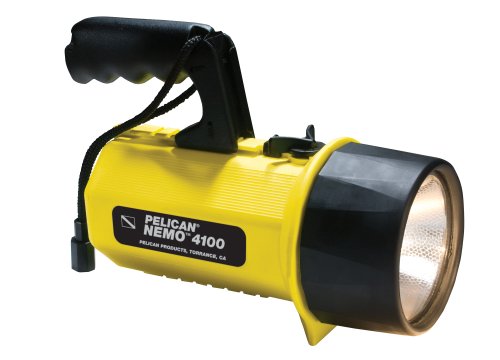
Image: The Pelican 4100N Nemo Dive Series Light, featuring its robust design and ergonomic pistol grip handle. This image illustrates the overall appearance of the dive light, highlighting its yellow casing and the front lens assembly.
Nlekọta
- Mgbe ọ bụla ị mikpuchara, jiri mmiri dị ọcha sachaa ọkụ ahụ nke ọma iji wepụ nnu na ihe ndị na-adịghị mma.
- Inspect O-rings regularly for cracks, tears, or signs of wear. Replace O-rings if damaged to maintain the waterproof seal.
- Apply a thin layer of silicone grease to O-rings periodically to ensure proper sealing and prevent drying.
- Store the light in a cool, dry place when not in use. Remove batteries if storing for extended periods to prevent leakage.
- Clean the lens with a soft, lint-free cloth. Avoid abrasive cleaners.
Nchọpụta nsogbu
| Nsogbu | Ihe nwere ike ime | Ngwọta |
|---|---|---|
| Ìhè anaghị agbanwuo. | Dead or incorrectly installed batteries. Switch in locked position. | Replace batteries, ensuring correct polarity. Unlock the switch. |
| Light beam is dim. | Low battery power. Dirty lens. | Replace batteries. Clean the lens. |
| Water inside the light. | Improperly sealed cap/bezel. Damaged O-ring. | Immediately open the light, remove batteries, and allow to dry. Inspect and replace O-rings if damaged. Ensure all seals are clean and properly seated before reassembly. |
Nkọwapụta
| Nọmba nlereanya | 4100-007-244X |
| Ụdị isi iyi ọkụ | Xenon |
| Lumens | 251 Lumen |
| Ụdị batrị | 8 D alkaline cells |
| Battery Burn Time | awa 12 |
| Submersible Depth | 500 ụkwụ (ihe dị ka mita 152) |
| Ihe onwunwe | Acrylonitrile Butadiene Styrene (ABS) body, Polycarbonate lens, Thermoplastic shroud |
| Agba | Odo |
| Akụkụ (Ngwugwu) | 24.89 x 14.48 x 13.72 cm |
| Ibu (Ngwugwu) | 1.02 n'arọ |
Akwụkwọ ikike na nkwado
Pelican Products offers an unconditional lifetime guarantee on its products. Pelican products will be replaced or you will be refunded on any dissatisfaction, through the original dealer.
This lifetime guarantee covers defects in workmanship. Please note that the guarantee does ọ bụghị kpuchie lamp or batteries. Furthermore, the guarantee does not cover damage resulting from shark bite, bear attack, or misuse by children under 5 years of age.
For support or warranty claims, please contact your original dealer or visit the official Pelican Products websaịtị maka enyemaka ọzọ.


