1. Okwu mmalite
The PlayStation Eye camera is an advanced digital camera designed for use with the PlayStation 3 console. It enables interactive gaming experiences, video communication, and creative content creation through its video, audio, and photo capture capabilities. This manual provides essential information for the proper setup, operation, and maintenance of your PlayStation Eye camera.
2. Akụrụngwa Ngwaahịa
The PlayStation Eye camera incorporates several features to enhance your interactive experience:
- EyeCreate Software Compatibility: Free EyeCreate download editing software allows users to save, edit, and add visual effects to photos, video, and audio clips.
- PlayStation Move Integration: Camera and audio reception make it an integral part of the PlayStation Move motion control system.
- Sophisticated Microphone: Features a microphone with the ability to reduce background noise and focus on spoken word for smoother, more accurate speech recognition.
- Ọnụego ya dị elu: Two fast frame rates for improved tracking, responsiveness, and smoothness.
- Igwe anya ngbanwe: Two-position zoom lens for close-up and full-body options.
- 4-Channel Audio Input: 16-bits/channel, 48kHz, SNR 90db for high-quality audio capture.

Foto 2.1: N'ihu view of the PlayStation Eye camera, showcasing its lens and microphone array.
3. Nhazi
Follow these steps to properly set up your PlayStation Eye camera with your PlayStation 3 console:
- Wepu igwefoto: Carefully remove the PlayStation Eye camera from its packaging.
- Jikọọ na PlayStation 3: Insert the USB connector of the PlayStation Eye camera into an available USB port on your PlayStation 3 console.
- Debe igwefoto: Place the camera on a stable surface, such as on top of your television or a shelf, ensuring it has a clear view of the play area. Adjust the camera's angle as needed.
- Nwụnye ngwanrọ: If prompted, download and install any necessary system software updates or the EyeCreate application from the PlayStation Store.
- Nhazi izizi: Follow any on-screen instructions for initial camera calibration, especially when using with PlayStation Move titles.
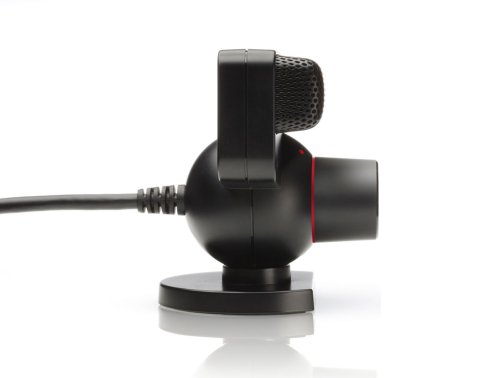
Foto 3.1: Akụkụ view of the PlayStation Eye camera, illustrating the USB cable connection point.
4. Ntuziaka ọrụ
Once set up, the PlayStation Eye camera can be used for various functions:
4.1. Njide vidiyo na foto
- Launch the EyeCreate application from the PlayStation 3 XMB (XrossMediaBar).
- Within EyeCreate, select options to capture video, still photos, or audio.
- Utilize the software's editing features to apply filters, distortions, or other effects to your captured media.
- Export your finished creations to the Video folder on the XMB for viewing.
4.2. PlayStation Move Gaming
- Ensure the camera is positioned to capture the entire play area where PlayStation Move controllers will be used.
- The camera tracks the spherical light of the PlayStation Move controller to translate your movements into gameplay.
- Refer to specific game manuals for optimal camera placement and lighting conditions.
4.3. Voice Chat and Communication
- The integrated microphone allows for voice chat in compatible games and applications.
- Position the camera so that the microphone array faces the speaker for optimal voice capture and background noise reduction.
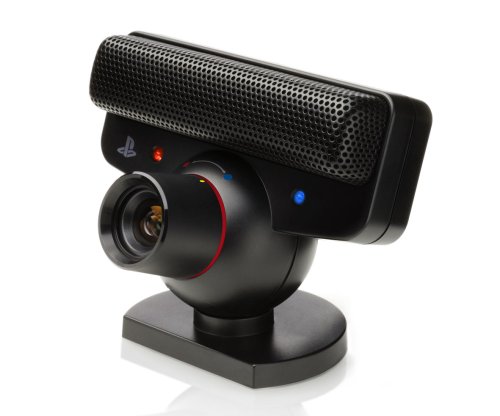
Onyonyo 4.1: Akuku view of the PlayStation Eye camera, showing its adjustable base and lens.
5. Nlekọta
Proper care ensures the longevity and optimal performance of your PlayStation Eye camera:
- Na-ehicha oghere: Gently wipe the camera lens with a soft, dry, lint-free cloth. Avoid using abrasive cleaners or solvents.
- Na-ehicha ahụ: Jiri ntakịrị damp cloth to clean the camera body. Ensure no moisture enters the device.
- Nchekwa: When not in use, store the camera in a clean, dry place away from direct sunlight and extreme temperatures.
- Nlekọta USB: Avoid bending or twisting the USB cable excessively. Do not pull the cable to disconnect the camera.
6. Nchọpụta nsogbu
If you encounter issues with your PlayStation Eye camera, refer to the following common solutions:
- Achọpụtaghị igwefoto:
- Ensure the USB cable is securely connected to both the camera and the PlayStation 3 console.
- Try connecting the camera to a different USB port on the console.
- Malitegharịa njikwa PlayStation 3 gị.
- Poor Image Quality or Tracking:
- Check the lighting in your room. Avoid overly bright or dim conditions, and minimize direct light sources shining into the lens.
- Ensure the camera lens is clean and free of smudges or dust.
- Verify that there are no obstructions between the camera and the play area.
- Certain environmental factors, such as ceiling fans or reflective surfaces, can interfere with motion detection. Try to minimize these.
- Okwu igwe okwu:
- Confirm that the microphone is enabled in your PlayStation 3 system settings and within the application you are using.
- Adjust the microphone sensitivity settings if available.
- Ensure there is no physical obstruction blocking the microphone array.
- Okwu ngwanrọ:
- Hụ na ngwanrọ sistemụ PlayStation 3 gị dị ọhụrụ.
- Reinstall the EyeCreate application if you suspect a software malfunction.
If problems persist, consult the official PlayStation support websaịtị ma ọ bụ kpọtụrụ ndị ahịa maka enyemaka ọzọ.
7. Nkọwapụta
| Njirimara | Nkọwa |
|---|---|
| Nọmba Nlereanya ihe | 99028 |
| Akụkụ ngwaahịa | 3.13 x 6.75 x 8.88 sentimita asatọ |
| Ibu Ibu | 8.1 ounces |
| Onye nrụpụta | Sony Computer Entertainment |
| Ụbọchị mwepụta | Ọktoba 31, 2007 |
| Asụsụ | Bekee |
8. Akwụkwọ ikike Ozi
For information regarding product warranty, please refer to the documentation included with your purchase or visit the official PlayStation support website. Extended protection plans may be available from your retailer at the time of purchase. These plans typically offer additional coverage beyond the standard manufacturer's warranty.


