Ozi nchekwa dị mkpa
Ịdọ aka ná ntị: To avoid fire, shock, or death, turn off power at the circuit breaker or fuse box and test that power is off before wiring. This device must be installed in accordance with all national and local electrical codes. If you are unsure about any part of these instructions, consult a qualified electrician.
- Do not use with dimmers or other non-compatible devices.
- Gbaa mbọ hụ na echekwabara njikọ waya niile.
- This switch is rated for 120V/277V AC and 20 Amps. Do not exceed these ratings.
- Grounding is required for safe operation.
Ngwaahịa gafereview
The Leviton S08-CS120-02W is a commercial-grade, single-pole AC quiet toggle switch designed for reliable ON-OFF control of lighting or other electrical loads. Its quiet operation makes it suitable for various residential and commercial applications. This switch features a grounding screw for enhanced safety and is UL listed, ensuring compliance with safety standards.
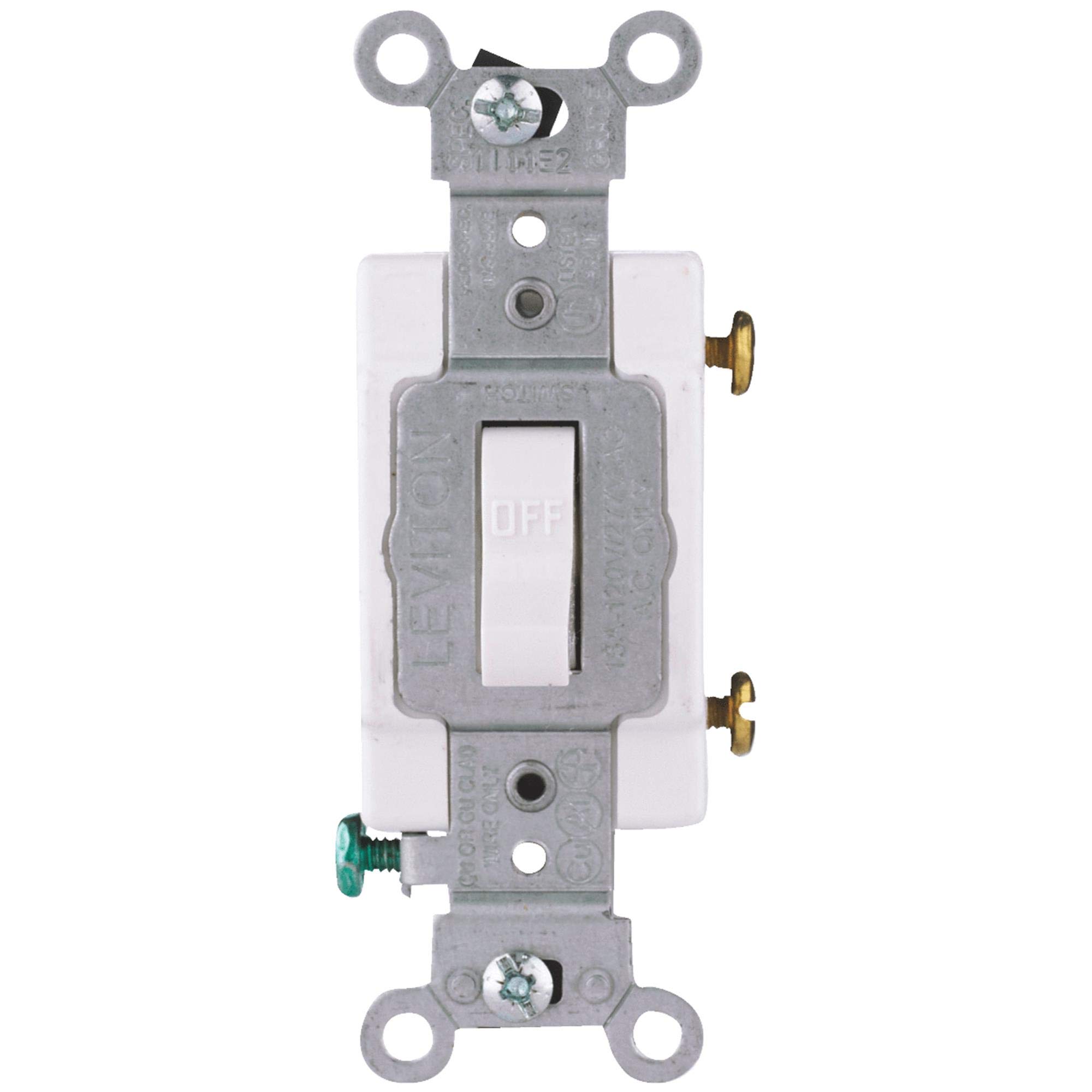
Foto: N'ihu view of the Leviton S08-CS120-02W Commercial Grade AC Quiet Toggle Switch. The image displays a white toggle switch with a standard rectangular faceplate, suitable for wall mounting. The toggle lever is visible in the center, designed for simple up/down operation.
Ihe ngwugwu
Chọpụta na akụrụngwa niile dị tupu ịmalite nrụnye:
- 1 x Leviton S08-CS120-02W Commercial Grade AC Quiet Toggle Switch
Ntuziaka nwụnye
Ngwa achọrọ:
- Screwdriver (Phillips na/ma ọ bụ Flathead)
- Waya Strippers
- Teepu eletriki (nhọrọ)
- Voltage onye nyocha
Wiring (Single-Pole Switch):
- Gbanyụọ ike: Locate the circuit breaker or fuse that controls the switch location and turn it OFF. Verify power is off using a voltagọ bụ onye nyocha.
- Wepu Mgbanwe Ochie: Carefully remove the existing wall plate and switch from the electrical box. Disconnect the wires from the old switch, noting their connections.
- Jikọọ waya: This single-pole switch has three screw terminals: two for the hot (line/load) wires and one for the ground wire.
- Connect the incoming hot wire (from the power source) to one of the brass screw terminals.
- Connect the outgoing hot wire (to the light fixture or load) to the other brass screw terminal.
- Connect the bare copper or green insulated ground wire from the electrical box to the green grounding screw terminal on the switch.
Ensure all wire connections are tight and secure. Use wire nuts if necessary for any splices. The switch is designed for screw terminals.
- Ịkwanye: Carefully fold the wires into the electrical box. Secure the switch to the electrical box using the provided mounting screws. Ensure the switch is oriented correctly.
- Wụnye Plate Wall: Tinye efere mgbidi mara mma n'elu ihe mgba ọkụ ahụ.
- Weghachi ike: Turn the power back ON at the circuit breaker or fuse box. Test the switch to ensure proper operation.
Ọrụ
The Leviton S08-CS120-02W is a simple ON-OFF toggle switch. To operate, simply push the toggle lever up to turn the connected device (e.g., light) ON, and push the toggle lever down to turn it OFF. The switch is designed for quiet operation, minimizing audible clicking sounds during use.
Nlekọta na nlekọta
- Nhicha: To clean the switch, ensure power is off at the circuit breaker. Wipe the surface with a soft, damp akwa . Ejila ihe nchacha abrasive ma ọ bụ ihe mgbaze.
- Nyocha: Lelee swiitị ahụ mgbe niile iji hụ ihe ịrịba ama ọ bụla nke mmebi, njikọ ndị na-adịghị mma, ma ọ bụ mgbanwe agba. Ọ bụrụ na achọpụta nsogbu ọ bụla, gbanyụọ ọkụ eletrik ma gakwuru ọkachamara ọkụ eletrik ruru eru.
Nchọpụta nsogbu
| Nsogbu | Ihe nwere ike ime | Ngwọta |
|---|---|---|
| Switch does not turn ON/OFF device. | No power to the switch; Loose wiring; Faulty device. | Check circuit breaker/fuse. Verify all wire connections are secure. Test the connected device separately. |
| Switch feels hot to the touch. | Overload; Loose connection. | Immediately turn off power. Reduce load on the circuit. Check for loose wiring. Consult an electrician if the problem persists. |
| Flickering light or intermittent power. | Loose wiring; Faulty bulb/device. | Turn off power and check all wire connections. Replace bulb or test device. |
Nkọwapụta
- Ụdị: S08-CS120-02W
- Akara: Leviton
- Ụdị: Commercial Grade AC Quiet Toggle Switch
- Ụdị ọrụ: ON-Gbanyụọ
- Voltage: 120 Volts / 277 Volts AC
- Ogo dị ugbu a: 20 Amps
- Ụdị njedebe: Ịghasa
- Ụdị nkwụnye: Ugwu elu
- Ngwa kọntaktị: Silver-cadmium
- Ike Dielectric: 1500 volt
- Ihe: Alloy Steel, Polybutylene Terephthalate, Polycarbonate (PC)
- Agba: Ọcha
- Met nkọwapụta: UL
- Akụkụ ihe (LxWxH): 4.25 x 1.25 x 0.75 sentimita asatọ
- Ibu ihe: 1 paụnd
- UPC: 078477069646
Akwụkwọ ikike na nkwado nka nka
For warranty information or technical assistance, please contact Leviton customer support directly or visit their official websaịtị. Debe akwụkwọ nnata ịzụrụ maka akwụkwọ ikike.
Leviton Official Websaịtị: www.leviton.com


