1. Okwu mmalite
The Buffalo DriveStation HD-HB250U2 is an external hard drive designed for reliable data storage and backup. It offers a 250 GB capacity, allowing users to store large files, digital images, and documents without consuming space on a computer's main drive. This device features a fanless design for quiet operation and a heat sink chassis to maintain optimal internal temperatures. Its versatile design supports both vertical and horizontal placement.
This manual provides instructions for setting up, operating, and maintaining your DriveStation HD-HB250U2.
2. Kedu ihe dị na Igbe ahụ
Chọpụta na ihe niile dị na ngwugwu:
- Buffalo DriveStation HD-HB250U2 External Hard Drive
- Ụdọ ọkụ
- eriri USB
- Ntuziaka Mbido ngwa ngwa
- Nkwupụta akwụkwọ ikike
3. Nhazi
The DriveStation HD-HB250U2 is designed for easy installation and is pre-formatted for immediate use.
-
Nkwanye: Position the DriveStation vertically or horizontally on a stable surface. The unique chassis design allows for flexible placement to conserve desktop space.
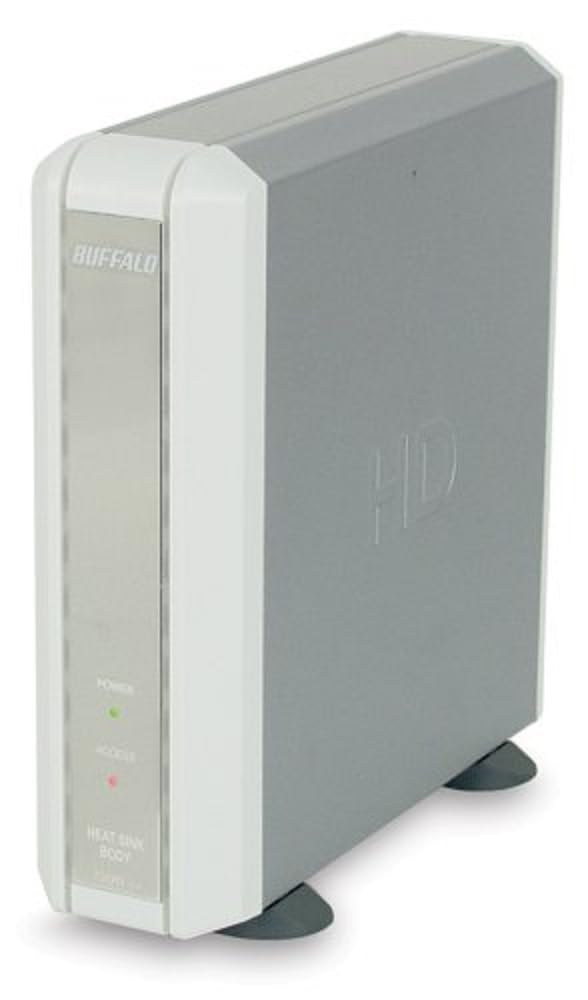
Image 1: Buffalo DriveStation HD-HB250U2. This image displays the Buffalo DriveStation HD-HB250U2 external hard drive in a vertical orientation. The front panel features the 'BUFFALO' logo, a green 'POWER' indicator light, and a red 'ACCESS' indicator light. The device has a sleek, grey and white design, with small black feet for stability.
- Njikọ Ike: Connect the power cord to the DriveStation and then plug it into an electrical outlet.
- Jikọọ na Kọmputa: Use the provided USB cable to connect the DriveStation to an available USB port on your computer. The DriveStation supports both USB 2.0 and USB 1.1 interfaces.
- Ntọala akpaaka: For most operating systems (Windows 2000/XP/Vista/7/8/10, macOS), the DriveStation will be automatically detected and configured. No driver installation is typically required, except for older operating systems like Windows 98/98SE.
4. Operating the DriveStation
Once connected, the DriveStation is ready for use as an external storage device.
- Auto Power-On: The DriveStation features an auto power-on function. It will automatically power on or off in conjunction with your attached computer's power state.
- Nyefee data: Ị nwere ike ịdọrọ na dobe files to and from the DriveStation, or use it as a target for backup software.
- Backup Software: The included backup utility allows you to customize backup scheduling for data protection. Refer to the Quick Setup Guide for instructions on using the backup software.
- Power-Saving Shutdown: Utilize the power-saving shutdown feature to schedule when the DriveStation powers off, helping to conserve energy.
5. Nlekọta
The DriveStation HD-HB250U2 is designed for minimal maintenance.
- Na-ajụ oyi: The fanless design ensures silent operation, while the integrated heat sink chassis effectively cools internal components, preventing overheating. Ensure adequate airflow around the device.
- Nhicha: Jiri ákwà dị nro ma kpọọ nkụ hichaa mpụta ngwaọrụ ahụ. Ejila ihe nhicha mmiri ma ọ bụ ihe mgbaze.
- Mmelite femụwe: Periodically check the official Buffalo websaịtị maka mmelite firmware ọ bụla dị maka ụdị gị iji hụ na arụmọrụ kacha mma yana ndakọrịta.
6. Nchọpụta nsogbu
If you encounter issues with your DriveStation, consider the following:
-
Achọpụtaghị Ngwaọrụ:
- Ensure the power cord is securely connected and the device is powered on.
- Verify the USB cable is firmly connected to both the DriveStation and your computer.
- Gbalịa jikọọ na ọdụ ụgbọ USB dị iche na kọmputa gị.
- Malitegharịa ekwentị gị na kọmputa.
-
Ịrụ ngwa ngwa:
- Ensure you are using a USB 2.0 port for optimal transfer speeds.
- Close any unnecessary applications running on your computer.
-
Power Indicator Not On:
- Check the power cord connection and the electrical outlet.
- Ensure your computer is powered on if using the auto power-on feature.
For further assistance, refer to the support information in Section 8.
7. Nkọwapụta
| Njirimara | Nkọwa |
|---|---|
| Nọmba nlereanya | HD-HB250U2 |
| Ụdị | BUFFALO |
| Ike Nchekwa Dijitalụ | 250 GB |
| Ọsọ ntụgharị Hard Disk | 7200 RPM |
| Ngwaọrụ Akụrụngwa | USB 2.0, USB 1.1 |
| Ngwa dakọtara | Kọmputa kọmputa |
| Atụmatụ pụrụ iche | Compact, Fanless Design, Heat Sink Chassis, Auto Power-On, Power-Saving Shutdown |
| Agba | Black (Note: Product image shows grey/white casing, but specification lists black) |
| Akụkụ (Ihe dị ka) | 34.04 x 22.35 x 12.19 cm (Nha nke ngwugwu) |
| Ibu (Ihe dị ka.) | 2.06 kg (Ibu ngwugwu) |
8. Akwụkwọ ikike na nkwado
Your Buffalo DriveStation HD-HB250U2 is backed by a limited 1-year warranty.
For technical assistance, Buffalo offers toll-free 24/7 technical support. Please refer to the warranty statement included in your product package for detailed terms and contact information.
You can also visit the official Buffalo website for product registration, driver downloads, and frequently asked questions.


