1. Okwu mmalite
This manual provides detailed instructions for the installation, operation, and maintenance of your Clarion MCD360 3-Way 6-Channel Electronic Crossover. Designed to optimize your car audio system, this electronic crossover allows for precise control over audio frequencies, ensuring a balanced and high-quality sound output.
2. Atụmatụ igodo
- Front/Rear/Subwoofer Level Control
- Ntinye 6/4/2 Channel RCA
- 6-Channel / 5 Volt RCA mmepụta (N'ihu/Azu/Subwoofer)
- Subwoofer Equalizer na nkwalite ọkwa ọkwa
- High-Pass Crossover Frequency Multiplier
- Remote Subwoofer Level Control (Included)
- Gold Plated Terminals
3. Kedu ihe dị na Igbe ahụ
Your Clarion MCD360 package includes the following components:
- Clarion MCD360 Electronic Crossover Unit
- Remote Subwoofer Level Control Knob
- Nessgba Harị
- Ngwaike mgbakwasa
- Akwụkwọ ntuziaka

Image: Clarion MCD360 Electronic Crossover unit with remote bass knob, wiring, and mounting hardware.
4. Ntọala na nwụnye
4.1. Njikọ njikọ
Ensure all power, ground, and remote connections are secure and correctly polarized to prevent damage to the unit or your audio system.
- Ike (+12V): Connect to a constant +12V power source from your vehicle's battery.
- Ala (GND): Connect to a solid chassis ground point on your vehicle.
- Ime (REM): Connect to the remote turn-on lead from your head unit or ignition switch.
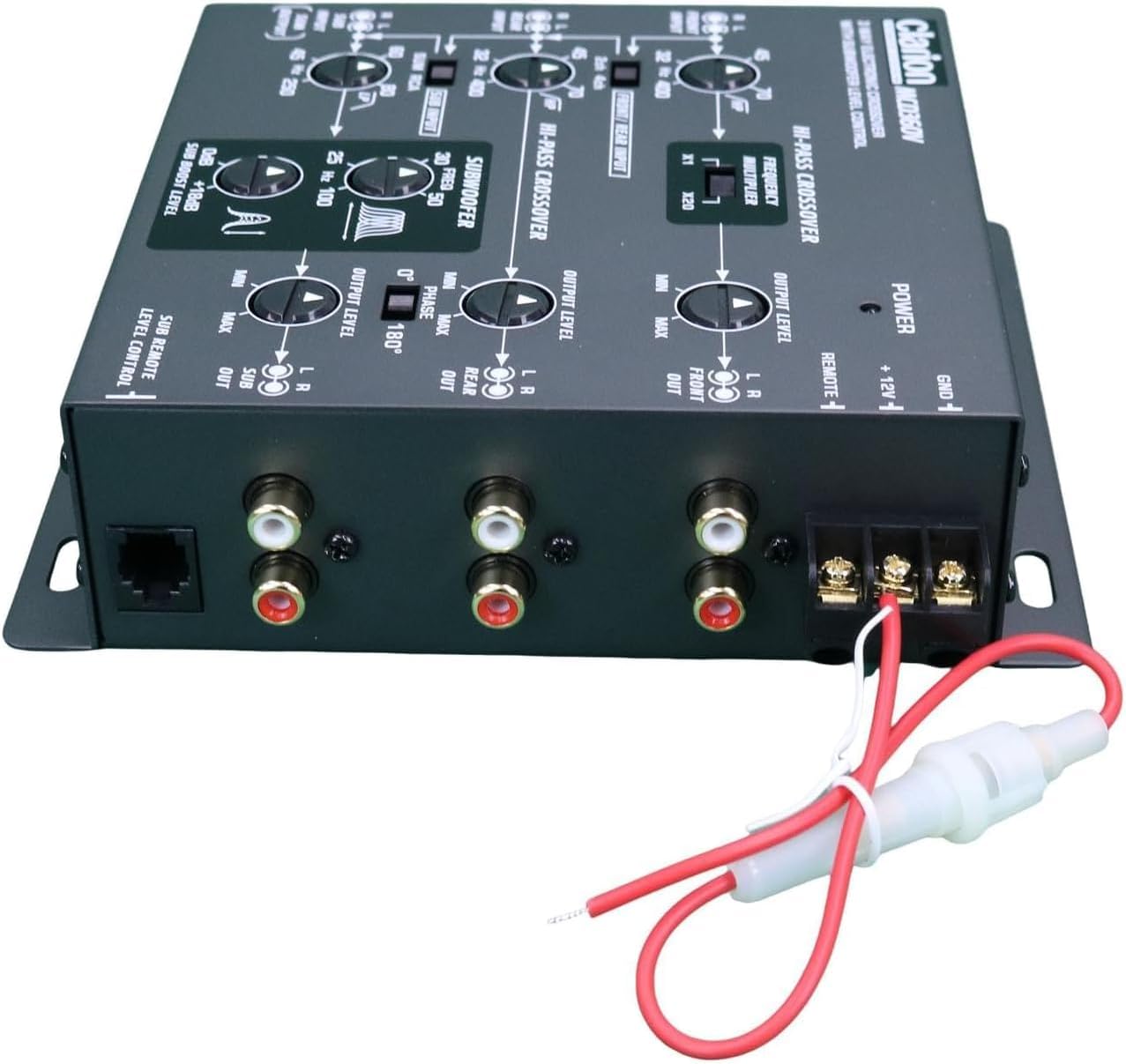
Foto: N'azụ view of the Clarion MCD360 showing power, ground, and remote terminals, along with RCA inputs and outputs.
4.2. RCA Input/Output Connections
Connect your head unit's RCA outputs to the corresponding inputs on the MCD360, and then connect the MCD360's outputs to your ampndị na -enye ndụ.
- Ntinye: The MCD360 features 6/4/2 channel RCA inputs. Connect your head unit's front, rear, and subwoofer RCA outputs to the respective inputs on the crossover.
- Nsonaazụ: The unit provides 6-channel / 5 Volt RCA outputs for Front, Rear, and Subwoofer. Connect these to your external ampndị na -enye ndụ.

Foto: N'ihu view of the Clarion MCD360 showing RCA input connections for front, rear, and subwoofer channels.

Foto: N'azụ view of the Clarion MCD360 showing RCA output connections for front, rear, and subwoofer channels.
5. Ntuziaka ọrụ
The Clarion MCD360 offers extensive control over your audio frequencies. Familiarize yourself with the controls for optimal sound tuning.

Image: Top panel of the Clarion MCD360 showing various control knobs and switches for frequency and level adjustments.
- Front/Rear/Subwoofer Level Control: Adjust the output level for each channel independently to match your amplifier's input sensitivity and achieve desired volume balance.
- High-Pass Crossover Frequency Multiplier: Use this control to set the high-pass filter frequency for your front and rear speakers, preventing low frequencies from reaching them.
- Subwoofer Equalizer and Boost Level Controls: Fine-tune your subwoofer's performance with dedicated equalizer and boost controls. This allows you to enhance bass response at specific frequencies.
- Remote Subwoofer Level Control: The included remote knob allows for convenient adjustment of the subwoofer output level from your driving position.

Image: Clarion MCD360 unit displayed with its remote subwoofer level control and connecting cable.
5.1. Video Guides
For visual guidance on setting up and operating your electronic crossover, please refer to the following videos:
PRV Audio EX4.6 PRO 4 Way Electronic Crossover Overview
Nkọwa: Vidiyo a na-egosi nkọwa zuru ezuview of the PRV Audio EX4.6 PRO 4-Way Electronic Crossover, demonstrating its features and controls. While not the exact MCD360 model, it offers general insights into electronic crossover functionality.
Skar Audio SKEC23 3-Way 6 Channel Electronic Crossover
Description: This video showcases the Skar Audio SKEC23 3-Way 6 Channel Electronic Crossover, highlighting its various adjustments and connections. It can serve as a helpful reference for understanding similar crossover units.
Taramps Big Bass DSP Audio Processor
Description: This video introduces the Taramps Big Bass DSP Audio Processor, focusing on its bass enhancement capabilities. While a different product type, it demonstrates how external processors can refine audio output.
Taramps DSP Pro 2.4s Processor
Description: This video highlights the features of the Taramps DSP Pro 2.4s Processor, including its equalization and crossover functions. It provides a good understanding of digital signal processing in car audio.
Taramps TS 1200X4 2 Ohms multi-channel ampna -emegharị ihe
Description: This video presents the Taramps TS 1200X4 multi-channel amplifier, showing its connections and features. Understanding amplifier connections is crucial for integrating the MCD360 into your system.
CLARION EQS755V 7-Band Car Audio Graphic Equalizer/Crossover
Description: This video features the Clarion EQS755V Graphic Equalizer/Crossover, a related product that demonstrates Clarion's approach to audio processing. It can help users understand the brand's interface and functionality.
Big Bass Restoration module improving deep bass in car audio
Description: This video explains the function of a Big Bass Restoration module, which improves deep bass in car audio systems. This is relevant for users looking to maximize their subwoofer's performance with the MCD360.
6. Nlekọta
To ensure the longevity and optimal performance of your Clarion MCD360, follow these simple maintenance guidelines:
- Nhicha: Jiri akwa dị nro dị nro hichaa otu ahụ. Zere ihe nhicha ma ọ bụ ihe mgbaze.
- Njikọ: Lelee njikọ wiwi niile kwa oge iji hụ na echekwara ha na enweghị mmebi.
- gburugburu: Ensure the unit is installed in a location that is free from excessive heat, moisture, and direct sunlight.
7. Nchọpụta nsogbu
If you experience issues with your MCD360, consult the following common troubleshooting steps:
| Nsogbu | Ihe nwere ike ime | Ngwọta |
|---|---|---|
| Enweghị mpụta ụda | Incorrect wiring (power, ground, remote), RCA cables disconnected, gain settings too low. | Check all power, ground, and remote connections. Ensure RCA cables are securely connected. Verify gain levels on the crossover and ampndị na -enye ndụ. |
| Ụda agbagọ | Gain settings too high, improper crossover settings, faulty speakers/ampndị na -enye ndụ. | Reduce gain levels on the crossover and amplifiers. Adjust crossover frequencies to match speaker capabilities. Test speakers and amplifiers for proper function. |
| Loud Pop on Turn On/Off | Incorrect remote turn-on sequence. | Ensure the head unit turns on before the amplifier and off after the amplifier. The MCD360's remote output sequencing helps prevent this. |
| Subwoofer Not Responding | Subwoofer level control too low, low-pass filter set too high, phase issue. | Increase subwoofer level on the unit and remote. Adjust low-pass filter to appropriate frequency. Check subwoofer phase setting. |
8. Nkọwapụta
| Njirimara | Nkọwa |
|---|---|
| Ntinye Voltage | 5 volts |
| Ụdị nkwụnye | Ugwu Shelf |
| Ihe onwunwe | Gold (for terminals) |
| Ụdị Ọkà Okwu | Subwoofer (control) |
| Njirimara Pụrụ Iche | Ihe nha nhata |
| Akụkụ ngwaahịa | 7"D x 6"W x 0.75"H |
| Ibu Ibu | 2.2 pound |
| Agba | Nwa |
| Usoro njikwa | Ime ime |
| Signgbaàmà-na-Noise ruru | 100 dB |
| Nzaghachi ugboro ugboro | 50000 Hz |
| Teknụzụ Njikọta | Ekwenyere |
| Ọnọdụ mmepụta ọdịyo | Gburugburu |
| Ọnụọgụ nke sekit | 6 |
9. Akwụkwọ ikike
The Clarion MCD360 comes with a Akwụkwọ ikike dị afọ 1. Please retain your proof of purchase for any warranty claims. For detailed warranty terms and conditions, refer to the documentation included with your product or contact Clarion customer support.
10. Nkwado
For further assistance, technical support, or service inquiries, please visit the official Clarion websaịtị ma ọ bụ kpọtụrụ ngalaba ọrụ ndị ahịa ha. I nwekwara ike ileba anya na Clarion Store on Amazon maka ozi ngwaahịa na akụrụngwa ndị ọzọ.