1. Okwu mmalite
This manual provides essential instructions for the proper installation, operation, and maintenance of your Bogen Classic Series Amp C20. Please read this manual thoroughly before using the product to ensure safe and efficient performance. Retain this manual for future reference.
2. Ozi nchekwa
ỊDỌ AKA NA NTỊ: Ngwaahịa a nwere kemịkal mara steeti California na-ebute ọrịa kansa na ntụpọ ọmụmụ ma ọ bụ mmerụ ahụ ọmụmụ ọzọ.
Always observe basic safety precautions when using electrical equipment to reduce the risk of fire, electric shock, and injury to persons.
- Ewepụla ngwa a na mmiri ozuzo ma ọ bụ mmiri.
- Akwụsịla oghere ikuku ikuku ọ bụla. Wụnye dị ka ntuziaka onye nrụpụta si dị.
- Awụnyela n'akụkụ ebe okpomọkụ ọ bụla dị ka radiators, ndekọ okpomọkụ, stovu, ma ọ bụ ngwa ndị ọzọ (gụnyere amplifiers) nke na-emepụta okpomọkụ.
- Jiri naanị mgbakwunye / ngwa ndị nrụpụta akọwapụtara.
- Tụtụ aka n'aka ndị ọrụ ruru eru.
3. Ngwaahịa gafereview
The Bogen Classic Series Amp C20 is a single-channel amplifier designed for various audio applications. It features robust construction and reliable performance.
3.1 Atụmatụ
- Otu ọwa ampna -emegharị ihe
- Surface Mount design
- Ntinye voltagike: 120 volts
- Ike mmepụta: 20 Watts
Ihe ngwugwu 3.2
Mgbe ị na-ewepụ ihe ndị a, hụ na ihe ndị a gụnyere:
- Bogen Classic Series Amp C20
- Funnel
- Akwụkwọ ntuziaka (akwụkwọ a)
3.3 Njikwa ihu ihu na ihe ngosi

Image 1: Front panel of the Bogen Classic Series Amp C20. This image displays the MIC1, MIC2, AUX, and TREBLE control knobs, along with the POWER switch and the "Classic Series" branding.
- MIC1 Input Level Control: Adjusts the volume for Microphone Input 1.
- MIC2 Input Level Control: Adjusts the volume for Microphone Input 2.
- AUX Input Level Control: Adjusts the volume for the Auxiliary input.
- Njikwa TRUB: Adjusts the high-frequency response of the audio output.
- Mgbanwe IKE: Na-atụgharị ya amplifier's power on and off.
3.4 Njikọ azụ azụ
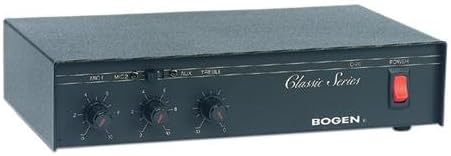
Image 2: Rear panel of the Bogen Classic Series Amp C20. This image shows the various input and output connections, including power input and speaker terminals.
The rear panel contains connections for power, microphone inputs, auxiliary inputs, and speaker outputs. Specific details on these connections are provided in the Setup section.
4. Ntọala na nwụnye
4.1 Na-arịgo
The Bogen Classic Series Amp C20 is designed for surface mounting. Ensure the mounting surface is stable and capable of supporting the unit's weight (approximately 4.5 pounds). Allow adequate ventilation around the unit to prevent overheating.
4.2 Njikọ eletrik
- Ensure the POWER switch on the front panel is in the OFF position.
- Connect the power cord to a standard 120 Volt AC outlet.
4.3 Njikọ ntinye ọdịyo
Connect your audio sources to the appropriate inputs on the rear panel:
- Igwe okwu: Connect microphones to the MIC1 and MIC2 input jacks.
- Auxiliary Devices: Connect line-level audio sources (e.g., CD player, media player) to the AUX input jacks.
4.4 Njikọ Mmepụta Ọkà Okwu
Connect your speakers to the speaker output terminals on the rear panel. Ensure correct polarity (+ to + and - to -) for all speaker connections. Refer to your speaker's manual for impedance matching requirements.
5. Ọrụ
5.1 Gbanyụọ/ gbanyụọ
- Ka ike na amplifier, press the POWER switch on the front panel to the ON position. The power indicator (if present) will illuminate.
- To power off, press the POWER switch to the OFF position.
5.2 Adjusting Input Levels
- Start with all input level controls (MIC1, MIC2, AUX) set to their minimum position.
- Begin playing audio from your desired source.
- Slowly increase the corresponding input level control until the desired volume is achieved.
- Adjust the TREBLE control to fine-tune the high-frequency response to your preference.
5.3 Atụmatụ ojiji izugbe
- Avoid setting volume levels too high, which can cause distortion and potentially damage speakers.
- Ensure all connections are secure before operating the ampna -emegharị ihe.
6. Nlekọta
6.1 Nhicha
Hichapụ mpụta nke amplifier with a soft, dry cloth. Do not use liquid cleaners or aerosol cleaners, as they may damage the finish or internal components.
6.2 Mgba ikuku
Regularly check that the ventilation openings are clear of dust and debris to ensure proper airflow and prevent overheating.
6.3 Ije ozi
Enweghị akụkụ ndị ọrụ na-arụ ọrụ n'ime amponye ndu. Tụtụ aka n'aka ndị ọrụ ruru eru.
7. Nchọpụta nsogbu
If you experience issues with your Bogen Classic Series Amp C20, consult the following table before contacting support.
| Nsogbu | Ihe nwere ike ime | Ngwọta |
|---|---|---|
| Enweghị mmepụta ụda. |
|
|
| Ụda agbagọ. |
|
|
| Static or crackling from knobs. | Dust or oxidation on control potentiometers. | Consult qualified service personnel for cleaning or replacement of potentiometers. |
| Unit becomes excessively warm or emits odor. |
|
|
8. Nkọwapụta
| Njirimara | Nkọwa |
|---|---|
| Ụdị | Bogen |
| Nlereanya | C20 |
| Nọmba Nlereanya ihe | C20 |
| Nọmba nke onye nrụpụta | C20 |
| Akụkụ ihe (L x W x H) | 11.37 x 7.37 x 2.87 sentimita asatọ |
| Akụkụ ngwaahịa | 11.37 x 7.37 x 2.87 sentimita asatọ |
| Ibu Ibu | 4.5 pound |
| Voltage | 120 volts |
| Wattage | 50 watt |
| Ike mmepụta | 20 Watt |
| Ọnụọgụ nke ọwa | 1 |
| Ụdị nkwụnye | Ugwu elu |
| Onye nrụpụta | Bogen |
| UPC | 765368330250 |
| Ụbọchị mbụ dị | Julaị 16, 2004 |
Mara: Nkọwapụta ga-agbanwe na-enweghị ọkwa.
9. Akwụkwọ ikike na nkwado
For warranty information and technical support, please refer to the official Bogen websaịtị ma ọ bụ kpọtụrụ ngalaba ọrụ ndị ahịa ha. Debe nnata nzụta gị dị ka ihe akaebe nke ịzụrụ maka nkwupụta ikike.
Ozi mkpọtụrụ:
- Websaịtị: www.bogen.com (Placeholder, actual URL nwere ike ịdị iche)
- Ndị ọrụ nlekọta ndị ahịa: Tụtụ aka na websaịtị maka nkọwa kọntaktị mpaghara.


