Okwu mmalite
Daalụ maka ịzụrụasing the Spectra 58-MBWR Undercounter Mountable 5" Black & White TV with AM/FM Radio. This versatile unit is designed for convenient placement in various environments, offering television and radio entertainment. This manual provides detailed instructions for proper setup, operation, and maintenance to ensure optimal performance and longevity of your device.
Ihe ngwugwu
Biko chọpụta na etinyere ihe niile edepụtara n'okpuru na ngwugwu gị. Ọ bụrụ na ihe ọ bụla na-efu ma ọ bụ mebie, biko kpọtụrụ onye na-ere ahịa gị.
- Spectra 58-MBWR TV Unit
- AC 120V/60Hz Adapter
- 12V DC Car Cord
- Arịọnụ mgbodo
- Detachable Mounting Head
- Antenna Rotary Telescopic
- 300/75 Ohm External Antenna Connector
- Jack ekwe ntị
- Njikwa anya
- Guzo
Atụmatụ igodo
- 5-inch Monochrome "Shortneck" Picture Tube
- Full Channel VHF/UHF Receiver
- Integrated AM/FM Radio
- Rotary Telescopic Antenna for improved reception
- 300/75 Ohm External Antenna Connector for alternative antenna options
- Earphone Jack for private listening
- Built-in Carry Handle for portability
- Mounting Bracket and Detachable Mounting Head for undercounter installation
- Versatile 3-way Power: AC 120V/60Hz, 12V DC Car Cord, or 10 x 'D' batteries (not included)
- Compact Dimensions: 6" (H) x 6-1/8" (W) x 8" (D)
Ntọala na nwụnye
Ịkwanye Unit
The Spectra 58-MBWR offers three power options:
- Ike AC: Connect the supplied AC 120V/60Hz adapter to the AC input jack on the unit and plug it into a standard wall outlet.
- Ike Ụgbọala DC: For use in vehicles, boats, or RVs, connect the supplied 12V DC car cord to the DC input jack on the unit and plug it into your vehicle's 12V accessory outlet.
- Ike batrị: For portable use, insert 10 'D' (UM-2) size batteries (not included) into the battery compartment, observing correct polarity.
Njikọ antenna
The unit features a built-in rotary telescopic antenna. Extend and rotate this antenna for optimal reception. For areas with weak signals or for connecting to a home antenna system, use the included 300/75 Ohm external antenna connector.
Undercounter Mounting
To mount the unit under a cabinet or shelf:
- Attach the mounting bracket to the desired surface using appropriate screws (not included), ensuring it is securely fastened.
- Align the detachable mounting head with the bracket and secure it.
- Slide the TV unit onto the detachable mounting head until it clicks into place. Ensure the unit is firmly seated before releasing.
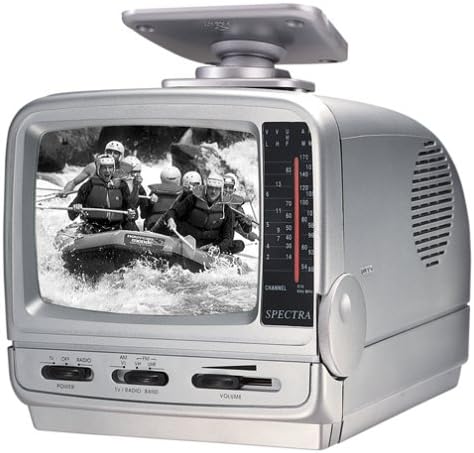
Image: Spectra 58-MBWR Undercounter Mountable 5" Black & White TV with Radio, featuring its compact design and undercounter mounting capability.
Ntuziaka ọrụ
Gbanyụọ/ Gbanyụọ
Locate the POWER switch on the front panel. Slide it to the 'ON' position to power on the unit. Slide it to 'OFF' to power off.
Ọrụ TV
- Gbaa mbọ hụ na agbanyere unit ahụ.
- Select 'TV' mode using the TV/RADIO BAND switch.
- Use the CHANNEL dial to scan for available VHF/UHF channels. Adjust the telescopic antenna for best picture quality.
- Gbanwee njikwa olu ka ọ bụrụ ọkwa ige ntị nke ịchọrọ.
Ọrụ redio
- Gbaa mbọ hụ na agbanyere unit ahụ.
- Select 'RADIO' mode using the TV/RADIO BAND switch. Choose between 'AM' or 'FM' bands.
- Use the TUNING dial to find your desired radio station.
- Gbanwee njikwa olu ka ọ bụrụ ọkwa ige ntị nke ịchọrọ.
Ojiji Ekwentị
For private listening, plug standard 3.5mm earphones (not included) into the EARPHONE JACK. The internal speaker will automatically mute when earphones are connected.
Nlekọta
- Nhicha: Use a soft, dry cloth to clean the exterior of the unit. For stubborn marks, slightly dampen akwa na mmiri. Ejila ihe nchacha abrasive ma ọ bụ ihe mgbaze.
- Ngbanwe batrị: If using battery power, replace all 10 'D' batteries when the unit's performance diminishes. Ensure correct polarity when inserting new batteries.
- Nchekwa: If storing the unit for an extended period, remove all batteries to prevent leakage and corrosion. Store in a cool, dry place.
Nchọpụta nsogbu
| Nsogbu | Ihe nwere ike ime | Ngwọta |
|---|---|---|
| Enweghị ike | Power cord not connected; Batteries depleted or incorrectly inserted; Power switch off. | Check power connections; Replace batteries; Ensure power switch is ON. |
| No picture/sound (TV) | Incorrect channel selected; Antenna not extended/positioned; Weak signal. | Scan channels; Extend and adjust telescopic antenna; Try external antenna. |
| Poor picture/sound (TV) | Mgbama na-adịghị ike; Ntinye aka. | Adjust antenna position; Try external antenna; Check for nearby electronic interference. |
| No sound (Radio) | Volume too low; Incorrect band selected; Earphones connected. | Increase volume; Select correct AM/FM band; Disconnect earphones. |
Nkọwapụta
| Njirimara | Nkọwapụta |
|---|---|
| Nọmba nlereanya | 58-MBWR |
| Nha ihuenyo | 5 sentimita asatọ |
| Ngosipụta teknụzụ | CRT (Monochrome) |
| Mkpebi | 480i |
| Ọnụego ume ọhụrụ | 60 Hz |
| Akụkụ akụkụ | 4:3 |
| Isi Iyi Ike | AC 120V/60Hz, 12V DC Car Cord, 10 x 'D' Batteries |
| Akụkụ ngwaahịa (H x W x D) | 6" x 6.13" x 8" (15.24 cm x 15.57 cm x 20.32 cm) |
| Ibu Ibu | 5.34 pound (2.42 n'arọ) |
| Ngwa gụnyere | TV, Remote, Stand, AC Adapter, DC Car Cord, Mounting Bracket, Detachable Mounting Head, External Antenna Connector |
Akwụkwọ ikike na nkwado
Ozi dị mkpa:
Please be aware that the seller assumes no warranty for this product. Additionally, this product is subject to a no-return policy. For any operational questions or issues not covered in this manual, please refer to the troubleshooting section or contact your point of purchase for further assistance, if available.


