Okwu mmalite
This manual provides essential information for the safe and efficient operation of your Thomson TM 9850 Radio. Please read it thoroughly before using the device and keep it for future reference.
Ozi nchekwa
- Ewepụla unit ahụ na mmiri ozuzo ma ọ bụ mmiri iji gbochie ọkụ ma ọ bụ ujo eletrik.
- Akwụsịla oghere ikuku. Gbaa mbọ hụ na oghere zuru oke gburugburu nkeji maka ikuku ikuku kwesịrị ekwesị.
- Use only the power supply specified for this device.
- Emeghela casing. Kpọtụrụ ndị ọrụ ruru eru ọrụ niile.
- Debe ihe ahụ ka ọ ghara ịpụta ìhè n'anwụ, ebe okpomọkụ na-esi, na ebe magnet siri ike.
Ngwaahịa gafereview
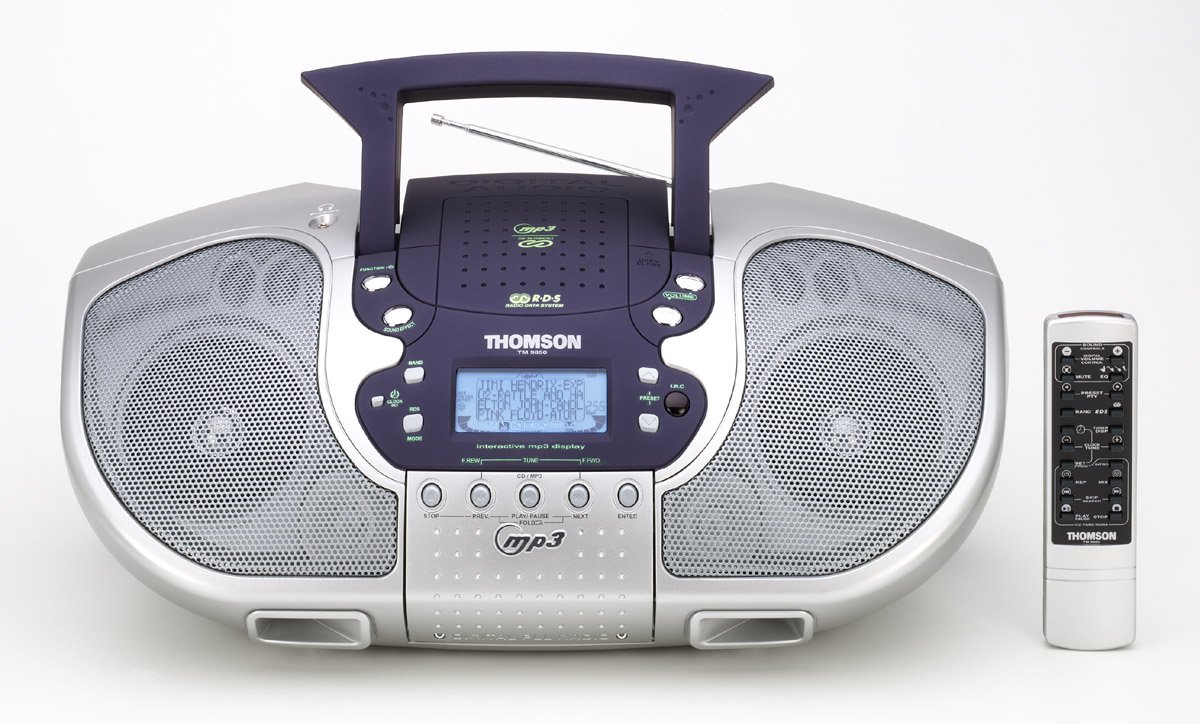
Foto 1: N'ihu view of the Thomson TM 9850 Radio with its accompanying remote control. The radio features dual speakers, a central control panel with an LCD display, and a top-mounted handle and telescopic antenna. The remote control is slender and white with various function buttons.
The Thomson TM 9850 is a portable radio designed for versatile audio playback. It features an integrated CD/MP3 player, an FM/AM radio tuner, and a clear LCD display for easy navigation. The unit also includes a remote control for convenient operation from a distance.
Melite
Njikọ Ike
- Hụ na etinyere ihe ahụ n'elu ebe kwụsiri ike ma dị larịị.
- Jikọọ eriri ọkụ AC na jakị AC IN dị n'azụ unit ahụ.
- Tinye nsọtụ nke ọzọ nke eriri ike AC n'ime oghere mgbidi ọkọlọtọ (AC 230V ~ 50Hz).
- Alternatively, for portable use, insert 8 x "C" size batteries (not included) into the battery compartment located on the bottom of the unit, observing correct polarity.
Ndozi antenna
- For FM reception, extend the telescopic antenna fully. Adjust its position for optimal signal reception.
- For AM reception, the unit has a built-in ferrite bar antenna. Rotate the unit itself for best reception.
Ntuziaka ọrụ
Isi ọrụ
- Gbanyụọ/ Gbanyụọ: Pịa IKE bọtịnụ iji gbanye ma ọ bụ gbanyụọ unit ahụ.
- Njikwa olu: Tugharia ihe Mpịakọta Pịa aka n'akụkụ aka nri iji mee ka olu dịkwuo elu, wee belata n'akụkụ aka ekpe.
- Nhọrọ ọrụ: Pịa Ọrụ button to switch between CD/MP3, FM, and AM modes.
Ọrụ redio (FM/AM)
- Select FM or AM mode using the Ọrụ bọtịnụ.
- Pịa BAND button to select the desired frequency band (FM or AM).
- Jiri ihe TUNE +/- bọtịnụ iji hazie ọdụ aka. Pịa ma jide maka nyocha akpaka.
- To store a preset station: Tune to the desired station, press Mmemme, wee jiri PRESET +/- iji họrọ nọmba edobere, wee pịa Mmemme ọzọ iji gosi.
- To recall a preset station: Press PRESET +/- to cycle through stored stations.
CD/MP3 ịkpọghachi
- Mepee mkpuchi nke CD ahụ.
- Place a CD or MP3 CD with the label side facing up.
- Mechie mkpuchi akụkụ CD.
- Select CD/MP3 mode using the Ọrụ button. The display will show "READING" then the total number of tracks/folders.
- Pịa KWURU/Kwụsịa to start playback. Press again to pause.
- Pịa OSOTE to skip to the next track/file. Pịa PREV to go to the beginning of the current track or the previous track.
- Pịa KWỤSỊ ịkwụsị ịkpọghachi.
- For MP3 CDs, use nchekwa +/- buttons to navigate between folders.
Nlekọta
- Nhicha: Jiri akwa dị nro hichaa otu ahụ. Ejila ihe nchacha abrasive ma ọ bụ ihe mgbaze.
- Nlekọta oghere CD: Ọ bụrụ na oghere CD ahụ ruru unyi, jiri ihe nhicha oghere CD dị maka azụmahịa. Emetụla oghere ahụ aka.
- Nchekwa: If not using the unit for an extended period, remove the batteries and store it in a cool, dry place.
Nchọpụta nsogbu
| Nsogbu | Ihe nwere ike ime | Ngwọta |
|---|---|---|
| Enweghị ike | Ejikọghị eriri ọkụ eletrik; Batrị agwụla ma ọ bụ tinye ya n'ụzọ na-ezighi ezi. | Lelee njikọ eriri ọkụ eletrik; Dochie batrị ma ọ bụ hụ na polarity ziri ezi. |
| Enweghị ụda | Volume too low; Mute function activated. | Increase volume; Deactivate mute. |
| Nnabata redio adịghị mma | Antenna adịghị agbatị / gbanwee; Mgbama adịghị ike. | Extend and adjust telescopic antenna (FM); Rotate unit (AM); Try moving the unit to a different location. |
| CD/MP3 not playing | Disc inserted incorrectly; Disc dirty or scratched; Incorrect function mode. | Insert disc with label side up; Clean or replace disc; Select CD/MP3 function mode. |
Nkọwapụta
- Ụdị: TM 9850
- Isi mmalite ike: AC 230V ~ 50Hz or 8 x "C" size batteries (UM-2)
- Oke ugboro: FM 87.5 - 108 MHz, AM 522 - 1620 kHz
- Ụdị diski akwadoro: CD, CD-R/RW, MP3-CD
- Mmepụta ọdịyo: Stereo
- Akụkụ (W x H x D): (Approximate, based on typical boombox size) 400mm x 200mm x 250mm
- Arọ: (Approximate, based on typical boombox weight) 2.5 n'arọ
Rịba ama: Nkọwapụta nwere ike ịgbanwe na-enweghị ọkwa maka mmezi.
Akwụkwọ ikike na nkwado
This Thomson TM 9850 Radio comes with a standard manufacturer's warranty. Please refer to the warranty card included in the original packaging for detailed terms and conditions. For technical support, service, or inquiries, please contact Thomson customer service through their official websaịtị ma ọ bụ ozi kọntaktị enyere na ịzụrụ gị.
For the latest information and support resources, please visit the official Thomson websaịtị: www.thomsonconsumer.com


