Okwu mmalite
The Capresso Infinity Conical Burr Grinder Model 560.01 is designed to provide precise and consistent coffee grinding for various brewing methods. Its commercial-grade solid steel conical burrs ensure optimal flavor and aroma preservation by minimizing heat buildup during grinding. This manual provides essential information for the safe and efficient operation, maintenance, and care of your grinder.
Nchekwa ndị dị mkpa
Mgbe ị na-eji ngwa eletriki, ekwesịrị ịgbaso usoro nchekwa nchekwa bụ isi mgbe niile iji belata ihe egwu ọkụ, ujo eletrik na mmerụ ahụ n'ahụ mmadụ, gụnyere ihe ndị a:
- Gụọ ntuziaka niile tupu i jiri ngwa.
- Emetụla ebe dị ọkụ aka. Jiri aka ma ọ bụ mkpọ.
- Iji kpuchido ọkụ, ujo eletrik na mmerụ ahụ mmadụ, etinyela eriri, plọg, ma ọ bụ ngwa n'ime mmiri ma ọ bụ mmiri mmiri ọzọ.
- Nleba anya dị mkpa mgbe ụmụaka na-eji ngwa ọ bụla ma ọ bụ nso.
- Kpupu na ntinye mgbe ejighị ya na tupu ihicha. Kwe ka ọ dị jụụ tupu ịtinye ma ọ bụ wepụ akụkụ, na tupu ihicha ngwa ahụ.
- Ejikwala ngwa ọ bụla nwere eriri ma ọ bụ plọg mebiri emebi ma ọ bụ mgbe ngwa ahụ dara, ma ọ bụ mebie ya n'ụzọ ọ bụla. Weghachite ngwa n'ebe ọrụ enyere ikike kacha nso maka nyocha, ndozi ma ọ bụ mmezi.
- Iji mgbakwunye ngwa anaghị akwado ndị nrụpụta ngwa nwere ike bute ọkụ, ujo eletrik, ma ọ bụ mmerụ ahụ ndị mmadụ.
- Ejila n'èzí.
- Ekwela ka eriri kwụgide n'akụkụ tebụl ma ọ bụ counter, ma ọ bụ metụ ebe dị ọkụ aka.
- Etinyela na ma ọ bụ nso gas na-ekpo ọkụ ma ọ bụ ọkụ eletrik, ma ọ bụ na oven ọkụ.
- Buru ụzọ tinye plọg mgbe niile na ngwa, wee tinye eriri n'ime oghere mgbidi. Iji kwupu njikọ, gbanyụọ njikwa ọ bụla ka ọ bụrụ "gbanyụọ", wee wepụ plọg na mpụta mgbidi.
- Ejila ngwa maka ndị ọzọ na-abụghị ebumnuche ebumnuche.
- Lelee hopper maka ọnụnọ nke ihe ndị mba ọzọ tupu i jiri ya.
- Ngwa a bụ maka naanị ụlọ.
Ngwa ngwaahịa
Familiarize yourself with the main components of your Capresso Infinity Conical Burr Grinder.

Ọgụgụ 1: N'ozuzu view of the Capresso Infinity Conical Burr Grinder, showing the main unit, bean hopper, and ground coffee container.

Figure 2: Close-up of the control panel, highlighting the grind fineness settings (Extra Fine, Fine, Medium, Coarse) and the timer dial.

Figure 3: The transparent bean hopper filled with whole coffee beans, ready for grinding.

Figure 4: The ground coffee container, showing freshly ground coffee collected after operation.
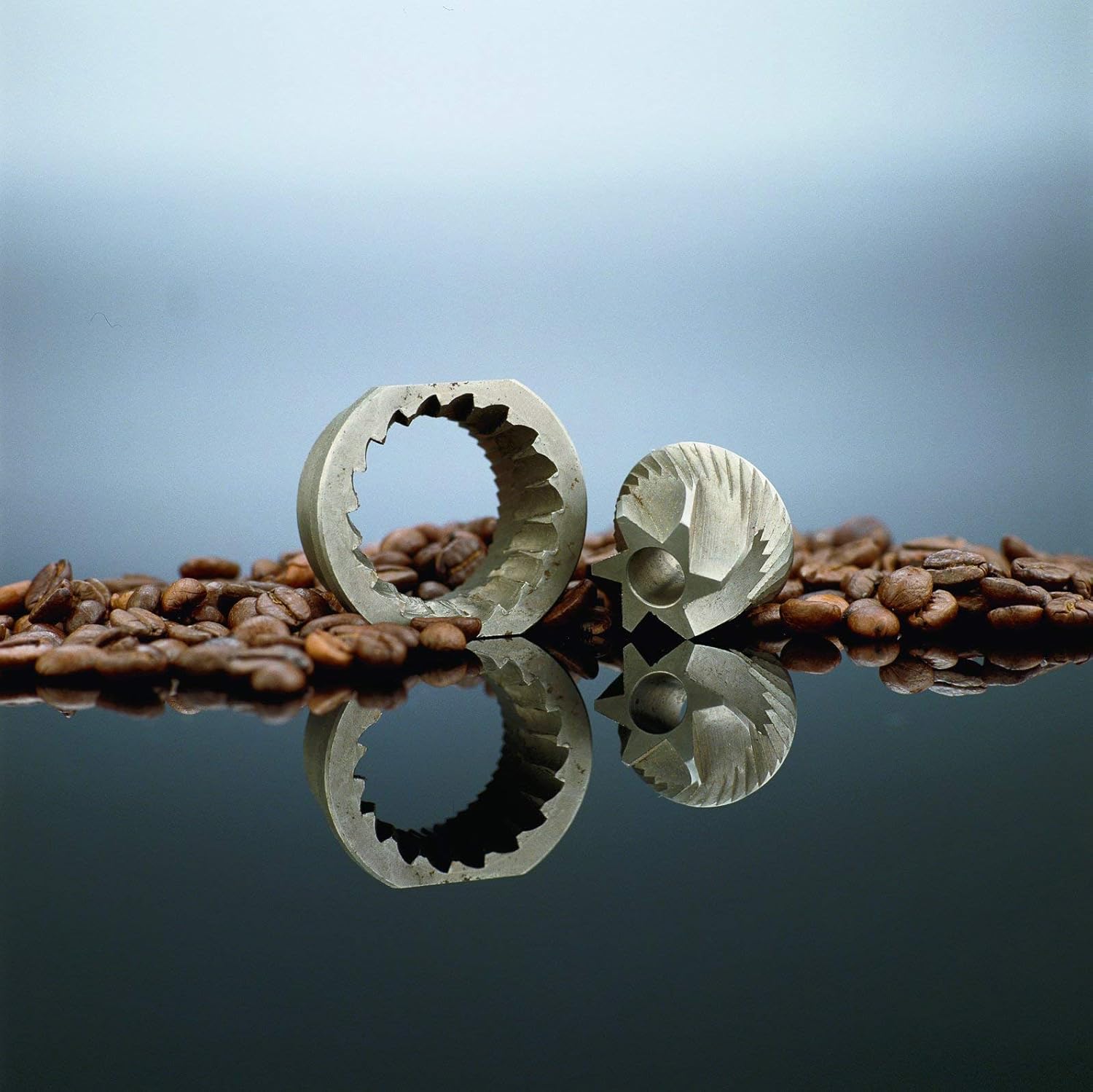
Figure 5: The precision-engineered conical burrs, responsible for uniform grinding.
Melite
- Wepu ihe niile ma wepụ ihe ọ bụla nkwakọ ngwaahịa.
- Debe igwe nri n'elu kwụ ọtọ, dị larịị na nke kpọrọ nkụ.
- Ensure the ground coffee container is securely inserted into its slot at the front of the grinder.
- Place the bean hopper onto the top of the grinder, aligning the black dot on the hopper with the desired grind setting (Extra Fine, Fine, Medium, Coarse) on the grinder base. Twist the hopper clockwise until it locks into place.
- Tinye eriri ike n'ime oghere AC 120V.
Ntuziaka ọrụ
Follow these steps to grind your coffee beans:
- Dejupụta Bean Hopper: Remove the lid from the bean hopper and pour whole coffee beans into it. The hopper has an 8.8-ounce capacity. Replace the lid securely.
- Họrọ Ịdị Mma nke Ncha: Rotate the bean hopper to align the black dot with your desired grind setting. The grinder offers 16 settings, categorized as Extra Fine, Fine, Medium, and Coarse.
- Extra Fine: Ideal for Turkish coffee.
- Ọma: Suitable for espresso machines.
- Ọkara: Recommended for drip coffee makers.
- Akpachaghị anya: Best for French press and percolators.
- Set Grinding Time: Turn the timer dial located on the front of the grinder to select the desired grinding duration, from 5 to 60 seconds. The grinder will automatically stop once the set time has elapsed.
- Malite egweri: The grinder will begin operation once the timer is set and the hopper is correctly positioned.
- Nakọta kọfị e gwere egwe: Once grinding is complete, carefully remove the ground coffee container from the front of the grinder.
Video 1: This video demonstrates the key features and basic operation of the Capresso Infinity Conical Burr Grinder, including filling the hopper, selecting grind settings, and collecting ground coffee.
Vidiyo nke 2: Vidiyo a na-egosi etu esi ewepụ ihe egwuview of the Capresso Infinity coffee grinder, showcasing its ease of use, grind settings, and the process of grinding coffee beans.
Nlekọta na nhicha
Nhicha mgbe niile na-eme ka arụmọrụ dị mma na-agbatị ndụ nke grinder gị.
- Unplug the Grinder: Na-ewepụ ngwa ahụ mgbe ọ bụla tupu gị ehicha ya.
- Wepu Bean Hopper: Rotate the bean hopper counter-clockwise to align the black dot with the "unlock" symbol, then lift it off.
- Wepụ Upper Burr: The upper burr is removable for easy cleaning. Lift it out of the grinding chamber.
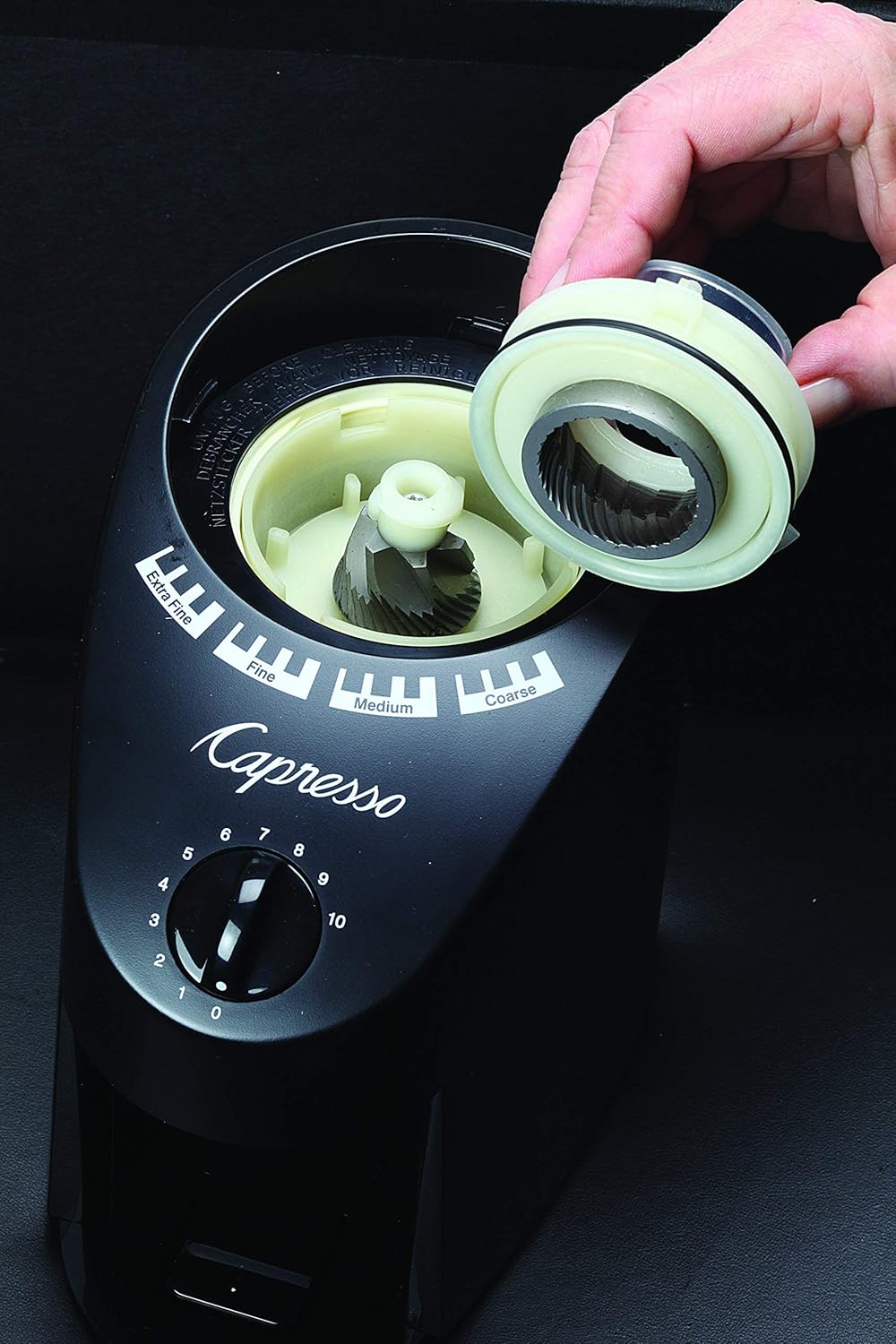
Figure 6: Removing the upper burr for thorough cleaning of the grinding mechanism.
- Clean Burrs and Chamber: Use the included cleaning brush to remove any residual coffee grounds from both the upper and lower burrs, as well as the grinding chamber.
- Clean Ground Coffee Container: Empty and wash the ground coffee container with warm, soapy water. Ensure it is completely dry before reinserting.
- Hichapụ Mpụga: Jiri mgbasa ozi hichaa mpụta igwe iheamp akwa . Ejila akụkụ bụ isi n'ime mmiri.
- Gbakọtaghachi: Place the cleaned upper burr back into the grinding chamber, then reattach the bean hopper by aligning the black dot and twisting clockwise to lock.
Nchọpụta nsogbu
| Nsogbu | Ihe nwere ike ime | Ngwọta |
|---|---|---|
| Igwe ihe anaghị ebido. | Power cord not plugged in; bean hopper not correctly locked; timer not set. | Ensure power cord is securely plugged in. Verify the bean hopper is locked into position. Set the timer dial to a desired grinding duration. |
| Mkpụcha na-adịghị agbanwe agbanwe. | Burrs are dirty or worn; incorrect grind setting for bean type. | Clean the burrs and grinding chamber thoroughly. Adjust the grind setting to a finer or coarser option as needed for your coffee beans and brewing method. |
| Excessive static cling of ground coffee. | Dry air conditions; natural static buildup during grinding. | This is a common issue with coffee grinders. Try lightly misting the coffee beans with water before grinding to reduce static. Alternatively, allow the ground coffee to sit in the container for a few minutes before emptying. |
| Mkpọchi grinder. | Foreign object in beans; excessive amount of beans; burrs clogged. | Unplug the grinder. Remove the bean hopper and upper burr. Inspect for and remove any foreign objects. Clean the burrs and grinding chamber. Do not overfill the hopper. |
Nkọwapụta
- Ụdị: 560.01
- Agba: Nwa
- Ihe: ABS Plastic
- Akụkụ ngwaahịa: 7.75"L x 5"W x 10.5"H
- Ibu ihe: 3 pound
- Wattage: 100W
- Voltage: 120V
- Hertz: 60Hz
- Hopper ikike: 8.8 ounces (whole beans)
- Ground Bin Capacity: 4 ounces (ground coffee)
- Ntọala igwe ihe: 16 (Extra Fine, Fine, Medium, Coarse)
- Ụdị Burr: Commercial-grade solid steel conical burrs
Akwụkwọ ikike na nkwado
The Capresso Infinity Conical Burr Grinder Model 560.01 comes with a one-year limited warranty. For detailed warranty information, product support, or to purchase replacement parts, please visit the official Capresso websaịtị ma ọ bụ kpọtụrụ ndị ahịa ha ọrụ. Debe nnata nzụta gị dị ka ihe akaebe nke ịzụrụ maka nkwupụta ikike.
Maka enyemaka ọzọ, ị nwere ike ịga na Capresso Store on Amazon.


