Okwu mmalite
This manual provides comprehensive instructions for the setup, operation, and maintenance of your VTech t2451 2.4 GHz Analog Cordless Phone with Answering System and Caller ID. Please read this manual thoroughly before using your new phone system to ensure proper functionality and to take full advantage nke atụmatụ ya.
Key features of your VTech t2451 include:
- 2.4 GHz analog reception for clear communication.
- Digital answering system with 3 mailboxes and 15 minutes of recording time.
- 50 name/number phonebook directory for easy contact management.
- 99 name/number Caller ID history to review oku azaghị.
- Headset compatibility (2.5 mm jack) for hands-free operation.
- Hold function, page/handset locator, and selectable ring tones.
- Wall-mountable design for flexible placement.
Melite
Follow these steps to set up your VTech t2451 cordless phone system.
- Iwepu: Carefully remove all components from the packaging. Ensure you have the cordless handset, base unit, AC power adapter, telephone line cord, and battery pack.
- Nwụnye batrị: Open the battery compartment on the back of the cordless handset. Connect the battery pack connector to the jack inside the compartment, ensuring correct polarity. Place the battery pack into the compartment and close the cover.
- Ijikọ ngalaba ntọala:
- Connect one end of the telephone line cord to the TEL LINE jack on the base unit and the other end to a telephone wall jack.
- Connect the small end of the AC power adapter to the DC IN 9V jack on the base unit. Plug the large end of the AC power adapter into a standard electrical outlet.
- Ịchaji ekwentị: Place the cordless handset in the base unit's charging cradle. The charge indicator on the handset should illuminate, indicating that the battery is charging. Allow the handset to charge for at least 12 hours before initial use.
- Mgbakwasị mgbidi (nhọrọ): The base unit is designed to be wall-mountable. Refer to the included wall-mount bracket and instructions for secure installation.
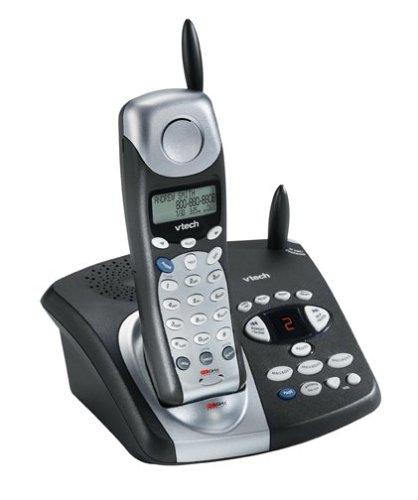
Image: The VTech t2451 cordless phone system, showing the black base unit with the silver and black handset docked in its charging cradle. The base unit features an integrated digital answering system with controls and a display.
Ntuziaka ọrụ
Ịkpọ na ịnata oku
- Ka ịkpọ oku: Pịa KWURU button, wait for a dial tone, then dial the phone number.
- Iji nweta oku: Mgbe ekwentị na-ada, pịa KWURU button or any key on the keypad (Any Key Answer).
- Iji kwụsị oku: Pịa N'ikpeazụ button or place the handset back in the base unit.
- Jidere ọrụ: Mgbe oku na-aga, pịa Jide button to place the call on hold. Press KWURU ọzọ ka ịmaliteghachi oku a.
Sistemụ azịza dijitalụ
Your phone system includes a digital answering system with 3 mailboxes and 15 minutes of recording time.
- Ozi egwu: Pịa KWURU bọtịnụ dị na ngalaba ntọala iji gee ntị na ozi ọhụrụ.
- Recording Outgoing Message (OGM): Follow the voice prompts to record a personalized outgoing message.
- Mailbox Management: The system supports up to 3 distinct mailboxes. Refer to the detailed instructions in the full user guide for setting up and accessing individual mailboxes.
Caller ID and Phonebook
- NJ onye ọkpụkpọ: When subscribed to Caller ID service, the handset display will show the caller's name and number. Press the CID bọtịnụ ka review the 99-name/number Caller ID history.
- Akwụkwọ ndekọ aha: Store up to 50 names and numbers in the phonebook. Use the navigation buttons to scroll through entries and the NHỌRỌ/HỤRỤ button to add or edit entries.
Ọrụ ndị ọzọ
- Page/Handset Locator: Pịa IHE button on the base unit to locate a misplaced handset.
- Ringer Tones: Customize your phone's ringer by selecting from various available tones. Refer to the handset settings menu.
- Headset Use: Connect a 2.5 mm compatible headset to the headset jack on the side of the handset for hands-free communication.
Nlekọta
Proper care ensures the longevity of your VTech t2451 phone system.
- Nhicha: Jiri nwayọ hichaa ekwentị na nkeji ntọala, damp akwa . Ejila kemịkalụ siri ike ma ọ bụ ihe mkpocha abrasive.
- Nlekọta batrị:
- Always return the handset to the base unit when not in use to ensure it remains charged.
- If the phone will not be used for an extended period, remove the battery from the handset.
- Replace the battery when its performance significantly degrades. Use only the specified replacement battery pack.
- Ọnọdụ gburugburu: Avoid exposing the phone to extreme temperatures, direct sunlight, or moisture.
Nchọpụta nsogbu
If you experience issues with your VTech t2451, try these common troubleshooting steps.
| Nsogbu | Ngwọta |
|---|---|
| Enweghị ụda ọkpụkpọ. |
|
| Ọbịa na-adịghị mma ma ọ bụ kwụ ọtọ. |
|
| Ekwentị anaghị akwụ ụgwọ. |
|
| Answering system not recording messages. |
|
Nkọwapụta
| Njirimara | Nkọwa |
|---|---|
| Ụdị | VTech |
| Nọmba nlereanya | T2451 |
| Ụdị ekwentị | Enweghị eriri |
| Ugboro ugboro | 2.4 GHz Analog |
| Ụdị Sistemu na-aza | Dijitalụ |
| Ike ịdekọ | 15 nkeji |
| Mailboxes | 3 |
| Phonebook Directory | 50 names/numbers |
| Ebe nchekwa onye oku | 99 names/numbers |
| Ndakọrịta ekweisi | 2.5mm jaak |
| Isi Iyi Ike | Igwe ọkụ eletrik |
| Akụkụ ngwaahịa | 7.1 x 8.5 x 5.1 sentimita asatọ |
| Ibu Ibu | 2.19 pound |
| Onye nrụpụta | Vtech |
Akwụkwọ ikike na nkwado
For warranty information, please refer to the warranty card included with your product packaging or visit the official VTech website. VTech provides customer support for product inquiries, technical assistance, and service. Contact information can typically be found on the VTech websaịtị ma ọ bụ n'ime akwụkwọ izizi ngwaahịa ahụ.
Onye nrụpụta: VTech


