Okwu mmalite
This manual provides detailed instructions for the installation, operation, and maintenance of your Russound SDB4.1 Speaker Selector. The SDB4.1 is designed to distribute audio from up to two amplifiers to four pairs of speakers, featuring individual volume controls and impedance matching for optimal performance.
Ozi nchekwa dị mkpa
- Gụọ ntuziaka niile tupu ị rụọ ọrụ ngwaọrụ.
- Ewepụla ngwa a na mmiri ozuzo ma ọ bụ mmiri.
- Gbaa mbọ hụ na ikuku ikuku dị na gburugburu unit ahụ.
- Gbanyụọ ike tupu ịme njikọ ma ọ bụ mgbanwe ọ bụla.
- Tụtụ aka n'aka ndị ọrụ ruru eru.
Ihe ngwugwu
Gbaa mbọ hụ na ihe niile dị ebe a:
- Russound SDB4.1 Speaker Selector
- Akwụkwọ ntuziaka (akwụkwọ a)
- Printed room labels
Ngwaahịa gafereview
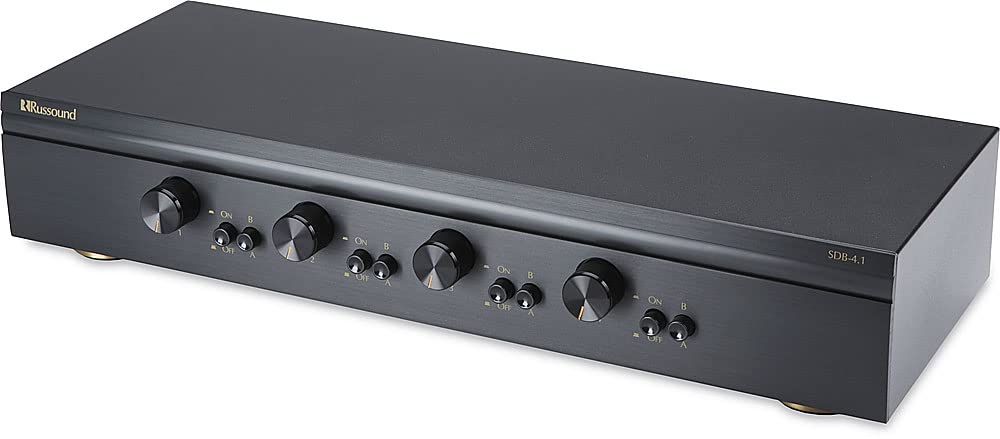
The Russound SDB4.1 is a high-quality speaker selector designed for multi-room audio distribution. It features dual amplifier inputs and supports up to four pairs of speakers, each with independent volume control. The unit incorporates autoformer-based impedance matching to maintain sound quality and protect your ampna -emegharị ihe.
Njikọ Ogwe azụ
The rear panel of the SDB4.1 provides all necessary connections for amplifiers and speakers. It includes color-coded detachable snap connectors for easy wire termination.
- AMP A/ AMP B Inputs: Jikọọ gị amplifiers here. Each input supports Left (+) and (-), and Right (+) and (-) channels.
- SPEAKER 1-4 Outputs: Connect your speaker pairs here. Each output supports Left (+) and (-), and Right (+) and (-) channels.
Melite
1. Ntinye
Place the SDB4.1 in a well-ventilated area, away from heat sources and direct sunlight. Ensure there is sufficient space around the unit for air circulation and cable management.
2. Njikọ njikọ
Before making any connections, ensure your amplifier(s) and the SDB4.1 are powered off and unplugged from the mains.
- Jikọọ ndị ọkà okwu: For each speaker pair, connect the speaker wires to the corresponding SPEAKER output terminals (SPEAKER 1, SPEAKER 2, etc.) on the SDB4.1. Ensure correct polarity (Left+, Left-, Right+, Right-). The detachable snap connectors are color-coded for ease of use.
- Jikọọ Ampihe na-enye ume (s): Connect the speaker outputs from your amplifier(s) to the AMP A na/ma ọ bụ AMP B input terminals on the SDB4.1. If using a single amplifier, connect it to AMP A. If using two amplifiers, connect the first to AMP A and the second to AMP B. Maintain correct polarity.
3. Impedance Matching Settings
The SDB4.1 features selectable impedance matching to accommodate various speaker configurations (4-ohm or 8-ohm speakers) and protect your amplifier. The impedance matching setting is typically located inside the unit. It is crucial to verify and adjust this setting according to your speaker setup to prevent damage to your amplifier. Consult the internal diagrams or markings for the correct jumper or switch positions for 2X, 4X, or 8X impedance matching. The factory default setting may vary, so always confirm it before operation.
Ọrụ
1. Ike Na
Once all connections are secure, plug in and power on your amplifier(s) and then the SDB4.1.
2. Selecting an Ampisi iyi
The SDB4.1 allows you to select between Amplifier A and Amplifier B for each speaker zone. Use the corresponding selector buttons on the front panel to choose the desired amplifier for each room.
3. Activating Speaker Zones
Each speaker zone has an individual button on the front panel. Press the button for the desired speaker zone to turn it on or off. Ensure the buttons are fully engaged when pressed.
4. Na-agbanwe olu
Each speaker zone is equipped with a rotary volume control knob. Turn the knob clockwise to increase the volume and counter-clockwise to decrease it. The volume controls have twelve detent positions for precise adjustment.
Nlekọta
- Nhicha: Jiri ákwà dị nro ma kpọọ nkụ hichaa mpụta nke ngwaọrụ ahụ. Ejila ihe nhicha mmiri ma ọ bụ ihe mkpuchi aerosol.
- Igwe ikuku: Gbaa mbọ hụ na egbochighị oghere ikuku.
- Njikọ: Lelee njikọ wiwi niile kwa oge iji hụ na edobere ha.
Nchọpụta nsogbu
| Nsogbu | Ihe nwere ike ime | Ngwọta |
|---|---|---|
| Enweghị ụda sitere na ndị ọkà okwu. |
|
|
| Ụda gbagọrọ agbagọ ma ọ bụ nke na-adịghị mma. |
|
|
| Speaker zone button stuck. | Okwu igwe. | Gently try to free the button. If it remains stuck, contact Russound customer support for assistance. |
Nkọwapụta
| Nlereanya | SDB4.1 |
| Speaker Pairs Supported | 4 |
| AmpNtinye ntinye | 2AMP A, AMP B) |
| Ijikwa ike | Up to 200W per channel RMS continuous |
| Mmekọahụ mgbochi | Selectable (accommodates 4- or 8-ohm speakers) |
| Njikwa olu | Individual per zone, 12 detent positions |
| Akụkụ (W x H x D) | 18.43 x 4.76 x 9.65 inches (Product dimensions) |
| Ibu Ibu | 8.82 pound |
| Agba | Nwa |
| Njikọ | Detachable snap connectors for bare speaker wire (L+ L- R+ R-) |
| Onye nrụpụta | Ihe ngwa ngwa |
Mara: Nkọwapụta ga-agbanwe na-enweghị ọkwa.
Akwụkwọ ikike na nkwado
For warranty information or technical support, please refer to the official Russound websaịtị ma ọ bụ kpọtụrụ ngalaba ọrụ ndị ahịa ha. Debe nnata nzụta gị dị ka ihe akaebe nke ịzụrụ maka nkwupụta ikike.
Russound Contact Information:
- Websaịtị: www.russound.com
- Tụtụ aka na website for current contact details and support resources.


