1. Okwu mmalite
This manual provides instructions for the proper setup, operation, maintenance, and troubleshooting of your Panasonic KX-FLM551 Laser Fax Machine. Please read this manual thoroughly before using the device to ensure correct and safe operation.
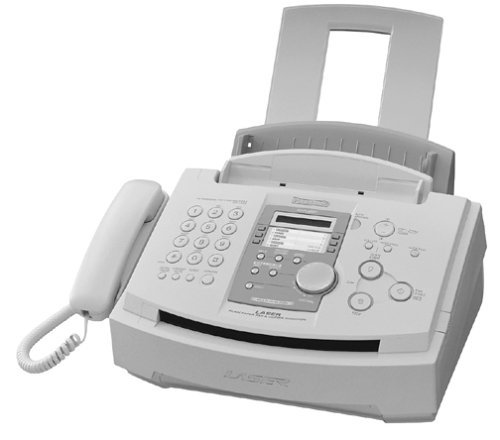
Foto 1: N'ihu view of the Panasonic KX-FLM551 Laser Fax Machine. The image displays the compact design of the multi-function device, featuring a control panel, paper tray, and document feeder.
2. Nhazi
2.1 Nwepu
- Carefully remove the fax machine and all accessories from the packaging.
- Debe ihe ndị e ji ekpuchi ihe maka njem ma ọ bụ nchekwa n'ọdịnihu.
- Remove all protective tapes and packing materials from the unit.
2.2 Njikọ ike
- Connect the power cord to the AC inlet on the back of the machine.
- Tinye nsọtụ nke ọzọ nke eriri ọkụ n'ime oghere eletrik ọkọlọtọ.
2.3 Njikọ Ahịrị Ekwentị
- Connect one end of the telephone line cord to the LINE jack on the fax machine.
- Jikọọ nsọtụ nke ọzọ nke eriri ekwentị ahụ na ihe mkpuchi ekwentị mgbidi gị.
- If using an external telephone, connect it to the EXT jack on the fax machine.
- The machine is compatible with Call Waiting/Caller ID and Distinctive Ring features, if subscribed through your telephone service provider.
2.4 Mpempe akwụkwọ
- Open the paper tray located at the front of the machine.
- Load up to 150 sheets of letter-size or legal-size paper into the paper tray.
- Dezie akwụkwọ ntuziaka ka ọ dabara nha akwụkwọ ahụ.
- For faxing or copying multiple originals, load up to 15 pages into the automatic document feeder (ADF).
2.5 Ntinye Katrij Toner
- Open the front cover of the fax machine.
- Carefully insert the toner cartridge into its designated slot until it clicks into place.
- Mechie mkpuchi ihu.
2.6 Njikọ Kọmputa
- To use the device as a printer or scanner, connect it to a personal computer via a parallel port cable.
- Install the necessary drivers on your computer (drivers not included in this manual).
3. Ntuziaka ọrụ
3.1 Sending a Fax
- Manual Dialing: Place the document face down in the document feeder. Dial the recipient's fax number using the keypad. Press the 'Start' button.
- Auto-Dial: Store frequently used fax numbers in the 100 auto-dial locations. Select the desired auto-dial entry and press 'Start'.
- Mgbasa ozi: Send a single document to up to 158 different locations by programming a broadcast list.
- Fax Forwarding: Configure the machine to automatically forward received faxes to another designated fax number.
3.2 Receiving a Fax
- Automatic Reception: The machine will automatically answer incoming calls and receive faxes after a set number of rings.
- Nnabata akwụkwọ ntuziaka: If you answer a call and hear fax tones, press the 'Fax/Start' button to receive the fax.
- Remote Retrieval: Access and retrieve faxes stored in the machine's memory from a remote location using a touch-tone phone.
3.3 Iṅomi akwụkwọ
- Place the original document face down in the document feeder or on the document glass.
- Enter the desired number of copies (up to 99) using the keypad.
- Press the 'Copy' or 'Start' button to begin copying.
- The machine produces copies at a resolution of 600 x 600 dpi.
3.4 Printing from a Computer
- Ensure the machine is connected to your computer via the parallel port and drivers are installed.
- Select the Panasonic KX-FLM551 as your printer from your computer's application.
- Adjust print settings as needed and initiate the print job.
- The machine prints at a resolution of 600 x 600 dpi and a speed of approximately 10 pages per minute.
3.5 Scanning to a Computer
- Ensure the machine is connected to your computer via the parallel port and drivers are installed.
- Place the document on the document glass or in the document feeder.
- Initiate the scan function from your computer's scanning software.
- The machine scans at a resolution of 600 x 600 dpi, suitable for importing pictures, line art, and signatures.
3.6 Using the Integrated Telephone Handset
- Lift the handset to make or receive voice calls.
- The handset functions as a standard telephone.
4. Nlekọta
4.1 Nhicha
- Kwupu igwe tupu ihicha.
- Jiri akwa dị nro hichaa mpụta.
- Gently clean the document glass and document feeder rollers with a lint-free cloth dampjiri mmiri ma ọ bụ ihe dị nro, nke na-adịghị emerụ ahụ, dị ọcha.
4.2 Replacing the Toner Cartridge
- When the 'Toner Low' or 'Replace Toner' indicator appears, replace the toner cartridge.
- Open the front cover and remove the old cartridge.
- Unpack the new Panasonic-approved toner cartridge and shake it gently to distribute the toner.
- Insert the new cartridge firmly until it locks into place.
- Mechie mkpuchi ihu.
5. Nchọpụta nsogbu
If you encounter issues with your Panasonic KX-FLM551, refer to the following common problems and solutions:
- Enweghị ike: Ensure the power cord is securely plugged into both the machine and a working electrical outlet.
- Fax Not Sending/Receiving: Verify the telephone line connection. Check if the recipient's fax number is correct. Ensure there is paper in the tray and toner in the cartridge.
- Mpempe akwụkwọ: Open the appropriate covers and carefully remove any jammed paper, following the instructions inside the machine. Ensure paper is loaded correctly and not overfilled.
- Poor Print/Copy Quality: Check the toner level and replace if low. Clean the document glass and print head area. Ensure you are using appropriate paper.
For more complex issues, consult the detailed troubleshooting section in the full user manual or contact Panasonic customer support.
6. Nkọwapụta
| Njirimara | Nkọwapụta |
|---|---|
| Nọmba nlereanya | KX-FLM551 |
| Ọrụ | Fax, Copier, Printer, Scanner |
| Ọsọ modem faksị | 14.4kbps |
| Fax Transmission Speed | Approx. 10 pages per minute |
| Print/Scan/Copy Resolution | 600 x 600 dpi |
| Ike akwụkwọ nri akpaaka (ADF). | 15 ibe |
| Ike Tray Akwụkwọ | Ibé akwụkwọ 150 |
| Nha akwụkwọ akwadoro | Akwụkwọ ozi, Iwu |
| Auto-Dial Memory | Ebe 100 |
| Broadcasting Capability | Up to 158 locations |
| Copy Capacity | Up to 99 copies from one original |
| Ọnụ ụzọ | Parallel, USB |
| Akụkụ ngwaahịa (W x D x H) | 18 x 20 x 13 sentimita asatọ |
| Ibu Ibu | 19.2 pound |
7. Akwụkwọ ikike Ozi
The Panasonic KX-FLM551 Laser Fax Machine is backed by a one-year limited warranty from the date of purchase. This warranty covers defects in materials and workmanship under normal use. Please retain your proof of purchase for warranty claims. For full warranty terms and conditions, refer to the warranty card included with your product or contact Panasonic customer support.
8. Nkwado
For technical assistance, service, or further inquiries regarding your Panasonic KX-FLM551 Laser Fax Machine, please contact Panasonic customer support. Contact information can typically be found on the Panasonic official websaịtị ma ọ bụ na akwụkwọ enyere na ngwaahịa gị.


