1. Okwu mmalite
Thank you for choosing the Wharfedale Diamond 8 Center Channel Speaker. This manual provides essential information for the proper setup, operation, and maintenance of your speaker, ensuring optimal performance and longevity. Please read this manual thoroughly before using your speaker.
2. Ozi nchekwa
To prevent fire, electric shock, and damage, please observe the following safety precautions:
- Ekpughela onye na-ekwu okwu n'ime mmiri ma ọ bụ n'ime mmiri.
- Akwụsịla oghere ikuku ikuku ọ bụla.
- Awụnyela n'akụkụ ebe okpomọkụ ọ bụla dị ka radiators, ndekọ okpomọkụ, stovu, ma ọ bụ ngwa ndị ọzọ (gụnyere amplifiers) nke na-emepụta okpomọkụ.
- Jiri naanị mgbakwunye / ngwa ndị nrụpụta akọwapụtara.
- Tụtụ aka n'aka ndị ọrụ ruru eru.
- Ensure proper speaker wire polarity when connecting.
3. Ihe ngwugwu
Biko lelee ma ngwugwu gị nwere ihe ndị a:
- Wharfedale Diamond 8 Center Channel Speaker
- Akwụkwọ ntuziaka (akwụkwọ a)
- Speaker Grille (pre-installed or separate)
4. Atụmatụ igodo
The Wharfedale Diamond 8 Center Channel Speaker is designed to deliver clear and dynamic dialogue for your home theater system. Its key features include:
- 2-way, compact, high-performance center channel perfectly matched with other Diamond series speakers.
- Wired internally with premium Monster Cable XP speaker cable for superior signal integrity.
- Twin 5.25-inch Kevlar bass and midrange drive units with phase plugs and nitrile rubber surrounds.
- 1-inch silk fabric dome tweeter, ferrofluid cooled with neodymium magnet.
- Measures 17.75 x 7 x 7.1 inches (W x H x D).
5. Nhazi
5.1 Ndobe Ọkà Okwu
The center channel speaker is crucial for dialogue clarity in a surround sound system. Place the speaker directly above or below the center of your television or projection screen. Ensure it is at approximately the same height as your main left and right speakers for a cohesive soundstage. Avoid placing it inside enclosed cabinets that could impede sound dispersion or cause overheating.
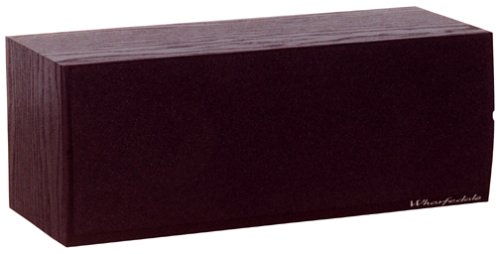
Figure 1: Wharfedale Diamond 8 Center Channel Speaker, showcasing its compact design and black ash finish. This image illustrates the speaker's rectangular form factor, suitable for placement above or below a display.
5.2 Connecting to Your Amplifier/Onye nnata
Before making any connections, ensure your amplifier/receiver is turned off and unplugged from the power outlet.
- Chọpụta ọnụ ụzọ: Locate the speaker terminals on the back of your Wharfedale Diamond 8 speaker and on your amplifier/receiver. You will see red (+) and black (-) terminals.
- Kwadebe Waya Ọkà Okwu: Wepụ ihe mkpuchi dị ihe dị ka 1/2 inch (12mm) site na nsọtụ waya igwe okwu gị. Gbagọọ eriri ndị ahụ nke ọma.
- Connect Positive: Connect the positive (red) terminal of the speaker to the positive (red) center channel output terminal on your amponye na-anata ihe.
- Connect Negative: Connect the negative (black) terminal of the speaker to the negative (black) center channel output terminal on your amponye na-anata ihe.
- Gbaa mbọ hụ na njikọ siri ike: Make sure there are no stray wire strands that could short circuit the terminals.
Ihe dị mkpa: Maintaining correct polarity (red to red, black to black) is crucial for proper sound reproduction and phase alignment within your home theater system.
6. Ịrụ ọrụ ọkà okwu gị
Once connected, your Wharfedale Diamond 8 Center Channel Speaker will function as part of your home theater system. Ensure your amplifier/receiver is configured to output audio to the center channel. Most modern receivers have an auto-calibration feature that will optimize the speaker's settings (level, distance, crossover frequency) for your listening environment. Refer to your amplifier/receiver's manual for detailed setup and calibration instructions.
The speaker is designed for clear dialogue reproduction. Adjust the volume on your amplifier/receiver to a comfortable listening level. Avoid excessively high volumes for prolonged periods to prevent potential damage to the speaker drivers.
7. Nlekọta
To keep your Wharfedale Diamond 8 Center Channel Speaker in optimal condition:
- Nhicha: Use a soft, dry, lint-free cloth to wipe the cabinet. For stubborn marks, a slightly damp cloth can be used, but avoid excessive moisture. Do not use abrasive cleaners, waxes, or solvents.
- Nlekọta Grille: The speaker grille can be gently removed for cleaning if necessary. Use a soft brush or vacuum cleaner with a brush attachment to remove dust.
- gburugburu: Avoid placing the speaker in direct sunlight, near heat sources, or in areas with high humidity.
- Nchekwa ọkwọ ụgbọ ala: Avoid touching the speaker drivers (cones and tweeter dome) as this can cause damage.
8. Nchọpụta nsogbu
If you experience issues with your speaker, consult the following common troubleshooting steps:
| Nsogbu | Ihe nwere ike ime | Ngwọta |
|---|---|---|
| Enweghị ụda sitere na ọkà okwu | Waya na-ezighi ezi; Amplifier/receiver settings; Amplifier/receiver off or muted. | Check speaker wire connections for correct polarity and secure fit. Verify amplifier/receiver is on, not muted, and center channel output is enabled. |
| Ụda agbagọ | Overdriving speaker; Loose connections; Damaged speaker wire. | Reduce volume. Check all connections for tightness. Inspect speaker wire for damage and replace if necessary. |
| Dialogue unclear or muffled | Incorrect placement; Amplifier/receiver calibration issues. | Ensure speaker is optimally placed (e.g., at ear level, unobstructed). Re-run amplifier/receiver's auto-calibration or manually adjust center channel levels and crossover frequency. |
If the problem persists after trying these solutions, please contact Wharfedale customer support or a qualified service technician.
9. Nkọwapụta
The following are the technical specifications for the Wharfedale Diamond 8 Center Channel Speaker:
- Aha nlereanya: Diamond 8
- Ụdị ọkà okwu: Ọwa etiti
- Eji akwadoro: Maka Sistemụ ụda gburugburu
- Dayameta Subwoofer: 5 Inches (referring to bass/midrange drivers)
- Nhazi ọwa ụda gburugburu: 1 (for the center channel itself)
- Agba: Black Ash
- Akụkụ ngwaahịa (D x W x H): 18D x 45.1W x 17.8H Centimeters (7.1D x 17.75W x 7H Inches)
- Ibu ihe: 4.99 n'arọ (11 lbs)
- Akara: Wharfedale
- Ike Nwepụta Kachasịnụ: 120 Watt
- Teknụzụ Njikọta: Ekwenyere
- Ụkpụrụ mmepụta ụda: Gburugburu
- Ụdị nkwụnye: Ugwu okpokoro
- Onye nrụpụta: Wharfdale
- Nọmba ihe nlereanya: Diamond8CenterBlack
10. Akwụkwọ ikike Ozi
Wharfedale products are manufactured to the highest standards. This product is covered by a limited warranty against manufacturing defects. For specific warranty terms and conditions, please refer to the warranty card included with your product or visit the official Wharfedale websaịtị. Debe ihe akaebe nke ịzụrụ maka akwụkwọ ikike.
11. Nkwado ndị ahịa
For technical assistance, troubleshooting beyond this manual, or service inquiries, please contact Wharfedale customer support. Contact information can typically be found on the official Wharfedale websaịtị ma ọ bụ na nkwakọ ngwaahịa.
You may also find additional resources, FAQs, and product registration options on the official Wharfedale websaịtị: www.wharfedale.co.uk


