Okwu mmalite
This manual provides detailed instructions for the proper use and care of your Audiovox CE-145G Personal CD Player. Please read this manual thoroughly before operating the device to ensure optimal performance and longevity.
Njirimara ngwaahịa
- 40-Second Anti-Skip Protection: Ensures continuous audio playback even during movement, utilizing a digital buffer.
- Multi-Directional Anti-Roll Sensors: Provides additional protection against playback interruption from various movements.
- 22-Track Programmable Memory: Allows customization of CD playback order.
- Sistemụ Mgbakwunye Bass: Na-eme ka mmepụta ọdịyo dị obere oge.
- 3-Beam Laser Pickup: Designed for accurate CD tracking and clear sound reproduction.
- Ụdị ịkpọghachi ọtụtụ: Includes random play and various repeat functions.
- Jide Mgbanwe: Prevents accidental button presses and program changes.
- Gbanyụọ akpaaka: Conserves battery life by automatically shutting down the player when not in use.
- Line-Out Jack: For connecting to external audio systems or power adapters.
- Built-in Rechargeable Circuitry: Supports the use of rechargeable Ni-Cad batteries (not included).
- Ekweisi Stereo: Included for immediate listening.
Melite
1. Ntinye batrị
The Audiovox CE-145G operates on two (2) AA batteries (not included) or an optional AC/car adapter (not included) connected via the line-out jack. For rechargeable Ni-Cad batteries, the unit features built-in charging circuitry.
- Locate the battery compartment on the underside of the CD player.
- Mepee mkpuchi nke batrị batrị.
- Tinye batrị AA abụọ (2), hụ na polarity ziri ezi (+/-) dịka egosiri n'ime ngalaba ahụ.
- Mechie mkpuchi nke batrị batrị nke ọma.

Image: The Audiovox CE-145G Personal CD Player in translucent green, shown with included stereo headphones. This image illustrates the overall product design and the headphones that come with the unit.
2. Ijikọ ekweisi
Insert the stereo headphone plug into the headphone jack located on the side of the CD player.

Image: A close-up of the stereo headphones included with the Audiovox CE-145G CD player, showing the earcups and the 3.5mm audio jack.
Ntuziaka ọrụ
1. Basic CD Playback
- Open the CD compartment lid by pressing the "OPEN" button or sliding the latch.
- Place a CD onto the center spindle with the label side facing up.
- Mechie mkpuchi nke CD ahụ nke ọma ruo mgbe ọ kụrụ aka.
- Pịa KWURU/Kwụsịa button to begin playback. The track number and elapsed time will display.
- Ka ịkwụsịtụ ọkpụkpọ, pịa KWURU/Kwụsịa ọzọ. Pịa ya ọzọ ka ịmaliteghachi.
- Iji kwụsị igwu egwu, pịa KWỤSỊ bọtịnụ.
- Ka ịga na egwu na-esote, pịa WERE N'OGWU bọtịnụ (►►|).
- To return to the beginning of the current track or go to the previous track, press the MAKA azụ azụ bọtịnụ (|◄◄).
- To fast forward or rewind within a track, press and hold the WERE N'OGWU or MAKA azụ azụ bọtịnụ, n'otu n'otu.
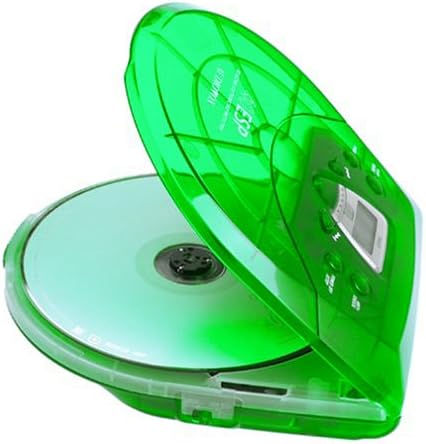
Image: The Audiovox CE-145G Personal CD Player with its translucent green lid open, revealing a compact disc placed inside the compartment.
2. Anti-Skip Protection (ESP)
The CE-145G features a 40-second Electronic Skip Protection (ESP) buffer. This system stores up to 40 seconds of audio data, allowing for uninterrupted playback even if the player experiences minor shocks or vibrations. This feature is automatically active during playback.
3. Programmable Memory (22 Tracks)
You can program up to 22 tracks to play in a specific order.
- Na ọnọdụ STOP, pịa bọtịnụ Mmemme button. The display will show "PROG" and "01".
- Jiri ihe WERE N'OGWU or MAKA azụ azụ buttons to select the desired first track.
- Pịa Mmemme again to confirm the track. The display will show "02".
- Repeat steps 2 and 3 to add up to 22 tracks to your program.
- After programming the last track, press KWURU/Kwụsịa to start playback of your programmed sequence.
- To clear the program, press the KWỤSỊ bọtịnụ ugboro abụọ.
4. Bass Boost
To enhance the bass frequencies, locate the MGBE OZI switch (or button) on the unit and activate it. Deactivate it to return to standard audio output.
5. Ọrụ Jide
Nke Jide switch prevents accidental button presses. Slide the Jide switch to the "ON" position to disable all control buttons. Slide it to "OFF" to re-enable controls.
6. Auto Power-Off
To conserve battery life, the CD player will automatically power off after a period of inactivity (e.g., when a CD finishes playing and no buttons are pressed). To restart, press the KWURU/Kwụsịa bọtịnụ.
Nlekọta
- Na-ehicha Ngalaba: Wipe the exterior of the player with a soft, damp akwa . Ejila ihe nchacha abrasive ma ọ bụ ihe mgbaze.
- Cleaning the CD Lens: If playback issues occur due to a dirty lens, use a specialized CD lens cleaning kit. Do not touch the lens directly.
- Nlekọta CD: Jikwaa CD n'akụkụ ha. Debe ha ọcha na enweghị ncha. Chekwaa ha n'ọnọdụ ha mgbe ejighị ya.
- Nlekọta batrị: Wepu batrị ma ọ bụrụ na agaghị eji nkeji ahụ ruo ogologo oge iji gbochie ntapu.
Nchọpụta nsogbu
| Nsogbu | Ihe nwere ike ime | Ngwọta |
|---|---|---|
| Enweghị ike | Batrị anwụọla ma ọ bụ tinyeghị ya nke ọma; njikọ AC adịghị ma ọ bụ nwee nsogbu. | Replace batteries, check polarity, or ensure AC adapter is properly connected and functional. |
| CD skips or stops | CD is dirty or scratched; unit is subjected to excessive shock; lens is dirty. | Clean CD, use a different CD, avoid strong impacts, clean the CD lens. |
| Enweghị ụda | Headphones not connected properly; volume too low; headphones faulty. | Ensure headphones are fully plugged in, increase volume, try different headphones. |
| Bọtịnụ anaghị anabata | HOLD switch is engaged. | Slide the HOLD switch to the "OFF" position. |
Nkọwapụta
- Ụdị: CE-145G
- Akara: Audiovox
- Mgbochi Mwụpụ: 40 seconds (Electronic Skip Protection)
- Egwu ndị a na-ahazi: 22
- Isi mmalite ike: 2 x AA batteries (not included) or optional AC/car adapter
- Mmepụta ọdịyo: 3.5mm headphone jack, Line-out jack
- Akụkụ (Ihe dị ka): 11.8 x 8.3 x 2.6 inch (akụkụ ngwugwu)
- Ibu (Ihe dị ka): 1.35 pound (ihe dị arọ)
- Agba: Translucent Green
Akwụkwọ ikike na nkwado
The Audiovox CE-145G Personal CD Player is backed by a Akwụkwọ ikike akụkụ na ọrụ ụbọchị 90 site na ụbọchị ịzụrụ. Biko dowe ihe akaebe nke ịzụrụ ihe maka akwụkwọ ikike.
For technical support or warranty service, please refer to the contact information provided with your product packaging or visit the official Audiovox websaịtị.


