1. Ngwaahịa gafereview
The Motorola 53727 Earpiece with Microphone is a compact and comfortable accessory designed for use with compatible Motorola two-way radios. It allows for discreet communication, fitting conveniently in either ear, and features a microphone that clips to your collar or sleeve for easy access.
This unit delivers clear audio, even in noisy environments, and includes a Push-to-Talk (PTT) button for seamless communication without needing to handle your radio directly.
Akụkụ ndị bụ isi:
- Earpiece for Motorola 2-way radios.
- Compatible with Spirit GT, Spirit GT+, and various TalkAbout series radios.
- Enables communication without holding the radio.
- Comfortable earbud design.
- Tiny push-to-talk microphone clips to collar or sleeve.
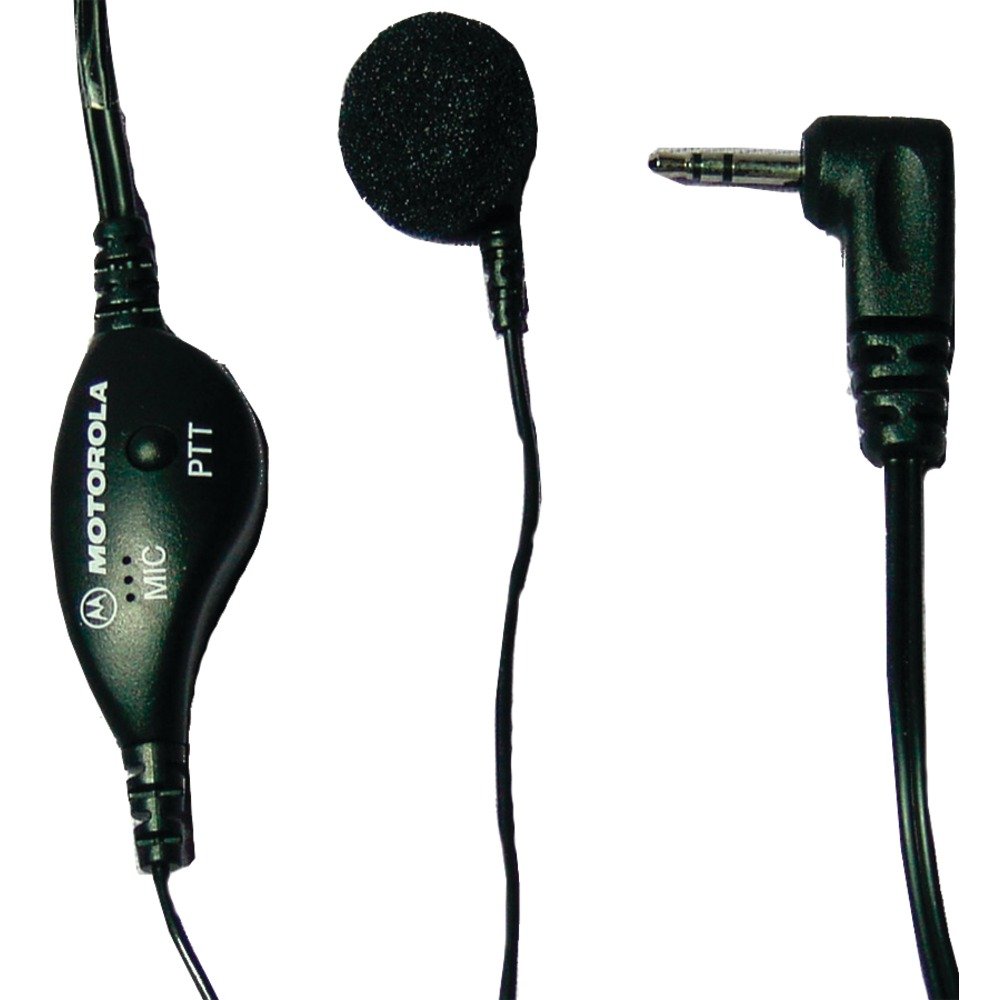
Image 1.1: Motorola 53727 Earpiece with Microphone. This image shows the compact design of the earpiece and its integrated microphone.
2. Ntọala na nwụnye
Follow these steps to properly set up and install your Motorola 53727 Earpiece with Microphone:
- Identify the Radio Port: Locate the single pin accessory port on your compatible Motorola two-way radio. This is typically on the side of the radio.
- Connect the Earpiece: Carefully insert the earpiece's connector into the radio's accessory port. Ensure it is fully seated for a secure connection.
- Tinye ihe ntị ntị: Place the earbud comfortably into either ear. Adjust its position until it feels secure and provides clear audio.
- Clip the Microphone: Attach the tiny push-to-talk microphone to your collar or sleeve. Position it close to your mouth for optimal voice transmission.
ndakọrịta:
The Motorola 53727 Earpiece is compatible with the following Motorola two-way radio series:
- Spirit GT and Spirit GT+ Series
- Talkabout 270, 280, T289 Series
- Talkabout T5100, T5200, T5300, T5320, T5400, T5410, T5420, T5600, T5620, T5700, T5720, T5800, T5820 Series
- Talkabout T6200, T6210, T6220, T6250, T6300, T6320, T6400 Series
- Talkabout T7200 Series
- FR50, FR60 Radios

Image 2.1: Talkabout Accessory Compatibility Chart. This chart provides a visual guide to compatible radio models for Motorola accessories.

Foto 2.2: Ọpụample of a compatible Motorola two-way radio.

Image 2.3: Another example of a compatible Motorola two-way radio.
3. Ntuziaka ọrụ
Using your Motorola 53727 Earpiece with Microphone is straightforward:
- Na-ege ntị: Once connected, audio from your two-way radio will be directed to the earpiece. Ensure your radio's volume is set to an appropriate level for clear listening.
- Nzipu ozi (Ngwa-na-Okwu): To speak, press and hold the Push-to-Talk (PTT) button located on the microphone unit. Speak clearly into the microphone. Release the PTT button when you are finished speaking to return to receive mode.
The earpiece allows for hands-free communication, enabling you to talk and listen without needing to remove the radio from your belt or pocket.

Image 3.1: Close-up of the earpiece and microphone unit, highlighting the PTT button.
4. Nlekọta na nlekọta
To ensure the longevity and optimal performance of your Motorola 53727 Earpiece with Microphone, follow these maintenance guidelines:
- Nhicha: Gently wipe the earpiece and microphone with a soft, damp cloth. Avoid using harsh chemicals or abrasive cleaners. Ensure the earpiece is dry before connecting it to your radio.
- Nchekwa: When not in use, store the earpiece in a clean, dry place, away from extreme temperatures and direct sunlight. Avoid tangling the cable.
- Ijikwa: Do not pull on the cable to disconnect the earpiece from the radio. Always grasp the connector itself. Avoid bending or twisting the cable excessively.
5. Nchọpụta nsogbu
If you encounter issues with your earpiece, refer to the following common troubleshooting steps:
- No Audio or Low Volume:
- Ensure the earpiece connector is fully inserted into the radio's port.
- Check the volume level on your two-way radio.
- Test the earpiece with another compatible radio if available, or test the radio with another accessory to isolate the issue.
- Igwe okwu anaghị ebugharị:
- Confirm the PTT button is being pressed and held firmly while speaking.
- Ensure the microphone is positioned correctly and not obstructed.
- Verify the earpiece is fully connected to the radio.
- Njikọ na-adịte aka:
- Check the earpiece cable for any visible damage or kinks.
- Gbaa mbọ hụ na njikọ ahụ dị ọcha na enweghị irighiri ihe.
If these steps do not resolve the issue, please refer to the "Support and Warranty" section for further assistance.
6. Nkọwapụta
| Njirimara | Nkọwa |
|---|---|
| Ụdị | Ngwọta Motorola |
| Nọmba nlereanya | 53727 |
| Agba | Nwa |
| Ntinye ntị | Na Ntị |
| Ụdị Ihe | Na Ntị |
| Njikwa mkpọtụ | Ọ dịghị |
| Ibu Ibu | 0.5 ounces |
| Teknụzụ Njikọta | Ekwenyere |
| Jack ekweisi | 2.5mm ọkpụrụkpụ |
| Atụmatụ USB | Push to Talk Microphone |
| Ọkwa Nguzogide mmiri | Mmiri na-eguzogide |
| Ụdị njikwa | Pịa Iji Kwuo Igwe okwu |
| Ngwa dakọtara | Spirit GT, Spirit GT+, Talkabout 270, 280, T289, T5100, T5200, T5300, T5320, T5400, T5420, T6200, T6300, T6400, T7200 Series, FR50, FR60 |
7. Akwụkwọ ikike na nkwado
Ozi akwụkwọ ikike:
This Motorola 53727 Earpiece with Microphone comes with a Akwụkwọ ikike nke ụbọchị 90 site na ụbọchị ịzụrụ.
Ihe ndetu dị mkpa: The warranty does not cover misuse of the product. Please ensure proper handling and care as outlined in this manual.
Nkwado ndị ahịa:
For technical assistance, warranty claims, or further inquiries, please contact Motorola Solutions customer support. Refer to your product packaging or the official Motorola Solutions websaịtị maka ozi kọntaktị kacha ugbu a.
Ị nwekwara ike ịga na Motorola Solutions Store on Amazon maka ozi ngwaahịa na akụrụngwa ndị ọzọ.


