
1. N'eluview
The Philips TAZ2200 is a versatile portable sound machine designed for enjoying various audio formats. It features a top-loading CD player, a front-loading cassette player, FM radio, Bluetooth 6.0 connectivity, USB playback, and a 3.5mm audio input. Equipped with dynamic bass boost and 6W stereo speakers, it delivers rich sound. The unit can be powered by AC mains or batteries and includes a carrying handle for portability.
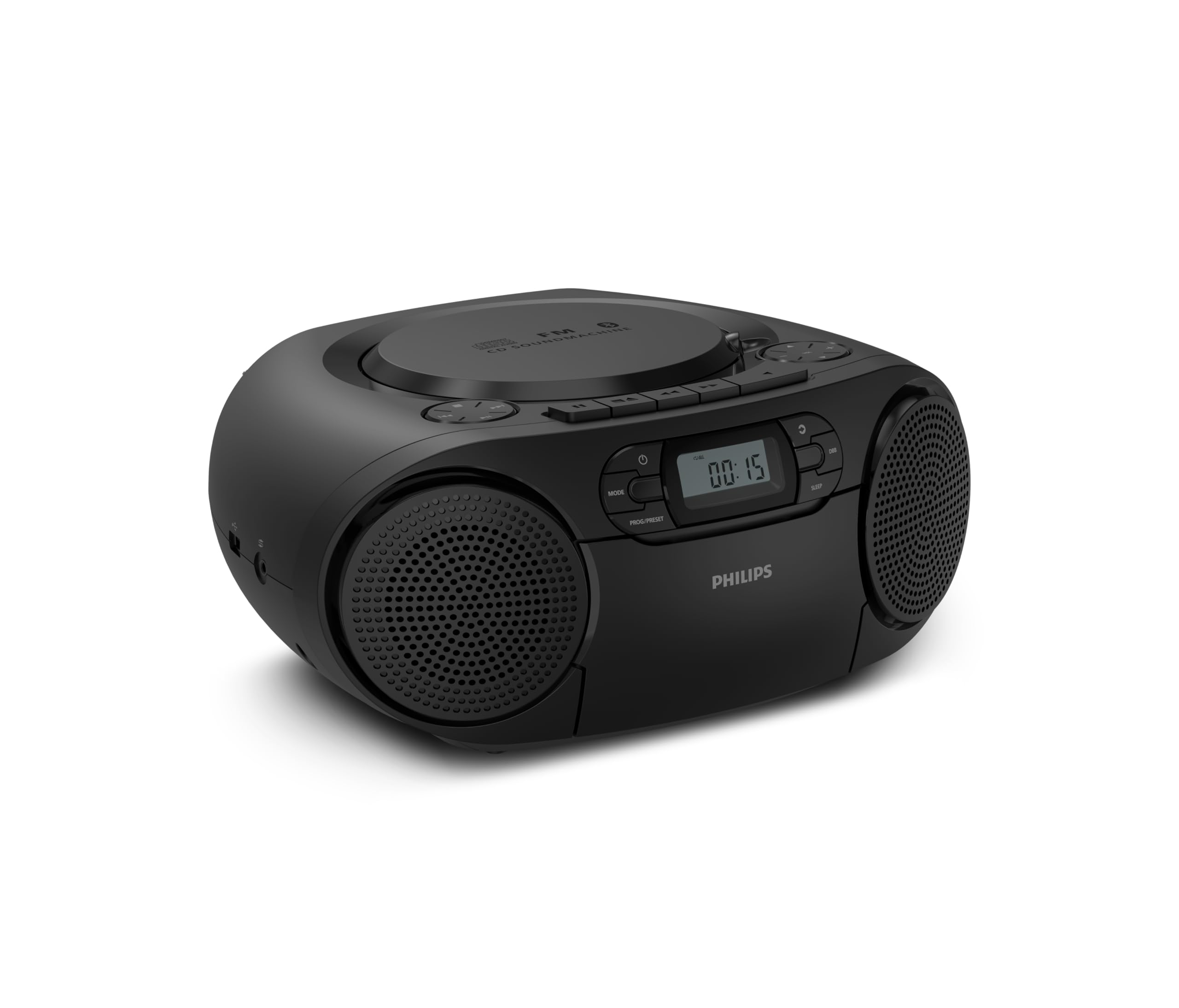
N'ihu view of the Philips TAZ2200 CD Soundmachine, showing the main display and control buttons.
2. Ozi nchekwa
Please read these safety instructions carefully before using your device and keep them for future reference. Incorrect use may result in hazards.
- Isi mmalite ike: Use only the specified power adapter or batteries. Ensure the voltage kwekọrọ na ihe achọrọ nke otu ahụ.
- Mmiri na mmiri: Etinyela ihe ndị e ji mmiri mee, mmiri mmiri, mmiri mmiri na-asọpụta, ma ọ bụ mmiri na-efesa. Etinyela ihe ndị e ji mmiri mmiri jupụta, dị ka ite, n'elu ihe ahụ.
- Igwe ikuku: Ensure adequate ventilation. Do not block any ventilation openings. Maintain a minimum distance around the unit for sufficient ventilation.
- Okpomọkụ: Etinyela ihe dị n'akụkụ ebe okpomọkụ dị ka radiator, ihe ndekọ okpomọkụ, stovu, ma ọ bụ ngwaọrụ ndị ọzọ (gụnyere amplifiers) nke na-emepụta okpomọkụ.
- Batrị: Follow correct polarity when inserting batteries. Do not mix old and new batteries, or different types of batteries. Remove batteries if the unit is not used for a long period.
- Nhicha: Unplug the unit from the power outlet before cleaning. Use a soft, dry cloth. Do not use liquid cleaners or aerosol cleaners.
- Ije ozi: Anwala ịnye ngwaahịa a n'onwe gị. Tụtụ aka n'aka ndị ọrụ ruru eru.
3. Kedu ihe dị na Igbe ahụ
Mgbe ebupuchara, biko hụ na ihe niile edepụtara n'okpuru nọ:
- Philips TAZ2200 CD Soundmachine
- Igwe ọkụ
- Ntuziaka mmalite ngwa ngwa
- Akwụkwọ ikike
- Mpempe akwụkwọ nchekwa
4. Njikwa na Njikọ
Njikwa Ogwe ihu
The front panel features the main display, power button, mode selection, program/preset buttons, and dynamic bass boost (DBB) control. Playback controls for CD and USB are also located here.

Zuru ezu n'ihu view showing the display, power, mode, program/preset, and DBB buttons.
Side and Rear Connections
The side of the unit provides a USB port for digital audio playback and a 3.5mm audio input jack for connecting external devices.

Akụkụ view illustrating the USB port and Audio Input jack.
The top of the unit houses the CD compartment and additional playback controls, while the rear features the AC power input and the FM antenna.

N'elu view showing the CD compartment and associated controls.

N'azụ view displaying the AC power input and the telescopic FM antenna.
5. Nhazi
5.1 Ike inye
Ike AC
- Gbaa mbọ hụ na agbanyụrụ unit ahụ.
- Connect the supplied power cable to the AC IN socket on the rear of the sound machine.
- Plug the other end of the power cable into a wall power outlet.
Ike batrị
For portable use, the unit can operate on 6 x C-type batteries (not included).
- Mepee mkpuchi batrị nke dị na ala nke otu.
- Insert 6 C-type batteries, ensuring correct polarity (+/-) as indicated inside the compartment.
- Mechie mkpuchi nke batrị batrị nke ọma.
5.2 mmezi nke antenna
For optimal FM radio reception, fully extend the telescopic antenna located at the rear of the unit. Adjust its position and angle to achieve the clearest signal.
6. Ntuziaka ọrụ
6.1 Ọrụ izugbe
- Gbanyụọ/ Gbanyụọ: Pịa IKE bọtịnụ iji gbanye ma ọ bụ gbanyụọ unit ahụ.
- Njikwa olu: Jiri ihe VOL + na or Vol - bọtịnụ iji dozie ọkwa olu.
- Dynamic Bass Boost (DBB): Pịa DBB button to activate or deactivate the dynamic bass boost feature for enhanced bass sound.
- Nhọrọ ụdị: Pịa MODE button repeatedly to switch between CD, Cassette, FM Radio, Bluetooth, USB, and Audio Input modes.
6.2 CD ịkpọghachi
- Mepee mkpuchi nke CD dị n'elu nke unit ahụ.
- Place a CD (CD, CD-R, or CD-RW) with the label side facing up onto the spindle.
- Mechie mkpuchi akụkụ CD.
- Pịa MODE bọtịnụ ka ịhọrọ ọnọdụ CD.
- Pịa KWURU/Kwụsịa bọtịnụ ka ịmalite ịkpọghachi.
- Jiri ihe MAKA bọtịnụ (|< or >>|) ịgafe egwu.
- Pịa ma jide |< or >>| ịchọ n'ime egwu.
- Pịa KWỤSỊ bọtịnụ kwụsị ịkpọghachi.
6.3 Cassette playback
- Open the cassette compartment door on the front of the unit.
- Tinye teepu kaseti ka o wee chee ihu elu.
- Mechie ọnụ ụzọ nke kaseti ahụ.
- Pịa MODE bọtịnụ iji họrọ ụdị kaseti.
- Pịa KWURU bọtịnụ ka ịmalite ịkpọghachi.
- Jiri ihe Ọsọ n'iru or KWESỊRỊ bọtịnụ iji mee ka teepu ahụ gaa n'ihu ma ọ bụ laghachi azụ ngwa ngwa.
- Pịa KWỤSỊ bọtịnụ kwụsị ịkpọghachi.
Igwe redio FM 6.4
- Pịa MODE bọtịnụ iji họrọ ọnọdụ redio FM.
- Nyocha akpaaka: Pịa ma jide PROG/PRESET bọtịnụ iji nyochaa ma chekwaa ọdụ FM dị na akpaghị aka.
- Akwụkwọ ntuziaka: Pịa NKWUKWU bọtịnụ (|< or >>|) to manually tune to a desired frequency.
- Ịchekwa atọrọ atọ: After tuning to a station, press PROG/PRESET once, then use |< or >>| iji họrọ nọmba edobere, wee pịa PROG/PRESET ọzọ iji gosi.
- Icheta atọrọ atọ: Na ọnọdụ FM, pịa PROG/PRESET repeatedly to cycle through saved preset stations.
6.5 Nghaghachi Bluetooth
- Pịa MODE button to select Bluetooth mode. The display will show 'BT' and flash, indicating it's in pairing mode.
- On your Bluetooth-enabled device (smartphone, tablet), enable Bluetooth and search for available devices.
- Select "Philips TAZ2200" from the list of devices.
- Once paired, the unit will emit a confirmation sound, and 'BT' will stop flashing.
- Start playing audio on your connected device. The sound will be streamed to the sound machine.
6.6 USB playback
- Insert a USB flash drive into the USB port on the side of the unit.
- Pịa MODE bọtịnụ ka ịhọrọ ọnọdụ USB.
- Ngalaba ahụ ga-achọpụta ozugbo wee malite ịkpọ ọdịyo dakọtara files (MP3, WAV, WMA).
- Use the playback controls (KWURU/Kwụsịa, MAKA, KWỤSỊ) as you would for CD playback.
6.7 Audio Input (AUX)
- Connect one end of a 3.5mm audio cable (not included) to the AUDIO IN jack on the side of the sound machine.
- Connect the other end of the audio cable to the headphone jack or audio output of your external device (e.g., MP3 player, turntable).
- Pịa MODE button to select Audio Input mode.
- Start playing audio on your external device. The sound will be played through the sound machine.
7. Nlekọta
- Na-ehicha Ngalaba: Wipe the exterior of the unit with a soft, slightly damp akwa . Ejila ihe nchacha abrasive ma ọ bụ ihe mgbaze.
- Nlekọta Ndị Na-akpọ CD: Keep the CD compartment clean. If the lens is dirty, use a specialized CD lens cleaner. Avoid touching the lens.
- Nlekọta ihe ọkpụkpọ Cassette: Jiri obere ákwà owu hichaa isi teepu ahụ ma jiri swab owu hichaa ya mgbe niile.ampetinyere ya na mmanya isopropyl.
- Ngbanwe batrị: If using batteries, replace all 6 C-type batteries when the unit's performance diminishes or if the unit will not be used for an extended period.
- Nchekwa: Mgbe a naghị eji ya, debe ihe ahụ n'ebe dị ọcha, kpọrọ nkụ, ebe anwụ na-anaghị apụta kpọmkwem, nakwa ebe okpomọkụ dị oke elu.
8. Nchọpụta nsogbu
If you encounter any issues with your Philips TAZ2200, please refer to the table below for common problems and solutions.
| Nsogbu | Ihe nwere ike ime | Ngwọta |
|---|---|---|
| Enweghị ike | Power cable not connected; Batteries depleted or incorrectly inserted. | Check AC power connection; Replace batteries or ensure correct polarity. |
| Enweghị ụda | Olu dị oke ala; Ahọpụtara ụdị na-ezighi ezi; Ekweisi ejikọrọ. | Increase volume; Select the correct source mode (CD, FM, BT, etc.); Disconnect headphones. |
| CD anaghị egwu | CD inserted incorrectly; CD is dirty or scratched; CD format not supported. | Insert CD with label side up; Clean or replace CD; Ensure CD is CD-R/RW compatible. |
| Cassette not playing | Cassette inserted incorrectly; Tape is damaged. | Insert cassette correctly; Try a different cassette. |
| Nnabata FM adịghị mma | A naghị agbatị ma ọ bụ tinye eriri ahụ n'ọnọdụ kwesịrị ekwesị; Mgbaàmà adịghị ike. | Gbatịa ma gbanwee antenna telescopic ahụ nke ọma; Gbalịa ibugharị ngwaọrụ ahụ gaa ebe ọzọ. |
| Bluetooth anaghị ejikọ | Unit not in pairing mode; Bluetooth device too far; Device already paired with another unit. | Ensure unit is in Bluetooth mode and flashing; Move device closer; Disconnect from other devices. |
| Nsogbu ọkpụkpọ USB | Etinyeghị draịva USB nke ọma; Anaghị ekwekọ file usoro; draịvụ USB mebiri emebi. | Tinyegharịa draịvụ USB; Hụ na files are MP3, WAV, or WMA; Try a different USB drive. |
9. Nkọwapụta
| Njirimara | Nkọwapụta |
|---|---|
| Ụdị | FILIPS |
| Nọmba nlereanya | TAZ2200/10 |
| Teknụzụ Njikọta | Bluetooth 6.0, USB, Audio Input (3.5mm) |
| Ụdị Ọkà Okwu | Stereo (2 speakers) |
| Ike mmepụta | 6 watts (max) |
| Mgbasa ozi akwadoro | CD, CD-R, CD-RW, Cassette, USB (MP3, WAV, WMA) |
| Redio Tuner | Digital FM with 20 presets |
| Isi Iyi Ike | AC (wired), 6 x C-type batteries (not included) |
| Akụkụ (LxWxH) | 24.5 x 28.5 x 12.5 cm |
| Ibu | 1.35 kilogram |
| Agba | Ọlaọcha |
10. Akwụkwọ ikike na nkwado
10.1 Akwụkwọ ikike ngwaahịa
This Philips TAZ2200 CD Soundmachine comes with a 2-afọ akwụkwọ ikike site na ụbọchị ịzụrụ ihe. Biko debe ihe akaebe nke ịzụrụ ihe gị maka nkwupụta nkwa. Akwụkwọ ikike ahụ na-ekpuchi ntụpọ na nsogbu nrụpụta n'okpuru ọnọdụ ojiji nkịtị.
10.2 Nkwado ndị ahịa
For technical assistance, troubleshooting beyond this manual, or warranty service, please refer to the contact information provided in the warranty booklet included with your product. You can also visit the official Philips support website for your region for further assistance and FAQs.