
1. Ozi dị mkpa
Please carefully check the store name and ensure you are purchasing products sold by "LUZHAN." We have received customer feedback stating that products received did not match the description and were of poor quality. Upon investigation, we found that these customers did not purchase the products from us. To prevent such incidents from happening again in the future and to avoid unnecessary misunderstandings, please carefully verify the store name LUZHAN.

Image: Important notice to verify seller name LUZHAN for authentic products.
2. N'eluview
The XIAOMI POCO X8 Pro Max 5G is a high-performance smartphone designed for advanced users. It features a powerful Mediatek Dimensity 9500s processor, a vibrant 1.5K 120Hz AMOLED display, a large 8500mAh battery with 100W HyperCharge, and a 50 MP Light Fusion 600 camera system with OIS. This manual provides essential information for setting up and operating your device.
Foto: ihu na azụ view of the POCO X8 Pro Max 5G smartphone.
Vidiyo: Efereview of the POCO X8 Pro Series, highlighting key features and design.
3. Nhazi
3.1 Kedu ihe dị na igbe ahụ
- XIAOMI POCO X8 Pro Max 5G Smartphone
- chaja
- Screen Protector (pre-applied or included)
3.2 Ntọala ngwaọrụ izizi
- Ike Na: Press and hold the power button located on the side of the device until the XIAOMI logo appears.
- Asụsụ na Mpaghara: Soro ntuziaka ndị dị na ihuenyo iji họrọ asụsụ na mpaghara ịchọrọ.
- Jikọọ na Wi-Fi: Select your Wi-Fi network and enter the password to connect to the internet. This is necessary for initial setup and software updates.
- Akaụntụ Google: Banye na akaụntụ Google gị ma ọ bụ mepụta nke ọhụrụ. Nke a dị mkpa maka ịnweta ụlọ ahịa Google Play na ọrụ Google ndị ọzọ.
- Nyefee data: If you are upgrading from another device, you may have the option to transfer your data (apps, photos, contacts) during this stage.
- Ntọala nchekwa: Set up your preferred security method, such as a PIN, pattern, password, or fingerprint. The device supports an ultrasonic fingerprint sensor.
- Nhazi zuru oke: Follow any remaining prompts to finalize the setup process.
3.3 SIM Card and eSIM Setup
The POCO X8 Pro Max 5G supports physical SIM cards and eSIM functionality.
- Physical SIM: Use the provided SIM ejector tool to open the SIM tray. Insert your Nano-SIM card(s) into the tray, ensuring proper orientation. Close the tray securely.
- eSIM: For eSIM activation, navigate to Ntọala> Netwọk & ịntanetị> SIM and follow the instructions to add an eSIM profile provided by your carrier.
4. Ntuziaka ọrụ
4.1 Ngosipụta atụmatụ
Your device features a 6.83-inch 1.5K ultra-bright AMOLED display with a 120Hz refresh rate for smooth visuals and a 24x super resolution touch for enhanced responsiveness. It also includes eye protection features and Corning Gorilla Glass 7i for durability.
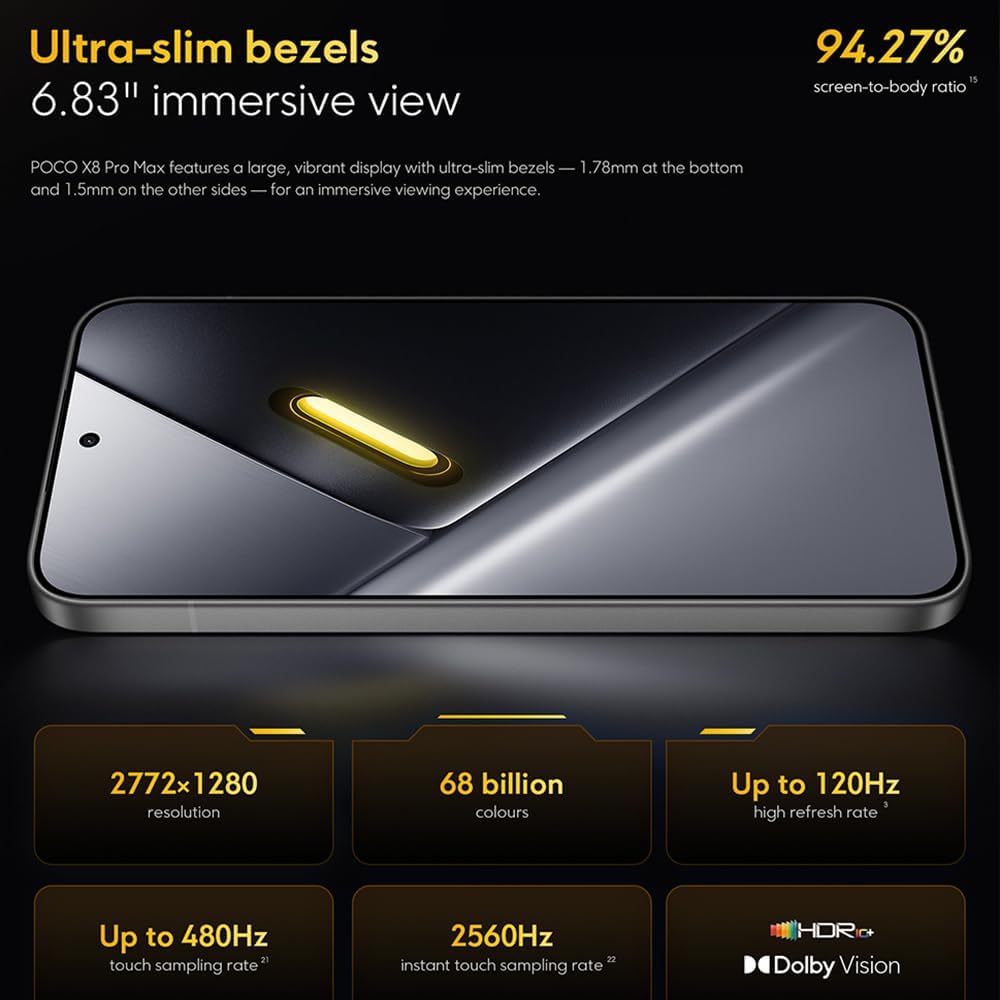
Image: The 6.83-inch 1.5K ultra-bright AMOLED display with minimal bezels.
4.2 Arụmọrụ
Powered by the Mediatek Dimensity 9500s chipset (3nm, 4+4 All Big Core architecture, NPU890 AI processor), the POCO X8 Pro Max 5G delivers high performance. The POCO 3D IceLoop cooling system ensures efficient heat dissipation, maintaining optimal performance during intensive tasks like gaming.

Image: Diagram illustrating the Mediatek Dimensity 9500s flagship platform.

Image: Illustration of the 5800mm² ultra-large LHP area for cooling.
Sistemụ igwefoto 4.3
The device features a 50 MP Light Fusion 600 main camera with OIS (Optical Image Stabilization) and an 8 MP ultra-wide camera. It supports portrait mode with bokeh + HDR and dynamic video-to-still conversion.

Image: Close-up of the 50 MP main camera and 8 MP ultra-wide camera system.
4.4 Batrị na Nchaji
Equipped with a massive 8500 mAh (typical) battery, the POCO X8 Pro Max 5G offers extended usage. It supports 100W HyperCharge, allowing for rapid recharging. A 16% ultra-high carbon-silicon content contributes to its high energy density.

Image: Illustration highlighting the massive 8500mAh battery capacity.

Image: Visual representation of the 100W HyperCharge technology.
4.5 Audio
The device features symmetrical dual stereo speakers (1115F) for a balanced and immersive audio experience.
Ngwanrọ 4.6
The POCO X8 Pro Max 5G comes with Xiaomi HyperOS 3 installed, offering an optimized and user-friendly interface based on Android 16.
5. Nlekọta
5.1 Na-ehicha ngwaọrụ gị
- Jiri ákwà dị nro, nke na-enweghị ihe e ji ehicha ákwà hichaa ihuenyo na azụ panel ahụ.
- Zere iji kemịkalụ siri ike, ihe ndị na-emebi emebi, ma ọ bụ ihe e ji aerosol fesaa.
- Maka isi ike smudges, ntakịrị dampen akwa na mmiri ma ọ bụ ihe nchacha ihuenyo e mere maka ngwá electronic.
5.2 Dust and Water Resistance
The device is certified for IP68 dust and water resistance. This means it can withstand immersion in up to 2 meters of water for 30 minutes under specific laboratory conditions. However, water and dust resistance may deteriorate over time with normal wear and tear. The warranty does not cover liquid damage. Avoid exposing the device to hot water, saltwater, or other liquids.

Image: Visual representation of the IP68 dust and water resistance.
5.3 Mmelite ngwanrọ
Na-enyocha ma wụnye mmelite ngwanrọ mgbe niile iji hụ na ngwaọrụ gị nwere njirimara kachasị ọhụrụ, ihe mkpuchi nchekwa, na mmezi arụmọrụ. Ị nwere ike ịchọta nhọrọ a na Ntọala > Gbasara ekwentị > Mmelite sistemụ.
6. Nchọpụta nsogbu
6.1 Okwu nkịtị na Ngwọta
- Ngwaọrụ anaghị agbanwu: Hụ na batrị ahụ agbajirila. Jikọọ ngwaọrụ ahụ na chaja ma chere nkeji ole na ole tupu ị nwaa ịgbanye ya ọzọ.
- Ihuenyo anaghị anabata: Try restarting the device by holding the power button for an extended period (e.g., 10-15 seconds) until it reboots.
- Ngwa na-akụda: Hichapụ ebe nchekwa nke ngwa nwere nsogbu (Ntọala> Ngwa> [Aha ngwa]> Nchekwa> Kpochapụ cache) or reinstall the app. Ensure your device software is up to date.
- Ndụ batrị adịghị mma: Check background app usage, reduce screen brightness, disable unnecessary features like GPS or Bluetooth when not in use, and ensure your software is updated.
- Nsogbu njikọ netwọkụ: Restart your device. Check if your SIM card is properly inserted. Toggle Airplane Mode on and off. Reset network settings (Ntọala> Sistemu> Nhọrọ Tọgharia> Tọgharia Wi-Fi, mkpanaka & Bluetooth).
6.2 nrụpụta nrụpụta
If you encounter persistent issues, a factory reset may be necessary. Ịdọ aka ná ntị: Nke a ga-ehichapụ data niile dị na ngwaọrụ gị. Kwado data dị mkpa tupu ịga n'ihu. Gaa na Ntọala> Sistemu> Nhọrọ Tọgharia> Hichapụ data niile (ntọgharị ụlọ ọrụ) ma soro ntuziaka na ihuenyo.
7. Nkọwapụta
| Njirimara | Nkọwapụta |
|---|---|
| Ụdị | XIAOMI |
| Aha Nlereanya | POCO X8 Pro Max 5G |
| Sistemụ nrụọrụ | Android 16 (with Xiaomi HyperOS 3) |
| Ike Nchekwa ebe nchekwa | 512 GB |
| Nha ihuenyo | 6.83 sentimita asatọ |
| Ụdị ngosi | AMOLED, 1.5K, 120Hz refresh rate |
| Teknụzụ ekwentị | 5G |
| Agba | Noir (Ojii) |
| Ụdị njikọ | USB Ụdị C |
| Nchekwa biometric | Fingerprint Recognition (Ultrasonic) |
| Ike batrị | 8500 mAh (Lithium-polymer) |
| Ịchaji | 100W HyperCharge |
| Igwefoto isi | 50 MP Light Fusion 600 with OIS |
| Igwefoto sara mbara nke ukwuu | 8 MP |
| Nhazi | Mediatek Dimensity 9500s |
| Uzuzu na mgbochi mmiri | IP68 |
| Afọ Ihe Nlereanya | 2025 |
| Mba onye si | China |
8. Akwụkwọ ikike na nkwado
For detailed warranty information and customer support, please refer to the warranty card included with your product or visit the official XIAOMI websaịtị. Debe ihe akaebe nke ịzụrụ maka akwụkwọ ikike.
Online resources and FAQs may also be available on the XIAOMI support portal.