
Okwu mmalite
This manual provides detailed instructions for the operation and maintenance of your RadioShack Portable CD Player Boombox. Please read this manual thoroughly before using the device to ensure proper function and to maximize your listening experience. This boombox combines classic CD playback with modern connectivity options including Bluetooth, FM radio, USB, and AUX input.
Kedu ihe dị na Igbe ahụ

Foto 1: Ihe dị n'ime igbe ahụ. This image displays the items included with your purchase: the boombox unit, AC power cord, remote control, and telescopic antenna.
- 1x RadioShack Portable CD Player Boombox Unit
- 1X AC Power Cord
- 1x njikwa anya
- 1x Telescopic Antenna (pre-attached)
- 1 x Akwụkwọ ntuziaka onye ọrụ (akwụkwọ a)
Note: 4 C batteries are required for portable operation and are not included.
Ngwaahịa gafereview na Atụmatụ
The RadioShack Portable CD Player Boombox offers multiple audio playback options and user-friendly controls.

Onyonyo 2: Isi atụmatụ. This diagram highlights the boombox's main functionalities including Bluetooth 5.0, various CD formats, USB MP3 playback, FM radio, AUX input, and playback modes.
- CD playback: Supports CD, CD-R, CD-RW, and CD-MP3 formats.
- Njikọ Bluetooth: Gbanye ọdịyo na ikuku site na ngwaọrụ dakọtara.
- Igwe Redio: Built-in tuner with telescopic antenna and 18 preset stations.
- USB playback: Kpọọ MP3 files ozugbo site na draịvụ USB.
- Ntinye AUX: Connect external audio devices via a 3.5mm cable.
- Ụdị ọkpụkpọ: Includes random, repeat, and program play functions.
- Njikwa anya: Maka ọrụ dị mma site n'ebe dị anya.
Melite
1. Ịkwanye ngwaọrụ

Figure 3: Power Options. The boombox can be powered by the included AC cord or by 4 C batteries for portable use.
Your boombox can be powered in two ways:
- Ike AC: Connect the included AC power cord to the AC input jack on the back of the boombox and then plug it into a standard wall outlet (110V-240V).
- Ike batrị: For portable use, open the battery compartment on the bottom of the unit and insert 4 "C" size batteries (not included), ensuring correct polarity (+/-). Close the compartment securely.
2. Antenna Setup (FM Radio)
Maka nnabata redio FM kacha mma, gbasaa antenna telescopic dị n'azụ ngwaọrụ ahụ nke ọma. Hazie ọnọdụ ya maka akara kacha mma.
Ntuziaka ọrụ
Njikwa izugbe
- bọtịnụ ike (⏻): Pịa ka ịgbanwuo ma ọ bụ gbanyụọ unit ahụ.
- Mpịakọta Mpịakọta: Tụgharịa n'akụkụ elekere ka iwelie olu, na-aga n'aka elekere ka ibelata.
- Function (FUNC) Button: Press to cycle through playback modes: CD, Bluetooth, FM, USB, AUX.
- Kwụsị/ Kwụsị (⏸/⏸) bọtịnụ: Na-amalite ma ọ bụ kwụsịtụ ọkpụkpọ.
- Kwụsị (⏹) bọtịnụ: Kwụsị ịkpọghachi ya.
- Skip/Search (⏮ / ⏭) bọtịnụ: Press briefly to skip tracks. Press and hold to search within a track.
Ịkpọghachi CD
- Open the CD compartment lid.
- Place a CD (CD, CD-R, CD-RW, or CD-MP3) onto the spindle with the label side facing up.
- Mechie mkpuchi nke CD ahụ nke ọma.
- Pịa ỌUNụ button until "CD" mode is selected.
- CD ahụ ga-amalite ịkpọ na akpaghị aka. Ọ bụrụ na ọ bụghị, pịa bọtịnụ ahụ. Gwuo/kwụsịtụ bọtịnụ.
Njikọ Bluetooth

Figure 4: Bluetooth Streaming. Easily stream audio from your smartphone or tablet to the boombox.
- Pịa ỌUNụ button until "BT" (Bluetooth) mode is selected. The display will show "BT" and flash, indicating it's in pairing mode.
- Na ngwaọrụ Bluetooth gị (ama, mbadamba), gaa na ntọala Bluetooth ya wee chọọ ngwaọrụ dị.
- Select "RadioShack Boombox" from the list.
- Once paired, the "BT" indicator on the boombox display will stop flashing and remain solid.
- You can now play audio from your device through the boombox.
FM Radio arụ ọrụ

Figure 5: FM Presets and Programmed Playback. Use the SCAN button to automatically save FM stations and REP/PROG for custom playback sequences.
- Pịa ỌUNụ button until "FM" mode is selected.
- Auto Scan and Save Presets: Pịa ma jide Nyochaa button (often combined with Play/Pause). The radio will automatically scan for and save up to 18 available FM stations.
- Akwụkwọ ntuziaka: Pịa nkenke Mafere/Chọọ bọtịnụ (⏮ / ⏭) to fine-tune the frequency.
- Ịhọrọ Preset: Pịa nkenke ỌRỤ button (often combined with Repeat) to cycle through saved preset stations.
USB playback
- Fanye draịva USB nwere MP3 files n'ọdụ ụgbọ mmiri USB.
- Pịa ỌUNụ button until "USB" mode is selected.
- The boombox will automatically detect and begin playing MP3 files site na USB mbanye.
- Jiri ihe Gwuo/kwụsịtụ, Kwụsị, na Mafere/Chọọ bọtịnụ iji jikwaa ịkpọghachi.
Ntinye aka AUX
- Jikọọ otu njedebe nke eriri ọdịyo 3.5mm (anaghị etinye ya) na jakị AUX IN na igbe igbe.
- Jikọọ nsọtụ nke ọzọ nke eriri na jakị ekweisi ma ọ bụ mmepụta ọdịyo nke ngwaọrụ ọdịyo mpụga gị (dịka ọmụmaatụ, MP3 player, smartphone).
- Pịa ỌUNụ bọtịnụ ruo mgbe ahọpụtara ọnọdụ "AUX".
- Jikwaa ọkpụkpọ egwu na olu site na ngwaọrụ ọdịyo mpụga gị.
Ojiji njikwa anya
The included remote control allows for convenient operation of most functions from a distance. Ensure the remote has working batteries (typically 2x AAA, not included) and point it towards the front of the boombox.
- Ike: Gbanyụọ / gbanyụọ unit ahụ.
- FUNC: Select input mode (CD, BT, FM, USB, AUX).
- Mpịakọta +/-: Gbanwee ọkwa olu.
- Play/Pause, Stop, Skip/Search: Jikwaa ịkpọghachi azụ.
- REP/PROG: Access repeat and program functions.
- Nyochaa: Auto-scan FM stations.
- EQ/SLEEP: Adjust equalizer settings or set sleep timer (refer to specific remote markings for details).
Playback Modes (CD/USB)
- Repeat (REP): Pịa REP button (on unit or remote) to cycle through repeat modes:
- Repeat One: Repeats the current track.
- Repeat All: Repeats all tracks on the CD/USB.
- Repeat Folder (for MP3 CDs/USB): Repeats all tracks in the current folder.
- Program (PROG): Allows you to program a specific order of tracks for CD or USB playback.
- In CD or USB mode, with playback stopped, press the ỌRỤ bọtịnụ.
- Jiri ihe Mafere/Chọọ buttons to select your desired track.
- Pịa ỌRỤ again to confirm and add the track to the program list.
- Repeat steps 2-3 to add more tracks.
- Pịa Gwuo/kwụsịtụ ịmalite ịkpọ egwu nke e mere na mmemme.
- Random/Shuffle: Some models may have a dedicated shuffle button (often labeled "RDM" or "SHUF") or it may be part of the REP/PROG cycle. This plays tracks in a random order.
Nlekọta
- Nhicha: Use a soft, dry cloth to clean the exterior of the boombox. Do not use abrasive cleaners or solvents. For the CD lens, use a specialized CD lens cleaner disc.
- Nchekwa: When not in use for extended periods, remove batteries to prevent leakage. Store the unit in a cool, dry place away from direct sunlight and extreme temperatures.
- Ngbanwe batrị: Replace all 4 "C" batteries simultaneously when they are depleted. Do not mix old and new batteries or different types of batteries.
- Nlekọta CD: Jikwaa CD n'akụkụ ha. Debe ha ọcha na enweghị ncha. Chekwaa ha n'ọnọdụ ha mgbe ejighị ya.
Nchọpụta nsogbu
| Nsogbu | Ihe nwere ike ime | Ngwọta |
|---|---|---|
| Enweghị ike | Ejikọghị eriri AC; Batrị agwụla ma ọ bụ tinye ezighi ezi. | Ensure AC cord is securely plugged in. Replace batteries with new ones, checking polarity. |
| Enweghị ụda | Volume too low; Incorrect input mode; Headphones connected. | Increase volume. Press FUNC to select correct mode. Disconnect headphones. |
| Ịwụfe CD ma ọ bụ na ọ naghị egwu egwu | CD dirty or scratched; CD inserted incorrectly; CD compartment not closed. | Clean CD. Reinsert CD correctly. Close lid firmly. Try another CD. |
| Bluetooth anaghị ejikọta | Boombox adịghị na ọnọdụ BT; Ngwaọrụ dị oke anya; Ngwaọrụ ejikọtara na ngwaọrụ ọzọ. | Ensure boombox is in BT mode and flashing. Move device closer. Disconnect from other devices. |
| Nnabata FM adịghị mma | Antenna not extended or positioned correctly; Weak signal area. | Fully extend and adjust the telescopic antenna. Try moving the unit to a different location. |
| USB adịghị egwu | USB drive not inserted correctly; Files not MP3 format; USB drive corrupted. | Reinsert USB drive. Ensure files are MP3. Try a different USB drive. |
Nkọwapụta
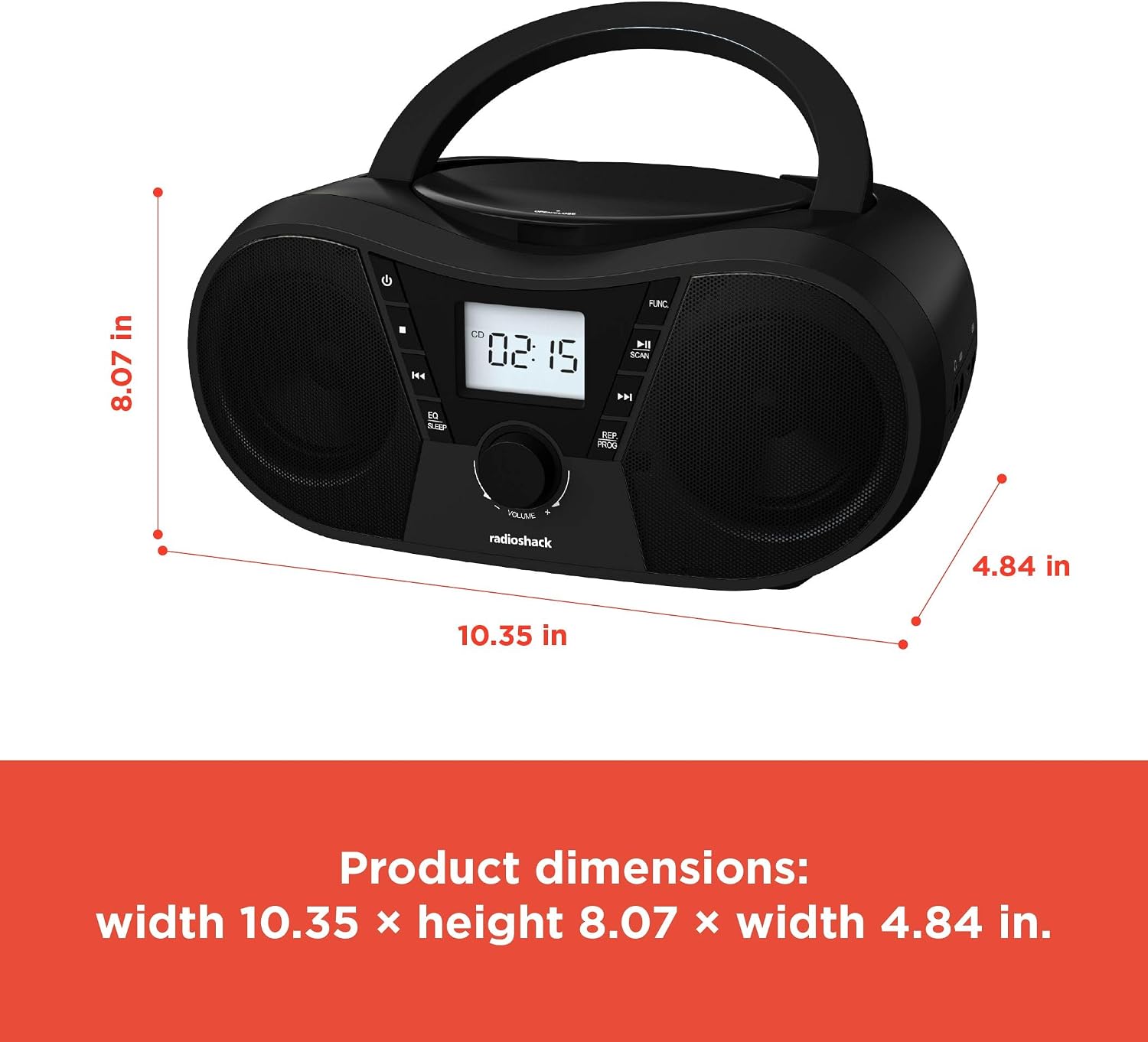
Ọgụgụ 6: Akụkụ ngwaahịa. The boombox measures approximately 10.35 inches wide, 8.07 inches high, and 4.84 inches deep.
| Njirimara | Nkọwa |
|---|---|
| Nọmba nlereanya | 1402010 |
| Isi Iyi Ike | AC 110V-240V ~ 50/60Hz or 4 x "C" Batteries (DC 6V) |
| Mgbasa ozi akwadoro | CD, CD-R, CD-RW, CD-MP3, USB (MP3), Bluetooth, FM Radio, AUX Input |
| Ụdị Bluetooth | 5.0 (Compatible) |
| Oke ugboro FM | 87.5 - 108 MHz |
| Ọnọdụ mmepụta ọdịyo | Stereo |
| Ọnụ ọgụgụ ndị na-ekwu okwu | 2 (Built-in Stereo Speakers) |
| Wattage | 10 watt |
| Nzaghachi ugboro ugboro | 20 Hz - 20000 Hz |
| Akụkụ (W x H x D) | Ihe dịka 10.35 x 8.07 x 4.84 sentimita asatọ |
| Agba | Nwa |
Akwụkwọ ikike na nkwado
This RadioShack Portable CD Player Boombox (Model 1402010) comes with a Akwụkwọ ikike nke afọ 1 site na ụbọchị ịzụrụ. Akwụkwọ ikike a na-ekpuchi ntụpọ n'ichepụta ihe na arụ ọrụ n'okpuru ojiji nkịtị.
For warranty claims, technical support, or customer service inquiries, please contact RadioShack customer support through their official websaịtị ma ọ bụ ozi kọntaktị enyere na akwụkwọ ịzụrụ ihe gị.
Biko dowe ihe akaebe nke ịzụrụ ihe maka ebumnuche ikike.