
1. Okwu mmalite
Thank you for choosing Monster Persona 6th ANC Active Noise Cancelling Headphones. These headphones are designed to provide a superior audio experience with advanced features such as Active Noise Cancellation, Bluetooth 6.0 connectivity, 60 hours of playtime, and three distinct music modes. This manual will guide you through the setup, operation, and maintenance of your new headphones to ensure optimal performance and longevity.
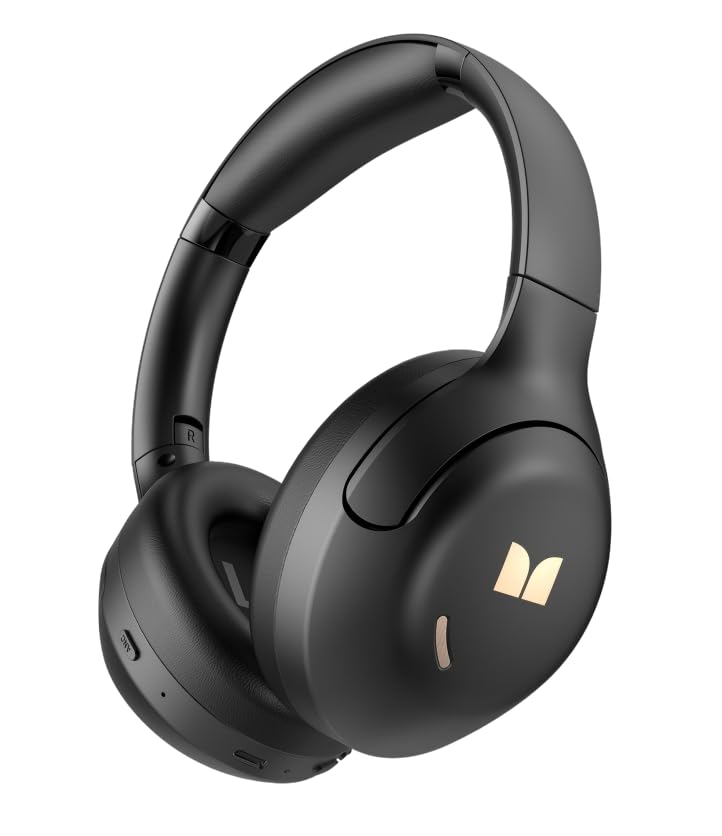
Foto 1.1: N'ihu view of the Monster Persona 6th ANC Active Noise Cancelling Headphones. The headphones feature a sleek, over-ear design with cushioned earcups and an adjustable headband, providing comfort for extended listening sessions.
2. Ihe ngwugwu
Biko lelee ngwungwu maka ihe ndị a:
- Monster Persona 6th ANC Headphones × 1
- Ụdị-C eriri USB × 1
- Audio Cable × 1 (for wired connection)
- Akwụkwọ ntuziaka onye ọrụ × 1
3. Nhazi
3.1 Ịchaji ekweisi
Before first use, fully charge your headphones. A full charge takes approximately 2-3 hours.
- Jikọọ eriri chaja Type-C na ọdụ chaja dị na ekweisi.
- Jikọọ nsọtụ nke ọzọ nke eriri na ihe nkwụnye ọkụ USB (anaghị etinye ya) ma ọ bụ ọdụ ụgbọ USB nke kọmputa.
- Ihe ngosi LED ga-egosi ọkwa nchaji (dịka ọmụmaatụ, ọbara ọbara maka ịchaji, acha anụnụ anụnụ maka chaja zuru oke).
Ụgwọ ngwa ngwa: A 10-minute charge provides approximately 5 hours of playback.
Image 3.1: Location of the Type-C charging port on the Monster Persona 6th ANC Headphones. The port is typically located on the bottom edge of one earcup, alongside other control buttons.
3.2 Gbanyụọ/ gbanyụọ
- Ike Na: Press and hold the Power button for 3 seconds until the LED indicator flashes blue and you hear a power-on prompt.
- Gbanyụọ: Press and hold the Power button for 3 seconds until the LED indicator flashes red and you hear a power-off prompt.
3.3 Njikọ Bluetooth
Jikọta ekweisi gị na ngwaọrụ gị maka ọdịyo ikuku.
- Gbaa mbọ hụ na agbanyụrụ ekweisi.
- Press and hold the Power button for 5-7 seconds until the LED indicator flashes blue and red alternately, indicating pairing mode.
- Na ngwaọrụ gị (smartphone, tabletị, kọmpụta), mee ka Bluetooth nwee ike wee chọọ ngwaọrụ dị.
- Select "Monster Persona 6th ANC" from the list of devices.
- Once connected, the LED indicator will flash blue slowly, and you will hear a connection prompt.
Njikọ ngwaọrụ abụọ: These headphones support connecting to two Bluetooth devices simultaneously. After pairing with the first device, disable Bluetooth on the first device, pair with the second, then re-enable Bluetooth on the first device. The headphones should connect to both.
4. Na-arụ ọrụ ekweisi
4.1 Njikwa ntọala
| Ọrụ | Omume |
|---|---|
| Gbanyụọ/ Gbanyụọ | Pịa ma jide bọtịnụ Ike maka sekọnd abụọ. |
| Gwuo/kwụsịtụ | Press the Multi-function button (often the Power button when not powering on/off). |
| Elu elu | Short press '+' button. |
| Mpịakọta ọnụ | Short press '-' button. |
| Track na-esote | Long press '+' button. |
| Egwu gara aga | Long press '-' button. |
| Zaa/Kwụsị Oku | Pịa bọtịnụ Multi-function. |
| Jụ oku | Long press the Multi-function button. |
| Mee ka onye enyemaka olu rụọ ọrụ | Pịa bọtịnụ Multi-function ugboro abụọ. |
Image 4.1: Diagram illustrating the location and function of control buttons on the Monster Persona 6th ANC Headphones. Buttons typically include Power/Multi-function, Volume Up/Next Track, Volume Down/Previous Track, and an ANC mode button.
4.2 Music Modes (EQ Modes)
Your headphones feature three distinct music modes to optimize your listening experience. Press the dedicated EQ/Mode button to cycle through them:
- Ụdị kagbuo mkpọtụ na-arụ ọrụ (ANC): Reduces ambient noise for an immersive audio experience. Ideal for travel or noisy environments.
- Ụdị nghọta: Allows you to hear your surroundings while still enjoying your audio. Useful for awareness in urban environments or when interacting with others.
- Ụkpụrụ ọkọlọtọ: Provides a balanced, classic sound profile without active noise cancellation or transparency features.
4.3 Njikọ wired
You can use the included audio cable to connect your headphones to devices without Bluetooth capability or when the battery is depleted. Simply plug one end into the headphone's audio jack and the other into your device's 3.5mm audio output.
5. Nlekọta
5.1 Nhicha
- Jiri akwa dị nro, kpọrọ nkụ, hichaa ekweisi.
- Ejila ihe mkpocha abrasive, mmanya, ma ọ bụ ihe mgbaze kemịkal.
- Zere ịbanye mmiri n'ime oghere ọ bụla.
5.2 Nchekwa
- Chekwaa ekweisi n'ebe dị jụụ, kpọrọ nkụ, pụọ na ìhè anyanwụ kpọmkwem na oke okpomọkụ.
- If storing for an extended period, charge the headphones every three months to maintain battery health.
6. Nchọpụta nsogbu
Ọ bụrụ na ịnwee nsogbu na ekweisi gị, rụtụ aka na azịza ndị a na-ahụkarị:
| Nsogbu | Ngwọta |
|---|---|
| Igwe ekweisi anaghị agba ọkụ. | Ensure the headphones are charged. Connect to a power source using the Type-C cable. |
| Enweghị ike ijikọ na ngwaọrụ. | Ensure headphones are in pairing mode (flashing blue/red). Turn off and on Bluetooth on your device. Move headphones closer to the device. Clear previous Bluetooth connections on your device. |
| Enweghị ụda ma ọ bụ obere olu. | Check headphone and device volume levels. Ensure headphones are properly paired. Try playing different audio sources. If using wired connection, ensure cable is fully inserted. |
| ANC anaghị arụ ọrụ nke ọma. | Ensure ANC mode is activated. ANC is most effective against low-frequency, constant noise. It may not completely eliminate all sounds. |
| Njikọ na-adịte aka. | Ensure no obstacles between headphones and device. Move away from strong Wi-Fi signals or other Bluetooth devices that may cause interference. Keep within the 33 feet Bluetooth range. |
7. Nkọwapụta
| Njirimara | Nkọwa |
|---|---|
| Ụdị | Nnukwu anụ ọhịa |
| Aha Nlereanya | Monster Persona 6th ANC |
| Ntinye ntị | N'elu Ntị |
| Njikwa mkpọtụ | Nkagbu mkpọtụ nọ n'ọrụ |
| Teknụzụ Njikọta | Wireless (Bluetooth), Wired (3.5mm Audio Cable) |
| Ụdị Bluetooth | 6.0 |
| Oke Bluetooth | 33 ụkwụ (10 mita) |
| Ndụ batrị | Ruo awa iri abụọ |
| Nchaji ọdụ ụgbọ mmiri | Ụdị-C |
| Nha ọkwọ ụgbọ ala ọdịyo | 40 millimeters |
| Oke ugboro ugboro | 20Hz - 20,000Hz |
| Ụdị njikwa | Njikwa bọtịnụ |
| Ihe onwunwe | Plastic |
| Atụmatụ ndị ọzọ | 3 Music Modes (ANC, Transparency, Standard), Dual Device Connection, Hands-free Calling |
8. Akwụkwọ ikike na nkwado
8.1 Ozi akwụkwọ ikike
Your Monster Persona 6th ANC Headphones come with a Akwụkwọ ikike nke ụbọchị 180 site na ụbọchị azụrụ ya. Akwụkwọ ikike a na-ekpuchi ntụpọ nrụpụta na ọrụ aka n'oge ojiji nkịtị. Ọ naghị ekpuchi mmebi sitere na ojiji na-ezighị ezi, ihe mberede, mgbanwe na-akwadoghị, ma ọ bụ mmebi nkịtị.
8.2 Nkwado ndị ahịa
For technical assistance, warranty claims, or any questions regarding your Monster Persona 6th ANC Headphones, please contact Monster customer support through their official webebe nrụọrụ weebụ ma ọ bụ ụlọ ahịa ebe azụrụ ngwaahịa ahụ. Biko debe akwụkwọ nnata ịzụrụ ihe gị na ozi ụdị ngwaahịa gị dị njikere mgbe ị na-akpọtụrụ ndị na-akwado ya.