
Okwu mmalite
This manual provides essential information for setting up, operating, maintaining, and troubleshooting your new vivo V70 FE 5G smartphone. Please read this guide thoroughly to ensure optimal performance and longevity of your device. Keep this manual for future reference.
1. Nhazi
1.1 Unboxing na nlele mbụ
Upon opening the package, verify that all components are present and undamaged. The box contents typically include:
- vivo V70 FE 5G Smartphone
- eriri USB
- SIM Tray Ejector
- Akpa ekwentị
- Ihe nkwụnye ọkụ
- Screen Protector (pre-applied or in-box)
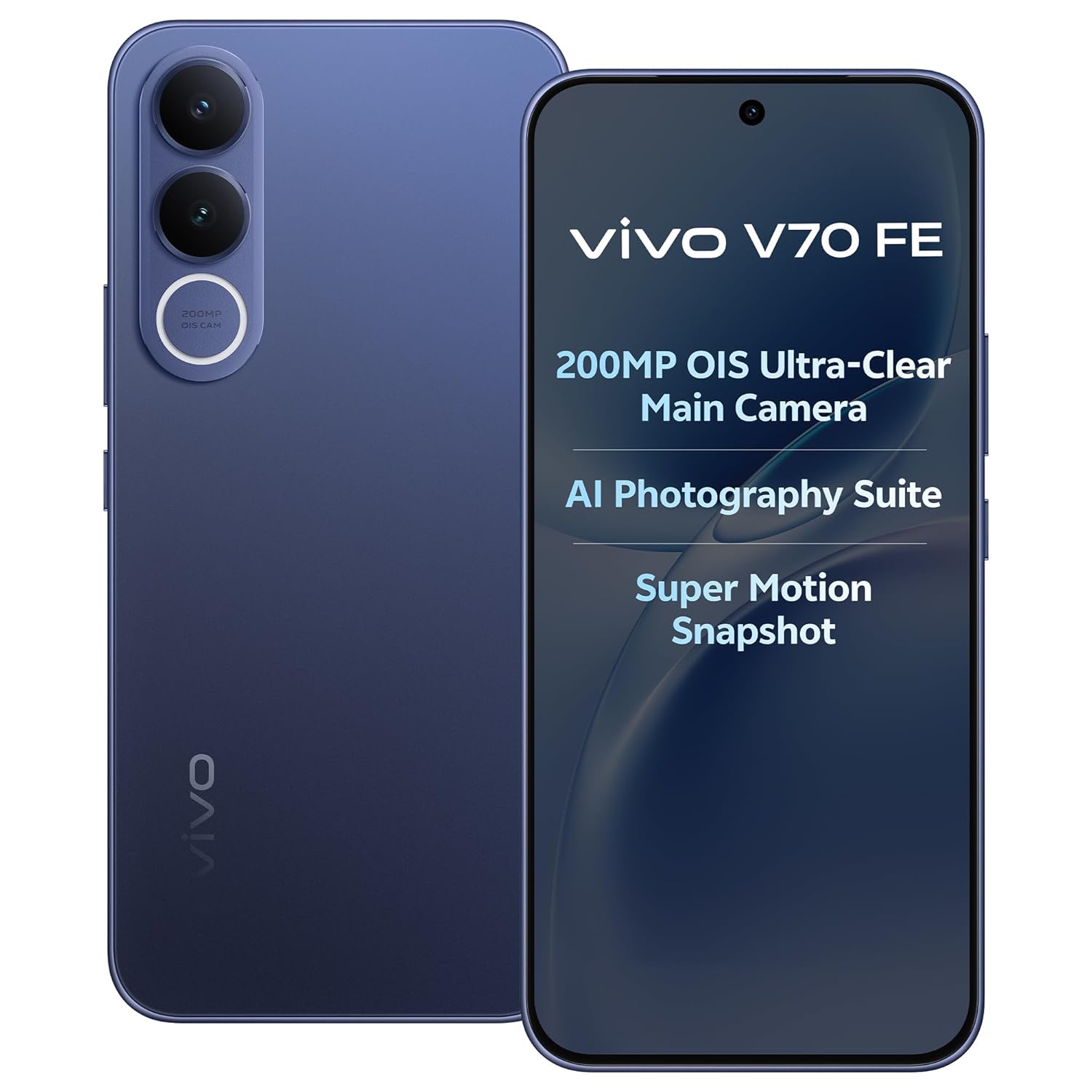
Image: The vivo V70 FE 5G smartphone in Monsoon Blue, showcasing ya imewe.
1.2 nwụnye kaadị SIM
- Chọta tray kaadị SIM n'akụkụ ngwaọrụ gị.
- Fanye ngwaọrụ mkpagharị SIM tray n'ime obere oghere dị n'akụkụ tray ahụ wee pịa nwayọ ruo mgbe tray ahụ pụtara.
- Tinye kaadị (s) Nano-SIM gị n'ime oghere ndị ahọpụtara na tray. Ngwaọrụ a na-akwado ọrụ SIM Dual.
- Jiri nlezianya tinyegharịa traị SIM n'ime ekwentị.
1.3 Initial Charging and Power On
Before first use, it is recommended to fully charge your device. Connect the provided USB cable to the phone's USB Type-C port and the power adapter, then plug it into a power outlet. The device supports 90W FlashCharge for rapid charging of its 7000mAh battery.
To power on, press and hold the Power button located on the side of the phone until the vivo logo appears. Follow the on-screen instructions to complete the initial setup wizard, including language selection, Wi-Fi connection, and Google account setup.
2. Ijikwa ngwaọrụ gị
2.1 Ngwaọrụ gafereview na Nhazi
The vivo V70 FE 5G features a minimalist design, crafted for a slim and clean aesthetic.

Image: The minimalist design of the vivo V70 FE 5G, emphasizing its sleek profile.
2.2 Display and User Interface
Your device is equipped with a 17.35 cm (6.83-inch) 1.5K Ultra Clear AMOLED Display, offering a resolution of 2800 x 1260 pixels, a 120Hz refresh rate, and HDR10+ support for vibrant visuals and smooth scrolling.

Image: The 1.5K Ultra Clear OLED Display of the vivo V70 FE 5G, highlighting its key display specifications.
The phone runs on OriginOS 6, providing a user-friendly interface with features like Drag & Go for easy file management, One Tap Transfer for quick data migration, and vivo Office Kit for productivity.

Image: OriginOS features including Drag & Go, One Tap Transfer, and vivo Office Kit.
2.3 Ọrụ igwefoto
The vivo V70 FE 5G is equipped with an advanced camera system:
- Igwefoto azụ: 200MP OIS Ultra-Clear Main Camera + 8MP 120° Wide-Angle Camera
- Igwefoto Selfie: 50 MP HD Selfie Camera with Eye AF Group Selfie

Foto: Zuru ezu view of the 200MP OIS Ultra-Clear Main Camera system.
Key camera features include:
- 200MP Ultra-Clear Cropping: Capture a single high-resolution shot and crop it into multiple scenes without losing detail.

Image: Demonstration of 200MP Ultra-Clear Cropping, showing how one shot can yield multiple compositions.
- AI Magic Weather: AI adjusts the sky, light, and automatically removes unwanted objects in your photos.

Foto: Examples of AI Magic Weather effects, transforming backgrounds from morning glow to twilight.
- AI Magic Landscape Mode: Enhance landscapes with AI, transforming scenes like deserts into islands or snow towns.

Image: Before and after comparisons using AI Magic Landscape Mode for various scenic transformations.
- 30X Superzoom with Telephoto Enhancement: Zoom in on distant subjects with clarity.

Image: Visual representation of 30X Superzoom, showing different levels of magnification.
- Super Motion Snapshot: Capture clear images of fast-moving subjects.

Image: Super Motion Snapshot in action, demonstrating its ability to capture clear images of moving subjects.
- 85 mm Close-Up Portrait: Achieve professional-looking portraits with various focal lengths.

Foto: Examples of 85mm Close-Up Portrait mode, illustrating different portrait styles.
2.4 Audio
Experience immersive sound with the Symmetrical Dual Stereo Speakers.

Image: Visual representation of the Symmetrical Dual Stereo Speaker system.
2.5 Arụmọrụ na Nchekwa
The device is powered by a Mediatek Dimensity 7400 CPU, coupled with 8GB RAM and 128GB internal memory (UFS 3.1) for ultra-fast performance and efficient multitasking.

Image: Illustration of LPDDR5 RAM and UFS 3.1 storage for enhanced speed.
2.6 Batrị na Nchaji
The vivo V70 FE 5G features a 7000mAh battery with 90W FlashCharge support. A full charge from 1% to 100% can be achieved in approximately 60 minutes. The battery provides up to 43.8 hours of YouTube video playback.

Image: Details on the 7000mAh battery capacity and 90W FlashCharge capabilities.
3. Nlekọta
3.1 Na-ehicha ngwaọrụ gị
To clean your phone, use a soft, lint-free cloth. Avoid using harsh chemicals, abrasive cleaners, or compressed air, as these can damage the screen or finish. For stubborn smudges, slightly dampen akwa na mmiri ma ọ bụ ihe nchacha ihuenyo ahaziri maka ngwá electronic.
3.2 Nlekọta batrị
To prolong battery life, avoid exposing your phone to extreme temperatures. While the 90W FlashCharge is efficient, avoid leaving the phone plugged in for extended periods after it's fully charged. For optimal battery health, try to keep the charge level between 20% and 80% when possible.
3.3 Mmelite ngwanrọ
Regularly check for and install software updates to ensure your device has the latest features, security patches, and performance improvements. You can usually find this option in your phone's Settings menu under 'System Update' or 'Software Update'.
3.4 Mgbochi mmiri na uzuzu
The vivo V70 FE 5G features IP68 & IP69 Top-Grade Dust and Water Resistance. This means it can withstand immersion in 1.5 meters of water for up to 120 minutes and offers 48 hours of rain resistance. However, water and dust resistance are not permanent conditions and may decrease over time with normal wear. Do not intentionally submerge the phone in water or expose it to liquids other than fresh water. Damage caused by liquid ingress is not covered under warranty.

Image: The vivo V70 FE 5G demonstrating its IP68 & IP69 dust and water resistance.
4. Nchọpụta nsogbu
This section addresses common issues you might encounter with your vivo V70 FE 5G.
4.1 Ngwaọrụ anaghị agba ọkụ
- Ensure the battery is charged. Connect the phone to the charger and wait a few minutes before attempting to power it on again.
- Pịa ma jide bọtịnụ Ike maka opekata mpe sekọnd 10-15 iji malitegharịa ma ọ bụ gbanyụọ ya.
4.2 Okwu nchaji
- Check if the USB cable and power adapter are securely connected to both the phone and the power outlet.
- Try using a different power outlet or a different compatible charger and cable to rule out faulty accessories.
- Lelee ọdụ ụgbọ mmiri ịchaji maka irighiri ma ọ bụ mmebi ọ bụla.
4.3 Nsogbu Njikọta Netwọk
- Ensure your SIM card is correctly inserted and activated.
- Check if Airplane Mode is disabled in your phone's Quick Settings or Settings menu.
- Malitegharịa ekwentị gị.
- Go to Settings > Network & internet > Mobile network and ensure your preferred network type (e.g., 5G) is selected and data roaming is enabled if necessary.
4.4 Ndahie ma ọ bụ oyi na-eme na ngwa
- Mechie ma meghee ngwa nsogbu ahụ.
- Hichapụ ebe nchekwa na data nke ngwa ahụ (Ntọala > Ngwa > [Aha Ngwa] > Nchekwa > Hichapụ ebe nchekwa/Hichapụ data).
- Hụ na emelitere ngwa ahụ na ụdị kachasị ọhụrụ ya site na Google Play Store.
- Ọ bụrụ na nsogbu ahụ anọgide, tụlee iwepụ ma tinyegharịa ngwa ahụ.
4.5 nrụpụta nrụpụta
Ọ bụrụ na ị na-enwe nsogbu ngwanrọ na-aga n'ihu, nrụpụta ụlọ ọrụ nwere ike idozi ha. Ịdọ aka ná ntị: A factory reset will erase all data on your phone. Back up important data before proceeding.
- Gaa na Ntọala> Sistemụ> Nhọrọ Tọgharịa.
- Họrọ 'Hichapụ data niile (ntọgharị ụlọ ọrụ mmepụta ihe)'.
- Kwado mkpebi gị wee tinye PIN/paswọọdụ gị ma ọ bụrụ na kpaliri gị.
5. Nkọwapụta
| Njirimara | Nkọwapụta |
|---|---|
| Ụdị | vivo |
| Nlereanya | V70 FE 5G |
| Sistemụ nrụọrụ | OriginOS 6 |
| Ebe nchekwa RAM | 8 GB |
| Nchekwa nke ime | 128GB (UFS 3.1) |
| Ụdị CPU | Mediatek Dimensity 7400 |
| Ngosipụta nha | 17.35 cm (6.83 sentimita) |
| Ụdị ngosi | AMOLED |
| Ngosipụta mkpebi | 2800 x 1260 (Maximum: 1080 x 2400) |
| Igwefoto azụ | 200 MP (OIS Ultra-Clear Main) + 8 MP (120° Wide-Angle) |
| Igwefoto ihu | 50 MP (HD Selfie) |
| Ike batrị | 7000 mAh |
| Ịchaji | 90W FlashCharge |
| Oghere kaadi SIM | SIM abụọ |
| Njikọta | 5G, Bluetooth, Built-In GPS, USB Type C |
| Ọkwa Nguzogide mmiri | IP68 & IP69 (Not Water Resistant - see maintenance section) |
| Akụkụ akụkụ | 16.4 x 7.6 x 0.8 centimita |
| Ibu Ibu | 200 grams |
| Afọ Nlereanya | 2026 |
6. Akwụkwọ ikike Ozi
Your vivo V70 FE 5G comes with a 1-year manufacturer warranty for the device na 6 months for in-box accessories, effective from the date of purchase. This warranty covers manufacturing defects under normal use. Please retain your proof of purchase for warranty claims. The warranty does not cover damage caused by misuse, accidents, unauthorized repairs, or liquid ingress.
7. Nkwado
For further assistance, technical support, or service inquiries, please contact vivo customer support. You can find more information and contact details on the official vivo website or through the vivo store.
Onye nrụpụta: vivo Mobile India Pvt Ltd Plot No 08, Sector 24, Yamuna Expressway Area, Gautam Buddha Nagar, Uttar Pradesh, 201310
Onye mbubata: Vivo Mobile India Pvt Ltd
Storelọ ahịa n'ịntanetị: Visit the vivo Store on Amazon.in