
1. Okwu mmalite
Daalụ maka ịzụrụasing the Audizio Laredo Bluetooth Turntable. This manual provides essential information for the safe and correct operation of your device. Please read it thoroughly before use and keep it for future reference.
Akụkụ ndị bụ isi:
- Integrated HiFi speakers with 160W total power output.
- Bidirectional Bluetooth for wireless audio streaming (in and out).
- High-quality Audio Technica cartridge for precise playback.
- Supports 7, 10, and 12-inch vinyl records at 33 and 45 RPM.
- Adjustable counterweight on the aluminum tonearm.
- RCA Line Out for external ampndị na-ekwu okwu.
- AUX Input for connecting external audio sources.
- Elegant bamboo finish.
Kedu ihe dị na igbe:
- Audizio Laredo Turntable Unit
- Akwụkwọ ntuziaka
- Ihe nkwụnye ọkụ
- 45 RPM Adapter for singles
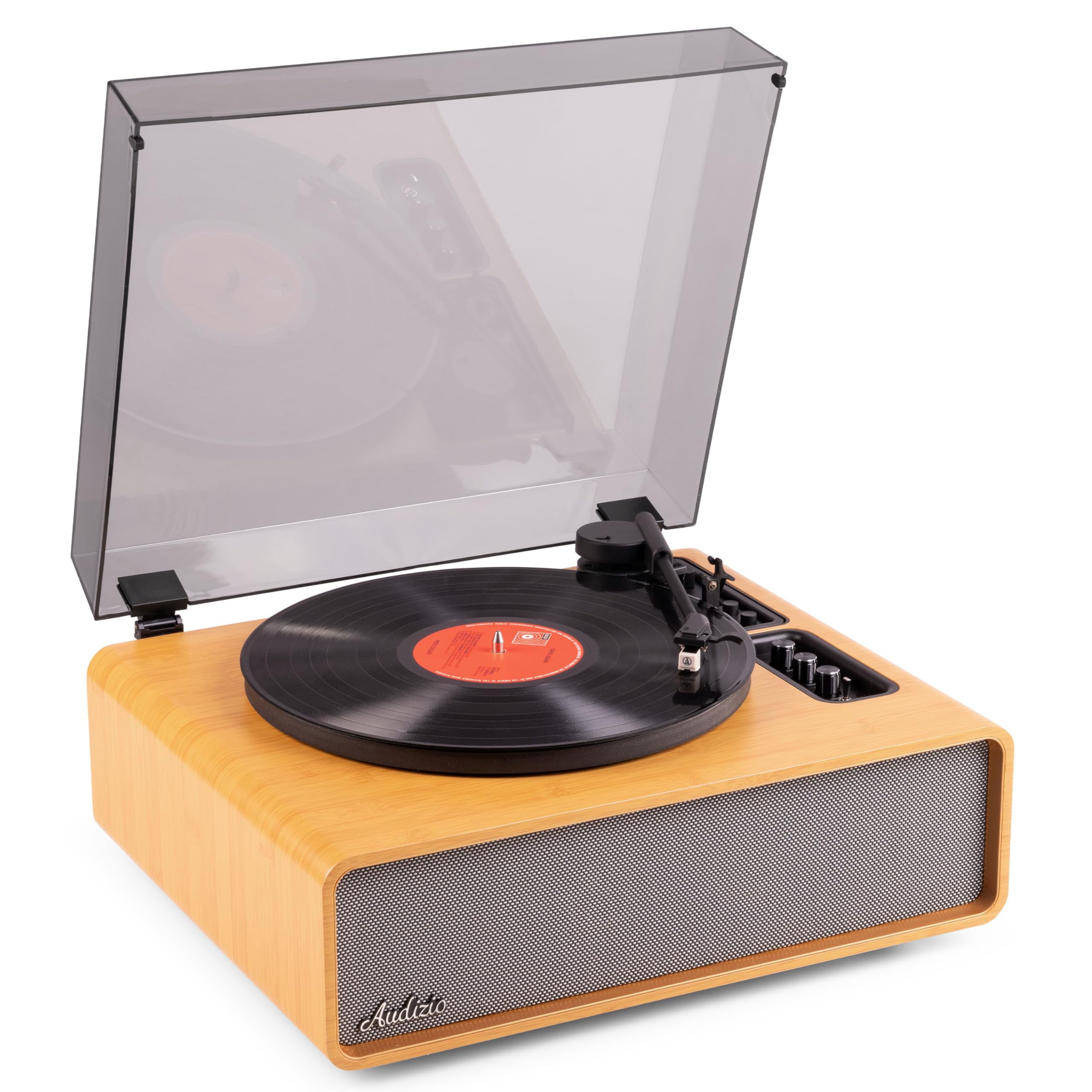
Figure 1.1: Audizio Laredo Turntable, overall view.
2. Ntuziaka nchekwa
Please read and follow these safety instructions carefully to prevent damage to the unit and ensure your safety.
- Ewepụla unit ahụ na mmiri ozuzo ma ọ bụ mmiri iji gbochie ọkụ ma ọ bụ ujo eletrik.
- Emeghela casing. Enweghị akụkụ ndị ọrụ ga-arụ ọrụ n'ime. Kpọtụrụ ndị ọrụ ruru eru ọrụ niile.
- Place the unit on a stable, level surface to prevent it from falling.
- Debe ihe ahụ ka ọ ghara ịpụta ìhè n'anwụ, ebe okpomọkụ na-esi apụta, na ájá gabigara ókè.
- Hụ na ikuku dị mma gburugburu ebe ahụ. Ekpuchila oghere ikuku.
- Jiri naanị nkwụnye ọkụ enyere.
- Kwupụ ngwaọrụ ahụ n'oge oke mmiri ozuzo ma ọ bụ mgbe ejighi ya ogologo oge.
3. Ngwaahịa gafereview
Familiarize yourself with the components and controls of your Audizio Laredo turntable.
Isi Components:
- Platter: Supports the vinyl record.
- Ụda olu: Na-ejide katrij na stylus.
- Cartridge & Stylus: Reads the grooves of the record. (Audio Technica ATN-3600)
- Mkpuchi uzuzu: Na-echebe efere na tonearm site na uzuzu.
- Ndị na-ekwu okwu ọnụ: For direct audio playback.
- Ogwe njikwa: For power, volume, tone, and mode selection.
- Njikọ azụ: RCA Line Out, AUX In, Power Input.

Foto 3.1: Top view of the turntable with key components visible.

Figure 3.2: Control Panel for volume, bass, and treble adjustments.

Figure 3.3: Audio Technica ATN-3600 Cartridge and Stylus.

Figure 3.4: Tonearm base with speed and auto-stop controls.

Figure 3.5: Rear connection panel.
4. Nhazi
4.1 Nwepu
- Carefully remove the turntable from its packaging.
- Remove all protective materials, including the stylus guard.
- Jikwaa nkwakọ ngwaahịa maka njem ma ọ bụ nchekwa n'ọdịnihu.
4.2 Ntinye
- Place the turntable on a stable, level surface to prevent vibrations and ensure proper playback.
- Avoid placing the unit near strong magnetic fields, heat sources, or areas with high humidity.
4.3 Nwụnye Mkpuchi Uzuzu
- Align the hinges of the dust cover with the slots on the back of the turntable.
- Gently push down until the cover is securely in place.
- The dust cover can be removed for playback if desired.

Figure 4.1: Turntable with dust cover.
4.4 Njikọ ike
- Connect the power adapter to the DC IN port on the rear of the turntable.
- Plug the adapter into a suitable wall outlet (220V).
4.5 Tonearm and Cartridge Setup
- The Audio Technica cartridge is pre-installed.
- The tonearm features an adjustable counterweight. Refer to the detailed instructions in the included manual for precise counterweight adjustment to optimize tracking force.
5. Ntuziaka ọrụ
5.1 Ịkpọ egwu ndekọ
- Place a vinyl record on the platter. If playing a 7-inch single, use the included 45 RPM adapter.
- Select the appropriate speed (33 or 45 RPM) using the speed selector switch near the tonearm base.
- Jiri nwayọ bulie ogwe aka ahụ elu site na iji ihe na-eme ka ọ dị nro.
- Position the tonearm over the desired track of the record.
- Jiri nwayọ wedata ogwe aka ahụ site na iji ihe na-eme ka ụda olu dị nro. Stịlọs ahụ ga-akpọtụ na ndekọ ahụ, a ga-amalitekwa ịkpọghachi ya.
- At the end of the record, the auto-stop function will automatically stop the platter rotation. Lift the tonearm and return it to its rest.

Figure 5.1: Playing a vinyl record.
5.2 Bluetooth Operation (Bidirectional)
The Laredo turntable supports both Bluetooth input (receiving audio from a device) and Bluetooth output (sending audio to a Bluetooth speaker/headphones).
Bluetooth Input (BT IN):
- Press the MODE/POWER button to select Bluetooth mode. The LED indicator will flash.
- On your smartphone or tablet, enable Bluetooth and search for 'Audizio Laredo'.
- Select the turntable to pair. Once connected, the LED will glow solid.
- You can now stream audio from your device to the turntable's integrated speakers.
Bluetooth Output (BT OUT):
- Hụ na ekweisi Bluetooth gị ma ọ bụ igwe okwu gị nọ n'ọnọdụ njikọta.
- Set the BT OUT switch (located near the tonearm base) to 'ON'.
- The turntable will automatically search for and connect to the nearest Bluetooth audio device.
- Once connected, the audio from your vinyl record will be transmitted to your Bluetooth device.

Figure 5.2: Bidirectional Bluetooth functionality.
Ntinye AUX 5.3
- Connect an external audio device (e.g., MP3 player, CD player) to the AUX IN port on the rear of the turntable using a 3.5mm audio cable.
- Press the MODE/POWER button to select AUX mode.
- Audio from the external device will play through the turntable's speakers.
5.4 RCA Line Out
- To connect the turntable to an external amplifier or powered speakers, use an RCA cable (not included) to connect the LINE OUT ports on the rear of the turntable to the corresponding input on your audio system.
- Ensure the 'Speaker ON/OFF' switch on the rear is set to 'OFF' if you only want sound from external speakers.
5.5 Njikwa olu na ụda olu
- Use the VOLUME knob on the control panel to adjust the overall playback volume.
- Adjust the BASS and TREBLE knobs to fine-tune the audio output to your preference.
6. Nlekọta
6.1 Na-ehicha ngalaba ahụ
- Wipe the dust cover and cabinet with a soft, dry cloth.
- Ejila ihe nchacha abrasive, waxes, ma ọ bụ ihe mgbaze.
- For the platter, use a slightly damp ákwà na nkụ nke ọma.
6.2 Stylus Care and Replacement
- The stylus is a delicate component. Handle it with care.
- Clean the stylus regularly using a soft brush designed for stylus cleaning, brushing from back to front.
- A stylus typically lasts for approximately 300-500 hours of playback. If you notice a decrease in sound quality or increased skipping, it may be time to replace the stylus.
- Replacement styli (e.g., Audio Technica ATN-3600L or compatible) can be purchased from authorized dealers. Refer to the detailed instructions provided with the replacement stylus for installation.
7. Nchọpụta nsogbu
If you encounter issues with your turntable, please consult the following table before contacting support.
| Nsogbu | Ihe nwere ike ime | Ngwọta |
|---|---|---|
| Enweghị ike | Power adapter not connected; Power outlet not working. | Ensure power adapter is securely connected to the unit and a working outlet. |
| Enweghị ụda sitere na ndị ọkà okwu | Volume too low; Speaker ON/OFF switch is OFF; Incorrect mode selected. | Increase volume; Set 'Speaker ON/OFF' switch to ON; Select correct input mode (Phono, BT IN, AUX). |
| Ndekọ ịwụ elu | Record is dirty or damaged; Stylus is worn or dirty; Turntable not level; Tracking force incorrect. | Clean record; Clean or replace stylus; Place turntable on a level surface; Adjust tonearm counterweight. |
| Nsogbu njikọta Bluetooth | Device too far; Turntable not in pairing mode; Interference. | Ensure devices are within range; Re-enter pairing mode; Turn off other Bluetooth devices. |
| Mgbagwoju anya ụda | Volume too high; Stylus worn; Record damaged. | Reduce volume; Replace stylus; Try a different record. |
8. Nkọwapụta
Technical specifications for the Audizio Laredo Turntable.
| Njirimara | Nkọwapụta |
|---|---|
| Aha Nlereanya | Laredo (101.537) |
| Akụkụ (L x W x H) | 43.2 x 43.2 x 21 cm (17 x 17 x 8.3 inch) |
| Ibu ngwaahịa | 7.65 n'arọ (16.86 lbs) |
| Ihe onwunwe | Wood (Bamboo finish) |
| Ọsọ ntụgharị | 33 RPM, 45 RPM |
| Ridgedị Cartridge | Audio Technica (ATN-3600) |
| Ụdị moto | Eriri mbanye |
| Ụdị mgbaàmà | Analọg |
| Ndị na-ekwu okwu ọnụ | Yes, 160W total output |
| Ụdị Bluetooth | 5.4 (Bidirectional) |
| Njikọta | Bluetooth (In/Out), RCA Line Out, AUX In |
| Isi Iyi Ike | Igwe ọkụ eletrik |
| Voltage | 220 volts |
| Ngwa dakọtara | Speakers, Headphones, Smartphone, Tablet |
9. Akwụkwọ ikike na nkwado
9.1 Ozi akwụkwọ ikike
This Audizio Laredo Turntable comes with a 2-afọ akwụkwọ ikike from the date of purchase. This warranty covers manufacturing defects and faults under normal use. It does not cover damage caused by misuse, accidents, unauthorized modifications, or normal wear and tear (e.g., stylus wear).
Biko dowe ihe akaebe nke ịzụrụ ihe maka akwụkwọ ikike.
9.2 Nkwado ndị ahịa
If you have any questions, require technical assistance, or need to make a warranty claim, please contact your retailer or visit the official Audizio websaịtị maka akụrụngwa nkwado na ozi kọntaktị.
Official Audizio Websaịtị: www.audizio.com