
1. Okwu mmalite
This manual provides detailed instructions for the installation, operation, and maintenance of your Zebronics DMS200 Monitor Desk Stand. Please read this manual thoroughly before installation and use to ensure proper function and safety. The DMS200 is designed to support monitors from 17 to 32 inches, with a maximum load capacity of 7 kg, offering ergonomic adjustments for an optimized viewahụmahụ.

Image 1.1: Zebronics DMS200 Monitor Desk Stand overview.
2. Ozi nchekwa
Biko debe ihe nchekwa nchekwa ndị a iji gbochie mmerụ ahụ ma ọ bụ mebie ngwaahịa a:
- Agafela ikike ịdị arọ kacha nke kilogram 7 (15.4 lbs).
- Ensure the desk surface is stable and strong enough to support the combined weight of the stand and monitor.
- Always follow the installation instructions carefully. Improper installation can lead to equipment damage or personal injury.
- Keep children and pets away during installation. Small parts may be a choking hazard.
- Etinyela skru ndị ahụ ike karịa, n'ihi na nke a nwere ike imebi ihe.
- Regularly check all connections to ensure they remain secure.
3. Ihe ngwugwu
Chọpụta na akụrụngwa niile dị tupu ịmalite nrụnye:
- Nyochaa Mgbakọ ogwe aka
- Ogige Clamp (C-clamp)
- Grommet Ugwu Base
- VESA Efere
- Hardware Kit (screws, washers, Allen keys)
- Akwụkwọ ntuziaka
4. Ntọala na nwụnye
The Zebronics DMS200 offers two installation methods: C-clamp and Grommet mount. Choose the method best suited for your desk.
4.1. Choosing a Mounting Method
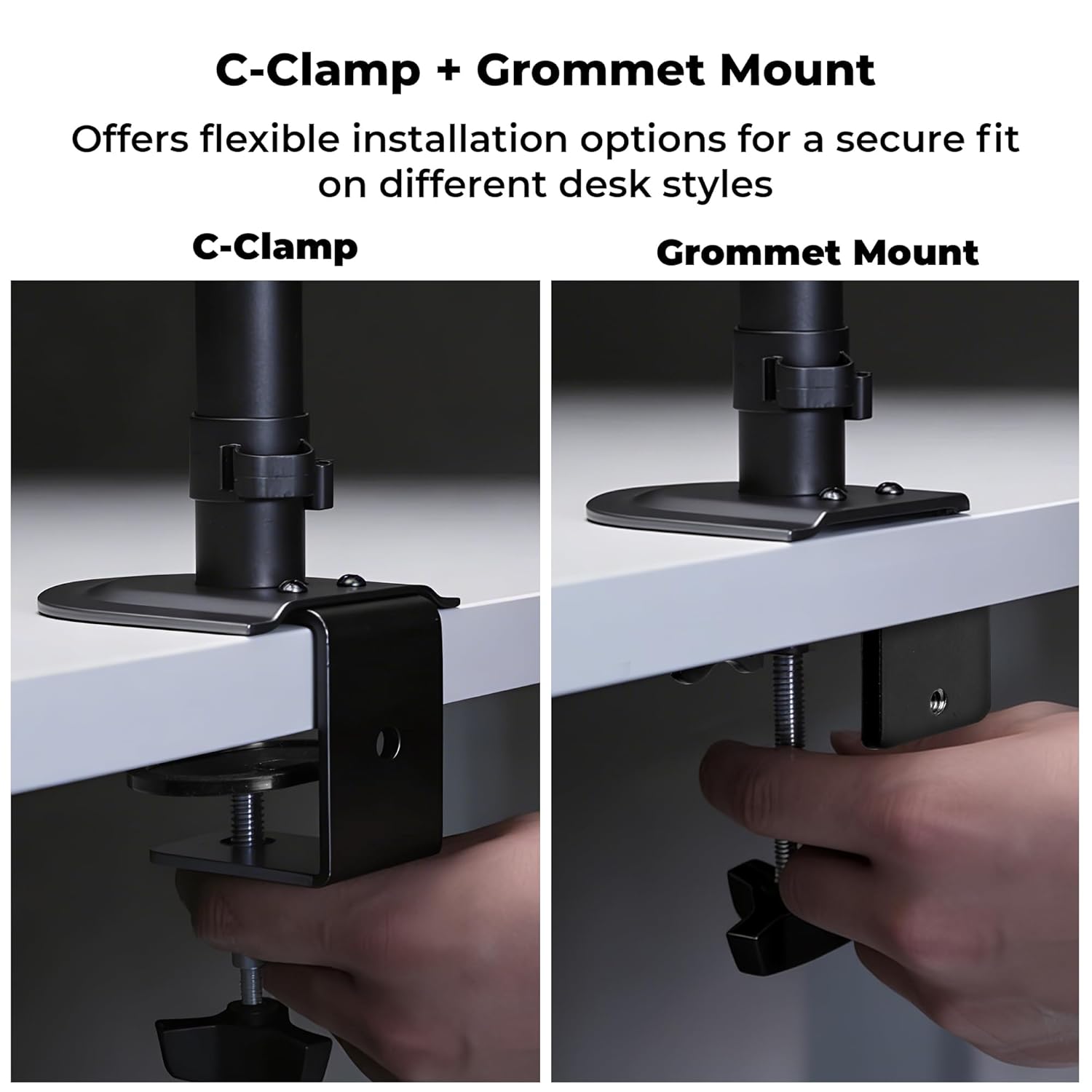
Image 4.1: C-Clamp and Grommet Mount options.
- C-Clamp: Ideal for desks without pre-drilled holes. Clamps to the edge of the desk.
- Ugwu Grommet: Requires a pre-drilled hole (or drilling one) in the desk. Provides a more flush installation.
4.2. C-Clamp Nwụnye
- Tinye C-clamp to the bottom of the main pole.
- Position the stand on the edge of your desk.
- Mechie C-clamp screw until the stand is securely fastened to the desk. Ensure it is stable and does not wobble.
4.3. Grommet Mount Installation
- Gbasaa C-clamp from the main pole if it was pre-attached.
- Insert the main pole through the grommet hole in your desk.
- Secure the grommet base plate and tighten the nut from underneath the desk until the stand is firm.
4.4. Ensuring Stability
After mounting the stand, verify its stability on the desk. The anti-slip base and robust construction ensure reliable support for monitors up to 7 kg.

Image 4.4: Stand stability and maximum load capacity.
4.5. Ịtinye ihe nlele ahụ
The DMS200 supports VESA patterns of 75x75mm and 100x100mm.

Image 4.5: VESA mount plate for monitor attachment.
- Attach the VESA plate to the back of your monitor using the appropriate screws from the hardware kit. Ensure the screws are not overtightened.
- Carefully slide the monitor (with the VESA plate attached) onto the monitor arm's mounting head.
- Secure the monitor to the arm by tightening the locking screw or mechanism on the mounting head.
4.6. Njikwa USB
Utilize the integrated cable management clips to keep your workspace tidy.

Image 4.6: Integrated cable management.
- Route your monitor's power and display cables through the clips located along the arm and pole.
- Ensure cables have enough slack for full range of motion without being strained.
5. Ntuziaka ọrụ
The DMS200 monitor arm provides various adjustments for optimal ergonomic positioning.

Image 5.1: Monitor arm adjustment capabilities.
- Ndozi elu: Loosen the collar on the main pole, adjust the arm to the desired height, and then re-tighten the collar.
- Ndozi Tilt: The monitor can be tilted up to ±5°. Adjust the tilt angle by gently pushing or pulling the top or bottom of the monitor. If the monitor does not hold its position, tighten the tilt mechanism screw with an Allen key.
- Ndozi Swivel: The arm allows for ±90° swivel. Gently rotate the monitor left or right to achieve the desired viewakụkụ n'akuku.
- Ntughari: The VESA plate allows for 360° rotation, enabling portrait or landscape orientation. Rotate the monitor gently to switch orientations.
- Mgbatị aka: The mechanical arm can extend up to 42 cm. Adjust the arm's position by gently pulling or pushing it to bring the monitor closer or further away.
6. Nlekọta
To ensure the longevity and proper function of your monitor stand:
- Nhicha: Jiri nwayọ hichaa ihe nkwụnye ahụ, damp ákwà. Zere ihe nhicha ma ọ bụ ihe mgbaze nke nwere ike imebi ihe ahụ.
- Nyocha oge: Periodically check all screws and connections to ensure they are tight and secure. Re-tighten if necessary.
- Ike ibu: Do not place items on the monitor arm or exceed the maximum weight capacity.
7. Nchọpụta nsogbu
| Nsogbu | Ihe nwere ike ime | Ngwọta |
|---|---|---|
| Monitor sags or does not hold tilt position. | Tilt mechanism screw is loose. | Tighten the tilt adjustment screw on the VESA head using the provided Allen key. |
| Stand wobbles or is unstable. | Ogwe clamp/grommet mount is not tight enough. | Mee ka C-cl sie ike ọzọamp or grommet mount screw/nut. Ensure the desk surface is stable. |
| Monitor cannot be rotated or swiveled smoothly. | Joints may be too tight or require lubrication. | Check for any obstructions. If joints are too stiff, apply a small amount of silicone-based lubricant (avoid oil-based). |
| Cables are strained during adjustment. | Insufficient slack in cable management. | Re-route cables, ensuring enough slack is provided for the full range of arm movement. |
8. Nkọwapụta
| Njirimara | Nkọwa |
|---|---|
| Nlereanya | NJ200 |
| Nha ihuenyo akwadoro | 17-32 sentimita asatọ |
| Ike ibu kacha | 7 n'arọ (15.4 lbs) |
| Ndakọrịta VESA | 75x75mm, 100x100mm |
| Ụdị nkwụnye | C-Clamp, Ugwu Grommet |
| Ndozigharị | Height, Tilt (±5°), Swivel (±90°), Rotation (360°) |
| Mgbatị ogwe aka | Ruo 42 cm |
| Ihe onwunwe | Metal (Rust-Proof) |
| Agba | Nwa |
| Ibu Ibu | 1670 grams |
9. Akwụkwọ ikike na nkwado
Akwụkwọ ikike: The Zebronics DMS200 Monitor Desk Stand comes with a 1-year carry-in warranty to the service center from the date of purchase.
Nkwado: For technical assistance, troubleshooting, or warranty claims, please contact Zebronics customer support. Refer to the official Zebronics websaịtị ma ọ bụ akwụkwọ ịzụrụ ihe gị maka nkọwa kọntaktị.
Manufacturer: Zebronics India Private Limited, 13/7 Smith Road, Royapettah, Chennai, Tamil Nadu - 600 002, India.