
1. Okwu mmalite na gafereview
This manual provides essential instructions for setting up, operating, maintaining, and troubleshooting your iiyama SENSE INFINITY SENSE-15FH127-i7-UH1X-M laptop. This high-performance notebook features a 15.6-inch Full HD anti-glare display, an Intel Core i7-12650H processor, 16GB of DDR4 RAM, and a 1TB NVMe SSD, running on Windows 11 Home.
Please read this manual thoroughly before using your new laptop to ensure proper operation and to maximize its lifespan.

Foto 1.1: N'ihu view of the iiyama SENSE INFINITY laptop with the screen open.
2. Nhazi
2.1 Unboxing na nlele mbụ
Jiri nlezianya wepụ ihe niile dị na ngwugwu ahụ. Hụ na ihe ndị a gụnyere:
- iiyama SENSE INFINITY Laptop
- AC Adapter Set (AC adapter and power cord)
- Various Manuals
- Akwụkwọ ikike kaadị
Inspect the laptop and accessories for any signs of damage. If any items are missing or damaged, contact your retailer immediately.
2.2 Ijikọ nkwụnye ọkụ
Before first use, ensure the laptop battery is fully charged. Connect the AC adapter to the power input port on the laptop and then plug the power cord into a wall outlet.

Foto 2.1: Akụkụ view illustrating the power input port and other external terminals.
2.3 Mbido Mmalite na Mbido Windows
Pịa bọtịnụ ike iji gbanye laptọọpụ ahụ. Soro ntuziaka dị na ihuenyo iji mezue usoro nhazi Windows 11 Home. Nke a gụnyere ịhọrọ mpaghara gị, asụsụ gị, ijikọ na netwọk, na ịmepụta akaụntụ onye ọrụ.

Figure 2.2: Laptop displaying the Windows 11 operating system interface.
3. Ntuziaka ọrụ
3.1 Ọnọdụ Ịgbanye/Mgbanyụ na Ụra Ike
- Ike Na: Pịa bọtịnụ ike dị n'elu ebe a na-etinye ihe n'ime keyboard ahụ.
- Gbanyụọ: Pịa bọtịnụ Malite na Windows, wee họrọ Ike> Mechie.
- Modera Modera: Mechie mkpuchi laptọọpụ ma ọ bụ họrọ Ike > Ụra site na menu Mmalite.
3.2 Iji ahụigodo na Touchpad
The laptop features a Japanese keyboard layout and a multi-touch compatible touchpad. Refer to the Windows operating system documentation for specific gestures and keyboard shortcuts.
3.3 Ijikọ ngwaọrụ mpụga
Laptọọpụ gị nwere ọdụ ụgbọ mmiri dị iche iche maka ijikọ ngwaọrụ mpụga:
- ọdụ ụgbọ mmiri USB: 2x USB 3.1 (Type-C), 1x USB 3.0, 1x USB 2.0 for connecting peripherals like mice, keyboards, and external storage.
- Ngosipụta arụpụta: 1x HDMI, 1x Mini DisplayPort for connecting external monitors or projectors.
- Jacks ọdịyo: 1x Headphone/Speaker Output, 1x Microphone Input for audio devices.
- Ihe na-agụ kaadị Micro SD: Insert a micro SD card to access stored data.
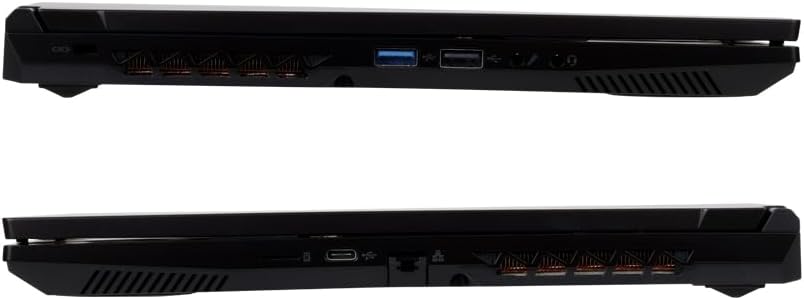
Ọgụgụ 3.1: Zuru ezu view of the laptop's external ports on both sides.
3.4 Njikọ netwọkụ
- Wi-Fi: The laptop supports Wi-Fi 6E (IEEE802.11 ax/ac/n/g/b/a). To connect, click the network icon in the taskbar, select your desired Wi-Fi network, and enter the password if prompted.
- Ekwentị LAN: Connect an Ethernet cable to the 1000BASE-T LAN port for a stable wired network connection.
- Bluetooth: The laptop includes Bluetooth 5 for connecting wireless peripherals such as headphones or speakers.
4. Nlekọta
4.1 Na-ehicha laptọọpụ
- Ihuenyo: Jiri akwa dị nro na-enweghị ntụpọ dampjiri mmiri ma ọ bụ ihe nhicha ihuenyo kpuchie ya. Afesala mmiri mmiri ozugbo na ihuenyo.
- Chassis na Keyboard: Jiri akwa dị nro ma kpọọ nkụ. Maka unyi isi ike, ntakịrị damp cloth can be used, ensuring no liquid enters the ports or vents.
- Oghere: Periodically use compressed air to clear dust from the cooling vents to maintain optimal airflow.
4.2 Nlekọta batrị
Ka ịgbatị ndụ batrị:
- Zere ịchaji batrị ugboro ugboro.
- Ekwela ka laptọọpụ ahụ nọrọ n'ọnọdụ okpomọkụ dị oke njọ.
- If storing the laptop for an extended period, charge the battery to approximately 50-60% before turning it off.
4.3 Mmelite ngwanrọ
Regularly update your Windows operating system and drivers to ensure optimal performance, security, and compatibility. Windows Update can be accessed via the Settings menu.
5. Nchọpụta nsogbu
This section addresses common issues you might encounter. For more complex problems, refer to the official iiyama support websaịtị ma ọ bụ kpọtụrụ ndị ahịa.
5.1 Enweghị Ike / Laptọọpụ Anaghị Agbanwu
- Gbaa mbọ hụ na ejikọrọ ihe nkwụnye ọkụ AC na kọmpụta ahụ yana ebe ọkụ na-arụ ọrụ.
- Lelee ma oghere ọkụ na-arụ ọrụ site na nkwụnye na ngwaọrụ ọzọ.
- Ọ bụrụ na batrị ahụ agbanyụọ kpamkpam, ọ nwere ike were nkeji ole na ole iji chajie kọmputa ahụ tupu laptọọpụ ahụ amalite ịgba ọkụ.
5.2 Ihe ngosi
- Ihuenyo oghere: Try pressing the function key combination (e.g., Fn + F5 or F7, depending on the model) to toggle the display output.
- External Monitor Not Detected: Ensure the cable is securely connected. Try restarting the laptop.
5.3 Nsogbu Njikọta Netwọk
- Wi-Fi: Verify that Wi-Fi is enabled in Windows settings. Restart your router and modem.
- Ekwentị LAN: Check the Ethernet cable connection. Ensure your network adapter drivers are up to date.
5.4 Ịrụ ọrụ nwayọ
- Mechie ngwa na-adịghị mkpa na-agba n'azụ.
- Ensure your operating system and drivers are updated.
- Jiri ngwanrọ antivirus a ma ama lelee ma ọ bụ malware.
- Ensure adequate free space on your 1TB SSD.
6. Nkọwapụta
The following table details the technical specifications of the iiyama SENSE INFINITY SENSE-15FH127-i7-UH1X-M laptop:
| Njirimara | Nkọwapụta |
|---|---|
| Ụdị | iyama |
| Nọmba nlereanya | SENSE-15FH127-i7-UH1X-M |
| Sistemụ nrụọrụ | Windows 11 Ụlọ |
| Nha ihuenyo | 15.6 sentimita asatọ |
| Mkpebi obodo | HD zuru oke (pikselụ 1920x1080) |
| Ụdị ngosi | Anti-glare Color LCD |
| Ụdị CPU | Intel Core i7-12650H Processor |
| Ọsọ CPU | Ruo 4.70GHz |
| Eserese | Ihe osise Intel UHD (Agbakwunyere) |
| Installed RAM Memory | 16GB DDR4-3200 S.O.DIMM (8GBx2) |
| Ebe nchekwa | 2 |
| Nchekwa | 1TB NVMe M.2 SSD (PCIe 4.0x4) |
| Ngwa anya | Emebeghi ya |
| Onye na-agụ kaadị | Micro SD kaadị Reader |
| Audio | High Definition Audio subsystem, Built-in Stereo Speakers, Built-in Microphone |
| Webcam | Pikselụ nde 1 |
| LAN arụnyere | 1000BASE-T LAN Port |
| Njikọ ikuku | Wi-Fi 6E (IEEE802.11 ax/ac/n/g/b/a), Bluetooth 5 |
| Ahụigodo | Japanese Keyboard |
| Ngwaọrụ na-atụ aka | Multi-touch compatible Touchpad |
| Ọdụ ụgbọ mmiri mpụga | Headphone/Speaker Output x1, Microphone Input x1, USB 3.1 (Type-C) x2, USB 3.0 x1, USB 2.0 x1, HDMI x1, Mini DisplayPort x1 |
| TPM | TPM2.0 compatible |
| Ndụ Batrị (Ịkpọgharị vidiyo) | Approx. 4.3 hours (JEITA3.0) |
| Ndụ batrị (anaghị arụ ọrụ) | Approx. 6.0 hours (JEITA3.0) |
| Ibu | Ihe ruru. 2.03kg (gụnyere batrị) |
| Akụkụ (WxDxH) | Approx. 360mm x 240mm x 27.7mm (including rubber feet) |
7. Akwụkwọ ikike na nkwado
7.1 Standard Warranty
This iiyama SENSE INFINITY laptop comes with a standard 1-afọ akwụkwọ ikike from the date of purchase. Please retain your proof of purchase and the warranty card for any warranty claims.
The warranty covers manufacturing defects and hardware failures under normal use. It does not cover damage caused by misuse, accidents, unauthorized modifications, or natural disasters.
7.2 Nkwado nka na ụzụ
For technical assistance, driver downloads, or further troubleshooting, please refer to the official iiyama support website. You can also find contact information for customer service on your warranty card or the official product page.
When contacting support, please have your laptop's model number (SENSE-15FH127-i7-UH1X-M) and serial number ready.