
1. Okwu mmalite
The Generic CM300 is a versatile 9-function digital multimeter designed for accurate electrical measurements in various environments. It features a 6000-count backlit LCD for clear readings, Non-Contact Voltage (NCV) detection for safety, and a CAT III 600V safety rating. This manual provides instructions for safe and effective use of your CM300 multimeter.
2. Ozi nchekwa
Ịdọ aka ná ntị: Always adhere to safety precautions when using electrical testing equipment. Failure to do so may result in injury or damage to the meter.
- The CM300 is rated for CAT III 600V. Do not exceed these voltage ókè.
- Always inspect test leads for damage before use. Replace if insulation is compromised.
- Hụ na ihe mgbanwe ọrụ ahụ dị n'ọnọdụ ziri ezi maka nha a na-eme.
- Anwala ịtụ voltage or current on circuits exceeding the meter's maximum ratings.
- Use caution when working with live circuits. Avoid contact with bare wires or terminals.
- Keep fingers behind the finger guards on the test probes.
- Dochie batrị ozugbo mgbe ihe ngosi batrị dị ala pụtara iji hụ na agụpụtara nke ọma.
3. Ngwaahịa gafereview
The CM300 Digital Multimeter includes the main unit and two 42-inch test probes (one red, one black).

Figure 3.1: CM300 Multimeter Rotary Dial and Display
Foto a na-egosi nkọwa zuru ezu view of the CM300 multimeter's central rotary dial, which is used to select different measurement functions. The backlit LCD display is visible above the dial, and various input jacks are located at the bottom of the device.
3.1 Akụkụ
- Ngosipụta LCD: 6000-count backlit display for clear readings.
- Ọrụ Mgbanwe Rotary: Selects measurement modes.
- Ntinye Jacks: For connecting test probes (COM, VΩmA, 10A).
- Test Probes: Red (positive) and Black (common/negative).
- Ihe mmetụta NCV: Located at the top of the meter for non-contact voltage nchọpụta.
- Bọtịnụ: HOLD/SELECT, REL, BACKLIGHT.
4. Nhazi
4.1 Ntinye batrị
- Hụ na agbanyụrụla multimeter ahụ.
- Chọta ebe batrị dị n'azụ mita ahụ.
- Jiri screwdriver mepee mkpuchi nke ebe batrị ahụ.
- Insert two AAA batteries, observing correct polarity (+/-).
- Dochie mkpuchi nke batrị batrị ma jiri nkedo chekwaa ya.
4.2 Connecting Test Probes
- Tinye isi ule ojii ahụ n'ime jakị "COM" (Common).
- Maka ọtụtụ nha (mkpụrụ)tage, resistance, continuity, capacitance, diode, battery test), insert the red test lead into the "VΩmA" jack.
- For current measurements (up to 10A), insert the red test lead into the "10A" jack.
5. Ntuziaka ọrụ
Before each measurement, ensure the test leads are correctly connected and the function switch is set to the appropriate range.
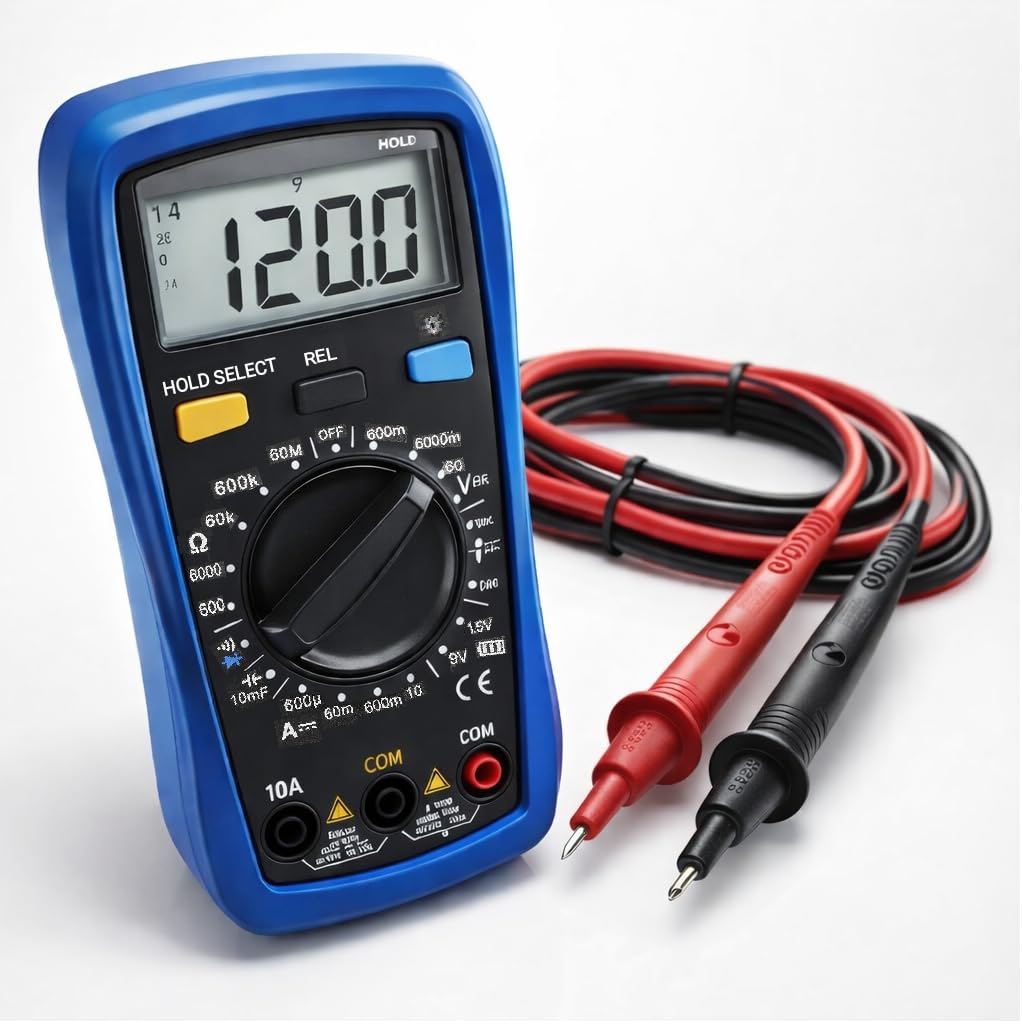
Figure 5.1: Measuring AC Voltage with CM300
This image illustrates the CM300 multimeter in use, displaying a voltage reading. A person is holding the blue multimeter while the red and black test probes are inserted into a standard wall outlet, demonstrating an AC voltage nha.
5.1 Gbanyụọ ma ọ bụ gbanyụọ
Rotate the function switch from "OFF" to any desired measurement function to power on the meter. Rotate it back to "OFF" to power off.
5.2 AC/DC Voltage Measurement (V~ / V--)
- Set the function switch to the "V~" (AC Voltage) or "V--" (DC Voltage) ọnọdụ.
- Jikọọ ihe nyocha ule ahụ n'otu akụkụ na sekit ma ọ bụ ihe a ga-atụ.
- Gụọ voltage uru na LCD ngosi.
5.3 DC Current Measurement (A--)
- Ịdọ aka ná ntị: Ensure the red test lead is in the "10A" jack for current measurements up to 10A, or "VΩmA" for lower current ranges.
- Set the function switch to the "A--" position.
- Open the circuit where current is to be measured and connect the meter in series.
- Gụọ uru dị ugbu a na ngosipụta LCD.
5.4 Nha Nguzogide (Ω)
- Set the function switch to the "Ω" position.
- Hụ na sekit ahụ anaghịzi enye ike tupu ị tụọ ihe ndị na-eguzogide ya.
- Connect the test probes across the component to be measured.
- Gụọ uru iguzogide na ngosipụta LCD.
5.5 Diode Test (->|-)
- Set the function switch to the "->|-" (Diode) position.
- Connect the red probe to the anode and the black probe to the cathode of the diode.
- A forward voltage drop will be displayed. Reverse the probes; an open circuit (OL) should be displayed for a good diode.
5.6 Capacitance Measurement (10mF)
- Set the function switch to the "10mF" (Capacitance) position.
- Ịdọ aka ná ntị: Discharge capacitors before testing to prevent electric shock or damage to the meter.
- Jikọọ nyocha ule n'ofe njedebe capacitor ahụ.
- Gụọ uru capacitance na ngosi LCD.
5.7 Audible Continuity ()))
- Set the function switch to the ")))" (Continuity) position.
- Jide n'aka na sekit ahụ anaghị arụ ọrụ nke ọma.
- Jikọọ ihe nyocha ule n'ofe sekit ma ọ bụ akụkụ ahụ.
- If resistance is below approximately 50Ω, the buzzer will sound, indicating continuity.
5.8 Battery Test (1.5V / 9V)
- Set the function switch to the "1.5V" or "9V" battery test position.
- Connect the red probe to the positive terminal and the black probe to the negative terminal of the battery.
- Ngosipụta ga-egosi batrị voltage.
5.9 Ndị anaghị akpọtụrụ Voltage (NCV)
- Set the function switch to the "NCV" position.
- Move the top of the meter near a live conductor.
- The meter will beep and the NCV indicator will light up when AC voltage achọpụtara.
5.10 Data Hold (HOLD)
Press the "HOLD" button to freeze the current reading on the display. Press it again to release and resume live readings.
5.11 Relative Mode (REL)
Press the "REL" button to store the current reading as a reference value. Subsequent measurements will be displayed as the difference from this reference. Press again to exit relative mode.
5.12 Ndabere
Press the "BACKLIGHT" button to turn on the display backlight for better visibility in dim conditions. Press again to turn it off.
6. Nlekọta
6.1 Nhicha
Jiri mgbasa ozi hichaa mita ahụamp cloth and mild detergent. Do not use abrasives or solvents. Ensure the meter is dry before use.
6.2 nnọchi batrị
Refer to Section 4.1 for battery installation instructions. Replace batteries when the low battery indicator appears on the display.
6.3 Mgbanwe Fuse
If the current measurement function stops working, the fuse may need replacement. This procedure should only be performed by qualified personnel. Contact support for assistance.
7. Nchọpụta nsogbu
| Nsogbu | Ihe nwere ike ime | Ngwọta |
|---|---|---|
| Mita ahụ anaghị agba ọkụ. | Batrị nwụrụ anwụ ma ọ bụ arụnyere na ezighi ezi. | Lelee polarity batrị; dochie batrị. |
| "OL" (Overload) gosiri. | Input value exceeds selected range or meter's maximum. | Select a higher range or ensure input is within meter's limits. |
| Ọgụgụ na-ezighi ezi. | Low battery, incorrect function selected, or damaged test leads. | Replace batteries, verify function switch, inspect and replace test leads if damaged. |
| Enweghị ụda na-aga n'ihu. | Circuit resistance too high, or open circuit. | Check the circuit for breaks; ensure resistance is below 50Ω. |
8. Nkọwapụta
| Njirimara | Nkọwapụta |
|---|---|
| Nlereanya | CM300 |
| Ngosipụta | 6000-Count Backlit LCD |
| AC/DC Voltage Oke | 1mV - 600V |
| DC dị ugbu a | Ruo 10A |
| Oke mgbochi | Up to 60MΩ |
| Oke ikike | Up to 10,000 µF |
| Ogo nchekwa | CAT III 600V, ETL Certified |
| Isi Iyi Ike | 2 x AAA batrị |
| Ngwa gụnyere | CM300 Digital Multimeter, two 42 in. test probes |
| Akụkụ | 8 x 4 x 2.5 sentimita asatọ |
| Ibu | 4 pound |
| Atụmatụ pụrụ iche | NCV, Data Hold, Relative Mode, Backlight, Audible Continuity, Diode Test, Battery Test |
9. Akwụkwọ ikike na nkwado
The Generic CM300 Digital Multimeter comes with a 30-day return policy. For technical support or warranty inquiries, please contact your retailer or the manufacturer.