
1. Okwu mmalite
Thank you for choosing the MOVA LiDAX Ultra 1200 Robot Lawnmower. This manual provides essential information for the safe and efficient operation, setup, and maintenance of your new robotic lawnmower. Please read this manual thoroughly before using the product and retain it for future reference.
2. Ozi nchekwa
Operating any electrical appliance requires careful attention to safety. Please observe the following guidelines:
- Gụọ ntuziaka niile tupu ojiji.
- Mee ka aka na ụkwụ pụọ n'ibe osisi.
- Ensure children and pets are kept at a safe distance from the working area.
- Do not operate the lawnmower on steep slopes beyond its specified capability.
- Turn off the lawnmower and disconnect it from the power source before cleaning, adjusting, or performing maintenance.
- Do not use the lawnmower in wet conditions or during rain.
- Regularly inspect the lawnmower for damage and wear. Replace worn or damaged parts immediately.
- Only use original MOVA replacement parts and accessories.
3. Ihe ngwugwu
Chọpụta na ihe niile edepụtara n'okpuru dị na ngwugwu gị:

Image showing the MOVA LiDAX Ultra 1200 Robot Lawnmower and its accessories, including the charging station, power adapter, cleaning brush, user manual, and spare blades.
- Robot Lawnmower (x1)
- Nduzi Ngwa Ngwa (x1)
- Sikruuokwomoto (x1)
- Charging Tower / Base Plate (x1)
- Ihe nkwụnye ọkụ (x1)
- Screws / Hex Key (x8 / x1)
- Ahịhịa nhicha (x1)
- Akwụkwọ ntuziaka onye ọrụ (x1)
- Spare Blades / Screws (x9 / x9)
- Lint-Free Cloth (x1)
4. Nhazi
4.1 Wireless Setup and Automatic Mapping
The MOVA LiDAX Ultra 1200 features wireless setup without the need for RTK stations or boundary wires. It uses 360° 3D-LiDAR and AI vision for precise centimeter-level mapping of your garden.

Image illustrating the wireless setup process and AI-assisted automatic mapping of the garden.

Image showing the robot lawnmower mapping a garden with the text 'Turn it on, map it, cut it. Anywhere.'
4.2 Mpaghara njikwa
The MOVA LiDAX Ultra 1200 supports up to two independent maps and management of up to 150 zones. This allows for customized cutting plans for different areas of your garden, including front and back yards or multiple properties.

Image depicting an aerial view of a property divided into multiple mowing zones (Zone A, B, C, D) with a 'No-Go Zone' around a pool, illustrating smart zone control.
You can manage multiple zones with directions, efficiency levels, and custom settings via the MOVAhome app. Establish prohibited zones, such as around pools or plants, which the robot will intelligently avoid.
4.3 Anti-Theft Protection
The robot includes intelligent security features. With an optional link module, it offers real-time tracking via Google Maps and instant alerts if it moves beyond the mapped area, even without Wi-Fi. It also provides lift alerts if the lawnmower is picked up or manipulated.

Image showing a user interacting with the MOVAhome app, displaying an alert that the robot has been lifted, demonstrating anti-theft protection.
5. Ntuziaka ọrụ
5.1 Cutting Modes and Patterns
The LiDAX Ultra 1200 offers 5 versatile cutting modes and adjustable cutting patterns to ensure a precise and uniform cut for every part of your garden.

Image displaying icons for various cutting modes: Whole Area Cut, Zone Cut, Edge Cut, Spot Cut, and Manual Cut.

Image showing a user selecting cutting patterns (chessboard, criss-cross, personalized) and examples of custom shapes (heart, triangle, square, crescent, star, butterfly) for artistic lawn designs.
5.2 U-Shaped Cutting for Efficiency
The lawnmower cuts every centimeter of your garden with U-shaped trajectory planning to ensure a uniform and precise cut. When the battery is low, it automatically returns to the charging station and resumes cutting exactly where it left off.

Image illustrating the robot lawnmower following a U-shaped cutting path on a lawn, with lines indicating the mowed area and the path back to the charging station.
5.3 Edge Trimming with UltraTrim 1.0
With UltraTrim 1.0, the robot cuts within 5 cm of walls, hedges, and raised edges. A movable disc covers gaps to minimize uncut space. On flush pavement, it moves over the edges for a clean and precise cut.

Image showing the robot lawnmower performing edge cutting, demonstrating its ability to cut close to borders (within 5 cm) and over edges for a clean finish.
5.4 Adjustable Cutting Height
Adjust the cutting height directly from the MOVAhome app to suit your preferences. With a simple tap, choose the perfect grass length, from 3 to 10 cm, for a clean and elegant finish.

Image illustrating the adjustable cutting height feature, showing two robot lawnmowers on grass cut to different heights (10 cm and 3 cm), controlled via a smartphone app.
5.5 Smart Scheduling
The MOVA LiDAX Ultra 1200 offers two programs that adapt to grass growth by season to ensure precise garden care throughout the year. After mapping, a default program is generated for all cutting modes (spring/summer and autumn/winter: whole area, zones, and edges). This can be easily customized.

Image showing the robot lawnmower on a lawn with a smartphone screen displaying the MOVAhome app's scheduling interface, allowing for intelligent seasonal adaptable programming.
5.6 Ngwaahịa gafereview Vidiyo
Vidiyo a na-enye nkọwa zuru okeview of the MOVA LiDAX Ultra 1200 Robot Lawnmower's features and operation, including its mapping capabilities, cutting precision, and obstacle avoidance.
6. Atụmatụ
6.1 UltraView 2.0: 360° 3D-LiDAR and AI Vision
The LiDAX Ultra 1200 utilizes UltraView 2.0 technology, combining 360° 3D-LiDAR and advanced AI vision, to automatically map your garden with centimeter-level precision. This system allows for reliable navigation in complex, dark, or brightly lit environments without external wires or RTK stations.
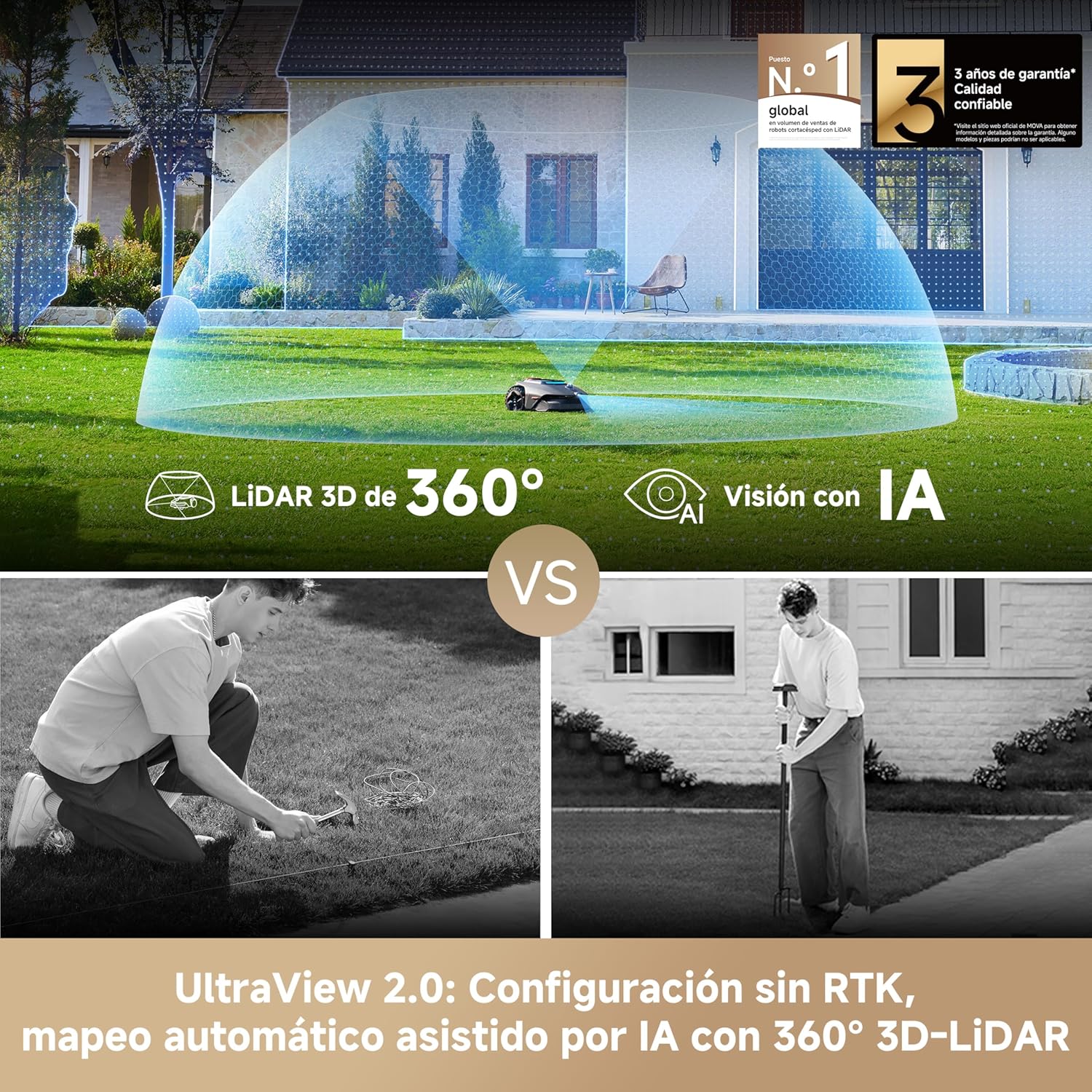
Ihe ngosi onyonyoasing the MOVA LiDAX Ultra 1200 Robot Lawnmower's advanced 360° 3D-LiDAR and AI vision system, enabling precise mapping and navigation.
6.2 All-Terrain Capability
The rear-wheel drive system and all-terrain wheels provide robust traction to ascend slopes of up to 45% and easily overcome obstacles up to 4 cm high and holes. It performs well on uneven terrain and in adverse weather conditions without damaging the lawn.

Image demonstrating the robot lawnmower's all-terrain capabilities, showing it navigating a 45% slope and highlighting its ability to clear 4 cm obstacles.
It can also pass through narrow spaces of only 60 cm, ensuring comprehensive garden care.

Image showing the robot lawnmower navigating various challenging garden environments, including slopes and narrow passages, demonstrating its ability to conquer complex terrains.
6.3 Intelligent Floating Cutting System
The LiDAX Ultra 1200 features an advanced floating cutting system that perfectly adapts to every contour of your garden. Its dynamic blade suspension moves fluidly up and down to achieve a consistently precise cut.

Image illustrating the robot lawnmower's intelligent floating cutting system, showing the blades adjusting to uneven ground for a consistent cut.
6.4 3D Obstacle Avoidance with AI Vision
With UltraView 2.0, the lawnmower detects and avoids over 300 types of obstacles, from large garden furniture to small items like pets and gardening tools, ensuring a smooth cutting process and safety for your family and pets.
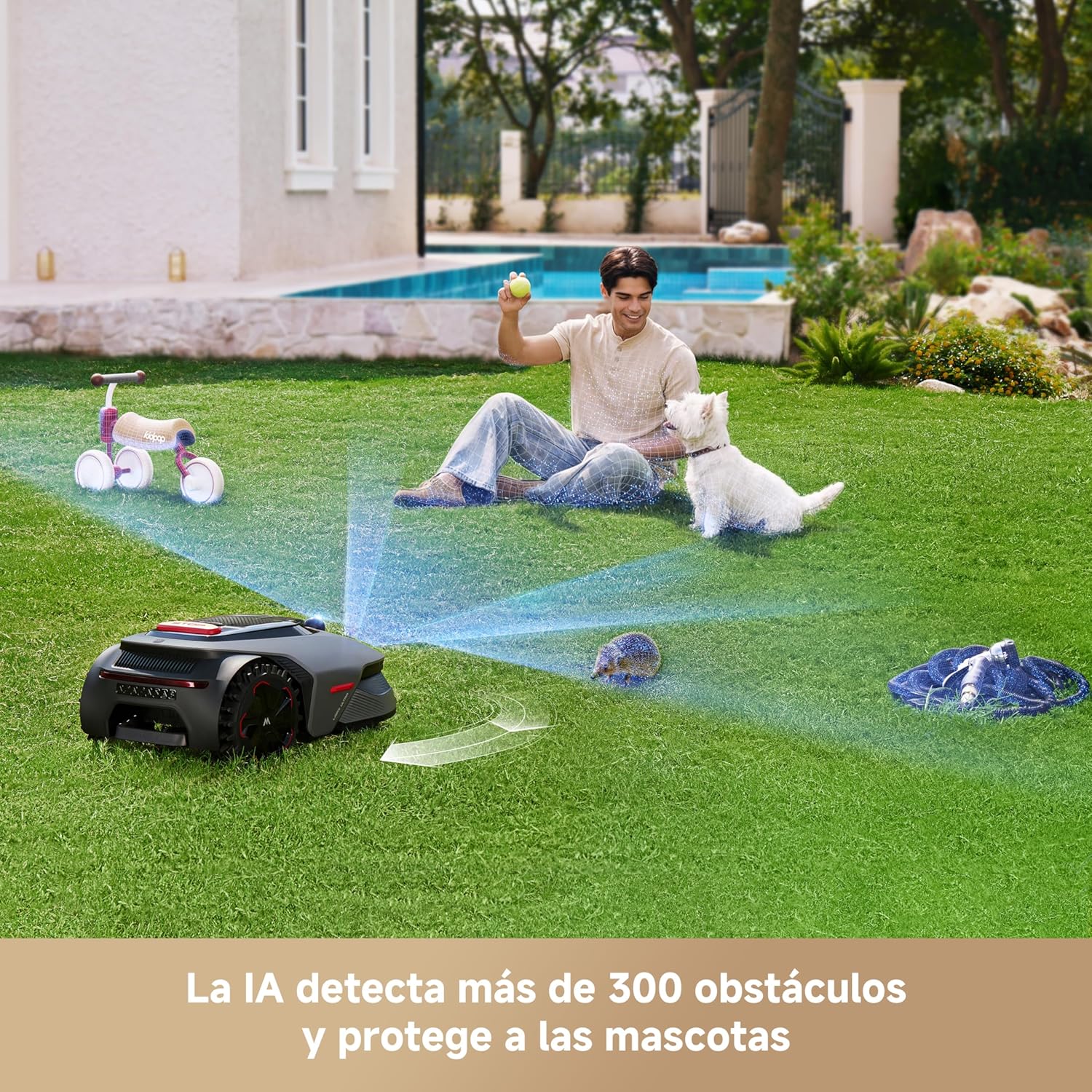
Image showing the robot lawnmower detecting and avoiding a hedgehog on the lawn, with text indicating AI detection of over 300 obstacles and pet protection.

Image illustrating the robot lawnmower's 3D obstacle avoidance system, highlighting its ability to detect and navigate around various objects like small items, people, pets, small animals, and gardening tools.
6.5 TrueGuard Security: 24/7 Garden Watchdog
The LiDAX Ultra 1200 features TrueGuard, an intelligent security system that keeps your garden safe day and night. It continuously monitors the surroundings, detects potential risks, and alerts you when necessary. This includes live video feed, automatic surveillance when not operating, and instant alerts for human activity.

Image showing a user monitoring their garden via a smartphone app, displaying live video feed from the robot lawnmower, illustrating the TrueGuard security feature.
6.6 Animal-Friendly Mode
Maintain the wildlife in your garden safely, day and night, thanks to its intelligent detection and evasion systems. This mode includes low-speed security, customizable animal activity zones, and a 'Do Not Disturb' mode.

Image showing the robot lawnmower operating near a hedge with a hedgehog, illustrating the animal-friendly mode with features like low-speed security and customizable activity zones.
7. Nlekọta
7.1 Nhicha
The MOVA LiDAX Ultra 1200 is IPX6 waterproof, allowing for easy cleaning. You can configure personalized cleaning points in the app and start cleaning with a single tap. The robot moves automatically, eliminating the need for manual transport, and its IPX6 rating allows for quick rinsing of the exterior and underside.

Image showing a person cleaning the underside of the robot lawnmower with a hose, highlighting its IPX6 waterproof rating and quiet operation (< 57 dB).
7.2 Ndochi agụba
Regularly inspect the cutting blades for wear and damage. Replace blades as needed to ensure optimal cutting performance. Refer to the 'Package Contents' section for spare blade information.
8. Nchọpụta nsogbu
If you encounter issues with your MOVA LiDAX Ultra 1200, please refer to the following common troubleshooting steps:
- Lawnmower not starting: Ensure the battery is charged and the safety switch is engaged. Check for any error messages on the app.
- Uneven cutting: Inspect blades for damage or dullness. Adjust cutting height settings in the app.
- Robot na-agba ọsọ: Check for obstacles in the mapped area. Ensure no-go zones are correctly defined around problematic areas.
- Poor navigation: Verify that the LiDAR and AI vision sensors are clean and unobstructed. Ensure the mapping is accurate in the MOVAhome app.
- Nsogbu njikọ ngwa: Check your Wi-Fi connection. Ensure the robot's firmware is up to date.
For more complex issues, please contact MOVA customer support.
9. Nkọwapụta
| Njirimara | Nkọwapụta |
|---|---|
| Nọmba nlereanya | MXXM4100 |
| Akụkụ ngwaahịa | 65.86 x 29.41 x 43.92 cm |
| Ibu ngwaahịa | 13.8 n'arọ |
| Isi Iyi Ike | Batrị |
| Ogologo obosara | 20 cm |
| Ịcha Elu | 3-10 cm (Enwere ike ịgbanwe) |
| Ụdị ọrụ | Akpaaka |
| Max Slope Capability | 45% |
| Mwepu ihe mgbochi | Ruo 4 cm |
| Obosara ngafe kacha nta | 60 cm |
| Nkà na ụzụ eserese | 360° 3D-LiDAR & AI Vision |
| Njikwa mpaghara | Up to 2 maps, 150 zones |
| Ngosi nke enweghị mmiri | IPX6 |
10. Akwụkwọ ikike na nkwado
The MOVA LiDAX Ultra 1200 Robot Lawnmower comes with a standard manufacturer's warranty. Please refer to the warranty card included in your package for specific terms and conditions.
For technical support, spare parts, or warranty claims, please contact MOVA customer service through the official website or the contact information provided in your quick guide.
Onye nrụpụta: Mova
Mba onye si: China