
Okwu mmalite
This manual provides detailed instructions for the operation and maintenance of your Mesqool CR1031 Portable FM Radio. Please read this manual thoroughly before using the device to ensure proper function and to maximize your listening experience. This radio features FM reception, NOAA weather alerts, Bluetooth connectivity, microSD playback, dual alarms, and a sleep timer.
Ngwaahịa gafereview
The Mesqool CR1031 is a versatile portable radio designed for various listening needs. It includes a 2.4-inch color display, an 8W speaker, and multiple input options.
Ngwa na njikwa

Foto: Ihu na akụkụ view of the Mesqool CR1031 radio highlighting key components.
- Mpịakọta Mpịakọta: Na-emezi ọkwa mmepụta ọdịyo.
- Oghere kaadị microSD: Maka ịkpọ ụda files from a microSD card (not included).
- Headphone Jack / Reset Hole: 3.5mm audio output for private listening; small hole for device reset.
- Ọdụ USB-C: For charging the internal battery and powering the device.
- Batrị 3000mAh arụnyere n'ime ya: Provides portable power.
- Ọkà okwu: 8W speaker for audio output.
- bọtịnụ njikwa: Mode, SOS, WX (Weather), Menu, Back, Preset, Enter, Scan, Play/Pause, Next/Previous Track.
- Antenna telescopic: For improved FM and NOAA signal reception.
Melite
Ịchaji batrị
Before first use, fully charge the radio. Connect the provided USB-C cable to the radio's USB-C port and the other end to a compatible USB power adapter (included) or a computer's USB port. The 2.4-inch color display will indicate charging status. A full charge ensures cordless listening for extended periods.

Image: The radio connected to a laptop via USB-C for charging, illustrating its rechargeable capability.
Ike mbụ Gbanye
Pịa ma jide Ike button to turn the radio on. The display will light up, showing the current time and mode.
Ntuziaka ọrụ
FM Radio arụ ọrụ
- Họrọ Usoro FM: Pịa MODE button until "FM Radio" is displayed.
- Nyocha akpaaka: Pịa Nyochaa button to automatically search for and save available FM stations. The radio can store up to 40 presets.
- Akwụkwọ ntuziaka: Jiri ihe Sochie nke gara aga/ọzọ bọtịnụ iji aka hazie ya na ugboro ole a kapịrị ọnụ.
- Nnweta Presets: Pịa PRESET bọtịnụ, wee jiri ya Sochie nke gara aga/ọzọ buttons to navigate through saved stations. Press Banye ịhọrọ.
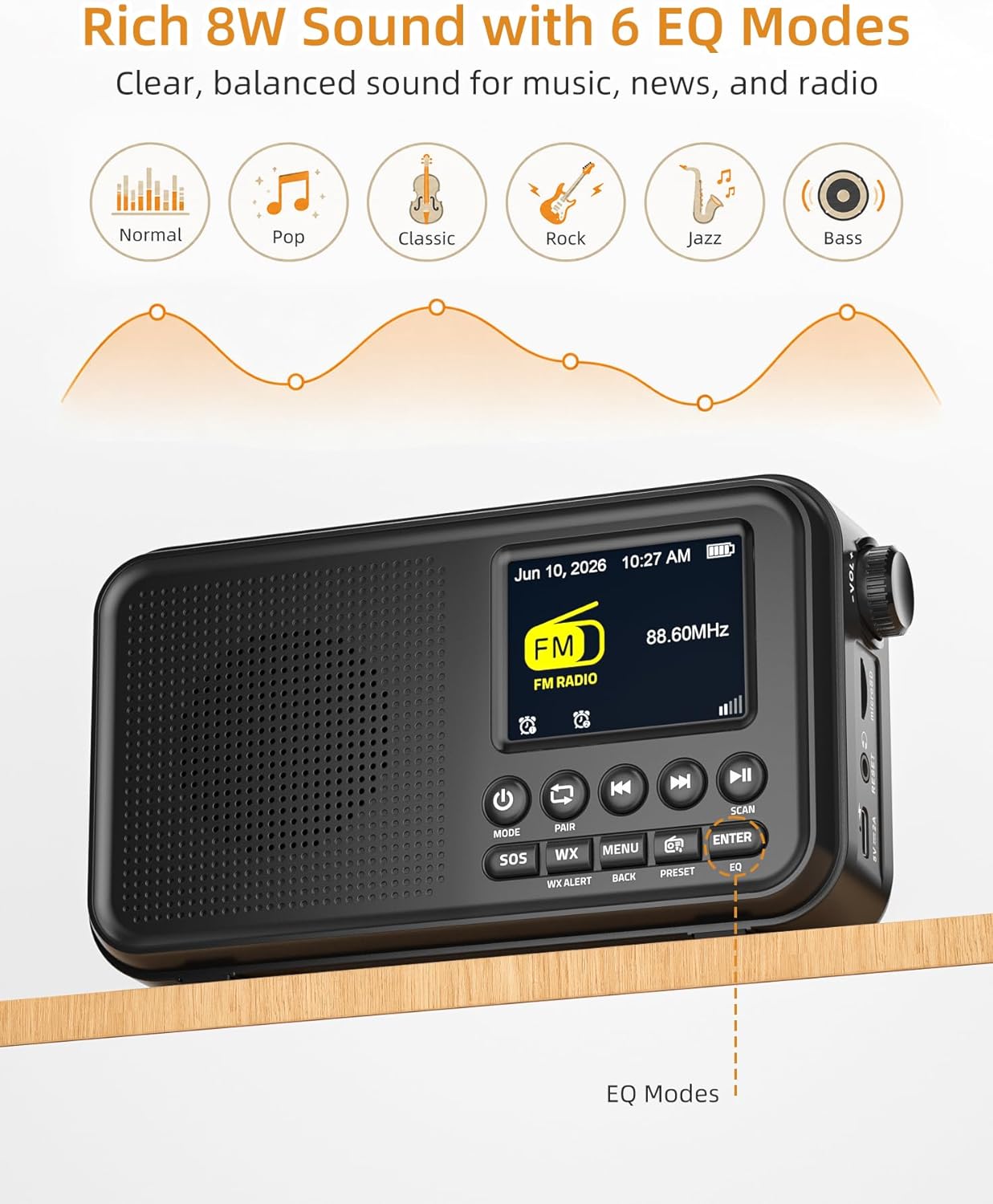
Image: The radio displaying FM mode and options for EQ settings.
NOAA ihu igwe
The radio includes a built-in U.S. NOAA Weather Band for receiving weather alerts.
- Select WX Mode: Pịa WX button to switch to the NOAA Weather Band.
- Nhọrọ ọwa: The radio will automatically scan for the strongest NOAA channel. You can manually cycle through channels using the Sochie nke gara aga/ọzọ bọtịnụ.
- Kwado ọkwa: Ensure the WX Alert function is enabled (check menu settings if necessary) to receive automatic weather alerts.

Image: The radio displaying NOAA Weather Band information in an outdoor environment.
Njikọ Bluetooth
Stream audio wirelessly from your compatible devices.
- Họrọ Ụdị Bluetooth: Pịa MODE button until "Bluetooth" is displayed. The radio will enter pairing mode, indicated by a flashing Bluetooth icon.
- Jikọọ ngwaọrụ: On your smartphone, tablet, or laptop, enable Bluetooth and search for "Mesqool CR1031" (or similar device name) in the list of available devices. Select it to pair.
- Kpọọ ọdịyo: Once paired, you can play audio from your device, and it will stream through the radio's speaker.

Image: A user connecting their smartphone to the radio via Bluetooth, demonstrating wireless audio streaming.
microSD playback
Kpọọ ọdịyo files directly from a microSD card.
- Fanye kaadị microSD: Gently insert a microSD card (up to 64GB, not included) into the microSD card slot until it clicks into place.
- Select microSD Mode: Pịa MODE button until "microSD" or "Card Playback" is displayed.
- Njikwa playback: Jiri ihe Gwuo/kwụsịtụ na Sochie nke gara aga/ọzọ bọtịnụ iji jikwaa ịkpọghachi.
Mkpu abụọ
Set two independent alarms to wake up to FM radio or a buzzer.
- Access Alarm Settings: Pịa MENU button and navigate to the "Alarm" settings.
- Set Alarm 1/2: Select Alarm 1 or Alarm 2. Set the desired time, alarm source (FM radio or buzzer), and volume.
- Tinye mkpu: Ensure the alarm is enabled in the settings.
- Soo: When an alarm sounds, press any button (except Power) to activate snooze for extra rest.

Image: The radio illustrating its dual alarm feature, with one alarm set for a meeting and another for waking up.
Oge ihi ụra
Fall asleep to your favorite radio station with the sleep timer function.
- Access Sleep Timer: Pịa MENU button and navigate to the "Sleep Timer" settings.
- Tọọ oge: Choose a duration from 15, 30, 45, 60, 90, or 120 minutes. The radio will automatically turn off after the selected time.
EQ esdị
Customize your audio experience with 6 equalizer modes.
- Access EQ Settings: Pịa EQ button (or navigate via the MENU).
- Họrọ Ụdị: Choose from Normal, Pop, Classic, Rock, Jazz, or Bass to match your listening preference.
Vidiyo ngwaahịa ngwaahịa
Video: An official product video demonstrating the FM Radio, Bluetooth, and NOAA Weather Alert features of the Mesqool CR1031.
Nlekọta
- Nhicha: Jiri ákwà dị nro ma kpọọ nkụ hichaa mpụta redio ahụ. Ejila ihe nhicha ma ọ bụ ihe mgbaze.
- Nchekwa: Chekwaa redio n'ebe dị jụụ, kpọrọ nkụ na-agaghị anwụ kpọmkwem na oke okpomọkụ.
- Nlekọta batrị: For optimal battery life, avoid fully discharging the battery frequently. Recharge regularly, especially if storing for long periods.
- Mkpughe mmiri: Ngwaọrụ a anaghị amị mmiri. Zere ka mmiri ghara iru gị ala ma ọ bụ oke iru mmiri.
Nchọpụta nsogbu
| Nsogbu | Ihe nwere ike ime | Ngwọta |
|---|---|---|
| No power/Won't turn on | Battery is depleted; Power adapter not connected. | Charge the battery using the USB-C cable. Ensure the power adapter is properly connected. |
| Poor FM/NOAA reception | A naghị agbatị eriri antenna; Mpaghara mgbaàmà adịghị ike. | Gbatịa antenna telescopic ahụ nke ọma. Gbalịa ịgbanwe redio ahụ ka ọ dị mma maka mgbaàmà ka mma. |
| Bluetooth anaghị ejikọta | Radio not in pairing mode; Device Bluetooth off. | Ensure the radio is in Bluetooth mode and the icon is flashing. Check Bluetooth settings on your device. |
| microSD card not recognized | Card inserted incorrectly; Incompatible format; Card corrupted. | Reinsert the card correctly. Ensure the card is formatted to FAT32. Try a different microSD card. |
| Enweghị ụda | Volume too low; Mute activated; Headphones connected. | Increase volume. Check if headphones are plugged in. Ensure the device is not muted. |
Nkọwapụta
- Akara: Mesqool
- Nọmba nlereanya: CR1031
- Agba: Nwa
- Akụkụ ngwaahịa: 6.65"L x 1.85"W x 3.62"H
- Ibu ihe: 0.77 pound
- Isi mmalite ike: Corded Electric, Battery Powered (3000mAh rechargeable battery included)
- Teknụzụ Njikọta: USB, Bluetooth 5.0
- Nkà na ụzụ Tuner: FM/Weather Band
- Ndị otu redio akwadoro: NOAA | FM | WB
- Gburugburu FM ugboro ole: 87.5-108 MHz
- NOAA Frequency: 162.400 - 162.550 MHz
- Ụdị ngosi: Ngosipụta Agba 2.4"
- Atụmatụ pụrụ iche: Portable, Rechargeable, SOS Alarm, Auto Scan, 40 FM Presets, 8W Sound, microSD Playback, Dual Alarms, Sleep Timer, 6 EQ Modes (Normal, Pop, Classic, Rock, Jazz, Bass)
- Ngwa dakọtara: Smartphone, Mbadamba ụrọ, Laptọọpụ
- Voltage: 5 volts
- Ihe: Acrylonitrile Butadiene Styrene (ABS)
Akwụkwọ ikike na nkwado
Ozi akwụkwọ ikike
The Mesqool CR1031 Portable FM Radio comes with a 2-Year Replacement/Refund Warranty for any quality problems. Please retain your proof of purchase for warranty claims.
Ngwa gụnyere
Ngwungwu ngwaahịa gụnyere:
- Mesqool CR1031 Portable FM Radio
- USB-C eriri USB
- Ihe nkwụnye ọkụ
- Akwụkwọ ntuziaka onye nwe (akwụkwọ a)

Image: The package contents of the Mesqool CR1031, showing the radio, manual, power adapter, and USB-C cable.
Nkwado ndị ahịa
For further assistance or inquiries, please refer to the contact information provided on the product packaging or the official Mesqool websaịtị.