
Ulefone RugKing Pad Pro
Ulefone RugKing Pad Pro Android 16 Rugged Tablet User Manual
Model: RugKing Pad Pro | Brand: Ulefone
1. Okwu mmalite
This manual provides essential instructions for setting up, operating, and maintaining your Ulefone RugKing Pad Pro rugged tablet. Please read this manual thoroughly before using the device to ensure proper function and longevity.
2. Ihe ngwugwu
Chọpụta na ihe niile dị na ngwugwu ngwaahịa gị:
- Ulefone RugKing Pad Pro Tablet x 1
- AC Charger (100~240V) x 1
- Type-C Data Cable (100 cm) x 1
- Protective Film (Pre-installed) x 1
- Metal Pry Opener x 1
- Portable Strap x 1
- skru x 2
- Multilingual User Manual x 1
- Charging Instruction Card x 1
- Safety Warning Declaration x 1

Figure 2.1: Contents of the Ulefone RugKing Pad Pro package.
3. Ngwaahịa gafereview
The Ulefone RugKing Pad Pro is a rugged tablet designed for durability and performance. Familiarize yourself with its physical components.
3.1 Akụkụ anụ ahụ
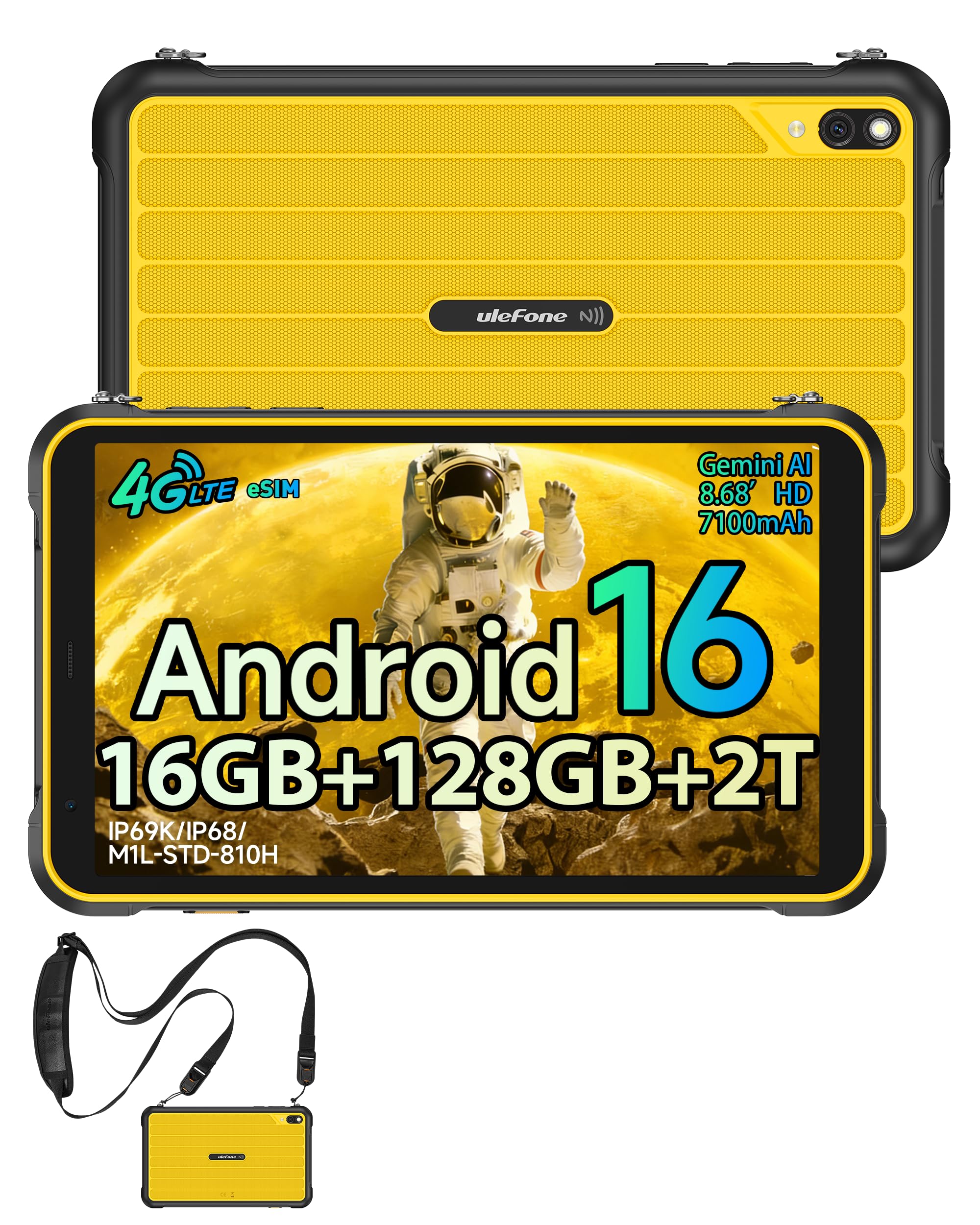
Foto 3.1: N'ihu view of the Ulefone RugKing Pad Pro.

Foto 3.2: Akụkụ view with buttons and ports.
- Ngosipụta: 8.68-inch, 90Hz refresh rate, Corning Gorilla Glass.
- Bọtịnụ ike: Dị n'akụkụ, eji ya eme ihe iji gbanye/gbanyụọ ma ọ bụ teta/hie ụra na ngwaọrụ ahụ.
- Bọtịnụ olu: Hazie ọkwa ọdịyo.
- Ọdụ ụgbọ mmiri Ụdị-C: Maka ịchaji na ịnyefe data.
- Ọkà okwu Grilles: Dual stereo speakers for audio output.
- Igwefoto: Igwefoto azụ 16MP, igwefoto ihu 8MP.
- Igwe ọkụ: Integrated 133 lumen Super Torch.
- Oghere kaadị SIM/MicroSD: Supports dual SIM and up to 2TB microSD expansion.
- uSmart Expansion Connector: For compatible peripherals like endoscopes.
- Jack ekweisi 3.5mm: For audio accessories.
4. Nhazi
4.1 Ike mbido
- Pịa ma jide bọtịnụ ike until the Ulefone logo appears.
- Soro mkpali na ihuenyo ka ịhọrọ asụsụ gị, mpaghara, wee jikọọ na netwọk Wi-Fi.
- Sign in with your Google account or create a new one to access the Google Play Store and other services.
4.2 SIM Card and eSIM Setup
The RugKing Pad Pro supports dual physical SIM cards and eSIM functionality for 4G LTE connectivity.

Figure 4.1: Triple card slot for SIM and MicroSD.
4.2.1 Physical SIM Card Installation
- Chọta tray kaadị SIM n'akụkụ mbadamba.
- Use the provided metal pry opener to eject the tray.
- Place your Nano-SIM cards into the designated slots.
- Jiri nlezianya tinyegharịa traị ahụ n'ime mbadamba ihe.
4.2.2 eSIM Activation
To activate eSIM, navigate to Ntọala> Netwọk & ịntanetị> SIM and follow the instructions to add a new mobile plan. You will typically need a QR code or activation code from your network provider.

Figure 4.2: eSIM connectivity feature.
5. Ntuziaka ọrụ
5.1 Android 16 Sistemụ arụmọrụ
The RugKing Pad Pro runs on Android 16, offering a dynamic and fluid user interface with enhanced security and usability features. Enjoy desktop-like window views for multitasking and smarter notification management.

Figure 5.1: Android 16 user interface.
5.2 Ngosipụta na Mmekọrịta
The 8.68-inch display with a 90Hz refresh rate provides smooth navigation and streaming. With 860 nits peak brightness, the screen is readable even in bright sunlight. Corning Gorilla Glass offers enhanced scratch resistance.

Figure 5.2: Display features including 90Hz refresh rate and Gorilla Glass.
Ụdị uwe aka 5.2.1
For use in cold environments or industrial settings, enable Glove Mode in settings to allow touch input while wearing gloves. Note that some leather gloves may not be compatible due to material differences.

Figure 5.3: Tablet operation with gloves enabled.
5.3 Camera and Flashlight
The tablet features a 16MP rear camera for clear photos and document scanning, and an 8MP front camera for video calls. The integrated 133 lumen Super Torch provides bright illumination in low-light conditions.

Figure 5.4: Camera and Super Torch features.
5.4 Njikọta na nsoroụzọ
- 4G LTE: Stay connected with dual SIM or eSIM.
- NFC: Supports Google Pay and other NFC functions for identification and authentication.
- GPS: Integrated GPS, GLONASS, BeiDou, and Galileo for accurate navigation.
- Wi-Fi: Supports 802.11b/g/n standards.
- Bluetooth: Maka ijikọ ngwa ikuku ikuku.

Figure 5.5: NFC enabled device for various applications.

Figure 5.6: GPS navigation in a vehicle.
Atụmatụ 5.5 Pụrụ Iche
- Igodo omenala: Assign specific functions to a programmable key for quick access.
- NJ ihu: Unlock your device using facial recognition.
- Igwe Redio: Listen to FM radio without headphones.
- uSmart Expansion Connector: Connect compatible external peripherals such as endoscopes (uSmart E01, E02) or digital microscopes (uSmart C01).

Figure 5.7: uSmart expansion connector and peripherals.
6. Atụmatụ Ịdịgide
The RugKing Pad Pro is built to withstand extreme conditions, certified with IP68, IP69K, and MIL-STD-810H standards.
- IP68: Dustproof and resistant to continuous immersion in water up to 2 meters for 30 minutes.
- IP69K: Protected against high-pressure, high-temperature jet sprays.
- MIL-STD-810H: Military-grade standard ensuring reliable resistance to shocks, vibrations, and extreme temperatures.

Figure 6.1: Rugged design and certifications.

Figure 6.2: Dust, water, and drop resistance tests.
7. Njikwa batrị
The RugKing Pad Pro is equipped with a 7100 mAh battery, offering extended usage. It supports 492 hours of standby time or 10 hours of video playback on a single charge.
7.1 Ịchaji
- Nchaji ọkọlọtọ: Connect the provided Type-C cable and AC charger to the tablet.
- Nchaji Pogo Pin: The tablet is compatible with Pogo Pin charging docks (sold separately) for convenient charging.
- Reverse Charging (OTG): Use the tablet as a power bank to charge other devices via an OTG cable (sold separately).

Figure 7.1: Battery capacity and charging methods.
8. Nchekwa na Arụmọrụ
Powered by an Unisoc T7250 Octa-core processor, the RugKing Pad Pro handles complex applications and demanding tasks efficiently. It comes with 16GB RAM (8GB physical + 8GB virtual) and 128GB internal storage, expandable up to 2TB via microSD card.

Figure 8.1: Octa-core processor for uninterrupted flow.

Figure 8.2: Memory and storage specifications.
*MicroSD card is sold separately for storage expansion. Dynamic RAM activation is user-configurable in Settings.
9. Nlekọta
9.1 Na-ehicha ngwaọrụ
- Jiri akwa dị nro na-enweghị lint hichaa ihuenyo na ahụ.
- Maka unyi isi ike, ntakịrị dampen akwa na mmiri. Zere kemịkalụ siri ike ma ọ bụ ihe na-emebi emebi.
- Ensure all port covers are securely closed before cleaning with liquids to maintain water resistance.
9.2 Mmelite ngwanrọ
Regularly check for software updates to ensure optimal performance, security, and access to new features. Navigate to Ntọala> Sistemu> Mmelite sistemụ iji lelee ma wụnye mmelite dị.
9.3 Njikwa nchekwa
Mgbe ụfọdụ review echekwara gị files and applications. Delete unnecessary data to free up space and maintain device speed. Utilize the microSD card slot for large media files.
10. Nchọpụta nsogbu
| Nsogbu | Ngwọta |
|---|---|
| Ngwaọrụ anaghị agbanwu ọkụ. | Gbaa mbọ hụ na agbagoro batrị. Jikọọ chaja wee chere nkeji ole na ole tupu ị nwaa ịgbanye ọzọ. |
| Ihuenyo anaghị anabata. | Perform a forced restart by holding the Power button for 10-15 seconds. If the issue persists, ensure Glove Mode is not causing interference if not needed. |
| Enweghị ike ijikọ na Wi-Fi. | Check if Wi-Fi is enabled in settings. Restart your router and the tablet. Verify the Wi-Fi password. |
| Achọpụtaghị kaadị SIM. | Hụ na etinyere kaadị SIM ahụ nke ọma n'ime tray ahụ. Malitegharịa mbadamba ahụ. Lelee ma kaadị SIM ahụ na-arụ ọrụ na onye na-ebuga ya. |
| Batrị na-agbapụ ngwa ngwa. | Reduce screen brightness, close unused apps, disable unnecessary connectivity features (Bluetooth, GPS, Wi-Fi) when not in use. Check for background app activity. |
11. Nkọwapụta
| Njirimara | Nkọwa |
|---|---|
| Aha Nlereanya | Ulefone RugKing Pad Pro |
| Sistemụ nrụọrụ | Android 16 |
| Nhazi | Unisoc T7250 Octa-core |
| RAM | 16 GB (8 GB physical + 8 GB virtual) |
| Nchekwa nke ime | 128 GB |
| Nchekwa enwere ike ịgbasa | Ruo 2 TB site na microSD |
| Ngosipụta nha | 8.68 sentimita asatọ |
| Ngosipụta mkpebi | 1400x800 pixels (HD+) |
| Ọnụego ume ọhụrụ | 90 Hz |
| Ngosipụta Nchedo | Corning Gorilla Glass |
| Igwefoto azụ | 16 MP |
| Igwefoto ihu | 8 MP |
| Ndekọ vidiyo | FHD 1080p |
| Ike batrị | 7100 mAh (Lithium Polymer) |
| Ndụ batrị (Ọkara) | 13 Days (standby), 10 Hours (video playback) |
| Njikọta | 4G LTE (Dual SIM, eSIM), Wi-Fi (802.11b/g/n), Bluetooth, NFC |
| Nsoro ụzọ | GPS, GLONASS, BeiDou, Galileo |
| Ọkwa Ịdịgide | IP68, IP69K, MIL-STD-810H |
| Atụmatụ nchekwa | NJ ihu |
| Akụkụ (L x W x T) | 20 x 10 x 1 cm |
| Ibu | 450 grams |
12. Akwụkwọ ikike na nkwado
12.1 Ozi akwụkwọ ikike
The Ulefone RugKing Pad Pro comes with a Akwụkwọ ikike onye nrụpụta afọ 2. Akwụkwọ ikike a na-ekpuchi ntụpọ dị na ngwa na arụ ọrụ n'okpuru ojiji nkịtị. Biko dowe ihe akaebe nke ịzụrụ ihe maka akwụkwọ ikike.


Figure 12.1: Ulefone brand and 2-year warranty indication.
12.2 Nkwado ndị ahịa
For technical assistance, warranty claims, or further inquiries, please contact Ulefone customer support. A service center is available in Europe.
- Refer to the official Ulefone websaịtị maka nkọwa kọntaktị.
- Consult the "Multilingual User Manual" included in your package for additional information.
- The tablet includes a "Service Center 2.0" application for intelligent support.
Ask a question about this manual
Ask about setup, troubleshooting, compatibility, parts, safety, or missing instructions. Manuals+ will review the question and use this page’s manual context to help answer it.