
1. Okwu mmalite
Thank you for choosing the Skyworth 86-inch Canvas Elite™ Art TV QD-Mini LED. This television combines advanced display technology with an elegant design, offering a premium viewing and art display experience. Featuring QD-Mini LED, 4K UHD resolution, a 144Hz refresh rate, and the OmniView Matte Screen™, this TV is designed for exceptional picture quality and a glare-free art gallery aesthetic. This manual provides essential information for setting up, operating, maintaining, and troubleshooting your new television.
2. Kedu ihe dị na Igbe ahụ
Carefully unpack your television and check for the following items:

Foto: Ofeview of the 86-inch TV dimensions, available input/output ports, and a list of included accessories.
- Skyworth 86-inch Canvas Elite™ Art TV
- Akwụkwọ ntuziaka (akwụkwọ a)
- Ụdọ ọkụ
- Base Screws (for stand installation)
- Njikwa anya
- Batrị njikwa anya (x2)
3. Nhazi
3.1 Mwepu na ntinye
Remove the TV from its packaging. It is recommended that two people handle the 86-inch TV due to its size and weight. Place the TV on a stable, level surface or mount it securely on a wall.
3.2 Nwụnye guzoro (nhọrọ)
If using the included stand, attach the stand bases to the bottom of the TV using the provided screws. Ensure all screws are tightened securely to prevent the TV from tipping.
3.3 Mgbidi mgbidi (nhọrọ)
The TV is compatible with a 200x200 VESA mount standard. Use a compatible wall mount bracket (sold separately) and follow the instructions provided with the wall mount. Ensure the wall can support the TV's weight.
3.4 Ngwa jikọọ
Connect your external devices to the TV's input ports. Refer to the diagram below for port locations and types:
Foto: Zuru ezu view of the TV's rear panel showing various input and output ports.
- Ntinye RF (Antenna): x1 for connecting an antenna or cable TV.
- Ngwakọta (AV): x1 for older devices.
- HDMI: x3 for high-definition devices like Blu-ray players, gaming consoles, or set-top boxes.
- USB: x2 for connecting USB storage devices.
- Igwe ntị ntị: x1 for headphones.
- Ntinye Ethernet: x1 for wired network connection.
- SPDIF Output (Optical/Coaxial): x1 for digital audio output to sound systems.
3.5 Njikọ ike
Connect the power cord to the TV's power input and then plug it into a wall outlet. The TV will enter standby mode.
3.6 Ntọala mbụ
Press the power button on the remote control to turn on the TV. Follow the on-screen instructions to complete the initial setup, including language selection, network connection, and Google TV account login.
4. Ntuziaka ọrụ
4.1 Google TV Interface
Your Skyworth Canvas Elite™ Art TV runs on the Google TV platform, providing access to a vast library of streaming services, apps, and personalized content recommendations. Use the remote control to navigate the interface, search for content, and manage your settings.
4.2 Art Mode and OmniView Matte Screen™
Transform your TV into a gallery-quality art display with Art Mode. The OmniView Matte Screen™ technology minimizes glare and reflections, providing an authentic art viewahụmahụ.

Image: The TV in Art Mode, showcasing a painting with a description of accessing over 400 iconic free artworks.
Access the Art Gallery feature to browse and select from hundreds of iconic artworks. The TV's design also integrates seamlessly into your living space, eliminating the need for external boxes and wires.

Image: Comparison highlighting the 'All-in-One Design' of the Canvas Elite Art TV, which eliminates messy wires and separate components.
4.3 Ntọala Ogo foto
Your TV features QD-Mini LED technology, 4K UHD resolution, and a 144Hz refresh rate for superior visuals. Adjust picture settings in the TV menu to optimize brightness, contrast, color, and motion for different content types.

Image: Visual comparison demonstrating the clarity of a 144Hz refresh rate versus 60Hz, emphasizing smooth motion for gaming and fast-paced content.
The QD-Mini LED panel with thousands of dimming zones and Quantum Dots delivers deep contrast and rich colors.
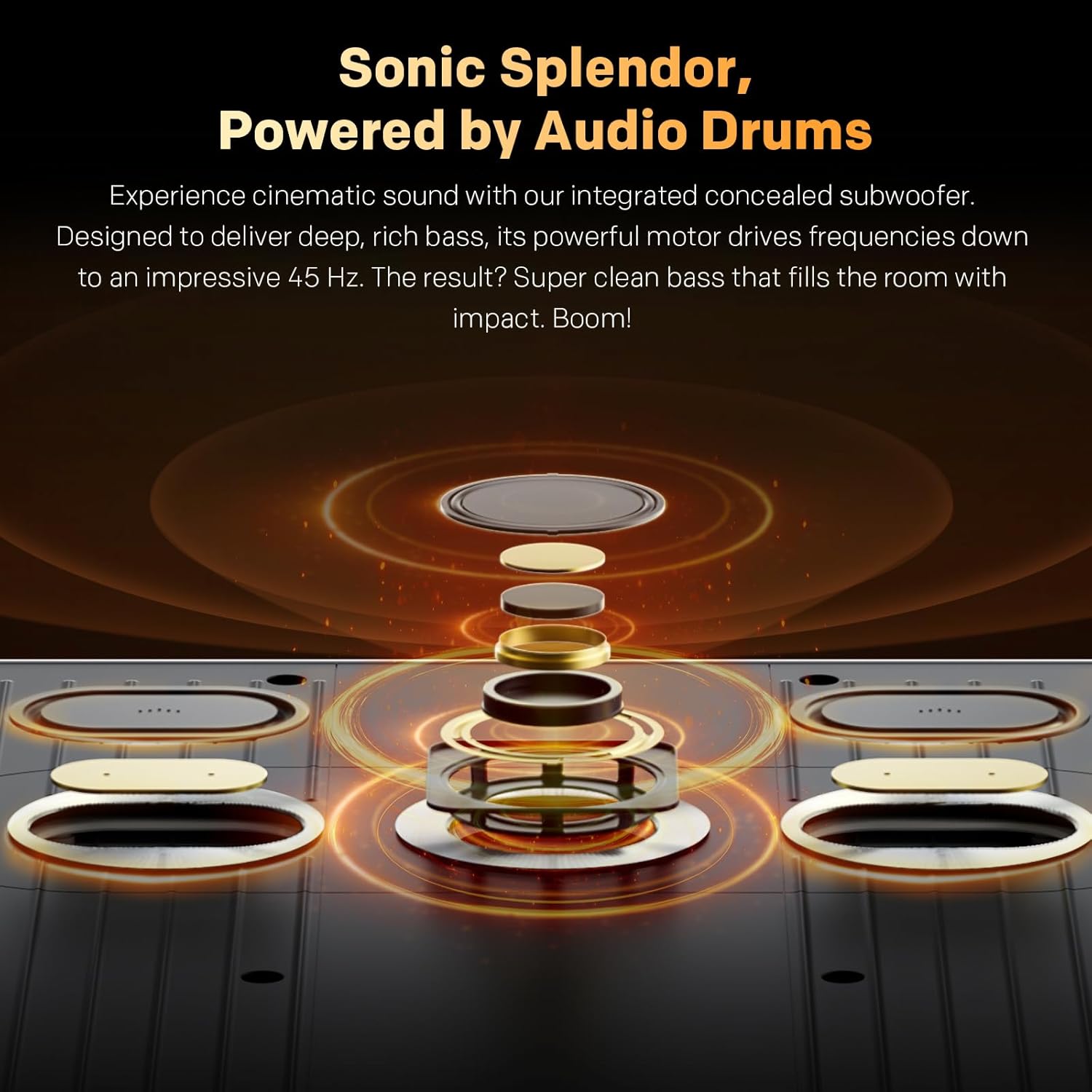
Image: Explanation of Quantum Dot Brilliance, showing how a special silica (glass-like) QD shield protects quantum dots for long-lasting vibrant colors.

Image: Illustration of QD-Mini LED technology, highlighting maximum brightness with deep contrast and the OmniView Matte Screen™ for superior viewing.
Onye OmniView Matte Screen™ provides an anti-glare, clear, wide-view experience, ensuring comfortable viewing from any angle and in various lighting conditions.

Image: Breakdown of the OmniView Matte Screen™ layers, explaining how it achieves true visual freedom from any seat, in any light.
4.4 Ntọala ọdịyo
The TV features built-in speakers with Dolby Atmos support and an integrated concealed subwoofer for cinematic sound. Adjust audio modes and equalizer settings to suit your preferences.

Image: Diagram illustrating the integrated concealed subwoofer, designed to deliver deep, rich bass down to 45 Hz.
4.5 Njikọta
Utilize Bluetooth 5.0 for connecting wireless headphones, soundbars, or other compatible accessories. Connect to your home network via Wi-Fi or the Ethernet port for internet access and streaming.
5. Nlekọta
5.1 Nhicha ihuenyo
Iji hichaa ihuenyo ahụ, jiri nwayọọ hichaa ya na akwa dị nro na-enweghị lint. Maka akara ndị isi ike, ntakịrị dampen the cloth with water or a specialized screen cleaner. Avoid using harsh chemicals, abrasive materials, or spraying liquid directly onto the screen.
5.2 Nlekọta n'ozuzu
- Dust the TV regularly with a soft, dry cloth.
- Ensure proper ventilation around the TV to prevent overheating. Do not block ventilation openings.
- Zere idobe TV na ìhè anyanwụ kpọmkwem ma ọ bụ nso ebe okpomọkụ.
- Kwụpụ TV na oghere ọkụ n'oge oké ifufe ma ọ bụ mgbe ọ ga-adị ogologo oge.
6. Nchọpụta nsogbu
Ọ bụrụ na ị na-enwe nsogbu na TV gị, rụtụ aka na nsogbu na ngwọta ndị a na-emekarị:
- Enweghị ike:
- Check if the power cord is securely connected to the TV and the wall outlet.
- Hụ na ihe mkpuchi mgbidi ahụ na-arụ ọrụ site na ịpịnye ngwaọrụ ọzọ.
- Pịa bọtịnụ ike na TV n'onwe ya, ọ bụghị naanị nke dịpụrụ adịpụ.
- No Picture or Sound:
- Nyochaa na ahọpụtara isi mmalite ntinye ziri ezi (dịka ọmụmaatụ, HDMI 1, AV).
- Lelee njikọ niile dị n'etiti TV na ngwaọrụ mpụga.
- Gbaa mbọ hụ na emebighị olu ma ọ bụ tọọ ka ọ bụrụ efu.
- Njikwa anya anaghị arụ ọrụ:
- Dochie batrị ndị dị na njikwa anya.
- Gbaa mbọ hụ na onweghị ihe mgbochi n'etiti ime ime na ihe mmetụta IR nke TV.
- Okwu njikọ netwọkụ:
- Malitegharịa ekwentị gị na modem gị.
- Check Wi-Fi password and network settings in the TV menu.
- If using a wired connection, ensure the Ethernet cable is properly connected.
- Okwu ịdịmma foto (dịka ọmụmaatụ, na-agbagọ, agbagọ):
- Check the resolution settings of your external device and the TV.
- Hụ na eriri ndị ahụ emebighị ma ọ bụ ghara ịdị nro.
- Reset picture settings to default in the TV menu.
For persistent issues, please contact Skyworth customer support.
7. Nkọwapụta
| Njirimara | Nkọwapụta |
|---|---|
| Nha ihuenyo | 86 sentimita asatọ |
| Ụdị | Skyworth |
| Ngosipụta teknụzụ | QD-Obere LED |
| Mkpebi | 4K UHD (2160p) |
| Ọnụego ume ọhụrụ | 144 Hz |
| Ọnụ na-egbuke egbuke | 2000 Nit |
| Njirimara Pụrụ Iche | Built-In Speaker, OmniView Matte Screen™, Google TV |
| Ngwa gụnyere | Power Adapter, Remote Control, Base Screws |
| Teknụzụ Njikọta | Bluetooth 5.0, Wi-Fi, Ethernet |
| Akụkụ akụkụ | 16:9 |
| Nha Ngwaahịa (na-enweghị ntọala) | 192.67 cm (W) x 111.31 cm (H) x 3.62 cm (D) |
| Ibu (na-enweghị isi) | 52.9 n'arọ |
| VESA Mount Standard | 200x200 mm |
8. Akwụkwọ ikike na nkwado
For warranty information, please refer to the warranty card included with your product or visit the official Skyworth website. Skyworth offers customer support for any inquiries or technical assistance you may require.
For returns, a 30-day easy return policy is typically available. Please check your purchase details for specific return instructions.
Ozi mkpọtụrụ: Please visit the Skyworth NA websaịtị maka nkọwa kọntaktị kachasị ọhụrụ maka nkwado ndị ahịa.