
1. Okwu mmalite
The Tiksounds S12 is a portable Bluetooth speaker designed for versatile audio playback. It features Bluetooth 5.4 connectivity, 15W audio output, IPX7 waterproofing, True Wireless Stereo (TWS) pairing, and integrated LED lighting. This manual provides instructions for the proper setup, operation, and maintenance of your S12 speaker.
2. Ihe ngwugwu
- Tiksounds S12 Portable Bluetooth Speaker
- Igwe ọkụ ọkụ
- Akwụkwọ ntuziaka (akwụkwọ a)
3. Akụrụngwa Ngwaahịa
- 15W Audio Output: Delivers clear sound for an enhanced listening experience.
- Njikọ Bluetooth 5.4: Provides a fast and stable wireless connection with compatible devices.
- IPX7 Nkwanye mgbochi mmiri: Protects the speaker from water immersion up to 1 meter for 30 minutes, suitable for outdoor use.
- Ezi stereo ikuku ikuku (TWS): Allows two S12 speakers to be paired together for 360° stereo sound.
- Ọkụ LED agbakwunyere: Features colorful LED lights that can pulse with music, enhancing the atmosphere.
- Ogologo oge ịkpọghachi: Up to 12 hours of music playback on a single charge (at 50% volume).
- Enwere ike ibugharị: Compact and lightweight (approximately 382g) for easy transport.
4. Njikwa na egosi
The speaker features intuitive controls and LED indicators for easy operation.

Image: Speaker button layout and functions. This diagram illustrates the various buttons on the speaker and their corresponding actions, including single presses and long presses for power, volume, track control, light modes, and TWS pairing.
| Bọtịnụ | Omume | Ọrụ |
|---|---|---|
| Power Button (◯) | Pịa ma jide (2s) | Gbanyụọ/ Gbanyụọ |
| Power Button (◯) | Otu Pịa | Kpọọ/Kwụsị Egwu, Zaa/Kwụsị Oku |
| Power Button (◯) | Pịa ma jide (1.5s) | Jụ oku |
| Elu elu (+) | Otu Pịa | Welie olu |
| Elu elu (+) | Pịa ma jide (2s) | Track na-esote |
| Olu ala (-) | Otu Pịa | Wedata olu |
| Olu ala (-) | Pịa ma jide (2s) | Egwu gara aga |
| Light Mode Button (☀) | Otu Pịa | Gbanwee ọnọdụ ọkụ |
| Light Mode Button (☀) | Pịa ma jide (3s) | Gbanwuo/ Gbanyụọ ọkụ |
| TWS Button (TWS) | Ugboro abụọ Pịa | Bido njikọ TWS |
5. Nhazi
5.1. gingchaji Okwu Okwu
Before first use, fully charge the speaker. Use the provided power cable to connect the speaker to a compatible USB power source. The charging indicator will show the charging status. A full charge typically takes 3-4 hours.

Image: Speaker dimensions and battery specifications. This image highlights the compact size of the speaker (8cm x 11.3cm) and its 1800mAh battery, which charges in 3-4 hours.
5.2. Gbanyụọ / gbanyụọ
- To power on, press and hold the Power Button (◯) for 2 seconds.
- To power off, press and hold the Power Button (◯) for 2 seconds again.
5.3. Njikọ Bluetooth
- Hụ na ekwenyere igwe okwu ahụ ma nwee ọnọdụ njikọta Bluetooth (nke LED na-enwu enwu gosiri).
- Na ngwaọrụ gị (smartphone, mbadamba, laptọọpụ), gbanye Bluetooth.
- Chọọ maka available Bluetooth devices and select "S12" from the list.
- Once connected, the speaker will indicate a successful pairing, and the LED will stop flashing.

Image: Multiple connection options. This image demonstrates the speaker's compatibility with various devices such as pads, PCs, and TVs, highlighting its versatile connectivity.
5.4. Ezi Ikuku Stereo (TWS) Pairing
To achieve 360° stereo sound, you can pair two Tiksounds S12 speakers together.
- Ensure both S12 speakers are powered on and not connected to any other Bluetooth device.
- On one of the speakers, double-press the TWS Button. The speaker will enter TWS pairing mode.
- The two speakers will automatically search for and connect to each other. A successful connection will be indicated by an audible prompt.
- Once TWS paired, connect your device to one of the speakers via Bluetooth as described in section 5.3. Both speakers will now play audio in stereo.

Image: True Wireless Stereo (TWS) setup. This image illustrates two S12 speakers connected wirelessly to a laptop, demonstrating the TWS feature for a 360-degree audio experience.
6. Ntuziaka ọrụ
6.1. Nghaghachi egwu
- Gwuo/kwụsịtụ: Single press the Power Button (◯).
- Olu elu: Single press the Volume Up (+) button.
- Olu ala: Single press the Volume Down (-) button.
- Track na-esote: Pịa ma jide bọtịnụ Mpịakọta Elu (+) maka sekọnd abụọ.
- Gara aga Track: Pịa ma jide bọtịnụ Mbelata Olu (-) maka sekọnd abụọ.
6.2. Njikwa oku
- Azịza/Kwụsị Oku: Single press the Power Button (◯).
- Jụ oku: Press and hold the Power Button (◯) for 1.5 seconds.
6.3. Ụdị ọkụ ọkụ LED
The speaker features multiple LED light modes.
- Gbanwee ụkpụrụ ọkụ: Single press the Light Mode Button (☀).
- Gbanwuo/ Gbanyụọ ọkụ: Press and hold the Light Mode Button (☀) for 3 seconds.
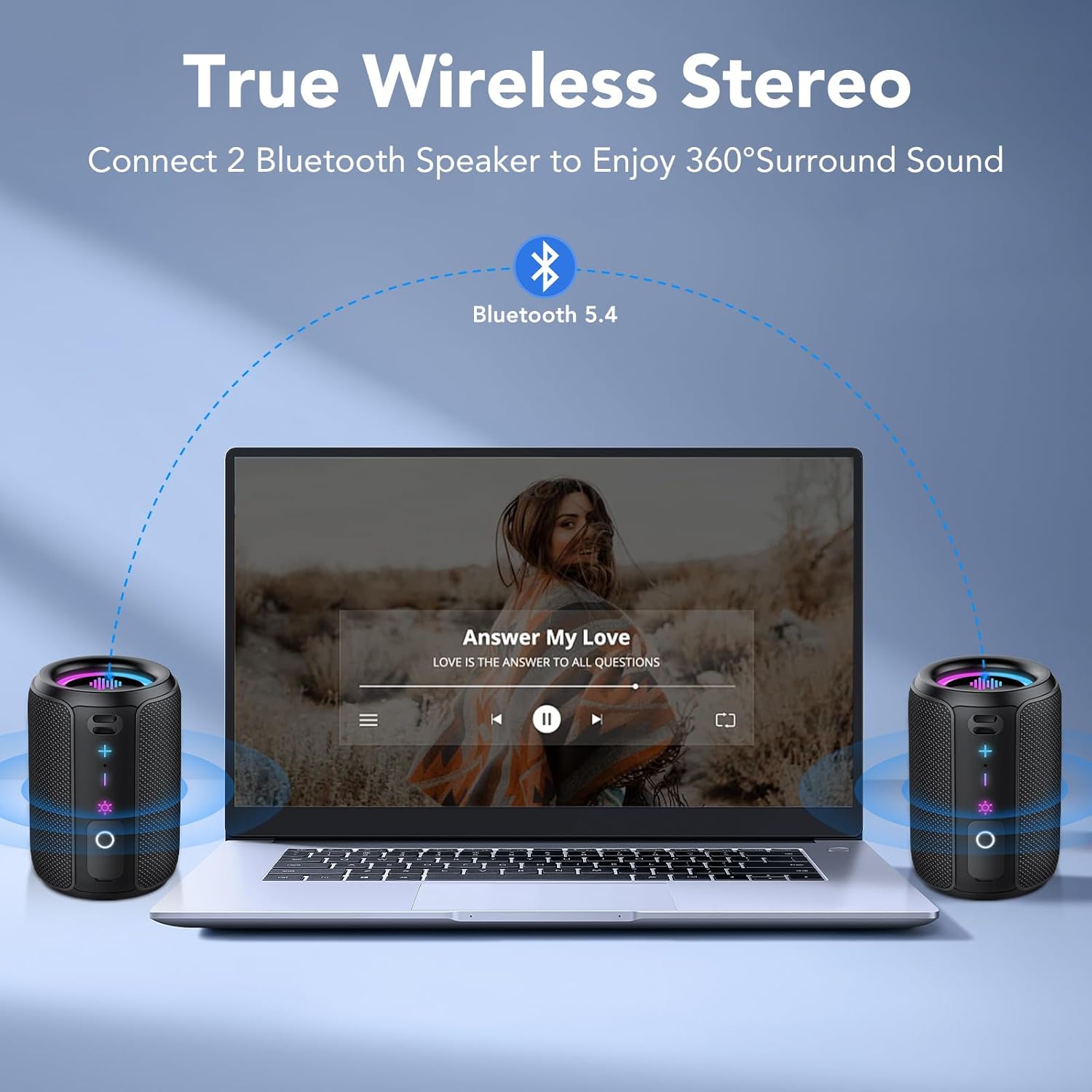
Image: RGB Colorful Lighting. This image displays three S12 speakers showcasing their dynamic RGB lighting, which can synchronize with music.
7. Nlekọta
- Nhicha: Jiri nwayọ hichaa ọkà okwu, damp akwa . Ejila ihe nchacha abrasive ma ọ bụ ihe mgbaze.
- Nguzogide mmiri: While IPX7 rated, ensure the charging port cover is securely closed before exposing the speaker to water. Do not intentionally submerge the speaker for extended periods or beyond specified depths.
- Nchekwa: Chekwaa ọkà okwu n'ebe dị jụụ, kpọrọ nkụ na-adịghị na ìhè anyanwụ kpọmkwem na oke okpomọkụ.
- Nlekọta batrị: Ka ịgbatị ndụ batrị ogologo, zere ịchaji ọkà okwu ugboro ugboro. Na-ana ya ụgwọ oge niile, ọbụlagodi ma ọ bụrụ na ejighị ya ogologo oge.
8. Nchọpụta nsogbu
| Nsogbu | Ihe nwere ike ime | Ngwọta |
|---|---|---|
| Ọkà okwu anaghị agba ọkụ. | Batrị dị ala. | Chajie ọkà okwu zuru ezu. |
| Enweghị ụda. | Volume too low; not paired; incorrect audio source. | Increase volume on speaker and device. Ensure successful Bluetooth pairing. Check device's audio output settings. |
| Njikọ Bluetooth ada ada. | Ọkà okwu adịghị n'ụdị njikọta; Bluetooth agbanyụrụ ngwaọrụ; ọ dị anya nke ukwuu. | Ensure speaker is in pairing mode. Turn device Bluetooth off and on. Move speaker closer to device (within 10 meters). Forget "S12" on device and re-pair. |
| Ogo ụda adịghị mma ma ọ bụ mgbagha. | Low battery; device too far; interference. | Charge the speaker. Move device closer. Avoid obstacles between speaker and device. Reduce volume if distortion occurs at high levels. |
| Njikota TWS ada ada. | Speakers already paired to other devices; not in TWS mode. | Ensure both speakers are disconnected from other devices. Double-press TWS button on one speaker to initiate pairing. |
9. Nkọwapụta
| Njirimara | Nkọwapụta |
|---|---|
| Aha Nlereanya | S12 |
| Ike mmepụta | 15 Watios |
| Ụdị Bluetooth | 5.4 |
| Ike batrị | 1800 mAh |
| Oge nkwughachi | Ruo awa 12 (na olu 50%) |
| Oge Nchaji | 3-4 Awa |
| Ngosi nke enweghị mmiri | IPX7 |
| Akụkụ (D x W x H) | 8 x 8 x 11 cm |
| Ibu | Ihe dị ka 382 g |
| Oke Bluetooth | Ruo mita 10 |
| Nzaghachi ugboro ugboro | 20 kHz |
10. Akwụkwọ ikike na nkwado
For warranty information, please refer to the documentation provided with your purchase or contact your retailer. For technical support or further assistance, please contact Tiksounds customer service through their official websaịtị ma ọ bụ ikpo okwu ebe a zụrụ ngwaahịa ahụ.