
1. Ngwaahịa gafereview
The PGST Solar Motion Sensor Alarm E10D is a self-sustaining security device designed for outdoor use. It integrates a motion sensor, a loud siren, and a strobe light to deter intruders and alert users. Its solar-powered design ensures continuous operation without external power sources, making it suitable for various locations.
- Ọrụ na-enye ike anyanwụ: Equipped with a high-efficiency solar panel and a rechargeable battery, it charges during the day for continuous operation.
- Nnyenye ọkụ anaghị akwụsị akwụsị: Operates independently of the electrical grid, providing 24/7 protection even during power outages.
- Effective Detection and Deterrence: Advanced PIR (Passive Infrared) motion sensors detect movement, activating a powerful 120dB siren and strobe light.
- Robust Weatherproof Construction: IP65 rated design ensures protection against dust and water, allowing reliable function in harsh weather.
- Simple Wire-Free Installation: Designed for easy setup without complex wiring, offering flexible placement options.
2. Ozi nchekwa
- Ensure the device is mounted securely to prevent falling.
- Anwala ịkwasa ma ọ bụ gbanwee ngwaọrụ ahụ, n'ihi na nke a nwere ike imebi akwụkwọ ikike ma bute mmebi.
- Keep the solar panel clean and free from obstructions to ensure optimal charging.
- Avoid directing the siren or strobe light directly at people or animals from close range.
- Tụfuo batrị dịka iwu mpaghara siri dị.
3. Ihe ngwugwu
Chọpụta na ihe niile dị na ngwugwu:
- 1x PGST Solar Motion Sensor Alarm (Model E10D)
- 1x njikwa anya
- Mounting Accessories (screws, wall anchors)
- USB USB Nchaji USB 1x
- 1x Akwụkwọ ntuziaka onye ọrụ
4. Atụmatụ
The PGST Solar Motion Sensor Alarm E10D offers a range of features for enhanced security:
- Nchaji okpukpu abụọ: Solar charging for daily power and USB charging for initial setup or low light conditions.
- Olu nwere ike imeghari: 3 levels of volume for the alarm sound.
- Ụdị ọrụ ọtụtụ: Three distinct modes to suit different security needs (All-day, Daytime, Night).
- High-Decibel Alarm: Produces a 120dB loud sound to effectively deter intruders.
- Oke nchọpụta sara mbara: Motion sensor covers a 110-degree angle with a range of up to 15 meters.
- Njikwa anya: Conveniently arm, disarm, adjust settings, and trigger SOS from a distance.

Image: The PGST Solar Motion Sensor Alarm with its remote control, highlighting key features like solar charging, USB charging, 3-level volume, 3 working modes, IP65 waterproof rating, and 120dB sound.

Image: The alarm device shown in a rainy environment, illustrating its IP65 weatherproof capability to withstand various weather conditions.
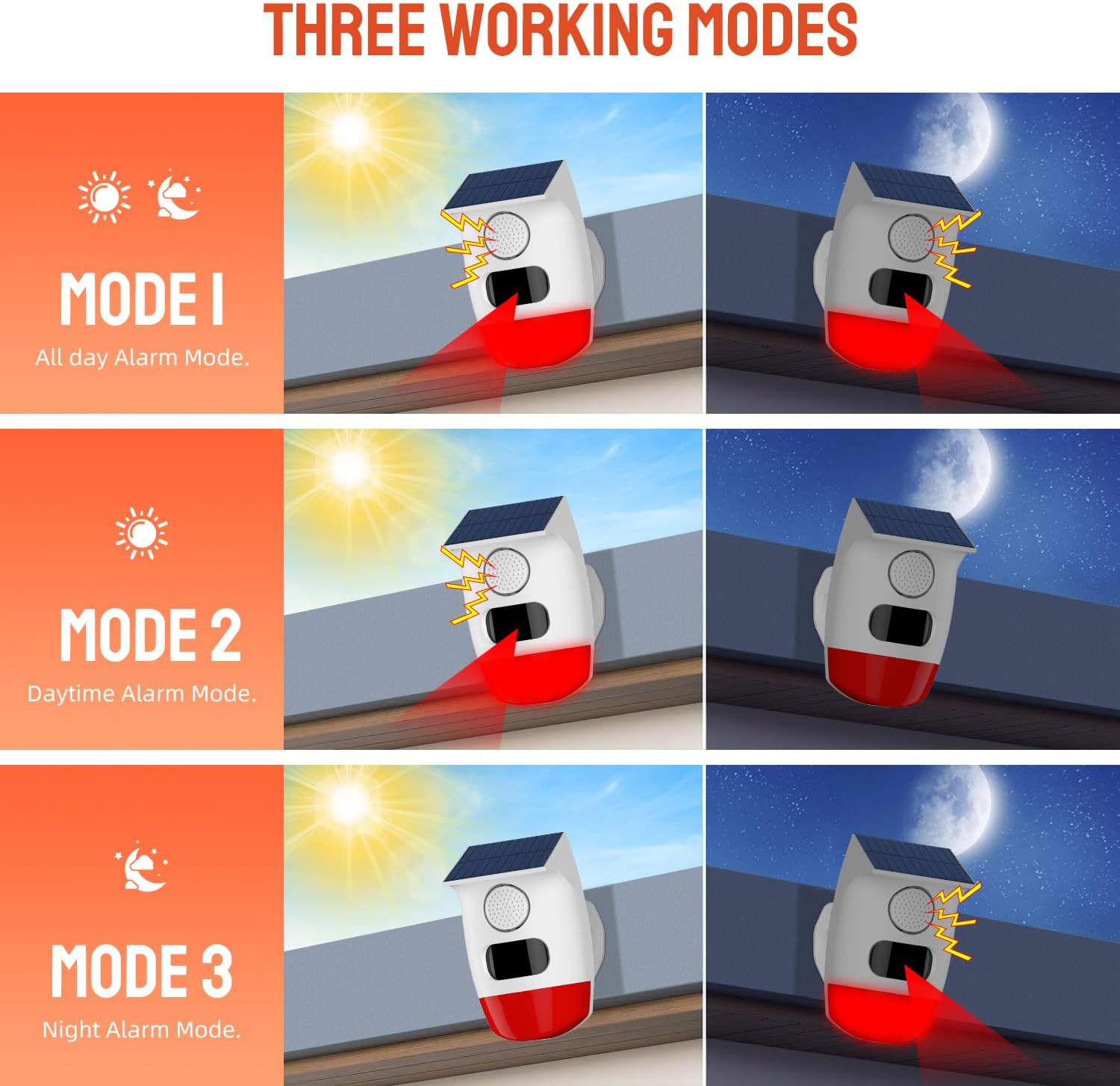
Image: A visual representation of the three working modes: Mode 1 (All-day Alarm), Mode 2 (Daytime Alarm), and Mode 3 (Night Alarm), showing how the alarm functions under different light conditions.

Image: An illustration demonstrating the alarm's 110-degree wide detection range and a detection distance of 6 meters, highlighting its panoramic coverage.

Image: The alarm device with a visual representation of its 120dB high-pitched alarm, indicating its strong deterrent effect.

Image: A hand holding the remote control, demonstrating its use for smart control functions like arm/disarm, volume levels, working modes, alarm ringtones, and sound/light on/off, with a remote range of 5 meters (16 feet).

Foto: Examples of the alarm's multipurpose use in different settings such as a garage, courtyard, indoors, and by a doorway.
5. Nhazi
5.1 Nchaji izizi
Before first use, it is recommended to fully charge the device. The alarm can be charged via its solar panel or using the provided USB cable.
- Ịchaji anyanwụ: Place the device in direct sunlight for at least 24 hours to ensure a full charge.
- Nchaji USB: Connect the USB cable to the device and a 5V USB power adapter. Charge for approximately 8 hours until the charging indicator light changes (refer to device for specific indicator behavior).
5.2 Ịtinye ngwaọrụ
The PGST Solar Motion Sensor Alarm is designed for wall mounting. Choose a location that receives ample sunlight for the solar panel and provides the desired detection coverage.
- Select a suitable mounting location, ensuring the solar panel faces the sun.
- Use the provided mounting accessories (screws and wall anchors) to securely attach the device to a wall or post.
- Adjust the device angle if necessary to optimize solar exposure and motion detection area.

Image: Detailed dimensions of the PGST Solar Motion Sensor Alarm and its remote control, useful for planning installation space.
6. Ọrụ
The alarm is controlled using the included remote control. Ensure you are within 5 meters (16 feet) of the device for optimal remote functionality.
6.1 Ọrụ njikwa anya
| Akara bọtịnụ | Ọrụ | Nkọwa |
|---|---|---|
| 🔒 | Ogwe aka | Activates the alarm system. |
| 🔓 | Bupụ ngwa agha | Deactivates the alarm system. |
| SOS | Mkpu SOS | Triggers an immediate alarm regardless of arm/disarm status. |
| 🔊 | Elu elu | Increases alarm volume. |
| 🔉 | Mpịakọta ọnụ | Decreases alarm volume. |
| 🔇 | Ogbi | Mutes the alarm sound. |
| 24 | Mode 1 (24-hour) | All-day alarm mode. Detects motion and alarms 24/7. |
| ☀️ | Mode 2 (Daytime) | Daytime alarm mode. Detects motion and alarms during daylight hours. |
| 🌙 | Mode 3 (Night) | Night alarm mode. Detects motion and alarms during nighttime hours. |
| 🎯 High | Mmetụta dị elu | Sets motion detection sensitivity to high. |
| 🎯 Low | Mmetụta dị ala | Sets motion detection sensitivity to low. |
| 🎤 | Mgbanwe olu | Switches between different voice prompts/tones (if available). |
| ❌ Off | Alarm Sound Off | Turns off the alarm sound. |
| ✅ On | Alarm Sound On | Turns on the alarm sound. |
| 💡 Off | Alarm Light Off | Turns off the strobe light. |
| 💡 On | Alarm Light On | Turns on the strobe light. |
7. Nlekọta
- Nhicha: Regularly wipe the solar panel and motion sensor lens with a soft, damp cloth to remove dust and debris. Do not use abrasive cleaners.
- Nlekọta batrị: Ensure the device receives adequate sunlight for charging. If stored for extended periods, fully charge the device every 3 months to maintain battery health.
- Nyocha: Periodically check the mounting for stability and ensure all connections are secure.
8. Nchọpụta nsogbu
| Nsogbu | Ihe nwere ike ime | Ngwọta |
|---|---|---|
| Device not alarming/detecting motion. | Low battery, device not armed, sensor obstructed, incorrect mode. | Charge the device (solar or USB). Ensure the device is armed using the remote. Clear any obstructions from the sensor. Verify the correct working mode is selected. |
| Njikwa anya anaghị arụ ọrụ. | Out of range, remote battery low, signal interference. | Move closer to the device (within 5 meters). Replace the remote control battery. Ensure no major obstructions are between the remote and the alarm. |
| Mkpu ụgha. | High sensitivity, environmental factors (e.g., strong wind, small animals). | Reduce the motion sensor sensitivity using the remote control. Adjust the device's position to avoid areas with frequent environmental disturbances. |
| Alarm sound is too low or off. | Volume setting, sound turned off. | Increase the volume using the remote control. Ensure the 'Alarm Sound On' button has been pressed. |
9. Nkọwapụta
| Njirimara | Nkọwa |
|---|---|
| Ụdị | PGST |
| Nọmba nlereanya | E10D |
| Agba | Ọcha |
| Isi Iyi Ike | Ike anyanwụ |
| Ibu Ibu | 3.2 ounces |
| Oke nchọpụta kacha | 15 mita |
| Ụdị nkwụnye | Ugwu mgbidi |
| Nkọwa batrị | Rechargeable battery charged by solar panel |
| Ọnụọgụ nke batrị | 1 batrị achọrọ (gụnyere) |
| Akụkụ ihe (D x W x H) | 1"D x 1"W x 1"H |
| Onye nrụpụta | PGST |
10. Akwụkwọ ikike na nkwado
For warranty information and technical support, please refer to the contact details provided on the product packaging or the official PGST websaịtị. Debe nnata nzụta gị ka ihe akaebe nke ịzụrụ.