
1. Okwu mmalite
Welcome to the PAXA S7PRO Smart Audio Glasses user manual. These innovative glasses combine advanced eyewear technology with integrated audio features, offering a seamless blend of style, protection, and connectivity. Designed for various environments, the S7PRO provides intelligent photochromic lenses, Bluetooth 5.4 for stable connections, and multi-function controls for calls, music, and remote photography. Please read this manual carefully to ensure proper use and maintenance of your device.

Image: The PAXA S7PRO Smart Audio Glasses in use, highlighting its innovative eyewear and headphone integration.
2. Ngwaahịa gafereview
The PAXA S7PRO Smart Audio Glasses are designed for comfort and functionality. Key components include:
- Intelligent Photochromic Lenses: Automatically adjust tint based on UV intensity, offering UV400 protection and blue light filtering.
- Ndị na-ekwu okwu ọnụ: Discreetly located in the temples for open-ear audio experience.
- Igwe okwu arụnyere n'ime ya: For clear hands-free calls.
- Multi-function Touch Controls: Located on the temples for easy management of calls, music, and camera functions.
- Frame na-adịgide adịgide: Lightweight and comfortable for extended wear.
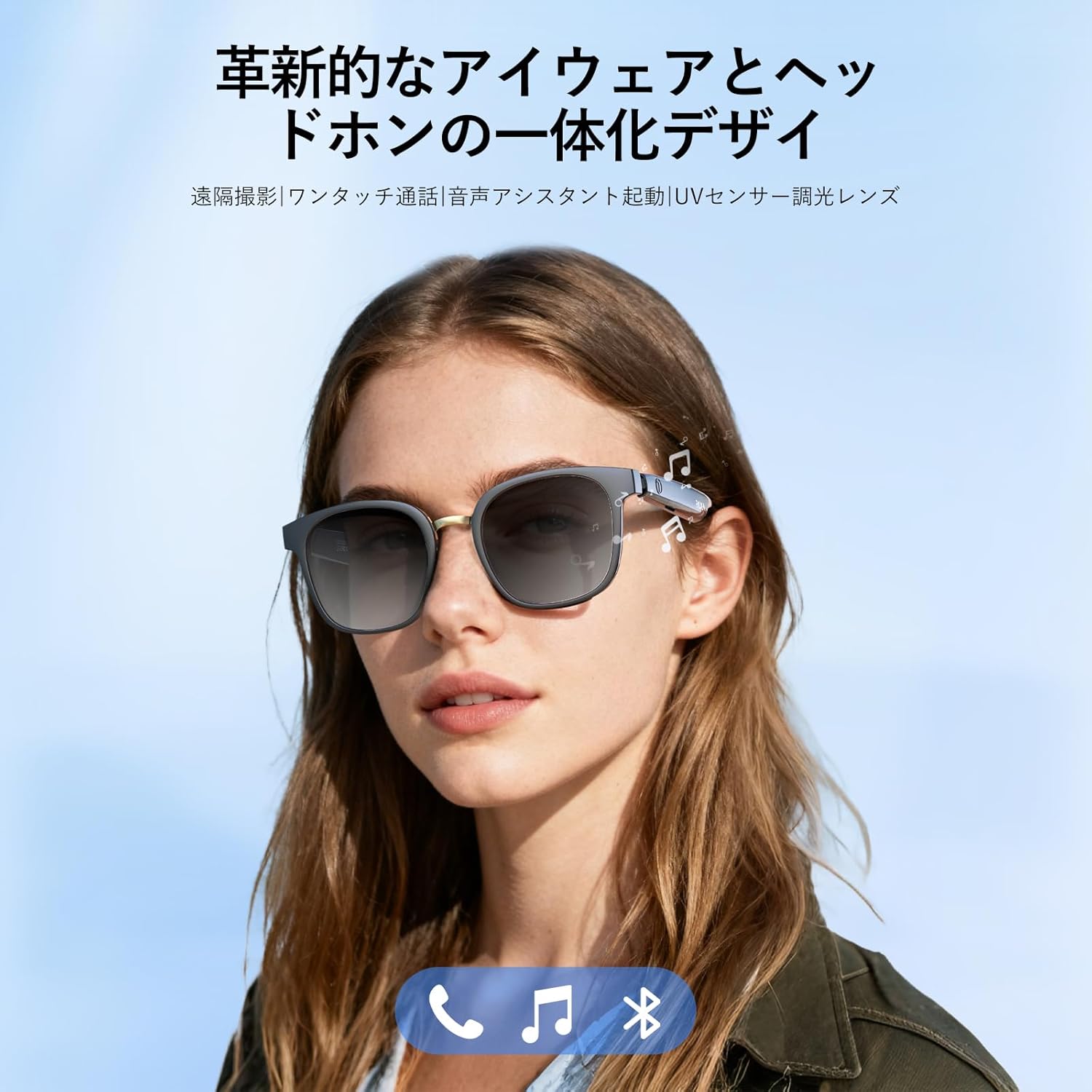
Foto: N'ihu view of the PAXA S7PRO Smart Audio Glasses, highlighting the sleek design.
3. Atụmatụ
3.1 Intelligent Photochromic Lenses with UV & Blue Light Cut
The lenses automatically adjust their color based on the intensity of ultraviolet light. They feature UV400 protection, blocking 99% of harmful UVA/UVB rays outdoors. Additionally, high-quality blue light cut functionality reduces harmful light from screens, protecting your eyes and improving sleep quality.

Image: Demonstrating the automatic tint adjustment of the lenses for indoor clear vision and outdoor sun protection.

Image: Visual representation of the effective UV and blue light cutting technology.
Njikọ Bluetooth 5.4 3.2
Equipped with the latest Bluetooth 5.4 technology, the S7PRO ensures stable and efficient connections. Enjoy uninterrupted music playback and calls within a range of up to 30 meters. The built-in microphone provides clear communication, and intelligent volume adjustment adapts to ambient noise, ensuring privacy and comfort.

Image: Illustrating the immersive sound experience and Bluetooth 5.4 capabilities.

Image: The Wireless 5.4 chip, ensuring stable and efficient signal transmission.
3.3 Multi-scene Adaptability
Thanks to the photochromic and polarizing functions, these glasses offer clear vision indoors and act as sunglasses outdoors. They are suitable for various activities including gaming, smartphone use, driving, golf, fishing, and running, providing excellent UV protection for outdoor adventures. From daily use to sports, the S7PRO adapts to any situation.

Image: The PAXA S7PRO Smart Audio Glasses used in diverse scenarios, from outdoor activities to indoor work.
3.4 Long Battery Life & Fast Charging
Equipped with dual 55mAh batteries, the S7PRO provides up to 4 hours of continuous talk/music playback on a mere 2-hour charge. With a standby time of up to 30 hours, it significantly reduces the need for frequent charging in daily use.

Image: Highlighting smart features including long-lasting battery life.
3.5 IPX5 Waterproofing
With IPX5 water resistance, the S7PRO is resilient against sweat and light rain, making it suitable for intense workouts or unexpected weather changes. Enjoy music and calls comfortably during sports activities.
3.6 Foto dịpụrụ adịpụ
Capture precious moments effortlessly with the remote photography function. Simply tap the side of the glasses to take photos or record videos, ensuring you never miss a memory.

Image: Demonstrating the remote photography feature, allowing users to capture moments with a simple tap.
Video: A short demonstration of the PAXA S7PRO Smart Audio Glasses, including unboxing and basic functions like remote photo capture and call handling.
3.7 Open Sound Field
Experience directional sound transmission that allows you to enjoy your audio while remaining aware of your surroundings. This open-ear design enhances safety and convenience.

Image: Visualizing the open sound field and comfortable, stable fit of the curved temples.
4. Nhazi
4.1 Ịchaji iko
- Connect the provided charging cable to the charging port on the glasses.
- Plug the other end of the cable into a USB power adapter (not included) or a computer USB port.
- Ọkụ ihe ngosi ga-egosi ọkwa chajị (dịka ọmụmaatụ, ọbara ọbara maka chajị, acha anụnụ anụnụ/akwụkwọ ndụ akwụkwọ ndụ maka chajị zuru oke).
- Ụgwọ zuru ezu na-ewe ihe dịka awa 2.
4.2 Gbanyụọ/ gbanyụọ
- Ike Na: Press and hold the multi-function button on the temple for a few seconds until you hear a power-on prompt or see the indicator light.
- Gbanyụọ: Press and hold the multi-function button for a few seconds until you hear a power-off prompt or the indicator light turns off.
4.3 Njikọ Bluetooth
- Gbaa mbọ hụ na agbanyere enyo na n'ụdị njikọta (ọkụ na-egosi nwere ike ịgbanwuo).
- Na ekwentị gị ma ọ bụ ngwaọrụ Bluetooth, gaa na ntọala Bluetooth.
- Chọọ maka available devices and select "PAXA S7PRO" from the list.
- Once connected, you will hear a confirmation sound, and the indicator light will change (e.g., solid blue).
5. Ntuziaka ọrụ
5.1 Nghaghachi egwu
- Gwuo/kwụsịtụ: Pịa otu bọtịnụ ọtụtụ ọrụ.
- Track na-esote: Double tap the multi-function button.
- Gara aga Track: Triple tap the multi-function button.
5.2 Njikwa oku
- Oku azaa: Single tap the multi-function button when a call comes in.
- Oku ngwụcha: Single tap the multi-function button during a call.
- Jụ oku: Press and hold the multi-function button for 2 seconds when a call comes in.

Image: The multi-function key enables smooth call handling with a high-sensitivity microphone and noise reduction.
5.3 Mmelite Onye Enyemaka Olu
- Mee ka onye enyemaka olu rụọ ọrụ: Press and hold the multi-function button for 3 seconds to activate your device's voice assistant (e.g., Siri, Google Assistant).
5.4 Njikwa Igwefoto Dị Anya
- Take Photo/Start Video: With your phone's camera app open, single tap the multi-function button to take a photo or start/stop video recording.
Video: A brief demonstration of the PAXA S7PRO's photochromic lenses changing tint when exposed to sunlight.
6. Nlekọta
6.1 Nhicha
- lenses: Use the provided cleaning cloth or a soft, lint-free cloth with a lens cleaning solution. Avoid abrasive materials or harsh chemicals.
- Frame: Wipe the frame gently with a soft, damp akwa . Ekpudola iko ndị ahụ n'ime mmiri.
6.2 Nchekwa
- Store the glasses in the provided storage case when not in use to protect them from scratches and damage.
- Avoid exposing the glasses to extreme temperatures or direct sunlight for prolonged periods.
6.3 Mmiri Nguzogide
The PAXA S7PRO glasses are IPX5 water-resistant, meaning they can withstand splashes and light rain. However, they are not designed for submersion in water. Avoid showering, swimming, or exposing them to high-pressure water jets.
7. Nchọpụta nsogbu
If you encounter any issues with your PAXA S7PRO Smart Audio Glasses, please refer to the following common solutions:
- Enweghị ike: Ensure the glasses are fully charged. Connect them to the charger and check the indicator light.
- Enweghị ike ijikọ site na Bluetooth:
- Ensure the glasses are in pairing mode.
- Gbanyụọ ma gbanye Bluetooth na ngwaọrụ gị.
- Move the glasses closer to your device.
- Chezọ ngwaọrụ dị na ntọala Bluetooth ekwentị gị wee nwaa ijikọ ọzọ.
- Enweghị ụda:
- Check the volume level on both the glasses and your connected device.
- Hụ na ejiri Bluetooth jikọọ iko ndị ahụ nke ọma.
- Restart both the glasses and your connected device.
- Lenses Not Changing Tint: Ensure the glasses are exposed to sufficient UV light. Photochromic lenses react to UV, not just visible light.
- Remote Camera Not Working: Ensure your phone's camera app is open and the glasses are properly paired.
8. Nkọwapụta
| Njirimara | Nkọwa |
|---|---|
| Aha ika | PAXA |
| Nlereanya | S7PRO |
| Agba | Ojii Frame |
| Ụdị | Square |
| Eji batrị | Mba (Batrị enwere ike ịchaji n'ime) |
| Onye nrụpụta | Ụgwọ nke ụlọ ọrụ Shanghai WeihonghangCulture Communication Co., Ltd. |
| Afọ mwepụta | 2025 |
| Ngwa gụnyere | Charging cable, Storage box, Storage bag |
| Ọrụ ndị ọzọ | Notifications, Calls, Voice Control, Voice Calls, Music Player |
| Nha | Obere |
| Akụkụ ngwugwu | 17.3 x 6.1 x 5.7 cm; 140 g |
| ASIN | B0FYFF8FCT |
| Ụbọchị mbụ dị | 2025/11/17 |

Image: Detailed dimensions of the PAXA S7PRO Smart Audio Glasses.
9. Akwụkwọ ikike na nkwado
PAXA products are covered by a limited warranty. For detailed warranty information, technical support, or customer service inquiries, please refer to the contact information provided with your product packaging or visit the official PAXA websaịtị. Biko dowe ihe akaebe nke ịzụrụ ihe maka akwụkwọ ikike.