
HomeWizard HWE-KWH1
HomeWizard 1-Phase Wi-Fi kWh Meter (MID Certified) Instruction Manual
Model: HWE-KWH1
1. Okwu mmalite
The HomeWizard 1-Phase Wi-Fi kWh Meter is designed to provide accurate, real-time energy consumption data for single-phase electrical installations. This MID-certified meter is suitable for official billing purposes and offers comprehensive monitoring capabilities via the HomeWizard app. It is ideal for tracking energy usage of large consumers such as electric vehicle charging stations, heat pumps, and solar installations.
2. Ozi nchekwa
Ịdọ aka ná ntị: Installation of this device involves working with high voltage electricity. Improper installation can lead to serious injury or death.
- Ọ bụ ọkachamara ọkụ eletrik ruru eru ga-arụ ọrụ nrụnye ahụ dịka iwu na ụkpụrụ eletrik mpaghara si dị.
- Ensure the main power supply is disconnected before attempting any installation or maintenance.
- Emeghela ngwaọrụ casing. Enweghị akụkụ ndị ọrụ ga-arụ ọrụ n'ime.
- Debe ngwaọrụ ahụ pụọ na mmiri na oke iru mmiri.
- Operate the device within its specified voltage and current ratings (100A, 230V).
3. Ihe ngwugwu
Chọpụta na ihe niile dị na ngwugwu:
- HomeWizard 1-Phase Wi-Fi kWh Meter (Model: HWE-KWH1)
- Ntuziaka mmalite ngwa ngwa
4. Ngwaahịa gafereview
The HomeWizard kWh Meter is a compact device designed for DIN rail mounting, providing precise energy measurement and Wi-Fi connectivity for smart home integration.

Figure 4.1: HomeWizard kWh Meter showing its compact dimensions (10.6 x 3.6 x 6.6 cm).

Figure 4.2: Key features of the HomeWizard kWh Meter, including backlit LCD, intuitive button control, impulse LED, DIN rail mounting, and security seal orifice.
Akụkụ ndị bụ isi:
- MID Certified: Ensures accuracy for official billing and leasing ebumnuche.
- Njikọ Wi-Fi: Real-time data access via the HomeWizard app.
- 1-Phase Measurement: Suitable for single-phase electrical systems.
- DIN Rail mgbakwasa: Easy installation in standard electrical panels.
- Nhazi kọmpat: Fits into most electrical cabinets.
- Ihuenyo LCD azụ: Direct on-site display of measurements.
- Intuitive Button Control: Simple navigation.
- Impulse LED: Indicates current energy consumption.
- Security Seal Orifice: For protection against tampiri.
5. Ntọala na nwụnye
The HomeWizard kWh Meter is designed for installation in your electrical panel. Due to the nature of electrical work, professional installation is highly recommended.
5.1. Nwụnye chọrọ
- Technical knowledge of electrical installations is required.
- Standard 35mm DIN rail for mounting.
- 2.4 GHz Wi-Fi network for app connectivity.
5.2. Installation Steps (Professional Installation Recommended)
- Kwụpụ ike: Before starting, ensure the main power supply to your electrical panel is completely switched off.
- Mount the Meter: Securely attach the HomeWizard kWh Meter onto a 35mm DIN rail within your electrical panel.
- Wire the Meter: Connect the meter according to the wiring diagram provided in the quick start guide and local electrical standards. Ensure correct phase and neutral connections, and connect the load.
- Weghachi ike: Once wiring is complete and verified, restore power to the electrical panel.
- Njikọ Wi-Fi: Follow the instructions in the Quick Start Guide to connect the meter to your 2.4 GHz Wi-Fi network.
- Ngwakọta ngwa: Download the HomeWizard app from your device's app store and follow the in-app instructions to add and configure your new kWh meter.

Figure 5.1: The HomeWizard kWh Meter being installed on a DIN rail in an electrical cabinet. Professional installation is advised.
6. Ntuziaka ọrụ
The HomeWizard kWh Meter provides real-time energy data directly on its LCD screen and through the HomeWizard mobile application.
6.1. On-Device Display
- The backlit LCD screen displays current energy consumption (kWh) and other relevant metrics.
- Use the intuitive button control to cycle through different display modes and view historical data directly on the device.
- The impulse LED will flash to indicate active energy consumption.
6.2. HomeWizard App Integration
The HomeWizard app is the primary interface for monitoring and managing your energy data.
- Budata ngwa: Chọọ maka "HomeWizard" in your smartphone's app store (iOS or Android).
- Mebe akaụntụ: If you don't have one, create a HomeWizard account and log in.
- Tinye ngwaọrụ: Follow the in-app instructions to add your kWh meter. Ensure your phone is connected to the same 2.4 GHz Wi-Fi network as the meter during setup.
- Monitor Consumption: View real-time and historical energy consumption data, including grid draw, grid feed-in, and consumption by specific appliances (if configured with other HomeWizard devices).
- Insights and Optimization: The app provides insights into your energy usage patterns, helping you identify large consumers and optimize your energy consumption.

Figure 6.1: The HomeWizard app interface showing real-time energy consumption data, including grid usage and solar production.

Figure 6.2: A smartphone displaying the HomeWizard app, illustrating its user-friendly interface for energy monitoring.
6.3. Ngwa
The HomeWizard kWh Meter is versatile and can be used to monitor various high-consumption devices and energy sources:
- Mgbapụta ọkụ
- Electric Vehicle (EV) Charging Stations
- Igwe ntụ oyi
- Solar Panels (for production monitoring)
- Igwe mmiri ọkụ eletrik
- Ulọ ọrụ Induction
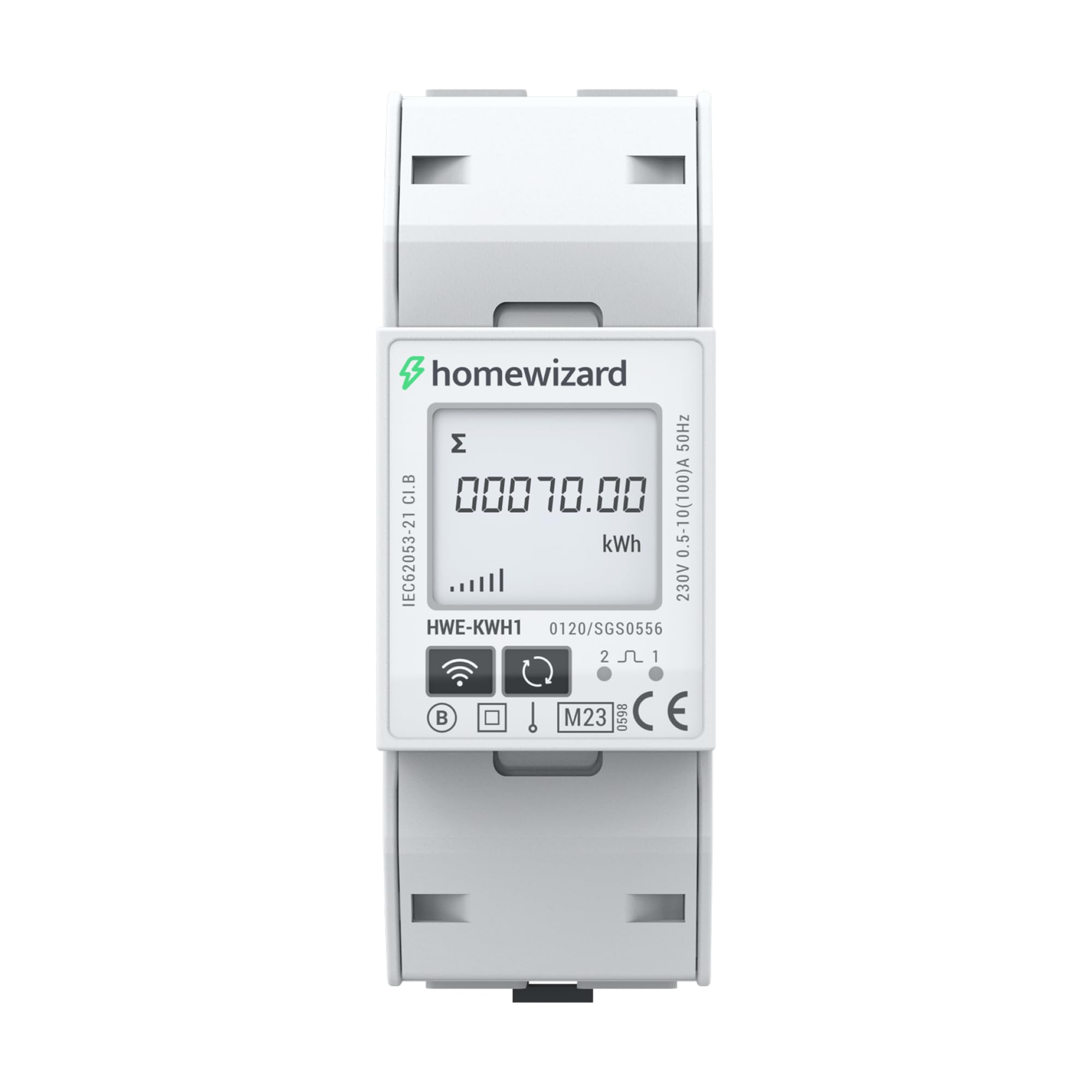
Figure 6.3: The HomeWizard kWh Meter monitoring an electric vehicle charging station and solar panel output.
7. Nlekọta
The HomeWizard kWh Meter is designed for maintenance-free operation.
- Nhicha: Ọ bụrụ na ọ dị mkpa, jiri nwayọọ hichaa mpụga nke ngwaọrụ ahụ na akwa akọrọ, dị nro. Ejila ihe nhicha mmiri ma ọ bụ ihe mgbaze.
- Mmelite femụwe: Ensure your device's firmware is up to date through the HomeWizard app to benefit from the latest features and improvements.
- Enweghị akụkụ ndị ọrụ nwere ike ịrụ ọrụ: Do not attempt to open or repair the device. Refer to qualified personnel for any issues.
8. Nchọpụta nsogbu
If you encounter issues with your HomeWizard kWh Meter, try the following steps:
- Enweghị Ike/Ngosipụta Gbanyụọ:
- Check the main power supply to the electrical panel.
- Hụ na njikọ waya niile dị nchebe (gakwuru onye ọrụ ọkụ eletrik ruru eru).
- Enweghị njikọ Wi-Fi:
- Verify your Wi-Fi network is 2.4 GHz. The device does not support 5 GHz networks.
- Ensure the Wi-Fi signal strength is adequate at the meter's location.
- Malitegharịa ekwentị Wi-Fi gị.
- Attempt to re-pair the device with the HomeWizard app.
- Ọgụgụ na-ezighi ezi:
- Confirm that the meter is correctly wired according to the installation diagram.
- Ensure the meter is MID certified for accurate measurements.
- App Not Displaying Data:
- Check your internet connection on your smartphone.
- Ensure the HomeWizard app is updated to the latest version.
- Log out and log back into the HomeWizard app.
- If the issue persists, contact HomeWizard support.
9. Nkọwapụta
| Ụdị | Ọkachamara ụlọ |
| Nlereanya | HWE-KWH1 |
| Akụkụ ngwaahịa (L x W x H) | 10.6 x 3.6 x 6.6 cm |
| Ibu Ibu | 167 grams |
| Agba | Agba ntụ |
| Ihe onwunwe | Plastic |
| Voltage | 230 volts |
| Ogo dị ugbu a | 100 A |
| Oriri ike | 2 Watt |
| MID Certified | Ee |
| Batrị gụnyere | Mba |
| Batrị achọrọ | Mba |
| Mbụ Dị | Nọvemba 19, 2025 |
10. Akwụkwọ ikike na nkwado
10.1. Akwụkwọ ikike Ozi
The HomeWizard kWh Meter comes with a 2-year availability for spare parts. For specific warranty terms and conditions, please refer to the documentation provided with your purchase or visit the official HomeWizard websaịtị.
10.2. Mmelite ngwanrọ
Software updates are provided to enhance functionality and security. Information regarding guaranteed software updates is not available in the provided data. Please check the HomeWizard app or websaịtị maka ozi ọhụrụ.
10.3. Nkwado ndị ahịa
For technical assistance, troubleshooting, or any other inquiries, please contact HomeWizard customer support.
- Onye nrụpụta: Ọkachamara ụlọ
- Onye na-ere ahịa: HomeWizard BV (on Amazon.fr)
- Refer to the HomeWizard websaịtị maka nkọwa kọntaktị na akụrụngwa nkwado.
Ask a question about this manual
Ask about setup, troubleshooting, compatibility, parts, safety, or missing instructions. Manuals+ will review the question and use this page’s manual context to help answer it.