
Okwu mmalite
Akwụkwọ ntuziaka a na-enye ntuziaka zuru oke maka ojiji nchekwa na irè nke ngwaọrụ gị AMPBANK M256 Thermal Camera. The M256 is a compact thermal imager designed for use with Android smartphones, tablets, and PCs, offering a 256x192 IR resolution and a temperature range of -4°F to 842°F (-20°C to 450°C). Please read this manual thoroughly before operating the device.
Ozi nchekwa
Na-edebe nchekwa nchekwa ndị a mgbe niile iji gbochie mmerụ ahụ ma ọ bụ mebie ngwaọrụ:
- Do not point the camera directly at intense heat sources, such as the sun or lasers, as this may damage the sensor.
- Ewepụla ngwaọrụ ahụ na oke okpomọkụ, iru mmiri, ma ọ bụ gburugburu na-emebi emebi.
- Zere idobe ma ọ bụ idobe ngwaọrụ ahụ na mmetụta siri ike.
- Use only the provided accessories or those approved by AMPBANK.
- Debe ngwaọrụ ahụ ka ụmụaka ghara iru ya.
- Refer to local regulations for proper disposal of electronic devices.
Ihe ngwugwu
Chọpụta na ihe niile dị na ngwugwu gị:
- 1 x AMPIgwefoto onyonyo nke BANK M256
- 1 x Multifunctional Adapter Cable (19.7-inch / 50cm USB extension cable)
- 1 x akwa nhicha
- 1 x Ntuziaka onye ọrụ ngwa ngwa
- 1 x Akpa na-ebu
- 1 x igbe nkwakọ ngwaahịa

Image: Contents of the AMPBANK M256 Thermal Camera package, including the camera, adapter cable, cleaning cloth, quick user guide, carrying bag, and packing box.
Ngwaahịa gafereview
Nke AMPBANK M256 is a compact, plug-and-play thermal imaging camera designed to extend the capabilities of your Android smartphone or PC. It features a USB-C connector for direct attachment to compatible devices.

Foto: N'ihu view nke AMPBANK M256 Thermal Camera, showing its compact green and black design with a USB-C connector.
Akụkụ ndị bụ isi:
- Mkpebi dị elu: 256x192 IR resolution for clear thermal images.
- Oke okpomoku sara mbara: Measures from -4°F to 842°F (-20°C to 450°C).
- Oriri ike dị ala: Operates efficiently at 0.35W.
- Kọmpat na ibugharị: Weighs only 30g, easily fits in a pocket.
- Njikọta dị iche iche: Compatible with Android smartphones/tablets and PCs via USB-C.
Melite
1. App Installation (Android)
- Locate the "ThermCam" application on the Google Play Store.
- Download and install the application on your Android smartphone or tablet.
- Ensure your device supports OTG (On-The-Go) functionality for external device connection.

Image: Screenshot showing the ThermCam app available on Google Play, indicating where to download the required software for the thermal camera.
2. Ijikọ ngwaọrụ
- For direct connection: Plug the USB-C connector of the M256 thermal camera directly into the USB-C port of your Android smartphone or tablet.
- For extended connection: Use the provided 19.7-inch (50cm) USB extension cable. Connect one end to your smartphone/tablet and the other end to the M256 camera. This offers greater flexibility during use.
- Once connected, open the "ThermCam" app. The app should automatically detect the camera and display the thermal image.

Image: A hand holding a smartphone with the AMPBANK M256 Thermal Camera connected to its USB-C port, displaying a thermal image on the phone screen.

Foto: The AMPBANK M256 Thermal Camera connected to a laptop and a tablet using the 19.7-inch USB extension cable, demonstrating its versatility.
3. Nwụnye ngwanrọ PC
- For PC usage, download the "TCView 2.0" software from the official AMPỤlọ akụ websaịtị.
- Install the software on your Windows PC.
- Connect the M256 camera to your PC using the USB-C extension cable.
- Launch the TCView 2.0 software to begin thermal imaging on your PC.
Ọrụ
1. Basic Temperature Measurement
- Once the app is open and the camera is connected, the thermal image will appear on your screen.
- The app displays real-time temperature readings.
- Adjust the camera's position to focus on the area of interest.

Image: A person using the AMPBANK M256 Thermal Camera with a smartphone to inspect a wall, showing the thermal image and temperature readings on the phone screen.
2. Measurement Modes and Color Palettes
- The ThermCam app offers various measurement modes, including Ntụpọ, Ahịrị, na Ụgbọ elu, for precise temperature monitoring.
- Select from 10 different color palettes to visualize temperature changes. Different palettes can highlight specific temperature variations more clearly.

Image: A smartphone screen displaying various color palettes and measurement settings within the ThermCam app, demonstrating customization options for thermal imaging.
3. 3D Thermal Analysis
- Utilize the advanced 3D editing features within the app or PC software for detailed temperature analysis from multiple perspectives.
- This feature assists in identifying subtle temperature anomalies and patterns.
4. Smart Alerts
- Configure smart alerts for high and low temperatures. The app will notify you when temperatures exceed or fall below predefined thresholds.
- This is useful for monitoring critical equipment or areas.
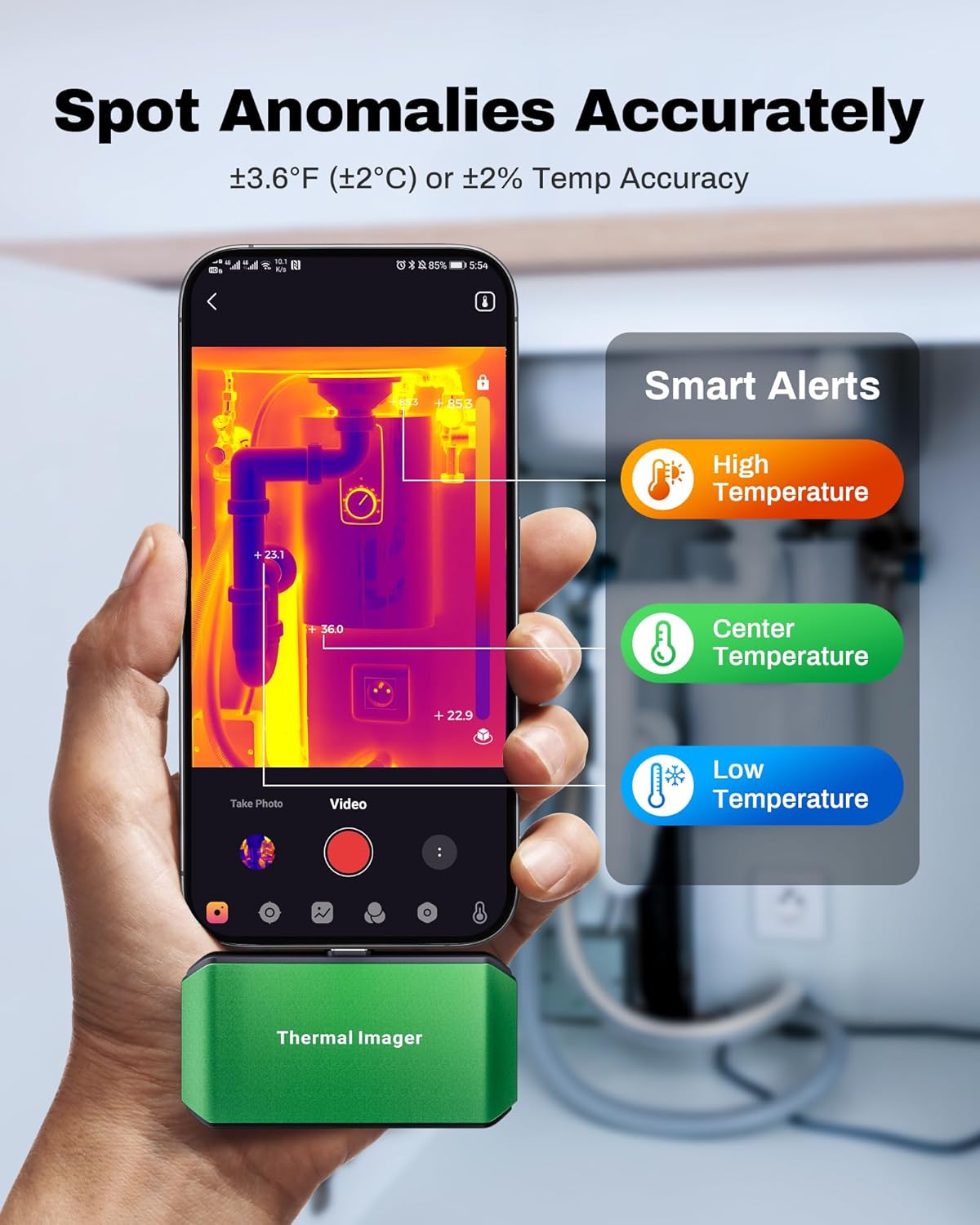
Image: A smartphone screen showing the ThermCam app with "Smart Alerts" for high, center, and low temperatures, indicating the camera's ability to detect anomalies.
5. Njide foto na vidiyo
- Capture still thermal images or record thermal videos directly through the app.
- These captures can be used for documentation, analysis, or sharing.

Image: Screenshots from the ThermCam app demonstrating options for video recording and photo capturing of thermal images.
6. Generating Professional Reports
- The ThermCam app and TCView 2.0 software allow you to generate professional field reports.
- Customize data, add watermarks, and adjust settings for seamless sharing of your thermal analysis.

Image: A smartphone screen displaying the ThermCam app's interface for generating professional reports, including options to customize data and share.
Nlekọta
- Nhicha: Use the provided cleaning cloth to gently wipe the camera lens and body. Do not use abrasive cleaners or solvents.
- Nchekwa: When not in use, store the thermal camera in its protective carrying bag to prevent dust and damage. Store in a cool, dry place away from direct sunlight.
- Mmelite ngwanrọ: Regularly check the Google Play Store or AMPỤlọ akụ website for updates to the ThermCam app or TCView 2.0 software to ensure optimal performance and access to new features.
Nchọpụta nsogbu
| Nsogbu | Ihe nwere ike ime | Ngwọta |
|---|---|---|
| Camera not detected by smartphone/PC. |
|
|
| Ọgụgụ okpomọkụ ezighi ezi. |
|
|
| Ngwa ahụ na-ada ma ọ bụ na-akpọnwụ. |
|
|
Nkọwapụta
| Njirimara | Nkọwa |
|---|---|
| Nlereanya | M256 |
| Mkpebi IR | 256x192 pikselụ |
| Oke okpomọkụ | -4°F ruo 842°F (-20°C ruo 450°C) |
| Okpomọkụ ziri ezi | ±3.6°F (±2°C) or ±2% |
| Mmetụta okpomọkụ (NETD) | <40mK |
| Ọnụego ume ọhụrụ | 25Hz |
| Oriri ike | 0.35W |
| Njikọta | USB-C |
| Ndakọrịta | Android Smartphones/Tablets, Windows PC |
| Akụkụ | 2.8 x 1.65 x 0.55 sentimita (70 x 44 x 14 mm) |
| Ibu | 30g (0.07 lb) |
| Onye nrụpụta | AMPỤlọ akụ |

Image: A visual summary of the AMPBANK M256 Thermal Camera's key features and specifications, including resolution, temperature range, and power consumption.
Akwụkwọ ikike na nkwado
AMPBANK products are designed for reliability and performance. For warranty information, technical support, or service inquiries, please refer to the official AMPỤlọ akụ websaịtị ma ọ bụ kpọtụrụ ngalaba ọrụ ndị ahịa ha.
Biko dowe ihe akaebe nke ịzụrụ ihe maka akwụkwọ ikike.
Akụrụngwa dị n'ịntanetị: Gaa leta AMPBANK Store on Amazon maka ozi ngwaahịa na nkwado ndị ọzọ.