
1. N'eluview
The Xiaomi Redmi Note 15 Pro 5G is a high-performance smartphone designed for robust daily use. It features a massive 6580 mAh battery, IP66/IP68 dust and water resistance, a 200 MP camera, and a 6.83-inch 1.5K AMOLED display. This manual provides essential information for setting up, operating, and maintaining your device.

Foto: Ọtụtụ views of the Xiaomi Redmi Note 15 Pro 5G smartphone, showcasinnhazi ya na modulu igwefoto ya.
2. Kedu ihe dị na Igbe ahụ
Upon unboxing your Xiaomi Redmi Note 15 Pro 5G, you should find the following items:
- Xiaomi Redmi Note 15 Pro 5G smartphone
- Eriri USB (Ụdị USB-C)
- SIM Ejection Tool
- Okwu nchekwa
- Holding Ring (Keyring)
Note: A power adapter is not included with this device.
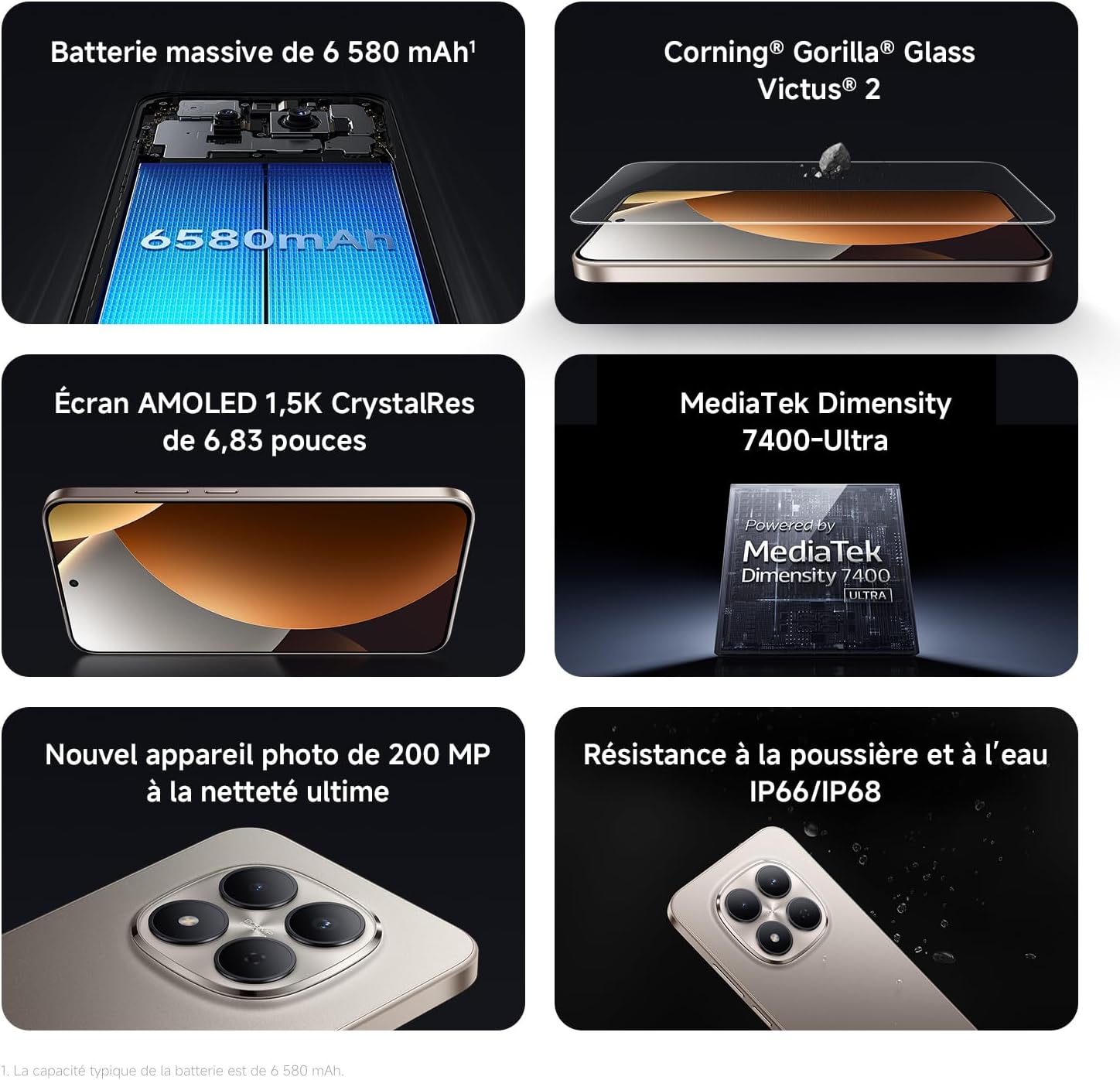
Image: Contents of the Xiaomi Redmi Note 15 Pro 5G box, showing the smartphone, USB-C cable, SIM ejection tool, protective case, and holding ring.
3. Atụmatụ igodo
- Massive 6580 mAh Battery with 45W Turbo Charging: Equipped with an ultra-large silicon-carbon battery for extended usage while maintaining a slim and light design. Supports 45W turbo charging and up to 22.5W reverse charging.
- IP66 / IP68 Dust and Water Resistance: The device has successfully passed 2-meter water resistance tests for 24 hours. It is designed to withstand daily splashes, accidental immersion, or drops in water without affecting performance.
- New 200 MP Ultra-Clear Camera System: Features a 4th generation 200 MP main sensor combined with a large 1/1.4-inch sensor, offering unprecedented image detail.
- Immersive 6.83-inch 1.5K Eye-Care AMOLED Display: Utilizes flagship-level luminous materials for reduced power consumption and a peak brightness of 3200 nits, ensuring clear visibility even in bright sunlight.
- Onye enyemaka AI: Intelligent optimization with a single gesture, enhancing imaging capabilities and creative efficiency.
- Corning Gorilla Glass Victus 2: Reinforced front glass for enhanced shock and scratch resistance, ensuring long-term durability.
- MediaTek Dimensity 7400-Ultra Processor: Built on a 4nm TSMC process with an octa-core architecture up to 2.6 GHz, providing powerful multitasking, smooth gaming, and stable performance.
- Xiaomi HyperOS 2: Offers a faster, smarter, and smoother user experience with 6 years of security updates.

Image: Diagram illustrating the 6580 mAh battery capacity of the Redmi Note 15 Pro 5G.

Image: The Redmi Note 15 Pro 5G with water droplets, demonstrating its IP66/IP68 dust and water resistance.

Foto: nso nso view of the 200 MP camera module on the Redmi Note 15 Pro 5G.

Image: The 6.83-inch 1.5K AMOLED display of the Redmi Note 15 Pro 5G with its specifications.

Image: Before and after images demonstrating AI photo optimization on the Redmi Note 15 Pro 5G.

Image: Illustration of Corning Gorilla Glass Victus 2 durability on the Redmi Note 15 Pro 5G.

Image: Technical image showing RAM chips, indicating up to 24GB RAM with memory extension on the Redmi Note 15 Pro 5G.

Image: Screenshot of the Xiaomi HyperOS 2 interface on the Redmi Note 15 Pro 5G.
4. Nhazi
4.1. Ịtinye kaadị SIM
- Chọta tray kaadị SIM n'akụkụ ngwaọrụ gị.
- Insert the SIM ejection tool into the small hole next to the tray and press firmly until the tray pops out.
- Place your Nano-SIM card(s) into the tray with the gold contacts facing down. Ensure they are correctly aligned.
- Carefully push the SIM card tray back into the device until it clicks into place.
4.2. Ike mbido na ịtọlite
- Press and hold the Power button (usually on the right side) until the Xiaomi logo appears.
- Soro ntuziaka dị na ihuenyo iji họrọ asụsụ gị, mpaghara gị, ma jikọọ na netwọk Wi-Fi.
- Banye na akaụntụ Google gị ma ọ bụ mepụta nke ọhụrụ iji nweta ọrụ Google na ụlọ ahịa Play.
- Set up your screen lock (PIN, pattern, password, fingerprint, or face unlock) for security.
- Review ma nabata usoro na ọnọdụ iji mezue usoro ntọala ahụ.
5. Ntuziaka ọrụ
5.1. Nsoro ụzọ
- Ihuenyo ụlọ: Pịa aka ekpe ma ọ bụ aka nri ka ịnyagharịa n'etiti ihuenyo ụlọ.
- Drawer ngwa: Si na ala ihuenyo pịgharịa ka ị nweta ngwa niile arụnyere.
- Amamọkwa & Ntọala ngwa ngwa: Si n'elu ihuenyo gaa ala view amamọkwa na nweta ntọala ngwa ngwa toggles.
- Ngwa ọhụrụ: Swipe up from the bottom and hold, or tap the square navigation button (if enabled) to see recently used applications.
5.2. Ojiji igwefoto
The 200 MP camera system offers various modes for capturing photos and videos.
- Mepee ngwa igwefoto site na ihuenyo ụlọ ma ọ bụ drawer ngwa gị.
- Swipe left or right on the screen to switch between modes like Photo, Video, Portrait, Pro, and more.
- Pịa bọtịnụ mkpọchi iji see foto ma ọ bụ bọtịnụ ndekọ iji malite/kwụsị ndekọ vidiyo.
- Use the zoom options (e.g., 0.6x, 1x, 2x) or pinch to zoom for different perspectives.
- Access settings (gear icon) for advanced options like resolution, aspect ratio, and AI enhancements.

Image: A hand holding the Redmi Note 15 Pro 5G, displaying the camera interface with various modes and controls.
5.3. Ngosipụta Ntọala
Customize your display for optimal viewing na nkasi obi.
- Gaa na Ntọala > Ngosipụta.
- Adjust brightness, enable Adaptive brightness, or activate Reading mode for eye comfort.
- Change the Refresh rate (up to 120Hz) for smoother scrolling and animations.
- Select Color scheme and adjust color temperature to your preference.
5.4. Njikwa batrị
Optimize your battery life and utilize charging features.
- Nweta Ntọala > Batrị ka view usage statistics and enable Battery Saver modes.
- Use the provided USB Type-C cable with a compatible 45W charger for turbo charging.
- To use reverse charging, connect a compatible device to your smartphone via a USB-C to USB-C cable.
6. Njikọta Mgbasa Ozi
6.1. Ngwaahịa gafereview Vidiyo
Video: A seller-provided overview of the Redmi Note 15 Pro, showcasing its design, interface, and camera features. This video highlights the device's smooth operation and aesthetic appeal.
7. Nlekọta
7.1. Na-ehicha ngwaọrụ gị
- Use a soft, lint-free cloth to clean the screen and body of your phone.
- Zere iji kemịkalụ siri ike ma ọ bụ ihe na-emebi emebi.
- For speaker and port cleaning, the device features a function to expel water and dust. Access this feature through the settings or a dedicated app.

Image: Screenshot of the Redmi Note 15 Pro 5G showing a speaker cleaning function on the screen, which uses high-frequency vibration to expel residual water and dust.
7.2. Mmelite ngwanrọ
Lelee ma wụnye mmelite ngwanrọ mgbe niile iji hụ na arụmọrụ kacha mma, nchekwa na ịnweta njirimara ọhụrụ.
- Gaa na Ntọala > Gbasara ekwentị > Ụdị MIUI (or HyperOS version) to check for updates.
8. Nchọpụta nsogbu
8.1. Ngwaọrụ anaghị azaghachi
- Pịa ma jide bọtịnụ ike maka ihe dịka 10-15 sekọnd ịmanye ịmalitegharịa.
- If the issue persists, ensure the device is charged. Connect it to a charger and wait a few minutes before attempting to power it on again.
8.2. Okwu Njikọta netwọkụ
- Toggle Airplane mode on and off from Quick Settings.
- Malitegharịa ekwentị gị.
- Lelee ma etinyere kaadị SIM gị nke ọma.
- Gaa na Ntọala > Kaadị SIM na netwọk mkpanaaka to ensure your mobile data is enabled and the correct network type is selected.
8.3. Ngwa na-emebi ma ọ bụ na-ajụ oyi
- Hichapụ ebe nchekwa na data nke ngwa nwere nsogbu (Settings > Apps > Manage apps > [App Name] > Clear data).
- Wepu ma tinyegharịa ngwa ahụ.
- Gbaa mbọ hụ na ngwanrọ ngwaọrụ gị emechaala.
8.4. Ntọgharị ụlọ nrụpụta
If you encounter persistent issues, a factory reset may be necessary. Ịdọ Aka Na Ntị: Nke a ga-ehichapụ data niile dị na ngwaọrụ gị. Kwadobe data dị mkpa tupu ị gaa n'ihu.
- Gaa na Ntọala > Gbasara ekwentị > Ntọgharị ụlọ ọrụ.
- Follow the on-screen instructions to confirm the reset.
9. Nkọwapụta
| Njirimara | Nkọwa |
|---|---|
| Ụdị | XIAOMI |
| Aha Nlereanya | Redmi Note 15 Pro 5G |
| Sistemụ nrụọrụ | Hyper OS |
| RAM | 12 GB |
| Ike nchekwa | 512 GB |
| Ụdị CPU | Mediatek Dimensity 7400 |
| Nha ihuenyo | 6.83 sentimita asatọ |
| Ngosipụta mkpebi | 1560 x720 |
| Ọnụego ume ọhụrụ | 120 Hz |
| Ụdị ngosi | AMOLED |
| Onye na-ebu ikuku | Emechiri |
| Agba | Nwa |
| Oghere kaadi SIM | SIM abụọ |
| Ntinye ntinye | USB Ụdị C |
| Ọkwa Nguzogide mmiri | Waterproof (IP66/IP68) |
| Mkpebi igwefoto n'ihu | 20 MP |
| Mkpebi igwefoto azụ | 200 megapixels |
| Ike batrị | 6580 mAh |
| Teknụzụ ekwentị | 5G |
| Teknụzụ Njikọta | Bluetooth, NFC, USB, Wi-Fi |
| Afọ Nlereanya | 2026 |

Image: Technical specifications and feature legends for the Redmi Note 15 Pro 5G.
10. Akwụkwọ ikike na nkwado
Your Xiaomi Redmi Note 15 Pro 5G comes with a Akwụkwọ ikike onye nrụpụta afọ 2. Akwụkwọ ikike a na-ekpuchi ntụpọ dị na ngwa na arụ ọrụ n'okpuru ojiji nkịtị.
For warranty claims, technical support, or service inquiries, please contact Xiaomi customer service or visit the official Xiaomi support websaịtị. Debe ihe akaebe nke ịzụrụ ihe maka nkwado akwụkwọ ikike.