
1. Ngwaahịa gafereview
The Mars Gaming MC-Pulsar is an ATX gaming case designed for optimal performance and aesthetics. It features a panoramic tempered glass design and a front LCD display for real-time system monitoring. The chassis includes a Cablehatch system for efficient cable management and offers versatile connectivity options.
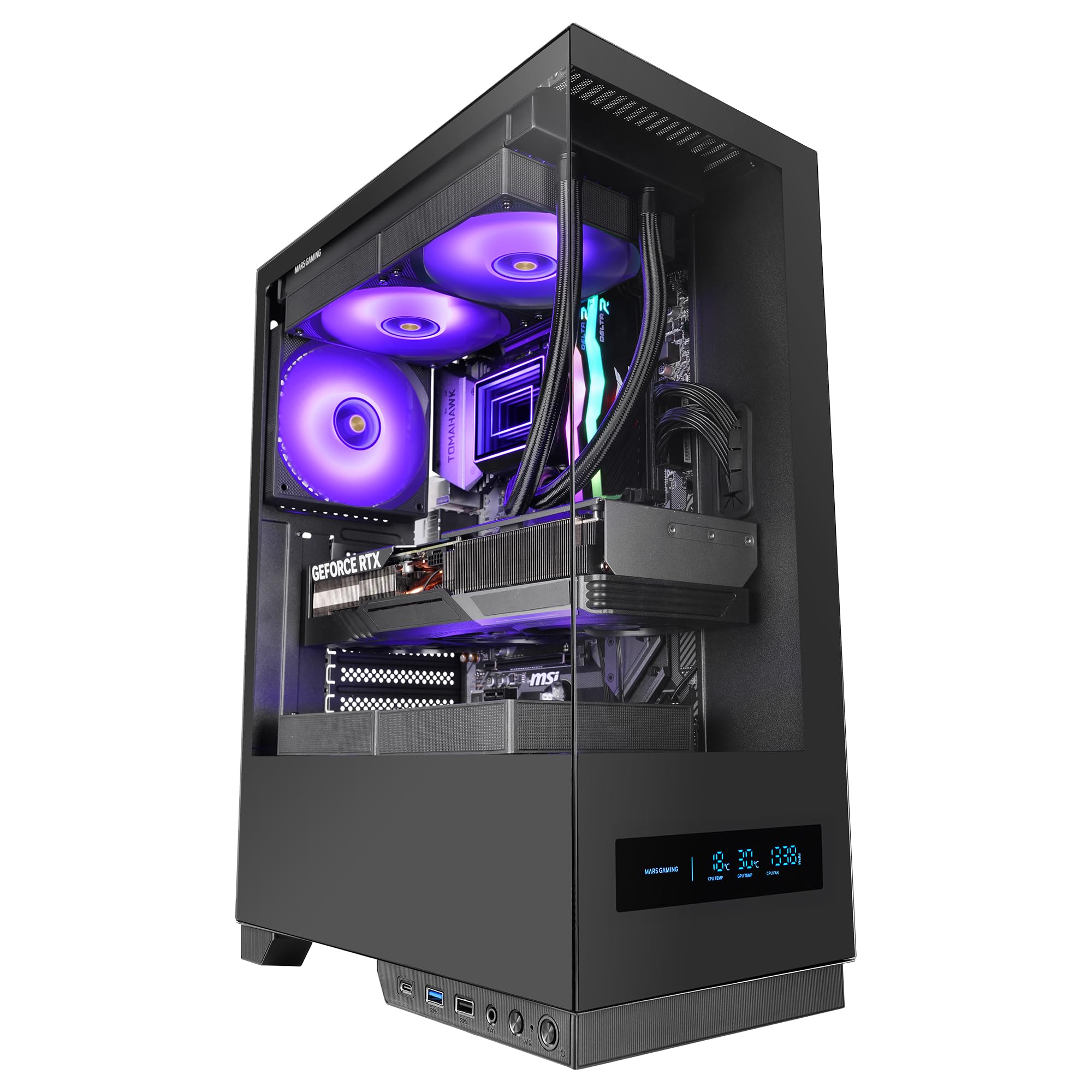
Figure 1: Mars Gaming MC-Pulsar ATX Gaming Case, front view.
Akụkụ ndị bụ isi:
- Real-Time Front LCD Display: Monitor CPU/GPU temperatures and fan RPM directly on the case.
- Double Tempered Glass: Front and side panels provide a clear view nke esịtidem components.
- Cablehatch System: Side cable bay with tool-free quick access for simplified cable management.
- Optimized Interior: Supports ATX, MicroATX, and Mini-ITX motherboards, with ample space for graphics cards and CPU coolers.
- Nkwado mmiri oyi: Accommodates liquid cooling radiators up to 240mm at the top and bottom, and 120mm at the rear.
- Njikọta ọgbara ọhụrụ: Includes USB-C, USB 3.0, USB 2.0, and HD audio ports on the I/O panel.

Figure 2: The MC-Pulsar case features dual tempered glass panels on the front and side.
2. Ntọala na nwụnye
Follow these steps for proper installation of your computer components into the MC-Pulsar case.
2.1 Na-akwado ikpe ahụ
- Unpack the MC-Pulsar case and place it on a stable, flat surface.
- Carefully remove the tempered glass side panel by unscrewing the thumb screws, if present, or by releasing usoro ihe nkwụnye ahụ.
- Identify the internal layout for motherboard, power supply, and drive installation.

Figure 3: Internal layout showing maximum CPU cooler height (162mm), VGA length (332mm), and VGA width (152mm) clearances, along with fan and radiator mounting points.
2.2 Nwụnye motherboard
- Install the necessary standoffs for your ATX, MicroATX, or Mini-ITX motherboard.
- Place the motherboard into the case, aligning it with the standoffs and the I/O shield opening.
- Chekwaa motherboard na kposara.
2.3 Ntinye ike
- The power supply mounts at the bottom of the case. Slide the ATX power supply into its designated bay.
- Secure the power supply with screws from the rear of the case.
2.4 Ntinye draịva nchekwa
- Install 3.5" HDDs in the designated drive cage.
- Install 2.5" SSDs in their respective mounting points. The case supports 1x 3.5" HDD and 2x 2.5" SSDs.
2.5 Graphics Card and Expansion Cards
- Remove the necessary expansion slot covers.
- Insert your graphics card (up to 332mm length, 152mm width) and other expansion cards into the PCIe slots on the motherboard.
- Chekwaa kaadị ndị ahụ na skru.
2.6 Nwụnye sistemu jụrụ oyi
- Install CPU coolers (up to 162mm height).
- For liquid cooling, radiators up to 240mm can be installed at the top and bottom, and a 120mm radiator at the rear.
- Install additional fans as needed: top (2x 120mm or 2x 140mm), bottom (2x 120mm), rear (1x 120mm).
2.7 Njikwa eriri
Utilize the Cablehatch system for organized cable routing. This side cable bay offers tool-free quick access to manage and hide cables, ensuring optimal airflow and a clean interior.

Figure 4: The Cablehatch system provides convenient side access for cable management without tools.
3. Ọrụ
This section details the operational aspects of your MC-Pulsar gaming case.
3.1 Njikọ Panel Ihu
The front I/O panel provides convenient access to various ports:
- Ọdụ USB-C: For modern peripherals and fast data transfer.
- ọdụ ụgbọ mmiri USB 3.0: Two ports for high-speed USB devices.
- ọdụ ụgbọ mmiri USB 2.0: Standard USB connectivity.
- HD Audio Jacks: Separate ports for microphone and headphones.
- Bọtịnụ ike: To turn the system on/off.
- Tọgharịa bọtịnụ: Iji malitegharịa sistemụ ahụ.
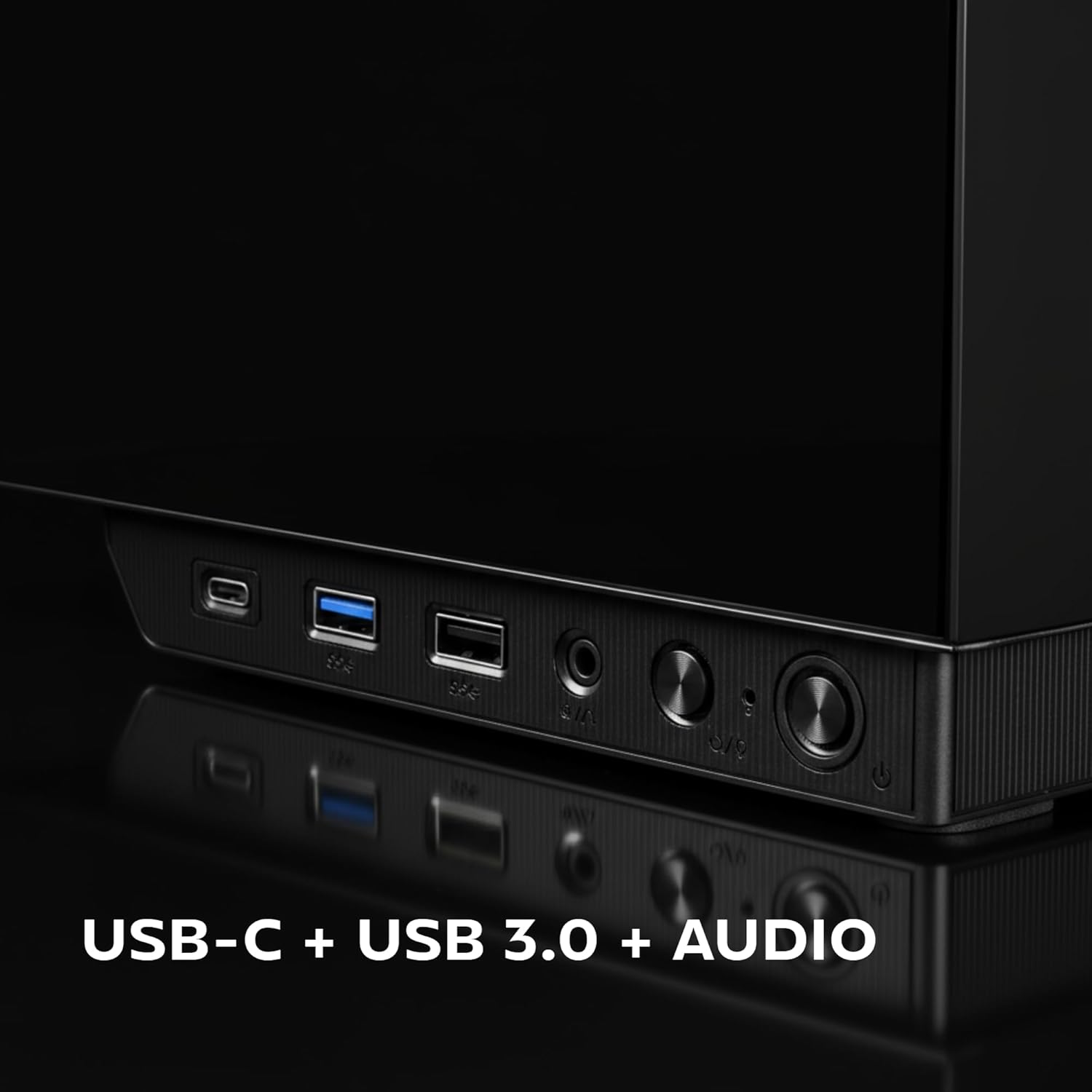
Figure 5: Close-up of the front I/O panel, showing USB-C, USB 3.0, and audio ports.
3.2 Front LCD Display
The integrated rectangular LCD display on the front panel provides real-time monitoring of critical system parameters. This includes:
- CPU Temperature: Displays the current temperature of your Central Processing Unit.
- GPU Temperature: Displays the current temperature of your Graphics Processing Unit.
- Fan RPM: Shows the rotational speed of your system fans.
Ensure the necessary internal connections from the case to your motherboard are made for the LCD display to function correctly. Refer to your motherboard manual for specific header locations.
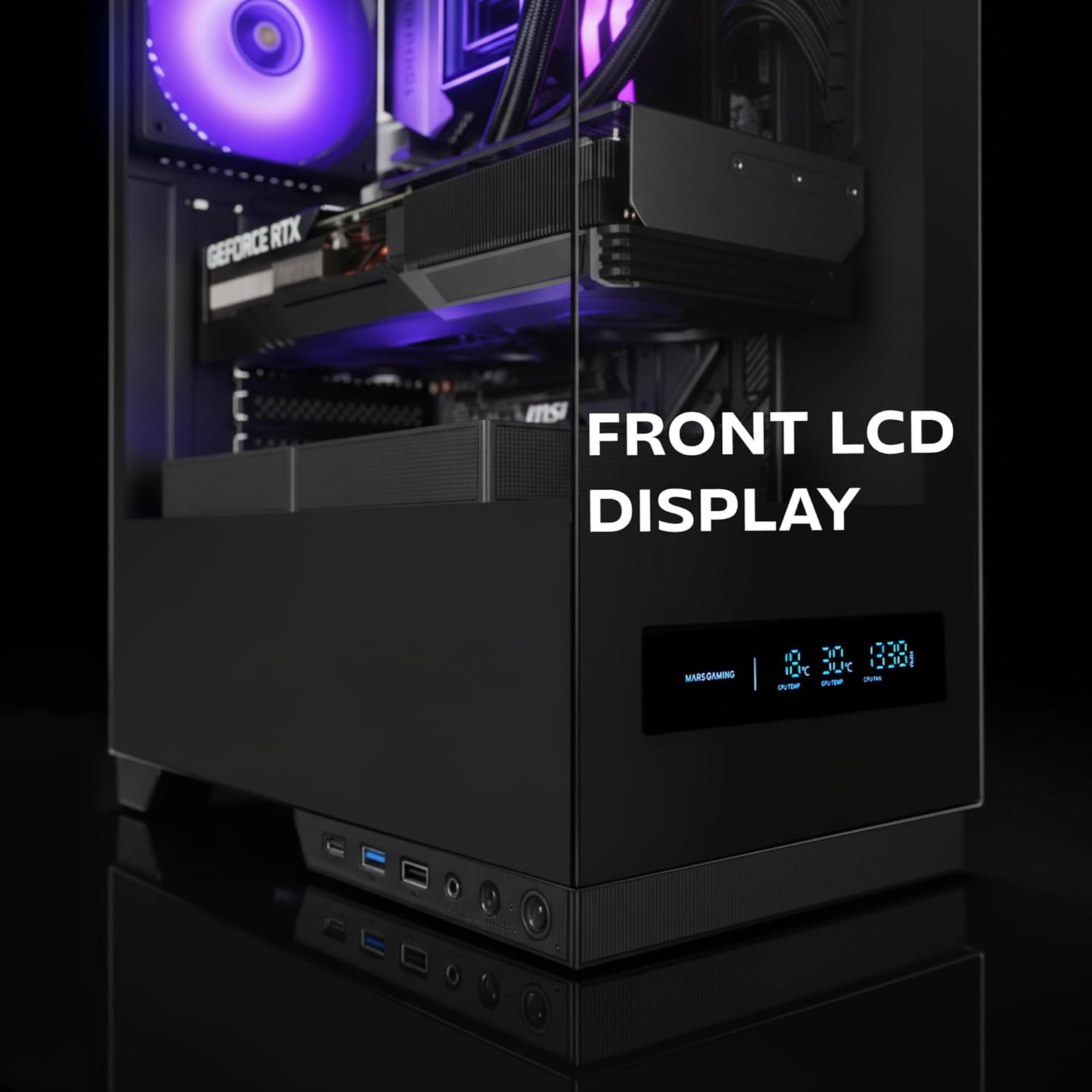
Figure 6: The front LCD display provides real-time system information.
4. Nlekọta
Regular maintenance helps ensure the longevity and optimal performance of your MC-Pulsar case and its components.
4.1 Nhicha uzuzu uzuzu
- The MC-Pulsar case includes a magnetic dust filter at the top.
- Periodically remove and clean this filter to prevent dust buildup inside the case, which can impede airflow and component cooling.
- Jiri ikuku mkpakọ dị ọcha ma ọ bụ ahịhịa dị nro dị nro.
4.2 Ime ụlọ ihicha
- With the system powered off and unplugged, carefully open the side panel.
- Use compressed air to remove dust from internal components and surfaces.
- Ensure all cables remain neatly managed using the Cablehatch system to maintain good airflow.
4.3 Nlekọta iko dị nro
- Clean tempered glass panels with a soft, lint-free cloth and a non-abrasive glass cleaner.
- Avoid harsh chemicals or abrasive materials that could scratch the glass.
5. Nchọpụta nsogbu
This section provides solutions to common issues you might encounter with your MC-Pulsar case.
5.1 Sistemụ anaghị arụ ọrụ
- Lelee njikọ ike: Ensure the power supply is properly connected to the wall outlet and the motherboard.
- Njikọ akụkụ ihu: Verify that the power button cable from the case is correctly connected to the motherboard's front panel header. Refer to your motherboard manual.
- Ngbanwe Nnyefe Ike: Confirm the power supply's main switch is in the "ON" position.
5.2 Front LCD Display Not Working
- Njikọ dị n'ime: Ensure all necessary data and power cables for the LCD display are securely connected from the case to the motherboard or power supply.
- Ngwanrọ/Ndị ọkwọ ụgbọ ala: Check if any specific software or drivers are required for the display and install them if necessary (refer to Mars Gaming websaịtị).
5.3 USB Ports or Audio Jacks Not Functioning
- Internal Header Connections: Verify that the USB and audio cables from the front I/O panel are correctly connected to the corresponding headers on your motherboard.
- Motherboard Drivers: Ensure your motherboard's USB and audio drivers are up to date.
5.4 Ikuku na-adịghị mma ma ọ bụ ekpo oke ọkụ
- Ihe nzacha uzuzu: Clean the magnetic dust filter and any other mesh areas regularly.
- Fan Orientation: Ensure case fans are installed with correct airflow direction (intake/exhaust).
- Njikwa USB: Improve cable routing using the Cablehatch system to reduce obstructions to airflow.
- Mkpochapụ akụkụ: Verify that large components like CPU coolers or GPUs are not blocking critical airflow paths.
6. Nka na ụzụ nkọwa
Below are the detailed specifications for the Mars Gaming MC-Pulsar ATX Gaming Case.
| Njirimara | Nkọwa |
|---|---|
| Ụdị | Ịgba egwu Mars |
| Aha Nlereanya | MCPULSAR |
| Ụdị ikpe | Mid Tower |
| Ndakọrịta Motherboard | ATX, MicroATX, Mini-ITX |
| Ihe onwunwe | Igwe ọkụ, Steel |
| Agba | Nwa |
| Ibu Ibu | 4.21 kilogram |
| Akụkụ ihe (D x W x H) | 45.3D x 35W x 19.6H centimita |
| Ogologo VGA Kachasị Elu | 332 mm |
| Max VGA Width | 152 mm |
| Max CPU cooler elu | 162 mm |
| Nkwado Nkwado Mmiri Liquid | Top: 240mm, Bottom: 240mm, Rear: 120mm |
| Ike Fans | Top: 2x 120mm or 2x 140mm, Bottom: 2x 120mm, Rear: 1x 120mm |
| Ọnụ ụzọ mbanye nke ime | 1 x 3.5 ″ HDD, 2 x 2.5 ″ SSD |
| N'ihu I / O Ports | 1x USB-C, 2x USB 3.0, 1x USB 2.0, HD Audio (Mic/Headphone) |
| Atụmatụ pụrụ iche | Front LCD Display, Cablehatch System, Magnetic Dust Filter |

Figure 7: External dimensions of the MC-Pulsar case.
7. Akwụkwọ ikike na nkwado
7.1 Ozi akwụkwọ ikike
Mars Gaming products are manufactured to high quality standards. For specific warranty terms and conditions, please refer to the warranty card included with your product or visit the official Mars Gaming websaịtị. Debe ihe akaebe nke ịzụrụ maka akwụkwọ ikike.
Note: A 30-day return policy may be available through your retailer. This is separate from the manufacturer's warranty.
7.2 Nkwado nka na ụzụ
If you encounter any issues not covered in this manual or require further assistance, please contact Mars Gaming customer support through their official website. You may need to provide your product model (MCPULSAR) and serial number.
Ndị ọchịchị Websaịtị: www.marsgaming.eu