
1. Ngwaahịa gafereview
The ROADOM KC-607 is a versatile retro-style portable CD player designed for various audio needs. It combines classic aesthetics with modern functionality, offering multiple playback options including CD, USB, FM radio, and Bluetooth audio. This device features integrated speakers, a rechargeable battery for portability, and intuitive controls, making it suitable for home use, outdoor activities, or as a decorative piece.
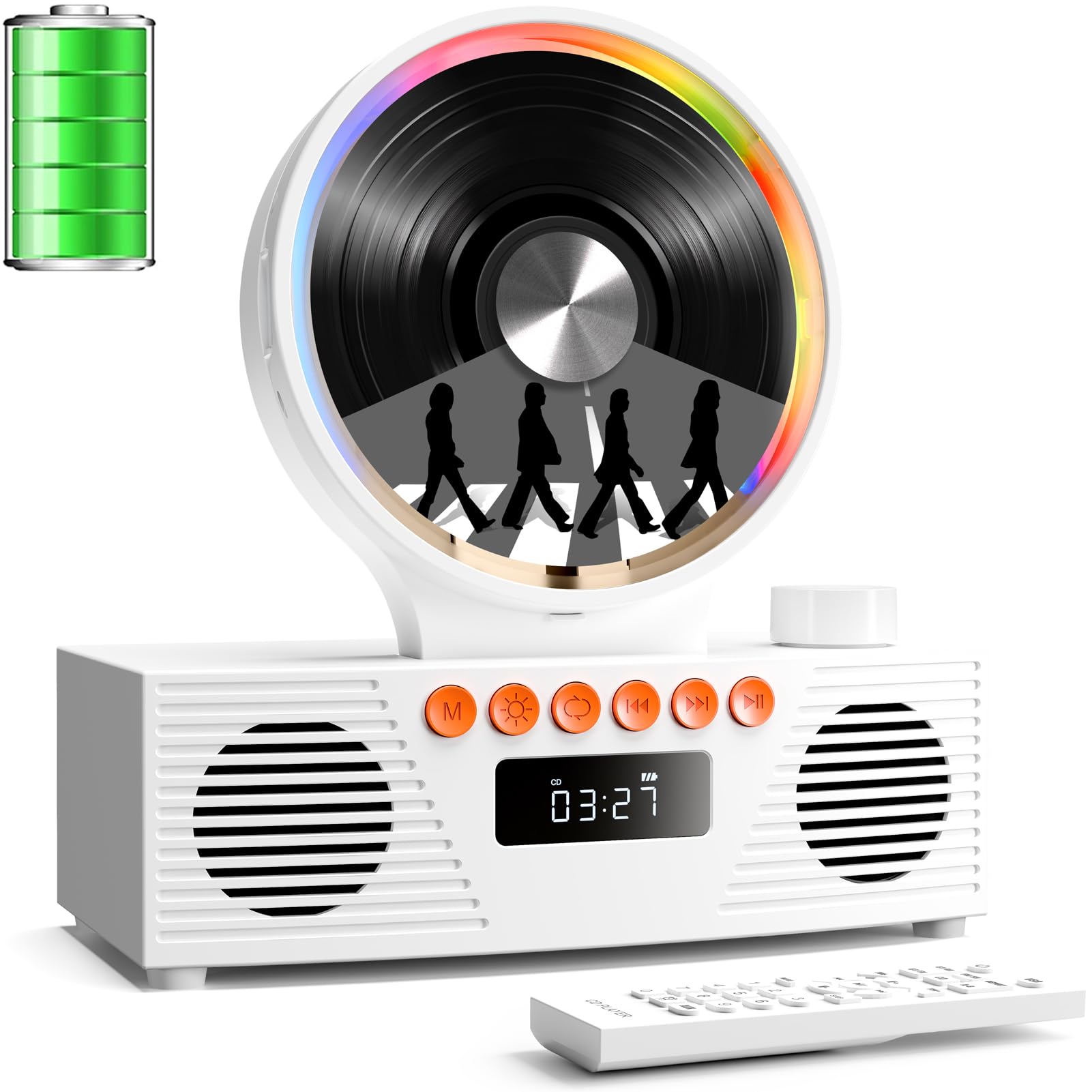
Foto 1: N'ihu view of the ROADOM KC-607 CD Player highlighting its features like 4000mAh portable power, magnetic 90° hatch, and various playback modes.
2. Kedu ihe dị na Igbe ahụ
- ROADOM CD Player × 1
- USB-A to USB-C Charge Cable × 1
- 3.5 mm Male to Male AUX Cable × 1
- Akwụkwọ ntuziaka onye ọrụ × 1
- Njikwa anya × 1

Image 2: The ROADOM KC-607 CD Player and its accessories laid out, including the remote control, USB-C charging cable, and AUX cable.
3. Akụrụngwa Ngwaahịa
- Ngụghachi nke ukwuu: Supports CD, CD-R, CD-RW, USB drives, FM radio, and Bluetooth audio. Compatible with MP3 and WMA digital formats.
- Retro Design & Mood Lights: Na-egosi vintage aesthetic with a transparent magnetic suction panel and colorful multi-mode RGB mood lights, adding a decorative touch.
- Ike mbugharị: Equipped with a 4000mAh rechargeable battery for extended playback, ideal for outdoor or car use. Lightweight design with silicone pads for easy transport.
- Ụda imikpu: Dual 45mm speakers and dual diaphragms deliver stereo sound with rich bass and clear audio.
- Njikọta: Supports Bluetooth receive and transmit, AUX in & out, and USB/TF card slots for comprehensive audio connections.
- Njikwa dị mfe: Intuitive buttons, a volume knob with mute function, and an LED display for simple operation. Includes an infrared remote control for convenience.
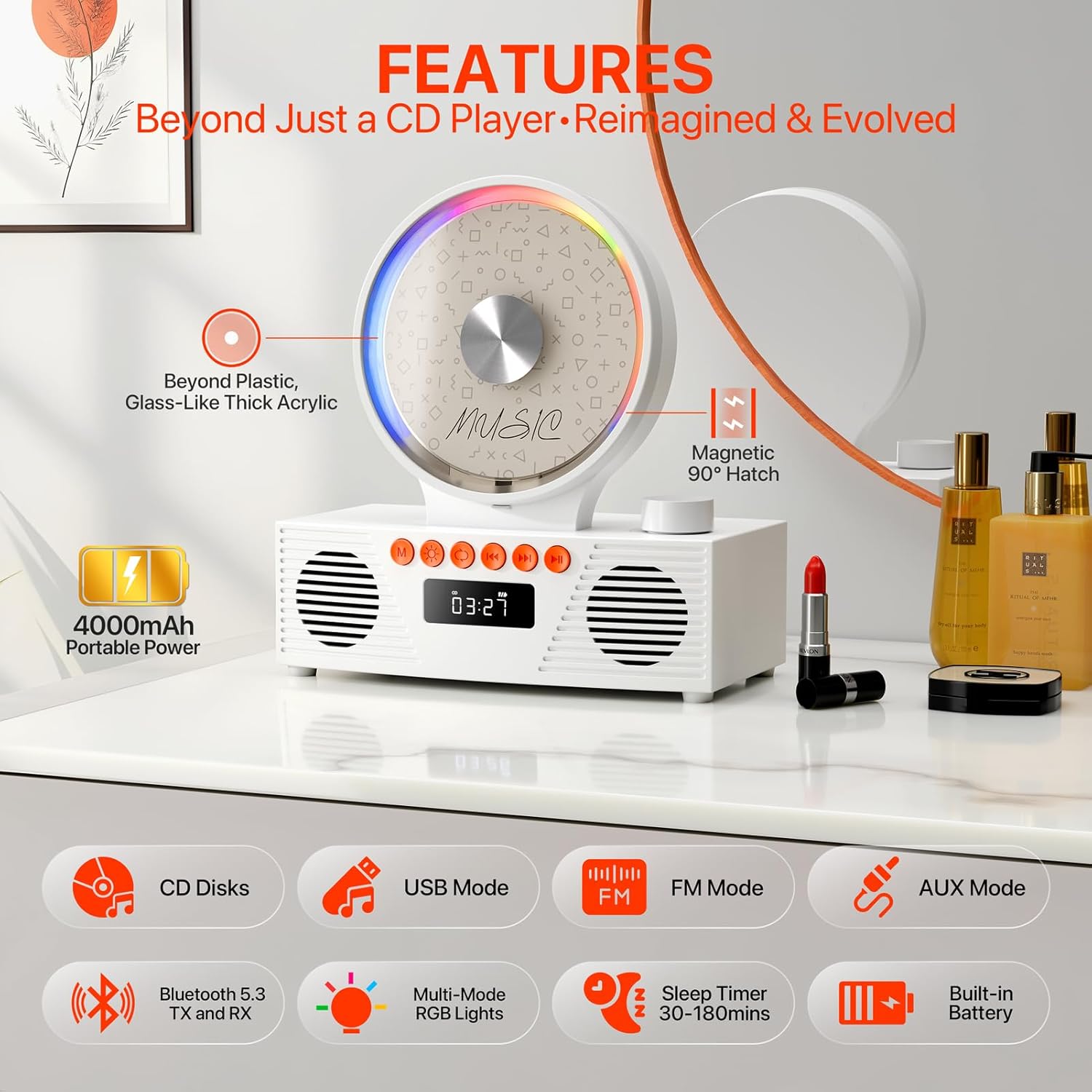
Image 3: The CD player showcasing its compatibility with various audio formats including CD, CD-R, CD-RW, MP3, and WMA files.
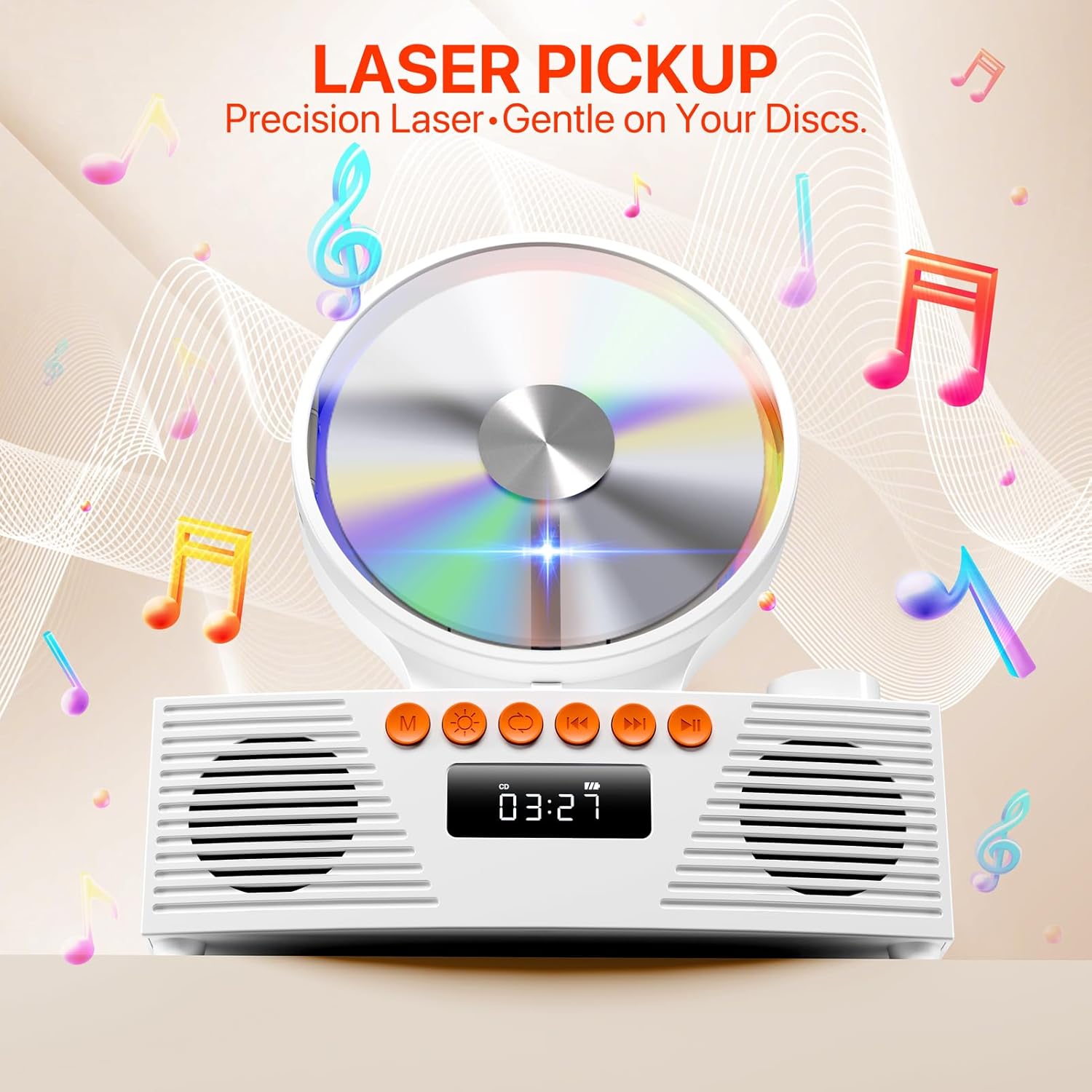
Image 4: Visual representation of the sound output and RGB lighting effects of the CD player, highlighting its audio quality and aesthetic features.
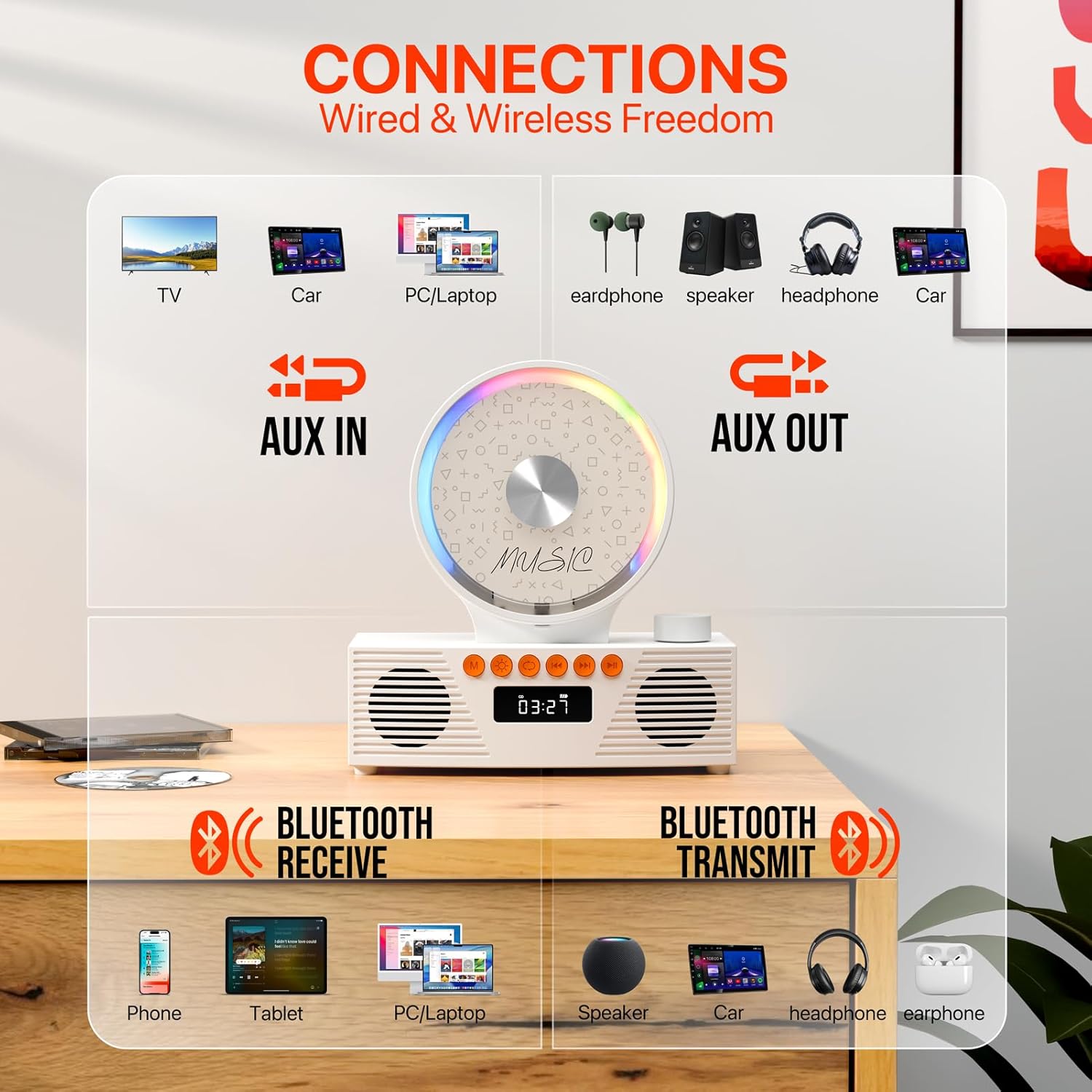
Image 5: Diagram illustrating the multiple connectivity options of the CD player, including AUX In, AUX Out, Bluetooth Receive, and Bluetooth Transmit, connecting to various devices.
4. Ntuziaka Nhazi
4.1 Gbanyụọ/ gbanyụọ
- Locate the Power On/Off switch on the back of the unit.
- Slide the switch to the 'ON' position to power on the device. The LED display will light up.
- Ka ịgbanyụ, gbanye mgba ọkụ ahụ gaa na ọnọdụ 'gbanyụọ'.
4.2 Ịchaji batrị
The device includes a built-in 4000mAh rechargeable battery. Use the provided USB-A to USB-C charge cable.
- Connect the USB-C end of the cable to the Type-C charging port on the back of the CD player.
- Connect the USB-A end to a compatible USB power adapter (not included) or a USB port on a computer.
- The Charging LED indicator will show charging status.
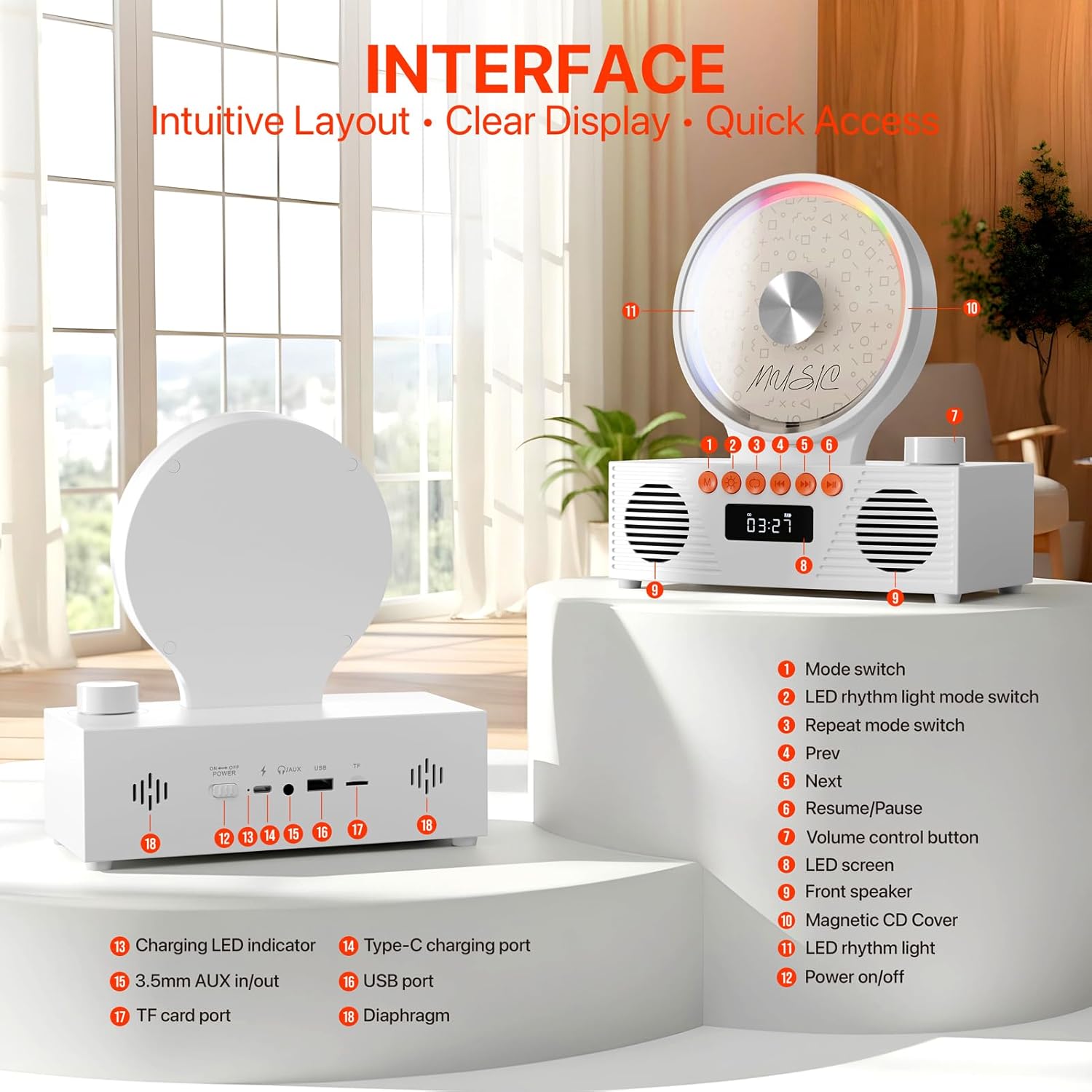
Foto 6: Zuru ezu view of the rear interface of the CD player, showing the power switch, charging port, AUX in/out, USB port, and TF card slot.
4.3 Loading a CD
- Gently open the magnetic CD cover.
- Place the CD onto the spindle, ensuring it is securely seated.
- Close the magnetic CD cover. The player will automatically detect the CD and begin reading it.
- Note: Remove any protective paper or film from the CD before use. Supported CD formats are CD, CD-R, CD-RW.
4.4 Connecting via Bluetooth (Receive Mode)
- Press the 'Mode' button until 'BLUE' appears on the LED display. The device is now in Bluetooth receive mode.
- On your mobile device (phone, tablet, PC/laptop), enable Bluetooth and search for available devices.
- Select 'CD Player' from the list to pair. Once connected, you can stream audio from your device to the CD player.
4.5 Connecting via Bluetooth (Transmit Mode)
- Ensure the CD player is in CD Mode or USB Mode.
- Activate Bluetooth pairing on your external Bluetooth speaker or headphones.
- The CD player will automatically search for and connect to nearby Bluetooth audio devices.
- Note: Ensure your headphones or speakers are disconnected from other devices before attempting to pair.
4.6 Using USB/TF Card
- Insert a USB drive into the USB port or a TF card into the TF card slot on the back of the unit.
- Press the 'Mode' button to select 'USB' or 'TF' mode.
- Onye ọkpụkpọ ahụ ga-achọpụta ma kpọọ ọdịyo na akpaghị aka files (MP3, WMA) from the storage device.
- Note: Only FAT32 format and 1-128GB storage devices are supported.
Igwe redio FM 4.7
- Press the 'Mode' button to select 'FM' mode.
- Use the 'Prev' and 'Next' buttons to scan for radio stations.
- The LED display will show the current frequency.
4.8 AUX Input/Output
- AUX n'ime: Connect an external audio device (e.g., smartphone, computer) to the 3.5mm AUX In port using the provided AUX cable. Select 'LINE' mode.
- AUX pụta: Connect external speakers or headphones to the 3.5mm AUX Out port.
- Note: Ensure the AUX cable is fully inserted into the jacks for proper connection.
5. Ntuziaka ọrụ
5.1 Basic Playback Controls
- Gwuo/kwụsịtụ: Press the 'Resume/Pause' button to start or pause playback.
- Next / Gara aga Track: Use the 'Next' and 'Prev' buttons to skip tracks or stations.
- Njikwa olu: Rotate the volume control knob on the top right to adjust the volume. Press the knob to mute/unmute.
5.2 Repeat Settings (CD & USB Modes Only)
Press the 'Repeat Mode' button to cycle through repeat options:
- OTU: Tinyegharịa egwu dị ugbu a.
- NILE: Tinyegharịa egwu niile.
- SFL: Shuffle play.
- Gbanyụọ: Turn off repeat function. Playback stops after the last track.
- AB kwugharịa: Press once at point A, press again at point B to repeat a segment.

Image 7: Illustration of the repeat settings available on the CD player, including single track repeat, all tracks repeat, shuffle, and turning off repeat.
5.3 Ngụ oge ụra
Set a timer for the device to automatically power off.
- Press the 'Sleep Timer' button repeatedly to select desired duration (e.g., 30, 60, 90, 120, 150, 180 minutes).
- Select 'OFF' to cancel the sleep timer.

Image 8: Display of the sleep timer function, allowing users to set automatic power-off intervals from 30 to 180 minutes.
6. Nlekọta
- Debe ngwaọrụ ahụ ọcha site n'iji ákwà dị nro ma kpọọ nkụ hichaa ya. Zere iji ihe nhicha mmiri ma ọ bụ ihe ndị na-eme ka ọ dị ọcha.
- Handle CDs by the edges to prevent scratches. Store them in their cases when not in use.
- Zere ikpughe ngwaọrụ ahụ na oke okpomọkụ, ìhè anyanwụ kpọmkwem, ma ọ bụ oke iru mmiri.
- Agbalịla ịkwatu ma ọ bụ rụzie ngwaọrụ ahụ n'onwe gị. Kpọtụrụ ndị ọrụ nkwado maka enyemaka.
7. Nchọpụta nsogbu
| Nsogbu | Ihe nwere ike ime | Ngwọta |
|---|---|---|
| Ngwaọrụ anaghị agbanwu ọkụ. | Battery is low or depleted. Power switch is off. | Charge the battery using the USB-C cable. Ensure the power switch is in the 'ON' position. |
| CD not playing or skipping. | CD is dirty, scratched, or inserted incorrectly. Unsupported CD format. | Clean the CD with a soft cloth. Reinsert the CD correctly. Ensure it's a supported format (CD, CD-R, CD-RW). |
| Enweghị ụda sitere na ndị ọkà okwu. | Volume is too low or muted. Incorrect mode selected. External device not connected properly. | Increase volume or unmute. Select the correct playback mode (CD, Bluetooth, FM, USB, AUX). Check all cable connections. |
| Nsogbu njikọ Bluetooth. | Device not in pairing mode. Too far from the player. Interference. | Ensure the player is in 'BLUE' mode. Move closer to the player. Disconnect other Bluetooth devices. |
| Njikwa anya anaghị arụ ọrụ. | Batteries are dead or inserted incorrectly. Obstruction between remote and player. | Replace remote batteries (AAA, not included). Ensure clear line of sight to the player's sensor. |
8. Nkọwapụta
- Nọmba nlereanya: KC-607
- Akara: ROADOM
- Agba: Ọcha
- Teknụzụ Njikọta: Enyemaka, Bluetooth, USB
- Atụmatụ pụrụ iche: Analog Volume Control, Built-In Radio, Dustproof, Portable, Rechargeable
- Ibu ihe: 2.01 pound
- Akụkụ ngwugwu: 9.57 x 8.82 x 4.92 sentimita asatọ
- Batrị: 1 Batrị na-abụghị ọkọlọtọ (gụnyere)
- Onye nrụpụta: ROADOM
9. Akwụkwọ ikike & Nkwado
ROADOM stands behind its products. For any questions or support needs, please refer to the following:
- Akwụkwọ ikike ngwaahịa: Ọnwa iri na abụọ
- na-alaghachi: 30 Days Free Returns
- Ọrụ mgbe ire ere: 24 Hours Support
Please contact ROADOM customer service for further assistance. Refer to the included User Manual for contact details.

Image 9: Visual representation of ROADOM's commitment to customer satisfaction, including product warranty, free returns, and after-sale service.
10. Official Product Video
Video 1: An official product video from ROADOM-US showcasing the Retro Portable CD Player for home use, highlighting its features and design in various settings.